
1. Introduction
Thank you for choosing the ELYKEN Narrow Console Sofa Table. This product is designed to enhance your living space by providing a convenient surface and integrated charging capabilities directly behind your sofa. Its slim design is ideal for narrow spaces, offering both functionality and a modern aesthetic. Please read this manual thoroughly before assembly and use to ensure proper installation and safe operation.
2. Safety Information
To ensure safe use and prevent damage, please observe the following guidelines:
- Always ensure the table is properly adjusted and stable before use.
- Use the provided anti-tipping strap and expansion screw for added safety, securing the table to a wall to prevent accidental tipping.
- Keep the table away from high traffic areas to prevent accidental tipping or damage.
- Supervise children and pets around the table to prevent any injuries.
- Do not overload the table. The maximum weight recommendation is 110 pounds.
- Ensure the power cord is not pinched or damaged during assembly or use.
- Only use the integrated power outlets and USB ports for devices within their specified voltage and current limits (2 standard 120VAC outlets, 2 USB ports).

Figure 2.1: Anti-tip device attachment for enhanced stability.
3. Package Contents
Please verify that all components are present before beginning assembly. If any parts are missing or damaged, please contact customer support.
- Tabletop sections (2 units for 78.8"W model)
- Metal frame components
- Integrated power outlets with 2 AC outlets and 2 USB ports
- 5.9’ (approx. 1.8m) power cord
- Adjustable feet (4 threaded pegs)
- Anti-tipping strap and expansion screw
- Assembly hardware (screws, wrench)
4. Assembly Instructions
Assembly of the ELYKEN Narrow Console Sofa Table is designed to be quick and straightforward, typically taking less than 30 minutes. No additional tools are required beyond what is provided.
- Unpack Components: Carefully remove all parts from the packaging and lay them out on a clean, soft surface to prevent scratches.
- Assemble Frame: Connect the metal frame components according to the diagram in your included instruction sheet. Ensure all connections are secure.
- Attach Tabletop: Place the tabletop sections onto the assembled frame. Secure them using the provided screws. For the 78.8"W model, two tabletop sections will be joined.
- Reinforce Connection (for 2-pack models): Use the two screws on the top and bottom to connect the two table units for added steadiness.
- Install Adjustable Feet: Screw the four adjustable feet into the bottom of the table legs. These can be adjusted later to adapt to uneven floors.
- Install Power Unit: Carefully place the power outlet unit into the designated slot on the tabletop. Ensure the power cord is routed safely.
- Attach Anti-Tipping Strap: Secure the anti-tipping strap to the back of the table and then to a wall stud using the expansion screw for maximum stability.

Figure 4.1: Reinforcing screws for connecting multiple table units.

Figure 4.2: Detail of screws reinforcing the tabletop boards.

Figure 4.3: Detail of screws reinforcing the table legs.

Figure 4.4: Adjustable feet for leveling the table on uneven surfaces.
5. Operating Instructions
Your ELYKEN Console Sofa Table is designed for convenient daily use.
5.1 Using the Charging Station
The table includes a built-in charging station with two standard 120VAC outlets and two USB ports. Simply plug the table's 5.9’ extension cord into a wall outlet. You can then plug in your devices directly into the table's integrated outlets and USB ports for easy access to power.

Figure 5.1: Integrated charging station with AC and USB ports.
5.2 Adjustable Charging Station Placement
The charging station can be positioned on the side or in the middle of the table, depending on your preference and sofa configuration. This allows for flexible placement to best suit your needs.
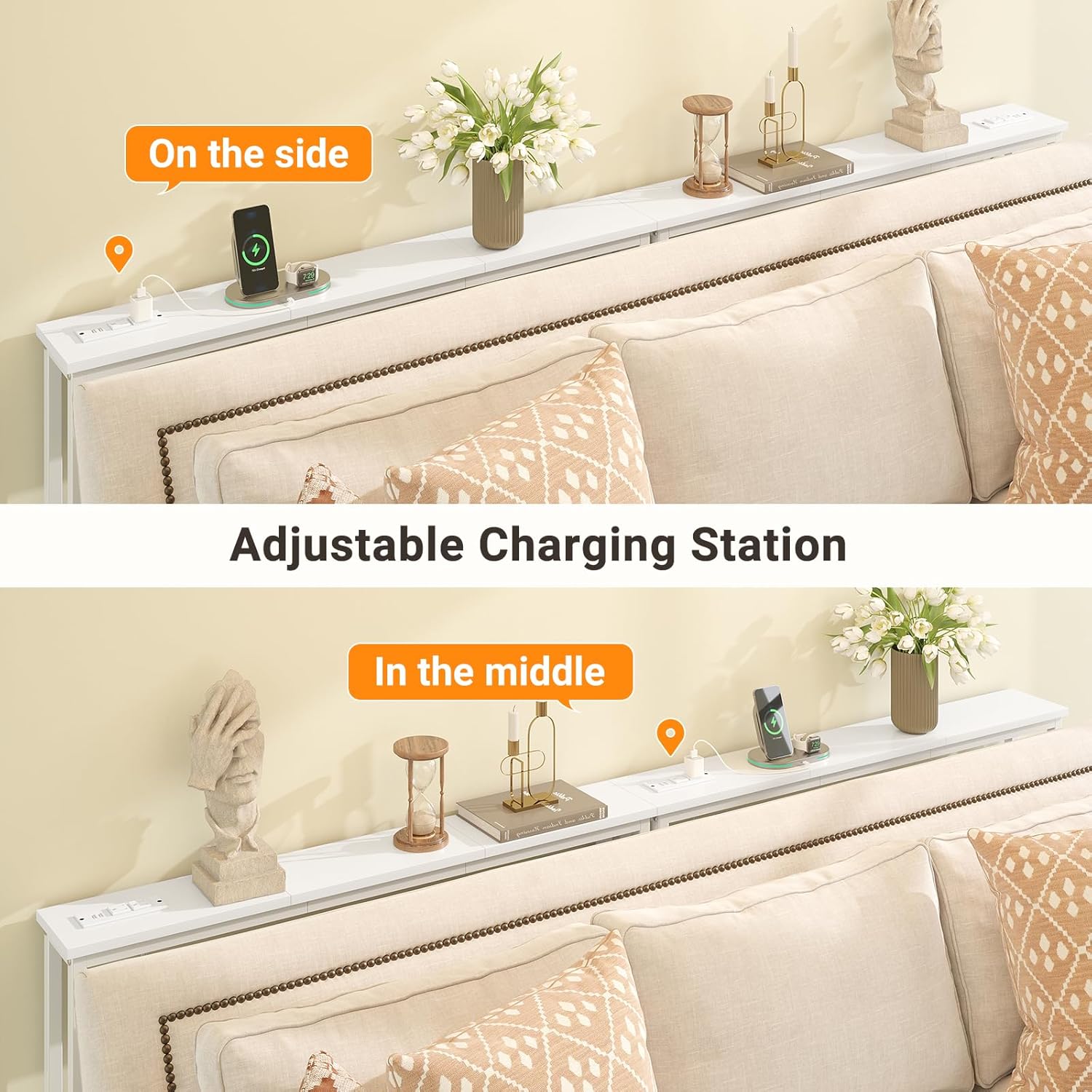
Figure 5.2: Flexible placement options for the charging station.
5.3 Utilizing the Tabletop
The narrow tabletop provides a convenient surface for placing drinks, remote controls, books, or decorative items. Its slim profile ensures it fits neatly behind your sofa without taking up excessive space.

Figure 5.3: Console table in use behind a sofa, showcasing its functionality.
6. Maintenance
Proper care will extend the life and appearance of your console table.
- Cleaning: Wipe the table surfaces with a soft, damp cloth. Avoid harsh chemicals or abrasive cleaners that could damage the finish.
- Stability Check: Periodically check all screws and connections to ensure they remain tight. Re-tighten if necessary.
- Adjustable Feet: If the table feels wobbly, adjust the threaded pegs on the feet to level the table on uneven flooring.
- Power Cord: Inspect the power cord regularly for any signs of wear or damage. Discontinue use and replace if damage is found.
7. Troubleshooting
| Problem | Possible Cause | Solution |
|---|---|---|
| Table is wobbly. | Uneven floor; loose connections; anti-tip strap not installed. | Adjust the threaded feet; tighten all assembly screws; install the anti-tipping strap to the wall. |
| Power outlets/USB ports not working. | Power cord not plugged in; wall outlet not active; damaged power unit. | Ensure the table's power cord is fully plugged into a functional wall outlet. Test the wall outlet with another device. If still not working, contact customer support. |
| Gap between tabletop sections. | Sections not fully pushed together; reinforcing screws not tightened. | Ensure tabletop sections are aligned and pushed together tightly before securing. Tighten the reinforcing screws between the sections. |
8. Specifications
| Feature | Detail |
|---|---|
| Brand | ELYKEN |
| Model Number | HST04 |
| Product Dimensions (D x W x H) | 5.9"D x 78.8"W x 29.5"H (for 2-pack) |
| Item Weight | 8 Pounds |
| Maximum Weight Recommendation | 110 Pounds |
| Frame Material | Metal |
| Top Material | Wood |
| Color | White |
| Power Outlets | 2 x 120VAC Standard Outlets |
| USB Ports | 2 x USB Ports (5V/2A) |
| Power Cord Length | 5.9 feet |
| Assembly Required | Yes |

Figure 8.1: Product dimensions overview.

Figure 8.2: Table load-bearing capacity demonstration.
9. Warranty & Support
ELYKEN products are manufactured with quality and durability in mind. While specific warranty details are not provided in this manual, please retain your proof of purchase for any warranty claims. For product support, missing parts, or troubleshooting assistance, please contact ELYKEN customer service through the retailer where the product was purchased.
We are committed to your satisfaction and are here to help with any questions or concerns you may have regarding your ELYKEN Narrow Console Sofa Table.