Product Overview
The EARMOR M200T Electronic Shooting Earbuds are designed to provide superior hearing protection and enhanced situational awareness in noisy environments. These earbuds feature advanced noise cancellation, sound amplification, and seamless Bluetooth 5.4 connectivity, making them ideal for activities such as shooting, hunting, and other professional uses.
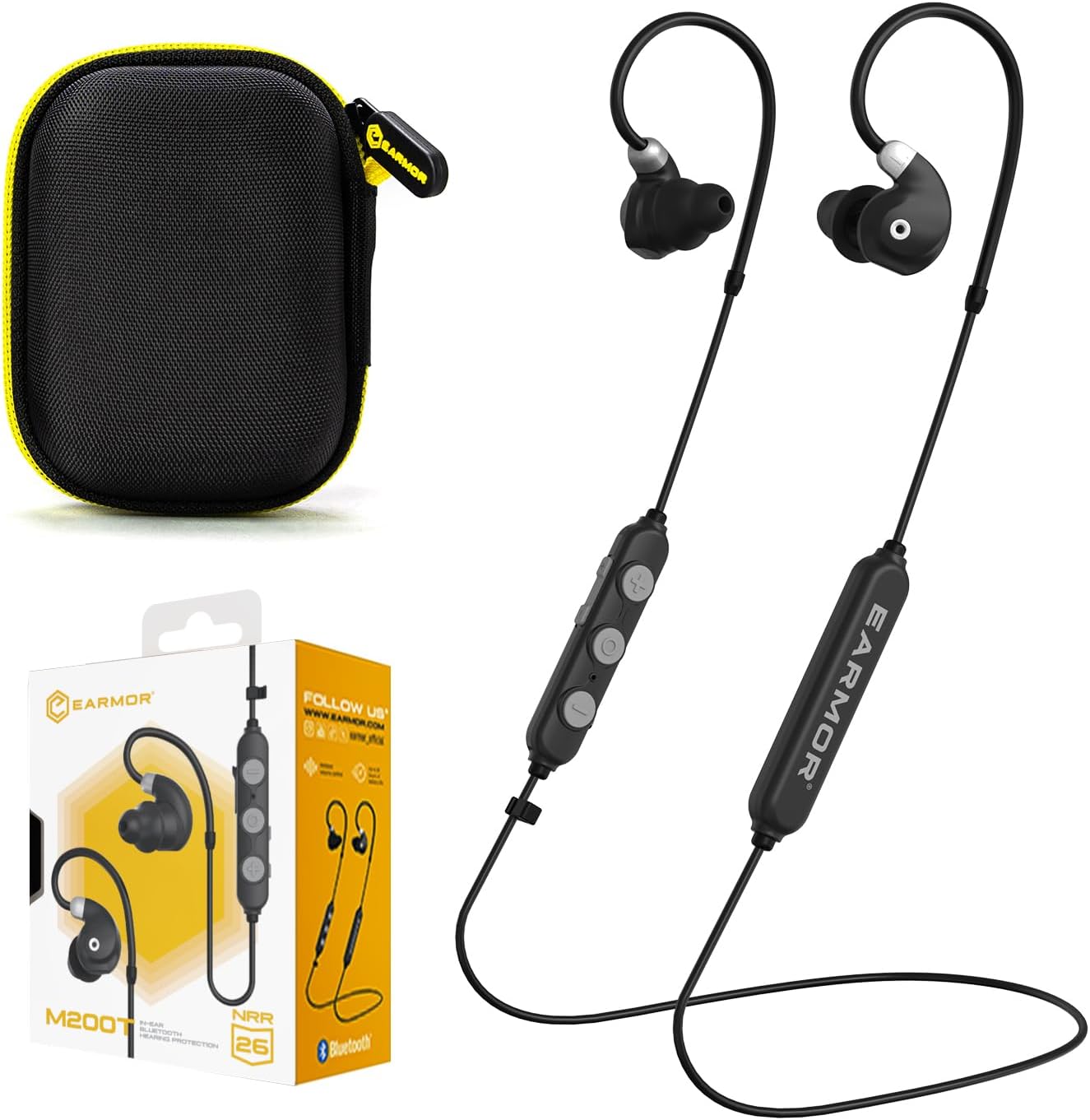
Figure 1: EARMOR M200T Electronic Shooting Earbuds, showing the earbuds, control module, carrying case, and retail packaging.
Key Features:
- 26dB NRR Hearing Protection & Noise Cancelling: ANSI-certified earbuds block harmful noise above 85dB, utilizing self-developed patented unique conical-shaped high-density foam ear tips and electronic chip technology for effective noise reduction while maintaining situational awareness.
- 360° Sound Tracking & 6X Hearing Enhancement: Smart acoustic technology provides omnidirectional sound pickup and 6x ambient sound amplification with instant 85dB noise suppression in just 2ms. 6mm dynamic drivers deliver crystal-clear audio and fast response.
- Bluetooth 5.4 for Seamless Connectivity: Enjoy crystal-clear calls and high-quality audio. Stream music, take calls, or use voice assistants effortlessly with industry-leading noise reduction.
- 3 Modes for Any Scenario: Switch between Quiet Mode (full noise isolation), Clear Voice (optimized speech clarity), and Ambient Mode (enhanced situational awareness).
- Ergonomic & Durable Design: Designed for comfort with adjustable ear hooks and a glasses-friendly fit. IP67-rated water and dust resistance ensures reliability in harsh conditions.
- Long Battery Life: A 150mAh rechargeable battery delivers up to 20 hours of continuous use.
What's in the Box
Verify that all components are present in the packaging before initial use.
- EARMOR M200T Earbuds
- USB-C Charging Cable
- Protective Case
- 3 Pairs of Patented Eartips (S, M, L)
- 3 Pairs of Silicone Triple Flange Eartips (S, M, L)
- User Manual (this document)
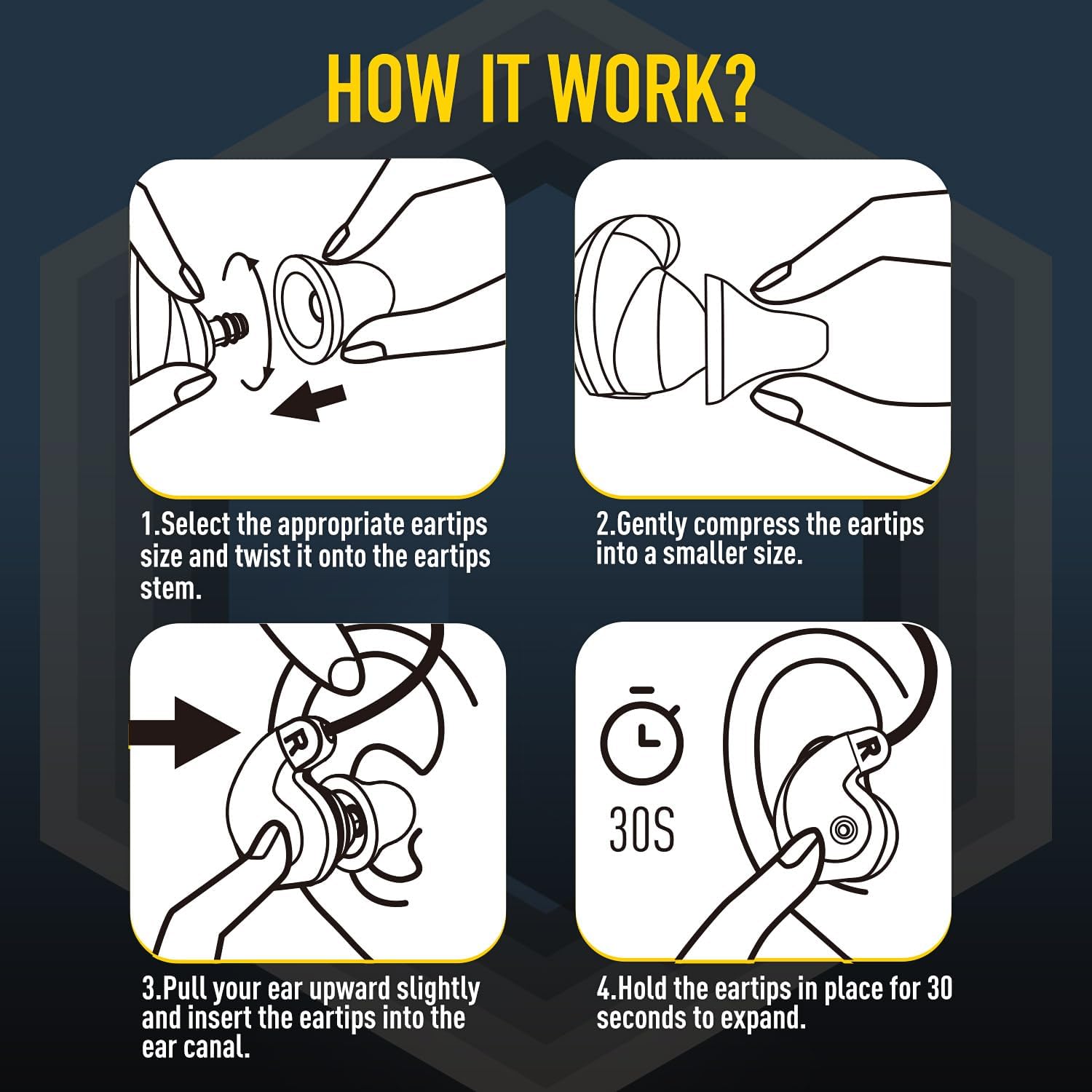
Figure 2: All components included in the EARMOR M200T product box.
Setup
1. Charging the Earbuds
Before first use, fully charge the earbuds. Connect the provided USB-C charging cable to the charging port on the control module and plug the other end into a USB power source (e.g., computer, wall adapter). The LED indicator will show charging status.

Figure 3: Connecting the USB-C charging cable to the control module.
2. Selecting and Installing Ear Tips
Choose the ear tips that provide the best seal and comfort for your ears. The package includes both patented foam eartips and silicone triple flange eartips in various sizes (S, M, L). A proper seal is crucial for effective noise reduction.
- Select the appropriate eartips size and twist it onto the eartips stem.
- Gently compress the eartips into a smaller size.
- Pull your ear upward slightly and insert the eartips into the ear canal.
- Hold the eartips in place for 30 seconds to allow them to expand and create a seal.
Figure 4: Step-by-step guide for proper ear tip installation.
3. Bluetooth Pairing
To connect your EARMOR M200T earbuds to a Bluetooth device:
- Ensure the earbuds are charged and powered off.
- Press and hold the Multifunction button for 2 seconds.
- On your device (e.g., smartphone), enable Bluetooth and search for available devices.
- Select "EARMOR M200T" from the list of devices.
- Once connected, the LED indicator will turn solid blue.

Figure 5: Bluetooth 5.4 connectivity for seamless pairing with devices.
Operating Instructions
Controls Overview:

Figure 6: Detailed view of the control module and its functions.
- Power On/Off: Press and hold the Multifunction button for 2 seconds.
- Play/Pause: Click the Multifunction button.
- Answer/End Call: Click the Multifunction button.
- Reject Call: Press and hold the Multifunction button for 2 seconds.
- Volume Up: Click the Volume + button.
- Volume Down: Click the Volume - button.
- Next Track: Double-click the Volume - button.
- Previous Track: Double-click the Volume + button.
- Hearing Enhancement +: Click the Hearing Enhancement + button.
- Hearing Enhancement -: Click the Hearing Enhancement - button.
- Switch Listening Modes: Double-click the Multifunction button.
- Voice Assistant: Triple-click the Multifunction button.
Listening Modes:
The EARMOR M200T offers three distinct listening modes to adapt to various environments:
- Quiet Mode: Provides full noise isolation, ideal for focused work or meditation.
- Clear Voice Mode: Optimizes clarity in conversations, ensuring smooth communication in moderately noisy environments.
- Ambient Mode: Enhances subtle ambient sounds to maintain acute awareness of your surroundings, crucial for hunting or tactical situations.

Figure 7: Visual representation of the three unique pickup modes.

Figure 8: The earbuds provide 6X amplification and 360-degree sound tracking for enhanced situational awareness.

Figure 9: NRR 26dB rating for maximum hearing protection, with a graph illustrating noise reduction performance.
Maintenance
Cleaning:
Regularly clean your earbuds to ensure optimal performance and hygiene. Use a soft, dry cloth to wipe the earbuds and control module. For ear tips, remove them from the earbuds and clean with mild soap and water, then allow them to air dry completely before reattaching.
Storage:
When not in use, store the earbuds in their protective case to prevent damage from dust, moisture, and physical impact. Store in a cool, dry place away from direct sunlight and extreme temperatures.
Water and Dust Resistance:
The EARMOR M200T earbuds are IP67-rated, meaning they are dustproof and can withstand immersion in water up to 1 meter for 30 minutes. While durable, avoid prolonged exposure to water or harsh chemicals. Ensure the USB-C port cover is securely closed when not charging to maintain water resistance.

Figure 10: The earbuds are IP67 dustproof and waterproof, ensuring durability in various conditions.
Troubleshooting
| Problem | Possible Cause | Solution |
|---|---|---|
| No power | Low battery | Charge the earbuds fully. |
| Cannot pair via Bluetooth | Earbuds not in pairing mode; Device Bluetooth off; Interference | Ensure earbuds are in pairing mode (flashing blue/red). Turn Bluetooth off/on on your device. Move closer to the device. |
| No sound or low sound | Volume too low; Improper ear tip fit; Earbuds not connected | Increase volume on earbuds and device. Adjust ear tips for a secure seal. Re-pair earbuds to your device. |
| Sound amplification not working | Incorrect mode selected; Microphones obstructed | Switch to Clear Voice or Ambient Mode. Ensure microphones are clean and unobstructed. |
Specifications
- Model Name: M200TBKVER2
- Noise Reduction Rating (NRR): 26dB
- Hearing Enhancement: Up to 6X amplification
- Noise Suppression: Instant 85dB suppression in 2ms
- Connectivity Technology: Bluetooth 5.4
- Water Resistance Level: IP67 Dustproof and Waterproof
- Battery Capacity: 150mAh rechargeable battery
- Continuous Use Time: Up to 20 hours
- Control Type: Button Control
- Material: Upgraded ABS and Self-developed foam earplugs
- Item Weight: 3.84 ounces (approx. 0.24 lbs)
- Included Components: Cable, Eartip, Protective Case, User Manual
Warranty and Support
Warranty Information:
EARMOR products typically come with a limited manufacturer's warranty covering defects in materials and workmanship. Please refer to the warranty card included with your product or visit the official EARMOR website for specific warranty terms and conditions.
Customer Support:
For any questions, technical assistance, or warranty claims, please contact EARMOR customer support. Contact information can usually be found on the product packaging, the official EARMOR website, or through your retailer.
Online Support: Visit the EARMOR official store on Amazon: EARMOR Official Store


