
1. Important Safety Information
- Always supervise children when using the desk and chair.
- Ensure all screws and fasteners are securely tightened before use and check periodically.
- Keep small parts and packaging materials away from children during assembly to prevent choking hazards.
- Do not stand or climb on the desk or chair.
- Place the desk on a flat, stable surface to prevent tipping.
- Avoid placing hot items directly on the desktop.
2. Package Contents
Before beginning assembly, verify that all components listed below are present and undamaged. If any parts are missing or damaged, please contact customer support.
- Desk Panels (various sizes)
- Chair Components (seat, backrest, legs)
- Hutch and Shelf Panels
- Fabric Drawers (2 units)
- Cabinet Door and Hardware
- Assembly Hardware (screws, dowels, cam locks, etc.)
- Corkboard Insert
- Instruction Manual (this document)
3. Setup and Assembly Instructions
Assembly requires two adults. Please follow the steps carefully. Tools required: Phillips head screwdriver (not included).
3.1. Overview of Components and Dimensions
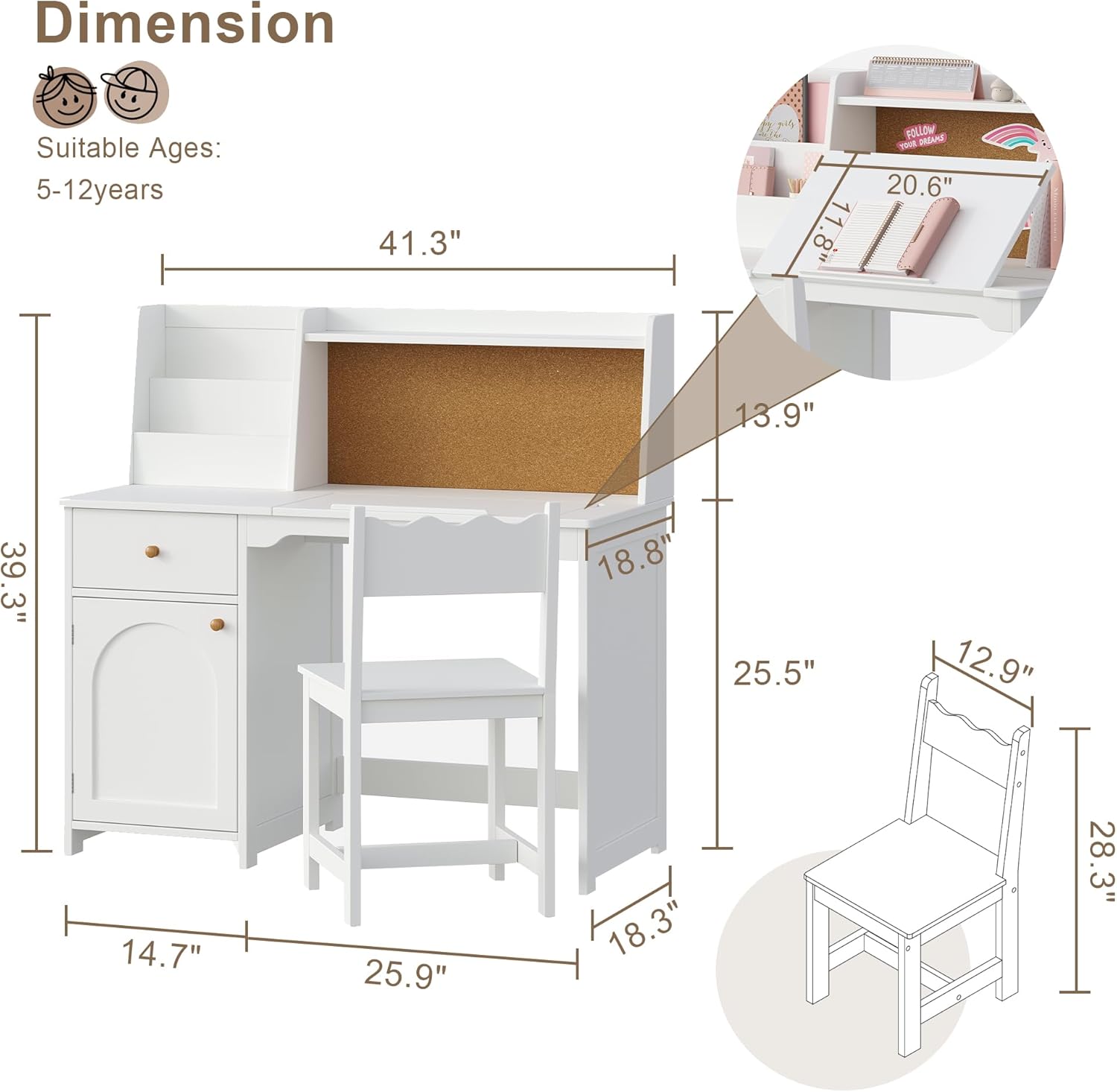
This image illustrates the overall dimensions of the Treocho Kids Study Desk and Chair Set, including the desk's length (41.3 inches), height (39.3 inches), and chair dimensions. Refer to these measurements for proper placement and to ensure suitability for the user's space.
3.2. Assembling the Desk Base
- Identify the side panels and the main desktop panel.
- Attach the side panels to the main desktop using the provided screws and dowels. Ensure cam locks are tightened for a secure fit.
- Install the back support panel to stabilize the desk frame.
3.3. Installing the Hutch and Storage Sections

This image highlights the ample storage features of the desk, including the 2-tier hutches, spacious desktop, fabric drawer, and exquisite cabinet door. This visual aid is helpful during the assembly of these specific components.
- Attach the hutch side panels and shelves to the back of the main desktop.
- Insert the corkboard into its designated slot on the hutch.
- Assemble the cabinet structure on the left side of the desk, attaching the cabinet door with hinges.
- Slide the fabric drawers into their respective compartments.
3.4. Assembling the Chair
- Connect the chair legs to the seat panel using the provided hardware.
- Attach the backrest to the chair frame. Ensure all connections are firm.
4. Operating Instructions
4.1. Adjustable Desktop
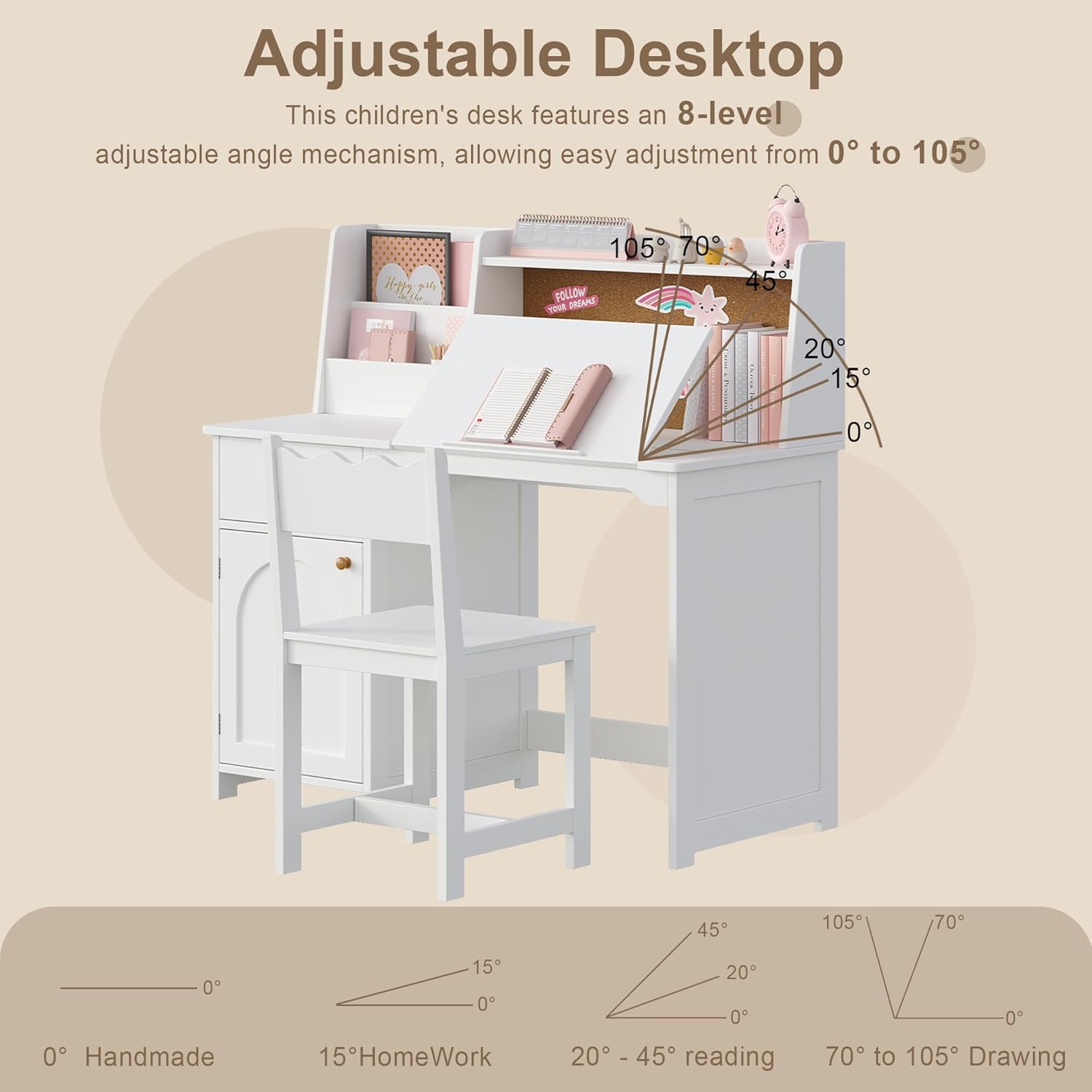
This image demonstrates the 8-level adjustable angle mechanism of the desktop, allowing adjustment from 0° to 105°. Different angles are suitable for various activities such as handmade crafts (0°), homework (15°), reading (20°-45°), and drawing (70°-105°).
- To adjust the desktop angle, gently lift the front edge of the tiltable section.
- Select one of the 8 available angle settings (from 0 to 105 degrees) by aligning the desktop with the desired notch.
- Ensure the desktop is securely locked into place before use.
4.2. Using the Corkboard
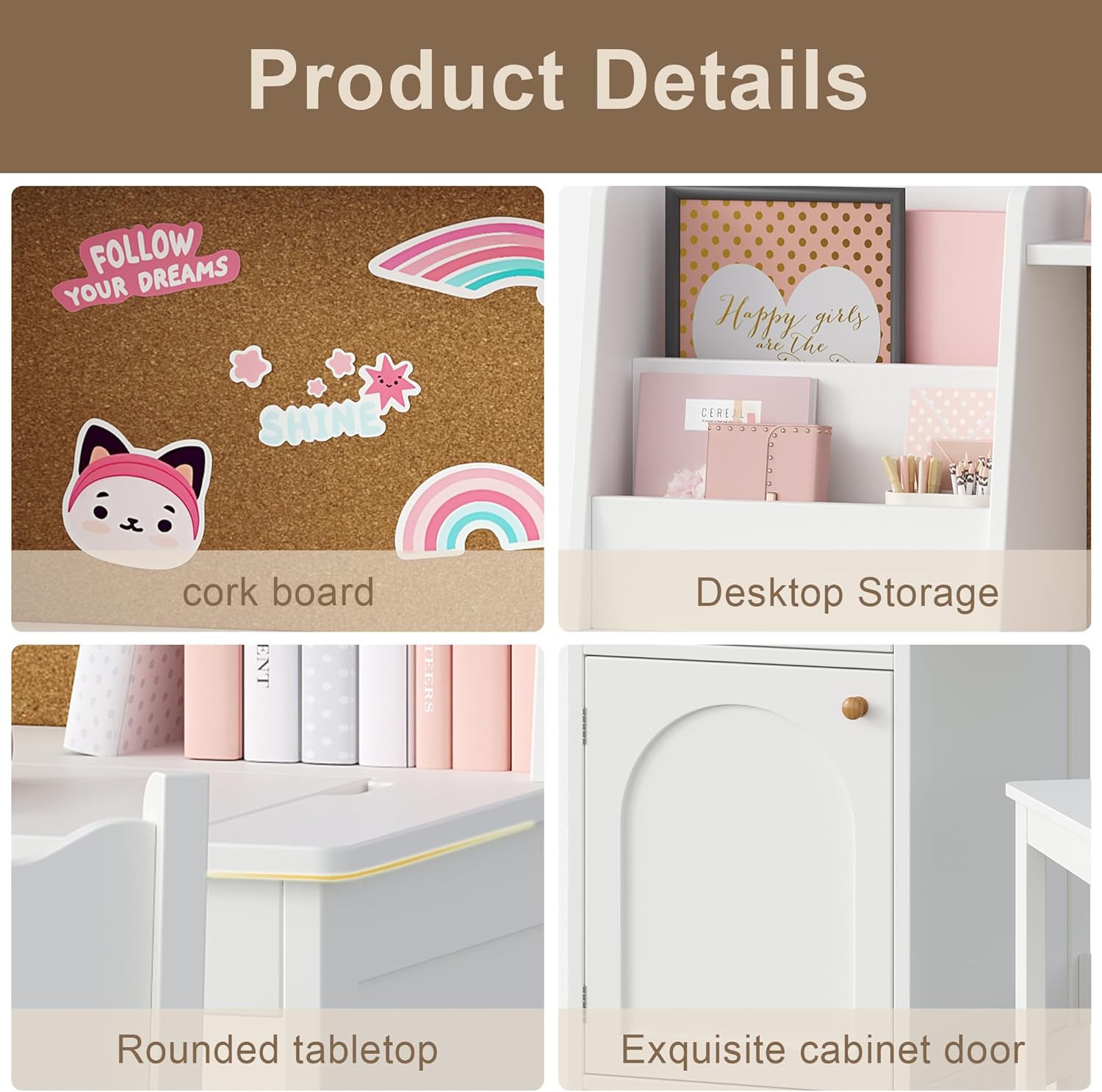
This image provides a close-up of the built-in corkboard, desktop storage, rounded tabletop, and the exquisite cabinet door. The corkboard is ideal for pinning notes, drawings, and reminders.
- Use pushpins to attach notes, drawings, or reminders to the corkboard.
- Avoid using excessive force when inserting pins to prevent damage to the corkboard.
4.3. Utilizing Storage
- The fabric drawers are suitable for storing stationery, small toys, or craft supplies.
- The cabinet with adjustable shelves provides space for books, larger items, or personal belongings.
- The desktop storage compartments are ideal for organizing pens, pencils, and other frequently used items.
5. Maintenance and Care
- Cleaning: Wipe surfaces with a soft, damp cloth. Use a mild, non-abrasive cleaner if necessary. Avoid harsh chemicals or abrasive materials that could damage the finish.
- Hardware: Periodically check all screws and fasteners to ensure they remain tight. Re-tighten as needed to maintain stability.
- Environment: Protect the desk from direct sunlight and extreme temperature changes to prevent warping or fading of the wood.
- Spills: Clean up spills immediately to prevent moisture damage to the engineered wood.
6. Troubleshooting
- Desk Wobbles: Ensure the desk is placed on a level surface. Check all assembly screws and tighten any that are loose.
- Drawer Sticks: Verify that the fabric drawers are inserted correctly and are not overloaded. Check for any obstructions in the drawer slides.
- Desktop Adjustment Issues: Ensure no debris is obstructing the tilt mechanism. Apply gentle, even pressure when adjusting the angle.
7. Specifications
- Brand: Treocho
- Model Number: OD2403-WH
- Color: White
- Material: Engineered Wood
- Item Dimensions (L x W x H): 105 x 48 x 100 cm (41.3 x 18.9 x 39.37 inches)
- Item Weight: 29.5 kg
- Recommended Age: 5-12 Years Old
- Special Features: Adjustable Desktop (0-105 degrees), Built-in Corkboard, Ample Storage (2 fabric drawers, cabinet with adjustable shelves, desktop storage)
- Assembly Required: Yes
8. Warranty and Support
For any questions, missing parts, or support needs, please contact Treocho customer service. Please have your model number (OD2403-WH) and purchase information ready when contacting support.