
PPMIC T19-T
PPMIC T19-T Karaoke Machine User Manual
Model: T19-T
Introduction
Thank you for choosing the PPMIC T19-T Karaoke Machine. This portable PA system is designed to deliver high-quality audio for various occasions, from home parties to outdoor gatherings. Featuring advanced Bluetooth 5.3 connectivity, an upgraded subwoofer with Bass Boost technology, and two wireless microphones, the T19-T provides an immersive karaoke experience. Please read this manual thoroughly to ensure proper use and maintenance of your device.
Package Contents

Image: The PPMIC T19-T Karaoke Machine, two wireless microphones, a Type-C charging cable, and an auxiliary cable are shown, illustrating the complete package contents.
- 1 × Karaoke Machine (PPMIC T19-T)
- 2 × Wireless Microphones
- 1 × Auxiliary Cable
- 1 × Type-C Charging Cable (Note: Power adapter not included)
- 1 × Shoulder Strap
- 1 × User Manual (This document)
Product Features
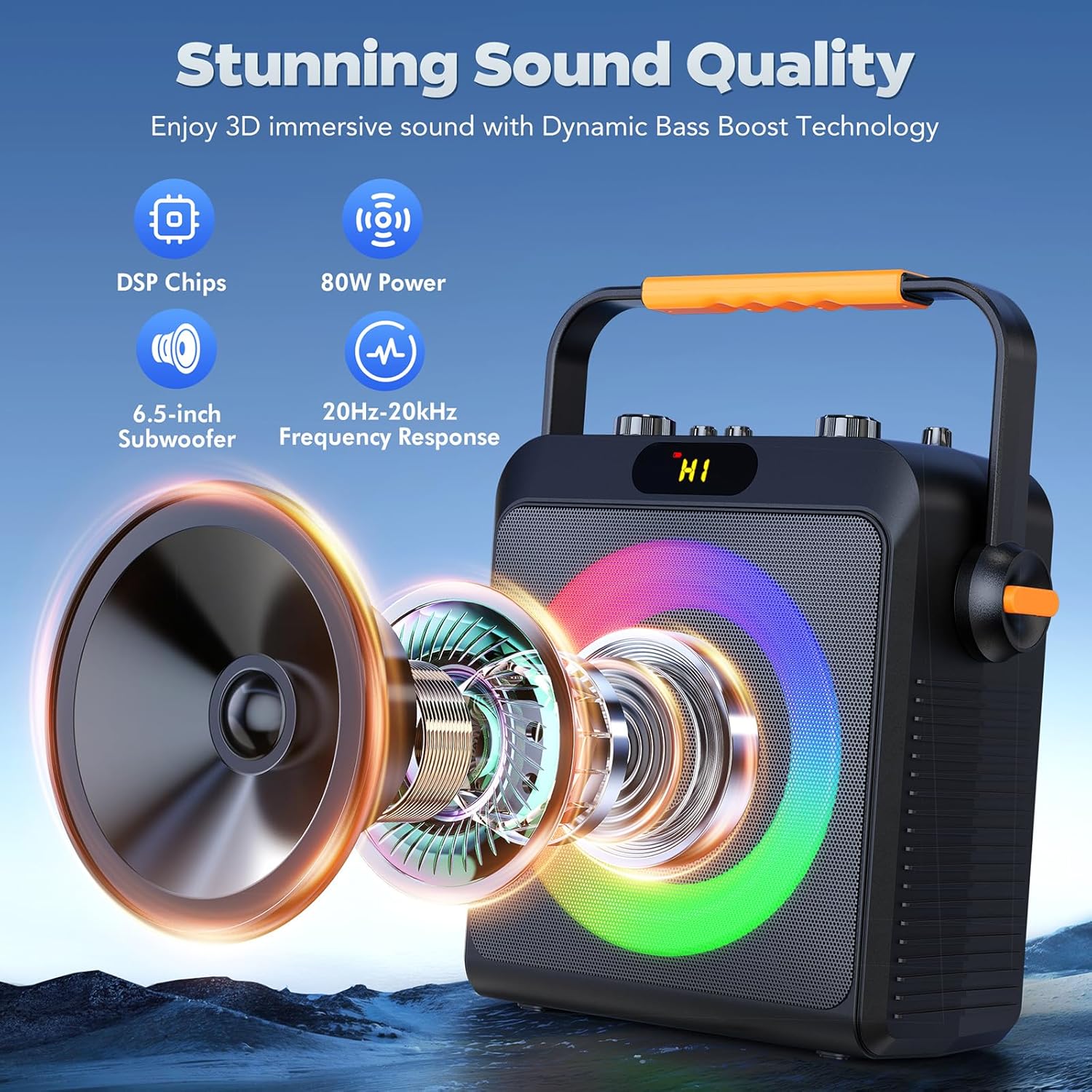
Image: An exploded view of the karaoke machine speaker, illustrating key audio components such as DSP chips, 80W power output, a 6.5-inch subwoofer, and a frequency response range of 20Hz-20kHz, emphasizing its sound quality.
- AI-Enhanced Bass Optimization: Features a 6.5-inch subwoofer (80W) with BassWave Pro technology for increased bass depth.
- Premium Durability: Built with impact-resistant diaphragms for enhanced audio clarity and reduced vibration distortion.
- Customizable Karaoke Modes: Includes Accompaniment Mode to reduce original vocals and offers 5-level bass adjustment (-6dB to +8dB) and adjustable reverb effects.
- Universal Connectivity: Supports Bluetooth 5.3 (up to 100ft range), AUX, USB, TF Card, and Live input.
- Long Battery Life: 5000mAh battery provides up to 12 hours of playback at 70% volume.
- Portable Design: Lightweight (5.2 lbs) with an 18W fast charging capability for easy transport.
- Rhythm Colorful Lights: Integrated LED lights with adjustable brightness and color saturation.
Setup Guide
1. Charging the Karaoke Machine

Image: The karaoke machine and microphones are shown alongside a battery graphic, indicating a 4-hour charging time and up to 12 hours of playing time, highlighting the Type-C charging port.
- Connect the provided Type-C charging cable to the DC5V/Type-C port on the karaoke machine.
- Connect the other end of the cable to a compatible USB power adapter (not included).
- Allow approximately 4 hours for a full charge. The battery indicator will show charging status.
2. Installing Batteries in Microphones
- Each wireless microphone requires two AA batteries (not included).
- Unscrew the bottom part of the microphone to reveal the battery compartment.
- Insert the batteries, ensuring correct polarity (+/-).
- Securely reattach the bottom part.
3. Initial Power On and Microphone Pairing

Image: A hand holds one of the wireless microphones, with the karaoke machine visible in the background, demonstrating the simple one-click Bluetooth 5.3 pairing process between the microphone and the speaker.
- Turn on the karaoke machine using the power switch.
- Turn on both wireless microphones. They will automatically pair with the karaoke machine.
- The display on the microphone will show the connected channel (e.g., UHF CH 662.82).
Operating Instructions
1. Connecting Audio Sources

Image: A detailed view of the karaoke machine's control panel, highlighting the various input options including Bluetooth 5.3, TF Card, USB Disk, AUX, and Live, along with control knobs for Master, Reverb, Instrument Volume, Bass, and Mic Volume.
- Bluetooth 5.3:
Turn on the karaoke machine. It will automatically enter Bluetooth pairing mode. On your smartphone, tablet, or other Bluetooth-enabled device, search for "PPMIC T19-T" and connect. A confirmation sound will indicate successful pairing.
- AUX Input:
Use the provided auxiliary cable to connect your TV, CD player, MP3 player, or other audio devices to the AUX port on the karaoke machine. The machine will automatically switch to AUX mode.
- USB Disk / TF Card:
Insert a USB flash drive or TF (Micro SD) card into the respective port. The machine will automatically detect and play audio files from the storage device. The recording function is available in these modes.
- Live Input:
Connect a live streaming device to the "Live" port. Use monitoring headphones to hear the processed sound in real-time, minimizing rhythm disturbance during live broadcasts.
- Instrument Input:
Connect electric guitars or other electronic instruments to the "Instrument" jack.
2. Adjusting Sound Controls
- Master Volume: Use the "MASTER" knob to adjust the overall volume of the system.
- Microphone Volume: Use the "MIC VOL" knob to control the volume of the wireless microphones.
- Reverb (Echo): Use the "REVERB" knob to add or reduce echo effect to the microphone vocals.
- Bass Adjustment: Use the "BASS" knob to fine-tune the bass levels (-6dB to +8dB).
- Instrument Volume: Use the "INSTRUMENT VOL" knob to adjust the volume of connected instruments.
3. Using Karaoke Modes
- Accompaniment Mode: Press the "Accompaniment" button on the control panel to reduce the original vocals of a song, creating a backing track for karaoke. Effectiveness may vary depending on the song source.
- Vocal Enhancement: The AI-optimized vocal frequencies ensure clear microphone output.
4. Rhythm Colorful Lights

Image: Three karaoke machines are shown side-by-side, each displaying vibrant, rhythmic colorful lights on their front speakers, demonstrating the adjustable brightness and color saturation of the LED feature.
- The integrated LED lights automatically synchronize with the music rhythm.
- Use the "LED" button on the control panel to cycle through different light modes or turn them off.
Maintenance and Care
- Cleaning: Use a soft, dry cloth to clean the surface of the karaoke machine and microphones. Do not use abrasive cleaners or solvents.
- Storage: Store the device in a cool, dry place away from direct sunlight and extreme temperatures.
- Battery Care: If the device will not be used for an extended period, fully charge the battery before storage and recharge it every 3 months to maintain battery health. Remove batteries from microphones if not in use for long periods.
- Water Exposure: This device is not waterproof. Avoid exposure to water or excessive moisture.
Troubleshooting
| Problem | Possible Cause | Solution |
|---|---|---|
| No sound from speaker. |
|
|
| Microphones not working. |
|
|
| Bluetooth connection unstable. |
|
|
| Poor sound quality / Distortion. |
|
|
Specifications
| Feature | Detail |
|---|---|
| Model Number | T19-T |
| Output Wattage | 80 Watts |
| Subwoofer Size | 6.5 inches |
| Frequency Response | 20Hz - 20kHz |
| Connectivity Technology | Bluetooth 5.3, USB, AUX, Live, TF Card |
| Bluetooth Range | Up to 100 feet (open space) |
| Battery Capacity | 5000 mAh |
| Playing Time | Up to 12 hours (at 70% volume) |
| Charging Time | Approx. 4 hours (18W fast charging) |
| Item Weight | 5.2 Pounds |
| Product Dimensions (L x W x H) | 5.7 x 12.6 x 13.8 inches |
| Material | Acrylonitrile Butadiene Styrene (ABS) |
| Microphone Type | Wireless UHF |
| Power Source | 5000 mAh Battery Powered |
| Mounting Type | Tabletop, Floor Standing |
Warranty and Support

Image: A graphic detailing PPMIC's customer support, including a 3-year warranty, 24/7 customer support, and a US local after-sales center.
PPMIC offers a 3-year warranty for the T19-T Karaoke Machine, ensuring peace of mind regarding your purchase.
For any issues, questions, or support needs, please contact our customer service team:
- Customer Support: Available 7 days a week, 24 hours a day.
- Contact Method: Please reach out via Amazon message for prompt assistance.
- After-sales Center: US Local After-sales Center for efficient service.
We are happy to help you with any problems you may encounter.
Related documentsT19-T


Ask a question about this manual
Ask about setup, troubleshooting, compatibility, parts, safety, or missing instructions. Manuals+ will review the question and use this page’s manual context to help answer it.