
1. Introduction
The ZiCOWAY H17 Smart Watch is designed to integrate smart features into your daily life, offering comprehensive health monitoring, communication capabilities, and fitness tracking. This manual provides detailed instructions for setting up, operating, and maintaining your device.
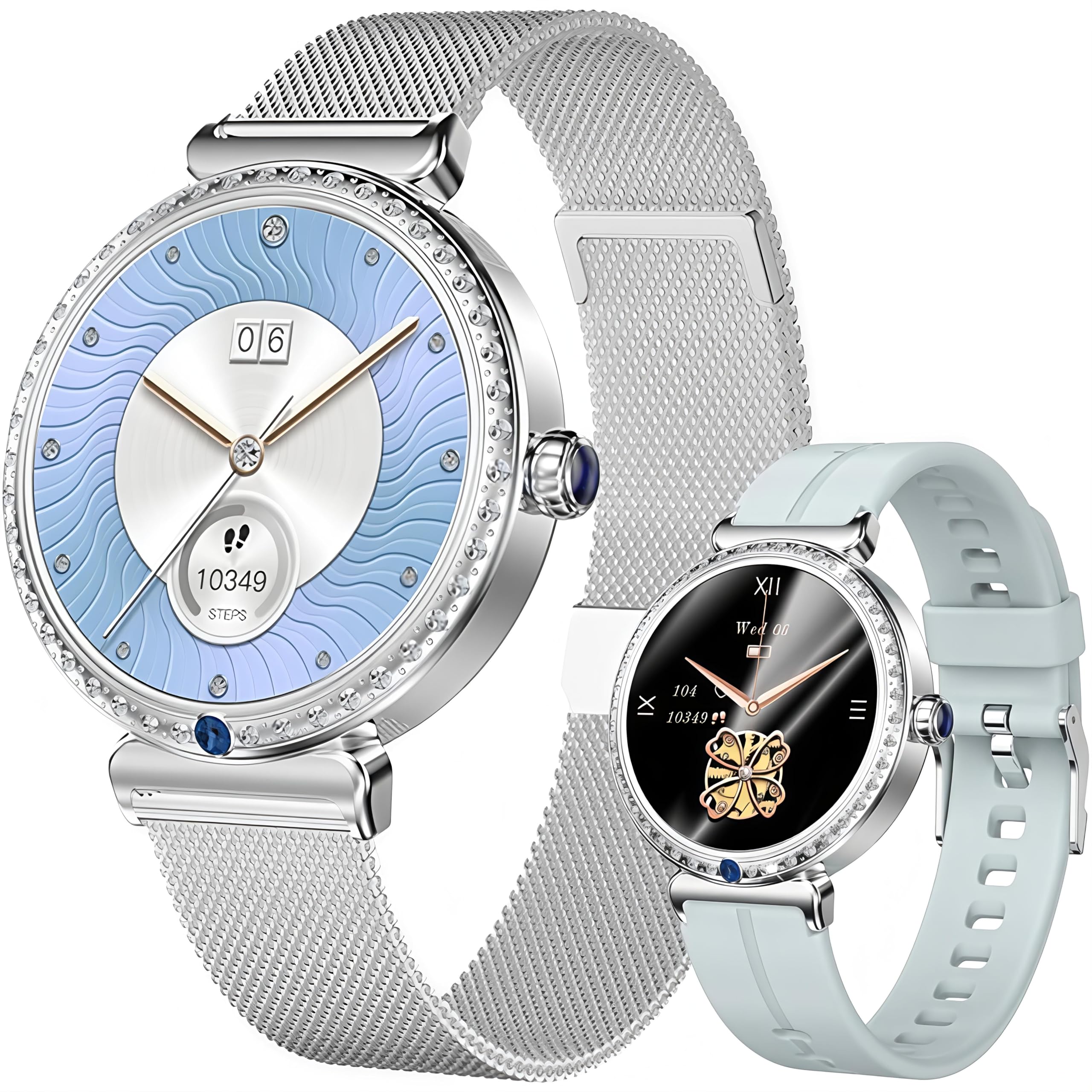
The ZiCOWAY H17 Smart Watch features a round display and comes with two interchangeable bands.
Key features include a 1.28-inch AMOLED display, Bluetooth calling, 24/7 heart rate and SpO2 monitoring, sleep analysis, menstrual cycle tracking, over 100 sports modes, and IP67 water resistance. It also includes various smart tools such as a voice assistant, remote camera control, and music playback.

The H17 Smart Watch combines functionality with a stylish design, suitable for various occasions.
2. Setup
2.1 Unboxing and Initial Inspection
Upon opening the package, ensure all components are present:
- ZiCOWAY H17 Smart Watch
- Charging Cable
- User Manual (this document)
- Watch Band(s) (typically two interchangeable bands)
Inspect the watch for any visible damage before proceeding with setup.
2.2 Charging the Device
Before first use, fully charge your H17 Smart Watch. The watch uses a magnetic charging cable.
- Connect the USB end of the charging cable to a standard USB power adapter (not included) or a computer's USB port.
- Align the magnetic end of the charging cable with the charging contacts on the back of the watch. The magnets will snap into place.
- The watch screen will display a charging indicator. A full charge typically takes approximately 2.5 hours.

Connect the magnetic charging cable to the back of the watch for power.

A full charge takes approximately 2.5 hours, providing 5-7 days of typical use or up to 20 days standby.
2.3 App Installation and Pairing
To unlock the full functionality of your H17 Smart Watch, you need to install the companion application on your smartphone.
- Download the App: Search for "FitCloudPro" in your smartphone's app store (Apple App Store for iOS or Google Play Store for Android) and download it.
- Compatibility: Ensure your smartphone runs iOS 12.0 or above, or Android 9.0 or above.
- Enable Bluetooth: On your smartphone, go to Settings and enable Bluetooth.
- Open FitCloudPro App: Launch the FitCloudPro app and follow the on-screen instructions to create an account or log in.
- Add Device: Within the app, navigate to the "Device" or "Add Device" section. The app will search for available Bluetooth devices.
- Select H17: Select "H17" or a similar device name from the list of found devices to initiate the pairing process.
- Confirm Pairing: Follow any prompts on both your watch and smartphone to confirm the pairing. Once connected, the watch will synchronize data with the app.
2.4 Strap Installation
The H17 Smart Watch comes with interchangeable straps. To install or change a strap:
- Locate the spring bar on the back of the watch strap.
- Gently pull the spring bar inwards to release it from the watch lug.
- Align the new strap with the watch lugs, ensuring the spring bar is properly seated in the holes on both sides.
- Release the spring bar to secure the strap. Give a gentle tug to ensure it is firmly attached.
This video demonstrates the process of changing the watch strap on the H17 Smart Watch, showing how to align and secure the strap into the watch groove.
3. Operating the Smart Watch
3.1 Basic Navigation
- Touchscreen: Swipe left, right, up, or down to navigate through menus and features. Tap to select an option.
- Side Button: Press the side button to return to the main watch face or to access the app list.
- Wake Screen: Raise your wrist or press the side button to wake the screen.
3.2 Customizing Watch Faces
Personalize your watch by choosing from a variety of watch faces or setting your own photo as the background.
- On the Watch: Long-press the watch face to enter the watch face selection interface. Swipe left or right to browse and tap to select.
- Via FitCloudPro App: Open the app, go to the watch face store, and download additional designs or upload a custom photo.

The watch offers a wide selection of customizable watch faces to suit different styles and preferences.
3.3 Bluetooth Calling and Notifications
Once paired with your smartphone, the H17 Smart Watch allows you to manage calls and receive notifications directly on your wrist.
- Making/Answering Calls: Use the built-in microphone and HD speaker to make, answer, or reject calls. Access your contact list and call history from the watch.
- Message Notifications: Receive alerts for messages from apps like WhatsApp, Facebook, SMS, Instagram, Skype, Line, and more.
- Do Not Disturb: Activate "Do Not Disturb" mode from the watch settings to silence notifications when needed.

Receive and manage calls and notifications directly from your wrist after connecting via Bluetooth.
3.4 Health Monitoring
The H17 Smart Watch provides comprehensive health tracking features. Note: This device is not a medical device and should not be used for medical diagnosis or treatment.
- Heart Rate Monitoring: The watch continuously monitors your heart rate 24/7. View real-time data on the watch or detailed trends in the FitCloudPro app.
- Blood Oxygen (SpO2) Monitoring: Track your blood oxygen saturation levels to understand your body's oxygen uptake.
- Sleep Tracking: The watch analyzes your sleep patterns, including deep sleep, light sleep, and wake times, to help you improve sleep quality.
- Menstrual Tracking: For women, the watch offers intelligent algorithms to track menstrual cycles, ovulation, and fertility windows.
- Breathing Exercises: Engage in guided breathing exercises to help regulate stress and improve focus.
- Hydration Reminders: Set reminders in the app to ensure you drink enough water throughout the day.

The watch continuously monitors your heart rate, providing data to help you track your cardiovascular health.

Monitor your blood oxygen levels to gain insights into your respiratory well-being.

Analyze your sleep patterns to improve sleep quality and overall rest.

Utilize the women-centric health features to track menstrual cycles and receive relevant reminders.
3.5 Sports Modes
The H17 Smart Watch supports over 100 sports modes to accurately track your physical activities.
- Activity Tracking: Monitor steps, distance, and calories burned in real-time.
- Workout Modes: Select a specific sports mode (e.g., walking, running, cycling, yoga, badminton, soccer) before starting your workout for tailored data collection.

Choose from over 100 sports modes to track your workouts, including steps, distance, and calories burned.
3.6 Smart Tools and Features
The watch includes several convenient tools to enhance your daily experience:
- Voice Assistant: Access your phone's voice assistant directly from the watch.
- Remote Camera: Use your watch as a remote shutter for your smartphone camera.
- Music Playback Control: Control music playing on your phone (play, pause, skip tracks).
- Weather Forecast: View current weather conditions and forecasts.
- Calculator, Alarm, Stopwatch, Timer, Flashlight: Standard utility functions.
- Sedentary Reminders: Get alerts to move if you've been inactive for too long.
- Two-Way Finder: Locate your misplaced phone or watch by triggering an alert from the other device (within Bluetooth range).

Access convenient smart tools such as weather forecasts, music control, remote camera shutter, and more.
4. Maintenance
4.1 Water Resistance
The H17 Smart Watch is IP67-rated, meaning it is resistant to dust and can withstand immersion in water up to 1 meter for 30 minutes. This makes it suitable for daily use, such as handwashing, sweating during exercise, and light rain.
Important Limitations:
- The watch is not intended for swimming, hot showers, or prolonged submersion.
- Avoid exposing the watch to hot water, steam, or high-pressure water jets, as this can compromise the water resistance.
- If the watch gets wet, wipe it dry with a soft cloth before charging or using the buttons.
4.2 Cleaning and Care
- Regularly clean the watch and strap with a soft, dry cloth.
- For stubborn dirt, slightly dampen the cloth with water. Avoid using harsh chemicals, soaps, or abrasive materials.
- Keep the charging contacts on the back of the watch clean and free of debris to ensure proper charging.
- Avoid extreme temperatures, direct sunlight for extended periods, and strong magnetic fields.
5. Troubleshooting
5.1 Connectivity Issues
- Watch not pairing with phone:
- Ensure Bluetooth is enabled on your phone and the watch is sufficiently charged.
- Make sure the FitCloudPro app is open and running in the background.
- Try restarting both your phone and the watch.
- If previously paired, try unpairing the watch from your phone's Bluetooth settings and then re-pairing through the app.
- Notifications not appearing:
- Check app notification permissions in your phone's settings for FitCloudPro.
- Ensure the watch is not in "Do Not Disturb" mode.
- Verify that the watch is connected via Bluetooth to your phone.
5.2 Screen Display Issues
- Screen not waking up:
- Ensure the "Raise to Wake" feature is enabled in the watch settings or the FitCloudPro app.
- Press the side button to manually wake the screen.
- Check if the battery is critically low or depleted.
- Screen unresponsive:
- Try restarting the watch by long-pressing the side button and selecting the restart option, or by holding it down until it reboots.
5.3 Health Data Accuracy
- Inaccurate readings:
- Ensure the watch is worn snugly on your wrist, about one finger's width above the wrist bone.
- Keep the sensor on the back of the watch clean.
- Movement during measurement can affect accuracy. Remain still for heart rate and SpO2 readings.
- Environmental factors and individual physiology can influence readings.
- Blood Pressure Monitoring: While some features lists may mention blood pressure, the H17 Smart Watch primarily focuses on Heart Rate and Blood Oxygen (SpO2) monitoring. It is not designed to provide medically accurate blood pressure measurements. Consult a medical professional for accurate blood pressure readings.
5.4 Battery Life Issues
- Short battery life:
- Frequent use of Bluetooth calling, continuous heart rate monitoring, and high screen brightness can drain the battery faster.
- Reduce screen brightness, shorten screen-on time, and disable unnecessary notifications.
- Ensure the watch is fully charged each time.
6. Specifications
| Feature | Specification |
|---|---|
| Model Name | H17 |
| Brand | ZiCOWAY |
| Screen Size | 1.28 Inches |
| Display Type | AMOLED |
| Resolution | 416 x 416 |
| Connectivity Technology | Bluetooth |
| Operating System | Wear OS 1.4 |
| Memory Storage Capacity | 128 MB |
| Battery Capacity | 200 mAh |
| Battery Average Life | 7 days (typical use) |
| Standby Time | Up to 20 days |
| Charging Time | Approximately 2.5 hours |
| Water Resistance Rating | IP67 |
| Metrics Measured | Blood Oxygen (SpO2), Breath Rate, Heart Rate, Sleep Duration |
| Supported Application | FitCloudPro |
| Compatible Phone Models | Android 9.0 and above, iOS 12.0 and above |
| Case Material Type | Zinc alloy |
| Band Material Type | Silicone, Metal |
7. Warranty and Support
The ZiCOWAY H17 Smart Watch comes with a one-year limited warranty from the date of purchase. This warranty covers manufacturing defects and malfunctions under normal use. It does not cover damage caused by misuse, accidents, unauthorized modifications, or failure to follow the instructions in this manual.
For warranty claims, technical support, or any questions regarding your H17 Smart Watch, please contact the seller, Zicoway, through the platform where you purchased the device. Please have your purchase receipt and product model number (H17) ready when contacting support.


