
Introduction
This manual provides essential information for the setup, operation, and maintenance of your MSI Claw 8 AI+ A2VM PC Gaming Handheld. Designed for portable gaming, this device combines powerful performance with a compact form factor.
Key features include:
- AI-Powered Performance: Equipped with the Intel Core Ultra 7 processor for demanding tasks and gaming.
- 8-inch Premium 120Hz Gaming Display: Offers exceptional color reproduction and smooth action.
- Ergonomic Design: Optimized grip and weight for comfortable handheld use.
- Extended Battery Life: Designed for prolonged gaming sessions.
- Windows 11 Home: Provides a familiar and versatile operating system.
Setup
Follow these steps to set up your MSI Claw 8 AI+ A2VM for the first time.
- Unboxing: Carefully remove the device and all accessories from the packaging. Ensure all components are present.
- Charging the Device: Connect the provided power adapter to the device's charging port and a power outlet. Allow the device to charge fully before initial use. The charging indicator will show the charging status.
- Initial Power On: Press and hold the power button until the MSI logo appears on the screen.
- Windows 11 Setup: Follow the on-screen instructions to complete the Windows 11 Home setup process. This includes selecting your region, connecting to a Wi-Fi network, and creating a user account.
- MicroSD Card Installation (Optional): Locate the MicroSD card slot. Insert a compatible MicroSD card for additional storage, ensuring it clicks into place.
- Connecting Peripherals: Utilize the Thunderbolt 4 ports for external displays or high-speed accessories. Bluetooth and Wi-Fi connectivity allow for wireless peripherals and internet access.
Operating the Device
This section covers the basic operation of your gaming handheld.
- Power On/Off: Press the power button to turn the device on. To shut down, go to the Windows Start menu, select Power, and then Shut down.
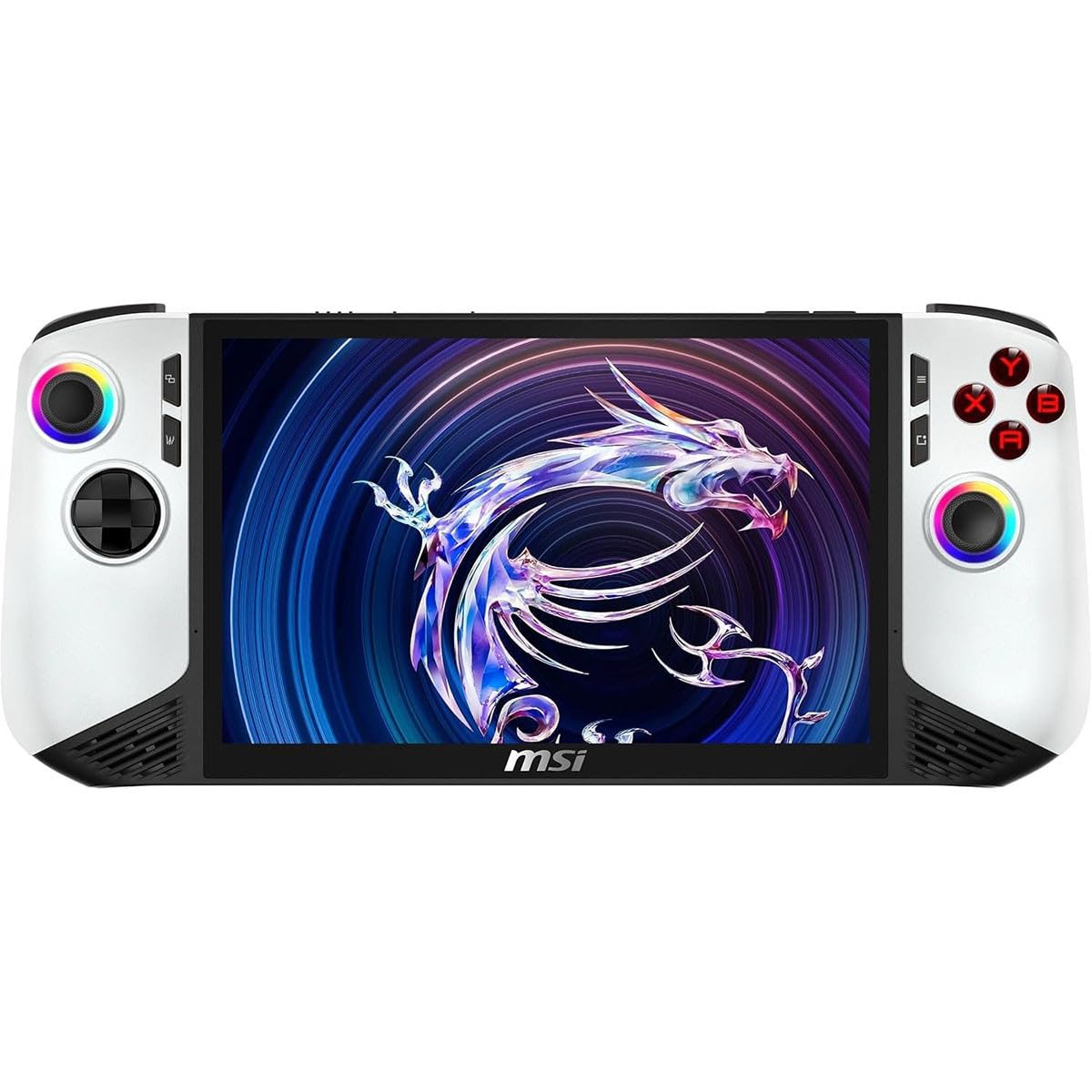
- Controls: The device features integrated joysticks, directional pad, action buttons (A, B, X, Y), shoulder buttons, and triggers for gaming input. Familiarize yourself with their layout for optimal gameplay.
- Display: The 8-inch FHD 120Hz display provides a smooth visual experience. Adjust brightness and display settings through Windows settings.
- Gaming: Install games from various platforms compatible with Windows 11. The Intel Core Ultra 7 processor and integrated Arc Graphics 140V are designed to deliver strong gaming performance.
- Audio: The device includes built-in speakers. For private listening, connect headphones via the audio jack or Bluetooth.
Maintenance
Proper maintenance ensures the longevity and performance of your MSI Claw 8 AI+ A2VM.
- Cleaning: Use a soft, lint-free cloth to clean the screen and exterior. For stubborn smudges, slightly dampen the cloth with water or a screen-safe cleaner. Avoid harsh chemicals.
- Battery Care: To maximize battery life, avoid extreme temperatures. Do not leave the device fully discharged for extended periods. For long-term storage, charge the battery to approximately 50-60%.
- Software Updates: Regularly check for and install Windows updates and driver updates from the MSI support website to ensure optimal performance and security.
- Storage: Keep the device in a cool, dry place away from direct sunlight and excessive dust.
Troubleshooting
This section addresses common issues you might encounter.
- Device Not Powering On: Ensure the device is charged. Connect the power adapter and wait a few minutes before attempting to power on again.
- No Display: If the device powers on but the screen remains black, try connecting an external monitor via Thunderbolt 4 to check if the display output is working.
- Performance Issues: Close unnecessary background applications. Ensure drivers and Windows are up to date. Check game settings to match the device's capabilities.
- Connectivity Problems (Wi-Fi/Bluetooth): Verify that Wi-Fi and Bluetooth are enabled in Windows settings. Restart the device and your router/Bluetooth peripheral.
- Controls Unresponsive: Restart the device. If the issue persists, check for driver updates for the input devices.
If you experience persistent issues not covered here, please refer to the Warranty and Support section for further assistance.
Specifications
| Model Name | Claw 8 AI+ A2VM Polar Tempest Edition-084US |
| Model Number | CLAW8A2084 |
| Processor | Intel Core Ultra 7-258V (up to 4.8 GHz) |
| Graphics | Integrated Arc Graphics 140V (GDDR5) |
| RAM | 32GB LPDDR5 |
| Storage | 1TB NVMe SSD |
| Display | 8-inch FHD (1920x1200) LCD, 120Hz Refresh Rate, Capacitive Touch Screen |
| Operating System | Windows 11 Home |
| Connectivity | Bluetooth 5.4, Wi-Fi (802.11ac, 802.11ax) |
| Ports | 2x Thunderbolt 4, MicroSD Card Reader |
| Battery | 80 Watt Hours Lithium Polymer |
| Dimensions (L x W x Th) | 11.77" x 4.96" x 0.94" |
| Weight | 1.75 Pounds |
| UPC | 824142423714 |
Warranty and Support
Your MSI Claw 8 AI+ A2VM PC Gaming Handheld comes with a 1 Year Manufacturer Limited Warranty. Please retain your proof of purchase for warranty claims.
For technical support, warranty service, or additional information, please visit the official MSI support website or contact their customer service. When contacting support, please have your Model Number (CLAW8A2084) and UPC (824142423714) available.
For the most up-to-date drivers, software, and FAQs, refer to the MSI official support resources.


