
Joyhis JS03-21Miles-350W
Joyhis JS03-21Miles-350W Electric Scooter User Manual
Model: JS03-21Miles-350W | Brand: Joyhis
1. Introduction
This manual provides essential information for the safe and efficient operation, maintenance, and troubleshooting of your Joyhis JS03-21Miles-350W Electric Scooter. Please read this manual thoroughly before first use and retain it for future reference.

Figure 1: Joyhis JS03-21Miles-350W Electric Scooter and its accompanying mobile application interface.
This image shows the Joyhis JS03-21Miles-350W Electric Scooter in its upright, ready-to-ride position, alongside a smartphone screen displaying the scooter's smart application. The app interface shows battery level, voltage, and various control options like headlights, locking, and speed modes. The scooter itself is black with red accents on the wheels and a grey footboard, featuring the 'Joyhis' logo.
2. Safety Information
Your safety is paramount. Always adhere to local laws and regulations regarding electric scooter usage. Failure to follow these instructions may result in serious injury or property damage.
2.1 General Safety Guidelines
- Always wear a helmet and appropriate protective gear (knee pads, elbow pads) when riding.
- Ensure the scooter is fully charged before its first use to prolong battery life and capacity.
- Do not ride in heavy rain or through puddles deeper than 1 inch. The scooter has an IP65 waterproof rating, but excessive water exposure can cause damage.
- Adhere to the maximum load capacity of 264 lbs (120 kg).
- Avoid riding on uneven or slippery surfaces.
- Familiarize yourself with the braking system before riding at higher speeds.
- The scooter is certified to UL2272 standards for electrical safety.
2.2 Important Safety Features
- Double Braking System: Features disc braking and EABS regenerative anti-lock braking for effective stopping.
- Warning Taillights & Ultra-Bright Headlights: Enhance visibility during low-light conditions.

Figure 2: Brilliant Light System for enhanced night safety.
This image highlights the scooter's lighting system, showing a bright white headlight illuminating the path ahead and a red taillight visible from the rear, indicating improved safety for night riding.

Figure 3: IP65 Waterproof Design.
This image shows the scooter being ridden by a person through a shallow puddle, with water splashing around the wheels, illustrating its IP65 waterproof rating and suitability for common rainy conditions.
3. Setup
3.1 Unboxing and Initial Assembly
The Joyhis JS03-21Miles-350W Electric Scooter comes largely pre-assembled. Minimal assembly is required.
- Carefully remove all components from the packaging.
- Lift the handlebar stem to its upright position until it clicks securely into place.
- Attach the handlebars to the stem. This typically involves screwing in four screws. Ensure they are tightened securely.
- Verify all connections and moving parts are secure before proceeding.
3.2 Initial Charging
Before your first ride, fully charge the scooter's lithium-ion battery. This process typically takes up to 5 hours.
- Locate the charging port on the scooter.
- Connect the charger to the scooter, then plug the charger into a power outlet.
- The charging indicator light on the charger will change (e.g., from red to green) when charging is complete.
- Disconnect the charger once charging is complete.
4. Operating Instructions
4.1 Power On/Off and Basic Controls
- Power Button: Press and hold the power button on the LCD display to turn the scooter on or off.
- Throttle: Use the thumb throttle to accelerate.
- Brake Handle: Located on the handlebar, activates the dual braking system.
- Scooter Bell: Use the bell to alert pedestrians or other riders.

Figure 4: Smart LCD Display and Handlebar Controls.
This image provides a detailed view of the scooter's handlebar, highlighting the Smart LCD Display which shows current speed, power level, and selected speed mode. It also points out the brake handle, anti-slip handlebar grips, folding buckle, scooter bell, and cruise control handle.
4.2 Riding Modes
The scooter offers multiple riding modes to suit different preferences and conditions. These can typically be switched via the power button or the mobile application.
- Eco Mode: Energy-saving mode, typically for longer range at lower speeds (approx. 12 km/h).
- Comfort Mode: Balanced mode for everyday commuting (approx. 20 km/h).
- Sport Mode: Maximum performance mode for higher speeds (up to 19 mph / 31 km/h).
4.3 Smart App Control
Pair your scooter with the dedicated mobile application for enhanced control and monitoring. The app allows you to:
- Select riding modes.
- Control the light system.
- Adjust speed levels.
- Activate/deactivate cruise control.
- View scooter status (e.g., battery level, voltage).
- Motor lock/unlock feature.
- Access vehicle setup options (e.g., maximum speed setting, starting torque).
- View location records (if registered).

Figure 5: Key Features of the Portable Electric Scooter.
This infographic visually summarizes the main features of the Joyhis electric scooter, including its smart app control, travel range, battery life, charging time, motor power, and maximum speed.

Figure 6: Vicont App Control Interface.
This image depicts a user's hand holding a smartphone, with the screen showing the "Vicont" application interface. The app provides various controls for the scooter, such as motor lock/unlock, cruise control, vehicle setup, and location records, emphasizing smart app integration for safety and convenience.
5. Maintenance
5.1 Battery Care
- Always charge the battery fully before its first use.
- Avoid completely draining the battery before recharging.
- Store the scooter in a cool, dry place when not in use, especially for extended periods.
5.2 Tire Maintenance
The Joyhis JS03-21Miles-350W Electric Scooter is equipped with 8.5-inch maintenance-free solid tires. These honeycomb solid tires are designed for durability and to reduce the hassle of punctures.
- Regularly inspect tires for any signs of wear or damage.
- Keep tires clean to ensure optimal grip.
5.3 General Cleaning and Storage
- Clean the scooter with a damp cloth. Do not use high-pressure water jets.
- Store the scooter in a dry environment, away from direct sunlight and extreme temperatures.
- The one-step folding design allows for compact storage and transport.

Figure 7: Portable Folding Design.
This image illustrates the scooter's portability, showing a person easily folding the scooter and placing it into the trunk of a car, highlighting its lightweight and compact design for convenient storage and transport.
6. Troubleshooting
This section addresses common issues you might encounter with your Joyhis Electric Scooter.
| Problem | Possible Cause | Solution |
|---|---|---|
| Scooter does not power on. | Low battery or power button not pressed correctly. | Charge the scooter fully. Press and hold the power button for a few seconds. |
| Scooter stuck in 'P' (Park) mode. | Safety lock engaged, or minor software glitch. | Check the app for a motor lock/unlock function. Try turning the scooter off and on again. If the issue persists, consult the app's diagnostic feature or contact support. |
| Reduced range or speed. | Low battery, heavy load, uphill riding, or selected riding mode. | Ensure battery is fully charged. Reduce load. Switch to Sport mode for maximum speed. Note that range and speed vary based on conditions and rider weight. |
| App connectivity issues. | Bluetooth not enabled, app not updated, or scooter not discoverable. | Ensure Bluetooth is on. Restart the app and scooter. Check for app updates. |
For more advanced diagnostics, the smart app includes a detection and diagnosis feature that can help identify potential issues.
7. Specifications
| Feature | Detail |
|---|---|
| Brand | Joyhis |
| Model Name | JS03 electric scooter |
| Motor Power | 350W |
| Max Speed | 19 mph (approx. 31 km/h) |
| Max Distance Range | 15-19 miles (actual range depends on speed, road conditions, and rider's weight) |
| Charging Time | Within 5 hours |
| Weight Limit | 264 Pounds (approx. 120 kg) |
| Item Weight | 27.55 Pounds (approx. 12.5 kg) |
| Product Dimensions (L x W x H) | 42"L x 17"W x 44.49"H (approx. 107cm L x 43cm W x 113cm H) |
| Wheel Size | 8.5 Inches |
| Wheel Type | Solid (Honeycomb) |
| Brake Style | Front Braking, Rear Braking (Disc braking and EABS regenerative anti-lock braking) |
| Frame Material | Aluminum |
| Special Features | Cruise Control, Digital Display, Dual Braking System, Foldable, Lightweight, Smart App Control |
| Waterproof Rating | IP65 |
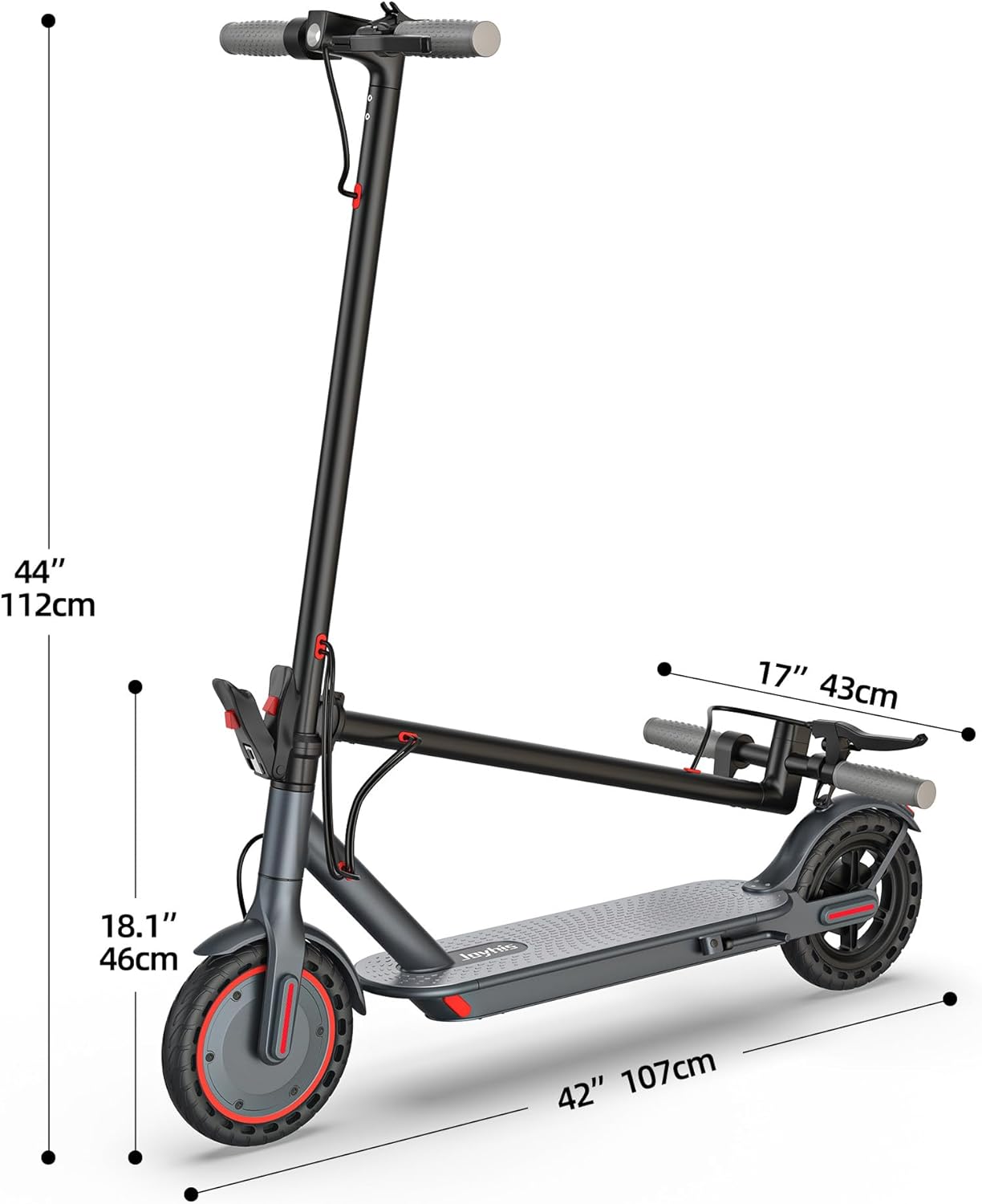
Figure 8: Scooter Dimensions.
This diagram provides key dimensions of the Joyhis electric scooter, including its overall height, height to the deck, handlebar width, and total length, useful for understanding its physical footprint.
8. Warranty and Support
8.1 Product Warranty
Joyhis electric scooters offer a warranty period for different parts. Please refer to the specific warranty terms provided with your purchase for detailed information. Generally, the warranty is 12-month or 180-day for different parts.
8.2 Customer Support
If you encounter any problems or have questions regarding your Joyhis electric scooter, please feel free to contact us. We aim to respond to inquiries within 24 hours and provide assistance.
For support, please refer to the contact information provided on your purchase receipt or the official Joyhis website.
Ask a question about this manual
Ask about setup, troubleshooting, compatibility, parts, safety, or missing instructions. Manuals+ will review the question and use this page’s manual context to help answer it.