
1. Introduction
This manual provides essential information for the safe and efficient operation of your DEWIN VFD Inverter. Please read these instructions carefully before installation, operation, or maintenance. Retain this manual for future reference.
2. Safety Information
WARNING: Electrical shock hazard. Installation and maintenance should only be performed by qualified personnel.
- Ensure the power supply is disconnected before any wiring or maintenance.
- Verify correct voltage and current ratings before connecting the inverter.
- Ground the inverter properly to prevent electrical hazards.
- Do not operate the inverter with damaged wiring or components.
- Avoid exposing the inverter to moisture, dust, or corrosive environments.
- Allow sufficient cooling time after operation before handling internal components.
3. Product Overview
The DEWIN VFD Inverter (Model AT4-2200X) is designed to regulate motor power and speed, offering energy savings and reducing voltage fluctuations. It features a robust design with multiple protection mechanisms.
Key Features:
- Intelligent Motor Speed Regulation: Provides precise control over motor speed.
- Energy Saving: Optimizes power consumption for connected equipment.
- Voltage Fluctuation Reduction: Stabilizes the power supply to the motor.
- High Performance: Achieves high torque, high precision, and a wide speed range.
- Removable Control Panel: Allows for flexible installation and remote operation.
- Robust Construction: Made from high-impact, heat-resistant, flame-retardant ABS plastic.
- Efficient Cooling: Features a thickened heatsink and dual high-efficiency fans for superior heat dissipation.
- Low Noise and EMI: Optimized PWM control technology minimizes operational noise and electromagnetic interference.
Protection Features:
- Overload Protection
- Overheat Protection
- Overvoltage Protection
- Load Drop Protection
- Low Voltage Protection
- Overcurrent Protection
- Phase Loss Protection
- Ground Fault Protection
- Short Circuit Protection
- Stall Protection
4. Specifications
| Parameter | Value |
|---|---|
| Product Series | AT4-2200X |
| Rated Input Voltage | Single-phase 220V AC |
| Rated Output Voltage | Three-phase 380V AC |
| Rated Current | 8A |
| Rated Power | 2.2 kW |
| Peak Output Power | 2500 Watts |
| Factory Frequency | 50/60 Hz |
| Control Mode | V/F Open Loop |
| Output Voltage Mode | PWM Control |
| Output Waveform | Modified Sine Wave |
| Shell Material | ABS Plastic |
| Certifications | CE |
5. Installation
5.1 Physical Installation
Mount the VFD inverter in a well-ventilated area, away from direct sunlight, excessive heat, moisture, and corrosive substances. Ensure adequate clearance around the unit for proper airflow and heat dissipation. The unit features a thickened heatsink and dual fans for efficient cooling.
5.2 Wiring Diagram
Refer to the diagram below for correct wiring connections. Ensure all connections are secure and comply with local electrical codes.

Image: Wiring diagram for the DEWIN VFD Inverter. It illustrates connecting a single-phase 220V power supply to the L and N terminals, and a three-phase 380V motor to the W, V, and U terminals.
- Connect the single-phase 220V input power supply to the L and N terminals.
- Connect the three-phase 380V motor to the W, V, and U terminals.
- Ensure proper grounding of the inverter and the motor.
6. Operation
6.1 Control Panel
The inverter features a user-friendly control panel for setting parameters and controlling operation. The panel is removable, allowing for separate installation and remote control.
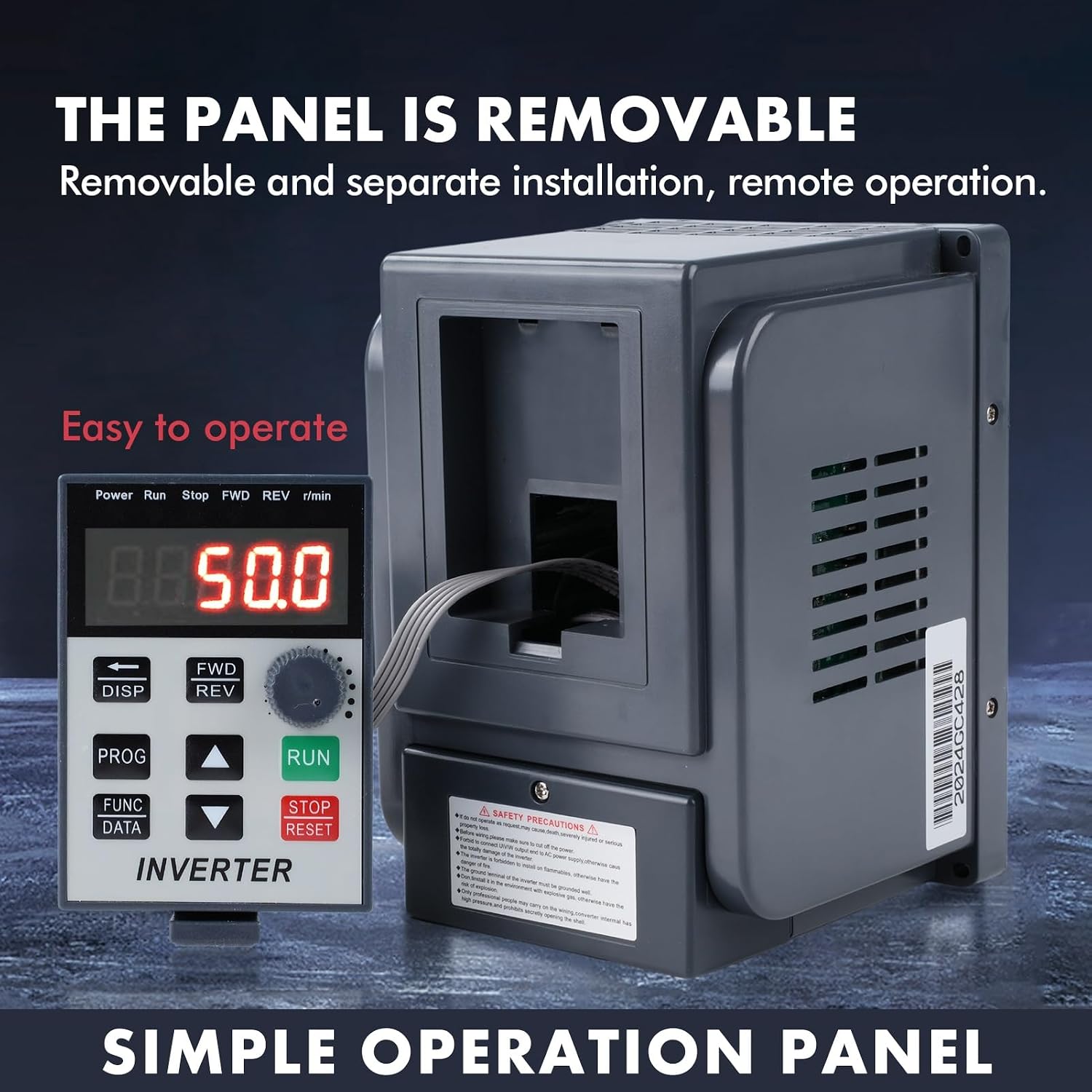
Image: The DEWIN VFD Inverter with its control panel detached, highlighting its removable design for remote operation. The panel displays current frequency (e.g., 50.0 Hz) and control buttons.
Control Panel Buttons:
- RUN: Starts the motor.
- STOP/RESET: Stops the motor or resets errors.
- FWD/REV: Changes motor direction (Forward/Reverse).
- DISP: Toggles display modes.
- PROG: Enters programming mode.
- FUNC/DATA: Accesses function parameters and data.
- Up/Down Arrows: Adjusts parameters or frequency.
- Rotary Knob: Fine-tunes frequency or parameter values.
6.2 Basic Operation
- Power On: Connect the inverter to the single-phase 220V power supply. The display will light up.
- Set Frequency: Use the Up/Down arrows or the rotary knob to set the desired output frequency.
- Start Motor: Press the RUN button to start the motor.
- Stop Motor: Press the STOP/RESET button to stop the motor.
- Change Direction: Press the FWD/REV button to switch between forward and reverse rotation.
7. Applications
The DEWIN VFD Inverter is suitable for a wide range of industrial and manufacturing applications requiring precise motor speed control and power optimization. It is designed for use with various three-phase 380V equipment.

Image: Visual representation of common applications for the VFD Inverter, including motors, water pumps, fans, conveyor belts, and compressors.
Common Uses Include:
- Fans
- Pumps (Water Pumps, Industrial Pumps)
- CNC Machine Tools
- Ball Mills
- Injection Molding Machines
- Crushers
- Conveyors / Conveyor Belts
- Textile Equipment
8. Maintenance
Regular maintenance ensures the longevity and reliable operation of your VFD inverter.
- Cleaning: Periodically clean the exterior of the inverter and ensure ventilation openings are free from dust and debris. Use a soft, dry cloth.
- Fan Inspection: Check the cooling fans for proper operation and cleanliness. Ensure no obstructions impede airflow.
- Connection Check: Regularly inspect all electrical connections for tightness and signs of corrosion or damage.
- Environmental Conditions: Ensure the operating environment remains within specified temperature and humidity ranges.
- Professional Inspection: For internal components or complex issues, consult a qualified technician.

Image: Close-up views highlighting the inverter's quality details, including the CE certified cooling fan, the robust ABS plastic shell, and the corrosion-resistant stainless steel bottom.
9. Troubleshooting
If you encounter issues with your DEWIN VFD Inverter, refer to the following general troubleshooting steps. For complex problems, contact customer support.
- No Power: Check the input power supply, circuit breaker, and all wiring connections.
- Motor Not Starting: Verify the RUN command is active, check motor connections, and ensure no fault codes are displayed.
- Overload Error: Reduce the motor load, check for mechanical issues with the driven equipment, or verify the inverter's current settings.
- Overheat Error: Ensure adequate ventilation, clean cooling fins and fans, and check ambient temperature.
- Abnormal Noise: Check motor bearings, coupling, and ensure the inverter is securely mounted.
- Display Errors: Note any error codes displayed and consult the manual for specific meanings (if available in the full product manual). Try resetting the inverter.

Image: The DEWIN VFD Inverter alongside a comprehensive list of its ten protection features, designed to ensure electrical safety and operational stability.
10. Warranty and Support
For warranty information or technical support, please refer to the documentation included with your purchase or contact DEWIN customer service. Keep your purchase receipt and product model number (AT4-2200X) handy when contacting support.