
1. Introduction
Thank you for choosing the Moondrop Illustrious In-Ear Monitor (IEM) Headphones. The Illustrious is a flagship audio device designed for professional monitoring and high-fidelity listening, featuring advanced driver technology and a precise acoustic structure.
Product Overview
The Moondrop Illustrious IEMs incorporate an 11mm patented dynamic driver with a TAC Diamond-Coated Dome Composite Diaphragm, engineered for reference-standard sound reproduction with ultra-low distortion. Its design ensures a neutral tuning profile, closely aligning with DF-HRTF standards for accurate audio playback.
Key Features
- 11mm Patented Dynamic Driver: Utilizes high-efficiency magnetic conductive materials and a large-volume magnetic circuit for superior performance.
- TAC Diamond-Coated Dome Composite Diaphragm: Enhances rigidity and internal damping for extended treble and finer details.
- Reference-Standard Low Distortion: Total Harmonic Distortion (THD) less than 0.03% for pure and clear sound.
- 0.78mm Universal Interchangeable Cable Design: Features a detachable cable with replaceable 3.5mm single-ended and 4.4mm balanced plugs.
- Durable Construction: Enclosure made from Titanium Alloy and Brass.
Package Contents
Upon unboxing your Moondrop Illustrious, please ensure all the following items are present:
- Moondrop Illustrious In-Ear Monitors
- Detachable Cable (0.78-2pin)
- 3.5mm Single-ended Replaceable Plug
- 4.4mm Balanced-ended Replaceable Plug
- Adapter (if applicable, not explicitly detailed but mentioned in package list)
- User Manual (this document)
- Certificate
- Wearing Instruction Guide
- Storage Bag
- Eartips (12 pairs of various sizes and materials)

Image: Complete package contents of the Moondrop Illustrious IEMs, showing the earphones, cable, interchangeable plugs, various eartips, storage bag, and accompanying documentation.
2. Setup
2.1 Eartip Selection and Installation
Proper eartip selection is crucial for optimal sound quality and comfort. Experiment with the included 12 pairs of eartips to find the best fit for your ears. A good seal ensures effective sound isolation and full bass response.
- Gently remove the pre-installed eartips from the IEM nozzles.
- Select an eartip size that feels comfortable and creates a snug seal in your ear canal.
- Carefully push the chosen eartip onto the IEM nozzle until it is securely seated.
2.2 Cable Connection
The Moondrop Illustrious uses a detachable 0.78-2pin cable. Ensure correct orientation when connecting the cable to the IEMs.
- Identify the left (L) and right (R) indicators on both the IEM units and the cable connectors.
- Align the 2-pin connector with the receptacle on the IEM unit. The pins should slide in smoothly without excessive force.
- Push firmly until the connector is fully seated. Do not twist or force the connection.
- To disconnect, gently pull the connector straight out from the IEM unit. Avoid pulling on the cable itself.

Image: A close-up view of the Moondrop Illustrious in-ear monitor with its detachable 0.78-2pin cable securely connected.
2.3 Replaceable Plug Installation
The cable features interchangeable plugs for 3.5mm single-ended and 4.4mm balanced connections.
- To change the plug, firmly grasp the current plug and the cable connector housing.
- Pull the plug straight out from the connector housing.
- Align the desired plug (3.5mm or 4.4mm) with the connector housing.
- Push the new plug firmly into the housing until it clicks into place. Ensure it is fully seated to prevent intermittent audio.
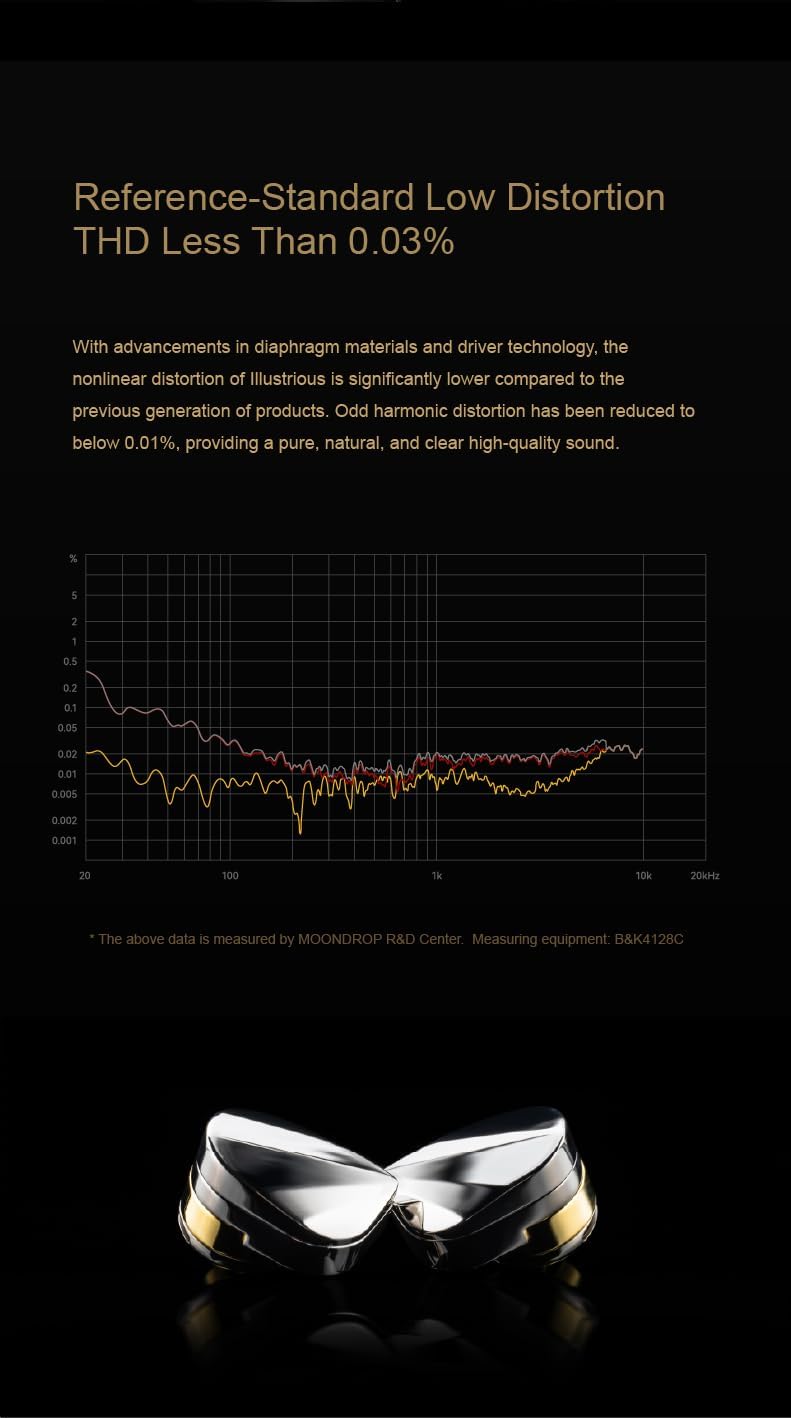
Image: The Moondrop Illustrious cable demonstrating its interchangeable 3.5mm single-ended and 4.4mm balanced audio plugs.
3. Operating Instructions
3.1 Wearing the IEMs
For optimal sound and comfort, follow these steps to wear your Illustrious IEMs:
- Ensure the correct eartips are installed and the cable is connected.
- Identify the left (L) and right (R) earpieces.
- Gently insert each earpiece into the corresponding ear canal.
- Adjust the earpiece until it forms a comfortable and secure seal. The cable should typically loop over the top of your ear for stability and reduced microphonics.
3.2 Connecting to an Audio Source
Once the IEMs are properly worn and the desired plug is attached to the cable:
- Plug the 3.5mm or 4.4mm connector into the corresponding audio output jack of your music player, smartphone, or amplifier.
- Start audio playback on your source device.
- Adjust the volume on your source device to a comfortable listening level. Avoid excessively high volumes to protect your hearing.
3.3 Sound Isolation
The Moondrop Illustrious IEMs provide passive sound isolation. A proper fit with the correct eartips will significantly reduce ambient noise, allowing for a more immersive listening experience. This is a feature of the IEM design and does not involve active noise cancellation.
4. Maintenance
4.1 Cleaning
- Regularly wipe the IEM shells and cable with a soft, dry, lint-free cloth.
- Remove eartips periodically and clean them with mild soap and water. Ensure they are completely dry before reattaching.
- Gently clean any earwax or debris from the IEM nozzles using a small brush or cleaning tool. Be careful not to push debris further into the nozzle.
- Avoid using harsh chemicals, solvents, or abrasive materials for cleaning.
4.2 Storage
When not in use, store your Moondrop Illustrious IEMs in the provided storage bag to protect them from dust, scratches, and physical damage. Avoid storing them in extreme temperatures or high humidity.
4.3 Water Resistance
The Moondrop Illustrious IEMs are rated as "Waterproof". While this indicates a high level of protection against water ingress, it is recommended to avoid intentional submersion or prolonged exposure to water to ensure longevity. Always dry the IEMs thoroughly if they come into contact with moisture.
5. Troubleshooting
If you encounter any issues with your Moondrop Illustrious IEMs, please refer to the following common troubleshooting steps:
5.1 No Sound or Intermittent Audio
- Check Cable Connections: Ensure the 0.78-2pin connectors are fully seated on both IEM units and the interchangeable plug is securely attached to the cable.
- Verify Audio Source: Confirm that your audio source (e.g., smartphone, DAP, amplifier) is powered on, playing audio, and its volume is turned up.
- Test with Another Source/Cable: If possible, try the IEMs with a different audio source or a known working cable to isolate the problem.
- Inspect Plugs: Check the 3.5mm or 4.4mm plug for any bends or damage.
5.2 Poor Sound Quality (Distortion, Lack of Bass, Muffled Sound)
- Eartip Fit: Ensure the eartips create a proper seal in your ear canal. A poor seal can lead to a lack of bass and reduced sound isolation. Try different eartip sizes.
- Clean Nozzles: Check if the IEM nozzles are obstructed by earwax or debris. Clean them carefully as described in the Maintenance section.
- Audio Source Quality: Ensure the audio files or streaming quality are high. Low-quality audio sources can result in poor sound.
- Cable Integrity: Inspect the cable for any visible damage or kinks that might affect signal transmission.
5.3 Uncomfortable Fit
- Eartip Size: Experiment with all included eartip sizes and materials to find the most comfortable and secure fit.
- Wearing Method: Ensure the cable is looped over your ear correctly. Adjust the angle of the IEM in your ear.
If these steps do not resolve your issue, please refer to the Warranty & Support section for further assistance.
6. Specifications
Detailed technical specifications for the Moondrop Illustrious In-Ear Monitor Headphones:
| Feature | Specification |
|---|---|
| Product Name | MOONDROP Illustrious |
| Driver | 11mm Patented Dynamic Driver |
| Diaphragm | TAC Diamond-Coated Dome Composite Diaphragm |
| Impedance | 25Ω ±15% (@1kHz) |
| Sensitivity | 124dB/rms (@1kHz) |
| Total Harmonic Distortion (THD) | <0.03% (@1kHz, 94dB) |
| Frequency Response | 10-50kHz (IEC61094, Free Field) |
| Effective Frequency Response | 20Hz-20kHz (IEC60318-4, -3dB) |
| Earphone Jack | 0.78-2pin |
| Cable Plug Options | 3.5mm Single-ended, 4.4mm Balanced-ended (replaceable) |
| Enclosure Material | Titanium Alloy, Brass |
| Item Weight | 0.88 Pounds |
| Noise Control | Sound Isolation (Passive) |
| Water Resistance Level | Waterproof |

Image: An exploded diagram illustrating the internal components of the Moondrop Illustrious's 11mm patented dynamic driver, highlighting its intricate design.

Image: A frequency response graph showing the acoustic performance of the Moondrop Illustrious IEMs, demonstrating its alignment with a target response curve.
7. Warranty & Support
7.1 Manufacturer's Warranty
The Moondrop Illustrious In-Ear Monitor Headphones come with a 1-Year Manufacturer's Warranty from the date of purchase. This warranty covers defects in materials and workmanship under normal use. It does not cover damage caused by misuse, accidents, unauthorized modifications, or normal wear and tear.
Please retain your proof of purchase for warranty claims.
7.2 Customer Support
For technical assistance, warranty claims, or any other inquiries regarding your Moondrop Illustrious IEMs, please contact:
- The authorized dealer or retailer from whom you purchased the product.
- Moondrop Customer Service (refer to the official Moondrop website for contact information).
When contacting support, please be prepared to provide your product model (Illustrious), purchase date, and a detailed description of the issue.