
1. Introduction
Welcome to the OUKITEL C59 Pro user manual. This guide provides essential information to help you set up, operate, and maintain your new smartphone. The OUKITEL C59 Pro is an unlocked Android phone featuring a 6.88-inch HD+ display, a massive 10000mAh battery, 24GB RAM, 256GB ROM (expandable to 1TB), a 120LM super-bright flashlight, and runs on Android 15.
For optimal performance and longevity, please read this manual thoroughly before using your device.
2. What's in the Box
Your OUKITEL C59 Pro package includes the following items:
- 1 x OUKITEL C59 Pro Smartphone
- 1 x Charger
- 1 x Protective Case (pre-installed)
- 1 x Type-C Cable
- 1 x Maintenance Card
- 1 x Card Pin (SIM ejector tool)

Image: The OUKITEL C59 Pro smartphone and its included accessories: charger, Type-C cable, protective case, maintenance card, and SIM ejector tool.
3. Device Layout and Components
Familiarize yourself with the physical features of your OUKITEL C59 Pro.
- Front: 6.88-inch HD+ Display, 5MP Front Camera (teardrop notch).
- Rear: 13MP Main Camera, Flashlight.
- Right Side: Volume Up/Down buttons, Power Button (integrated fingerprint sensor).
- Left Side: SIM/TF Card Slot, Flashlight Switch.
- Bottom: Type-C Charging Port, Microphone, Speaker.
Image: Detailed diagram illustrating the placement of the front camera, main camera, power button, volume keys, Type-C port, flashlight, flashlight switch, and TF card/SIM card slot on the OUKITEL C59 Pro.

Image: A clear view of the OUKITEL C59 Pro's front display and its distinctive circular rear camera module.
4. Setup
4.1. SIM Card and Memory Card Installation
- Locate the SIM/TF card slot on the left side of the phone.
- Insert the provided card pin into the small hole next to the tray to eject it.
- Place your Nano SIM card(s) and/or microSD (TF) card into the appropriate slots on the tray. The OUKITEL C59 Pro supports dual Nano SIM cards and up to 1TB microSD card expansion.
- Carefully reinsert the tray into the phone.
4.2. Initial Power On
- Press and hold the Power Button on the right side of the phone until the OUKITEL logo appears.
- Follow the on-screen prompts to complete the initial setup, including language selection, Wi-Fi connection, Google account setup, and security settings.
4.3. Memory Expansion Activation
To activate the full 24GB of memory (8GB physical + 16GB virtual), navigate to Settings > Memory Expansion and restart the device after selecting your desired expansion amount.

Image: Visual representation of the phone's memory configuration, showing 24GB RAM (8GB + 16GB virtual) and 256GB ROM with 1TB expansion support.
5. Operating Instructions
5.1. Basic Navigation (Android 15)
The OUKITEL C59 Pro runs on Android 15, offering a user-friendly interface. Use gestures or the navigation bar at the bottom of the screen to move between apps, return to the home screen, and access recent applications.

Image: The Android 15 home screen of the OUKITEL C59 Pro, displaying various pre-installed applications and the clean user interface.
5.2. Battery Management
Your OUKITEL C59 Pro is equipped with a 10000mAh battery, providing extended usage times. It supports 18W fast charging and OTG reverse charging, allowing you to use your phone as a power bank for other devices.
- Charging: Connect the provided Type-C cable and charger to the phone's bottom port.
- OTG Reverse Charging: Use an OTG cable (not included) to connect another device to your phone for charging.
- Battery Life: Expect up to 870 hours of standby time or 50 hours of high-intensity lighting time.

Image: A visual representation highlighting the 10000mAh battery, showing its impressive standby, talk, flashlight, and video playback durations.

Image: The OUKITEL C59 Pro functioning as a portable power bank, charging another smartphone via an OTG cable.
5.3. Flashlight Operation
The OUKITEL C59 Pro features a powerful 120-lumen integrated flashlight, designed for clear visibility in dark environments.
- Activation: Use the dedicated flashlight switch on the left side of the phone for one-touch instant access.
- Usage: Ideal for nighttime tasks, emergencies, outdoor activities like camping or hiking, or illuminating dark spaces.

Image: The OUKITEL C59 Pro's powerful 120LM flashlight in action, demonstrating its ability to brightly illuminate surroundings.
Image: The 120-lumen flashlight provides clear visibility for various tasks, from navigating trails to working in dimly lit areas.
5.4. Camera Usage
Capture decisive moments with the 13MP rear camera and 5MP front camera. Multiple shooting modes are available for professional-grade image quality.
- Rear Camera: 13 Megapixels for detailed photos.
- Front Camera: 5 Megapixels for selfies and video calls.
- Modes: Access various modes like Photo, Video, Portrait, and Time-lapse through the camera application.

Image: Examples of photos taken with the 13MP main camera and 5MP front camera, demonstrating their ability to capture clear and vibrant images.
5.5. Connectivity and Security
The OUKITEL C59 Pro supports 4G networks and includes NFC, GPS, Fingerprint, and Face ID features.
- Network Compatibility: Compatible with GSM carriers such as T-Mobile. (Not compatible with CDMA carriers like AT&T, Cricket Wireless, Verizon, Straight Talk, or U.S. Cellular).
- NFC: For contactless payments and quick pairing with compatible devices.
- GPS: For navigation and location services.
- Fingerprint & Face ID: Fast and secure unlocking methods.

Image: Illustration of the OUKITEL C59 Pro's compatibility with T-Mobile and other GSM carriers, detailing supported network bands.

Image: Features like NFC for payments, GPS for navigation, and the dual SIM/TF card slot are highlighted.

Image: The OUKITEL C59 Pro offers fast unlocking methods through both fingerprint recognition and face recognition for enhanced security.
6. Maintenance
To ensure the longevity and optimal performance of your OUKITEL C59 Pro, follow these maintenance guidelines:
- Cleaning: Use a soft, lint-free cloth to clean the screen and body. Avoid abrasive materials or harsh chemicals.
- Temperature: Operate the phone within recommended temperature ranges. Avoid extreme heat or cold.
- Storage: Store the phone in a cool, dry place when not in use for extended periods.
- Software Updates: Regularly check for and install system updates to ensure your device has the latest features and security patches.
7. Troubleshooting
Here are solutions to some common issues you might encounter:
| Issue | Possible Solution |
|---|---|
| Phone not turning on | Ensure the battery is charged. Connect to the charger for at least 10 minutes before attempting to power on. |
| Slow performance | Close unused apps, clear cache, or restart the phone. Consider activating memory expansion in Settings. |
| Network connectivity issues | Check SIM card installation. Ensure you are within network coverage. Verify carrier compatibility (GSM only). Restart the phone. |
| Flashlight not working | Ensure the flashlight switch is in the ON position. Check battery level. |
| Camera not functioning | Restart the camera app or the phone. Ensure no other app is using the camera. |
8. Specifications
| Feature | Detail |
|---|---|
| Model Name | OUKITEL C59 Pro |
| Operating System | Android 15 |
| Display Size | 6.88 Inches HD+ |
| Refresh Rate | 90 Hz |
| RAM | 24 GB (8GB physical + 16GB virtual) |
| Memory Storage Capacity | 256 GB (expandable up to 1TB via TF card) |
| Battery Capacity | 10000 mAh |
| Rear Camera | 13 MP |
| Front Camera | 5 MP |
| Flashlight Brightness | 120 LM |
| Wireless Carrier Compatibility | T-Mobile (GSM networks) |
| Special Features | NFC, Face ID, OTG, GPS |
| Item Weight | 10.4 ounces |
| Color | Purple |
9. Official Product Video
Video: An official product video from OUKITEL showcasing the C59 Pro Unlocked Cell Phone, highlighting its design and key features.
10. Warranty and Support
OUKITEL is committed to providing unparalleled quality and excellent user experience. Your OUKITEL C59 Pro comes with a two-year free maintenance service.
Our well-trained professional support team is available 24/7 to quickly respond to any inquiries or provide technical assistance.
- Warranty: Two-year free maintenance service.
- Support: Official 24/7 OUKITEL service.
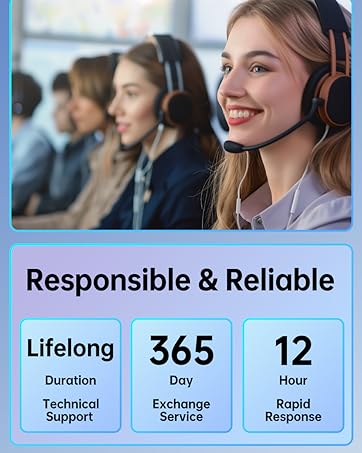
Image: OUKITEL's commitment to responsible and reliable customer service, offering lifelong technical support and rapid response times.


