
1. Introduction
The YoLink FlowSmart All-in-One Smart Water Meter & Auto Shutoff is an integrated ultrasonic water meter and motorized shutoff valve designed for potable water applications. This system provides real-time leak detection, automatic water shutoff, and comprehensive water usage monitoring. It operates using LoRa long-range technology for reliable whole-home coverage and features a long-life battery design.
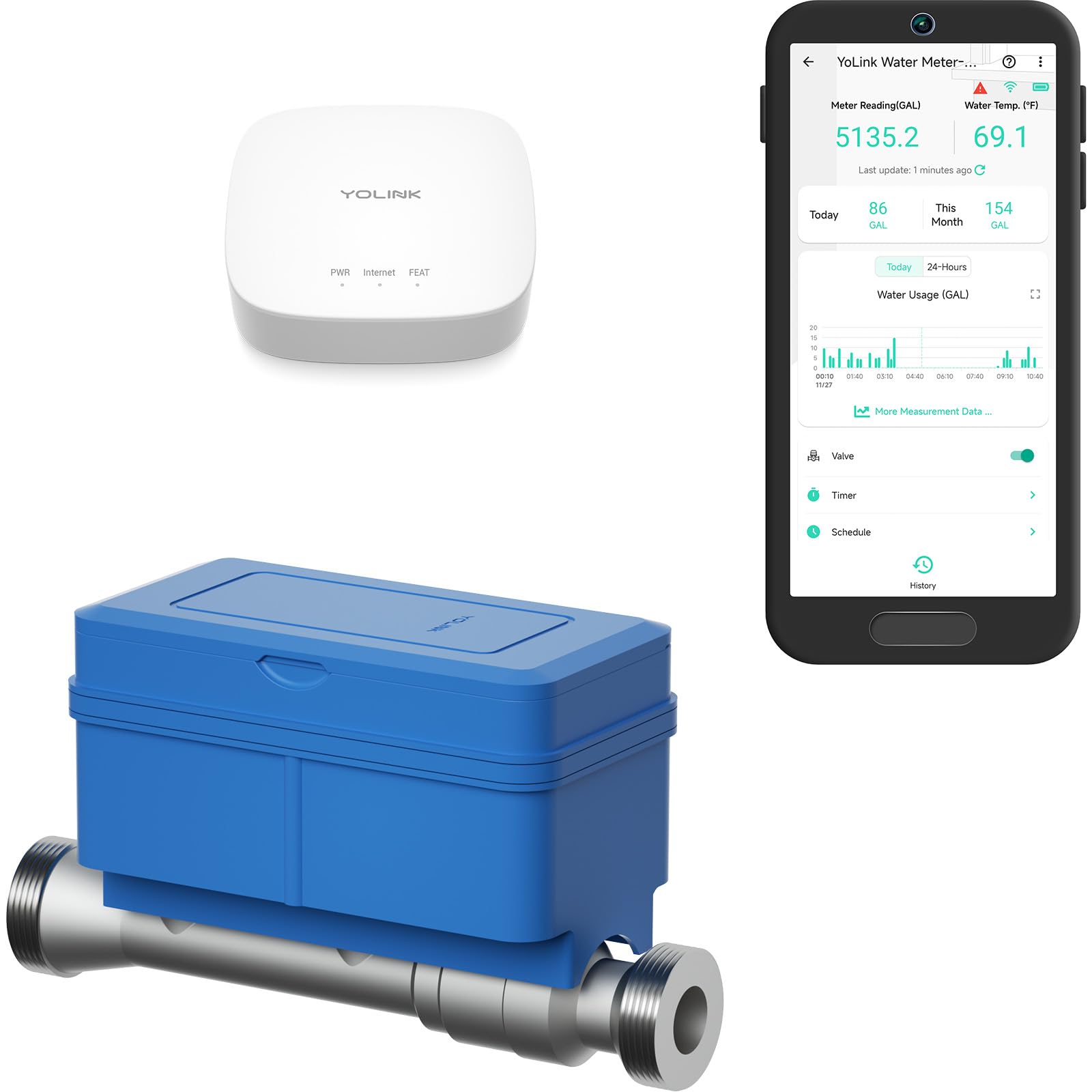
The YoLink FlowSmart All-in-One Smart Water Meter and Auto Shutoff device.
Key Features:
- NSF Certified: Integrated ultrasonic water meter and motorized shutoff valve for potable water.
- Real-Time Leak Detection + Auto Shutoff: Automatically detects leaks and abnormal water usage, then closes the valve. Includes scheduling and alert functions.
- Offline Operation (Control-D2D): Critical shutoff actions continue even without internet connectivity for enhanced reliability.
- LoRa Long-Range Reliability: Utilizes low-power radio technology for extended coverage throughout your home or building.
- 10+ Year Battery Design: Engineered for multi-year operation on a single battery.
- Hub Required: Requires a YoLink Hub for full functionality, including Ethernet or 2.4 GHz Wi-Fi connectivity. Compatible with Alexa, IFTTT, and Home Assistant.
Official product video: "FlowSmart All-in-One, protect your home!" This video demonstrates the key features and benefits of the YoLink FlowSmart system.
2. Setup and Installation
2.1 Pre-Installation Checklist
- Ensure you have a YoLink Hub (Ethernet or 2.4 GHz Wi-Fi) installed and configured.
- Verify your main water line pipe size. This model is for 0.75" pipes.
- Gather necessary plumbing tools (pipe wrench, thread sealant, pipe cutter, etc.).
- Locate a suitable installation point on your main water line, preferably after the main shutoff valve and before any branches.
2.2 Installation Steps
- Shut off Main Water Supply: Turn off the main water supply to your home.
- Drain Water Lines: Open a faucet at the lowest point in your home to drain residual water from the pipes.
- Cut Pipe: Carefully cut a section of your 0.75" main water pipe where the FlowSmart device will be installed. Ensure the cut section matches the length of the FlowSmart unit plus any required fittings.
- Install FlowSmart Unit: Install the FlowSmart unit into the cut section of the pipe, ensuring the flow direction arrow on the device matches the direction of water flow. Use appropriate thread sealant on all connections to prevent leaks.
- Secure Mounting: Securely mount the FlowSmart unit to a wall or stable surface using the provided mounting hardware.
- Restore Water Supply: Slowly turn the main water supply back on and check for any leaks.
- Power On: Ensure the battery is correctly installed in the FlowSmart unit.
- Pair with YoLink Hub: Follow the instructions in the YoLink app to add and pair your FlowSmart device with your YoLink Hub.

The FlowSmart device installed on a water pipe, ready for operation.
2.3 Hub Requirement
A YoLink Hub is essential for the FlowSmart All-in-One to function fully, enabling remote access, advanced features, and seamless integration into your smart home ecosystem. The hub connects your YoLink devices to the internet and the YoLink app.

A YoLink Hub is required for the FlowSmart system to operate.
3. Operating Instructions
3.1 Real-Time Water Monitoring
Monitor your water consumption in real-time through the YoLink app. The app displays live meter readings, water temperature, and daily/monthly usage statistics. This allows for efficient tracking and management of your water resources.

The YoLink app provides comprehensive water usage monitoring.
3.2 Advanced Leak Detection and Auto Shutoff
The FlowSmart system continuously monitors for leaks and abnormal water usage. You can set personalized leak detection thresholds and overflow prevention features within the YoLink app. If a leak or continuous flow exceeding set limits is detected, the system will automatically close the valve to prevent water damage.

Configure leak detection and auto-shutoff settings in the YoLink app.
3.3 Instant Notifications
Receive real-time alerts via the YoLink app, email, or SMS when a leak is detected or when water usage anomalies occur. This allows for timely action to safeguard your property.

Receive instant notifications on your smartphone for detected leaks.
3.4 Seamless Offline Protection
The FlowSmart All-in-One is designed to operate even during power outages or internet disruptions. Thanks to Control-D2D (Device-to-Device) technology, critical leak-to-shutoff actions will still function automatically, ensuring continuous protection for your home.

The FlowSmart system provides protection even without power or internet.
3.5 Intelligent Valve Automation and Scheduling
Program the valve to open or close based on schedules or timers set within the YoLink app. This feature helps prevent water waste and damage, allowing for efficient water management, such as automatically shutting off water when you are away or during specific times.

Set schedules and timers for automated valve control.
3.6 Manual Valve Control
For situations where smart control is not available or preferred, the FlowSmart All-in-One includes a manual override. You can directly operate the valve using a hex key, ensuring full control and flexibility over your water supply.

Manually operate the valve using a hex key.
3.7 Data Analysis and Export Options
The YoLink app provides detailed water consumption charts and analytics. You can view daily, monthly, and yearly usage patterns to identify trends and optimize water conservation. Data can also be exported for further analysis or record-keeping.

The FlowSmart system detects leaks, sends alerts, and performs auto-shutoff.
4. Maintenance
4.1 Battery Life
The FlowSmart All-in-One is designed with a long-life power system, providing over 10 years of operation on its included lithium battery. No regular battery replacement is typically needed for many years.

The FlowSmart device features an extended battery life.
4.2 Built-in Valve Maintenance
The FlowSmart All-in-One performs regular internal valve maintenance to ensure its reliable operation over time. This automated function helps keep the valve in optimal condition for daily usage and emergency response, requiring minimal user intervention.
5. Troubleshooting
5.1 Device Not Responding
- Check YoLink Hub: Ensure your YoLink Hub is powered on and connected to the internet.
- Check Device Battery: Although designed for long life, verify the device's battery status in the YoLink app.
- LoRa Signal: Confirm the FlowSmart device is within range of your YoLink Hub. LoRa technology offers long range, but extreme distances or heavy interference can affect connectivity.
- Restart Device/Hub: Try restarting the FlowSmart device (if applicable) and your YoLink Hub.
5.2 Inaccurate Water Readings
- Installation Orientation: Ensure the FlowSmart device is installed with the correct water flow direction.
- Pipe Size: Verify that the installed FlowSmart unit matches your pipe size (0.75" for this model).
- Air in Lines: Air pockets in the water lines can affect ultrasonic readings. Run water for a few minutes to clear any air.
5.3 Valve Not Shutting Off Automatically
- App Settings: Review your leak detection and auto-shutoff settings in the YoLink app to ensure thresholds are correctly configured.
- Offline Functionality: Remember that Control-D2D ensures shutoff even without internet. If the valve fails to shut off, check for physical obstructions or device malfunction.
- Manual Override: Use the manual valve control with a hex key to shut off water if automatic shutoff fails.
6. Specifications
| Feature | Detail |
|---|---|
| Brand | YoLink |
| Model Number | YS1603+YS5018-20 |
| Size | 0.75" (Nominal Pipe Size) |
| Power Source | Battery Powered (1 Lithium Metal battery included) |
| Battery Life | 10+ Years (design life) |
| Control Method | App |
| Mounting Type | Wall Mount |
| Maximum Range | 0.25 Miles (LoRa Long-Range) |
| Sensor Technology | Ultrasonic (for water flow) |
| Smart Home Compatibility | Alexa, IFTTT, Home Assistant |
| Product Dimensions | 3.5"L x 4.7"W x 8"H |
| UPC | 810121542484 |
6.1 Pipe Size and Flow Explanation
The FlowSmart All-in-One is sized by nominal pipe size (NPS) for thread compatibility. The internal ultrasonic measurement tube is intentionally smaller than the nominal pipe size. This design choice is made to meet accuracy standards and stabilize readings, ensuring precise water measurement. The overall assembly is engineered to handle typical household and light-commercial service flows effectively.

Flow rate ranges for different FlowSmart models.

Explanation regarding the internal tube size for accurate measurements.
7. Warranty Information
Warranty information for your YoLink FlowSmart All-in-One Smart Water Meter & Auto Shutoff is typically provided with the product packaging or can be found on the official YoLink website. Please refer to these resources for details regarding coverage, duration, and terms of service.
8. Support
For any questions, technical assistance, or support regarding your YoLink FlowSmart device, please utilize the following resources:
- YoLink App: Access FAQs, troubleshooting guides, and contact support directly through the YoLink mobile application.
- Online Resources: Visit the official YoLink support website for comprehensive guides, FAQs, and user manuals: www.yosmart.com/support-and-service
- Customer Service: Contact YoLink customer support via phone or email for personalized assistance.

Expert support is available to assist you.

Access comprehensive online resources for your YoLink product.

