
Fanttik F2 Master
Fanttik F2 Master Mini Cordless Rotary Tool Kit User Manual
Model: F2 Master | Brand: Fanttik
1. Introduction
The Fanttik F2 Master Mini Cordless Rotary Tool Kit is designed for precision tasks, offering a powerful yet quiet operation. Its compact and portable design, combined with a comprehensive set of accessories, makes it ideal for various DIY crafts and detailed work.

Figure 1: Fanttik F2 Master Mini Cordless Rotary Tool Kit
Key Features:
- Whisper-Powerful: Features a brushless hollow cup motor for reduced noise (30% quieter) and increased durability, reaching up to 25,000 RPM with 5 adjustable speed settings.
- Revostor Hub: A 360° rotating magnetic stand that keeps all 35 accessories organized and easily accessible.
- Mini & Portable: Weighing just 0.22 lb, its lightweight aluminum case is durable, rust-resistant, and features a one-click pop-out design for quick tool access.
- Stylish & Practical: Seamless integrated speed control button, waterproof and dustproof design, with an innovative LED speed indicator for precise operation.
- USB-C Charging: Universal Type-C port allows full charge in 60 minutes, with a rear power indicator for battery status. Front LED light provides enhanced visibility.
- Compatibility: The F2 Master collet accepts 3/32" (2.3mm) accessories.
2. What's in the Box
Your Fanttik F2 Master Mini Cordless Rotary Tool Kit comes with the following components:

Figure 2: Kit Contents and Dimensions
- 1 x F2 Master Mini Rotary Tool
- 1 x Aluminum Alloy Case
- 1 x Magnetic Rotating Box (Revostor Hub)
- 35 x Accessories (various bits for sanding, polishing, drilling, carving)
- 1 x USB-C Cable
- 1 x User Manual
3. Setup
3.1 Initial Charging
Before first use, fully charge your Fanttik F2 Master. Connect the provided USB-C cable to the tool's charging port and a compatible USB power source. The rear power indicator will turn red when the battery is below 30% and will indicate full charge when complete.
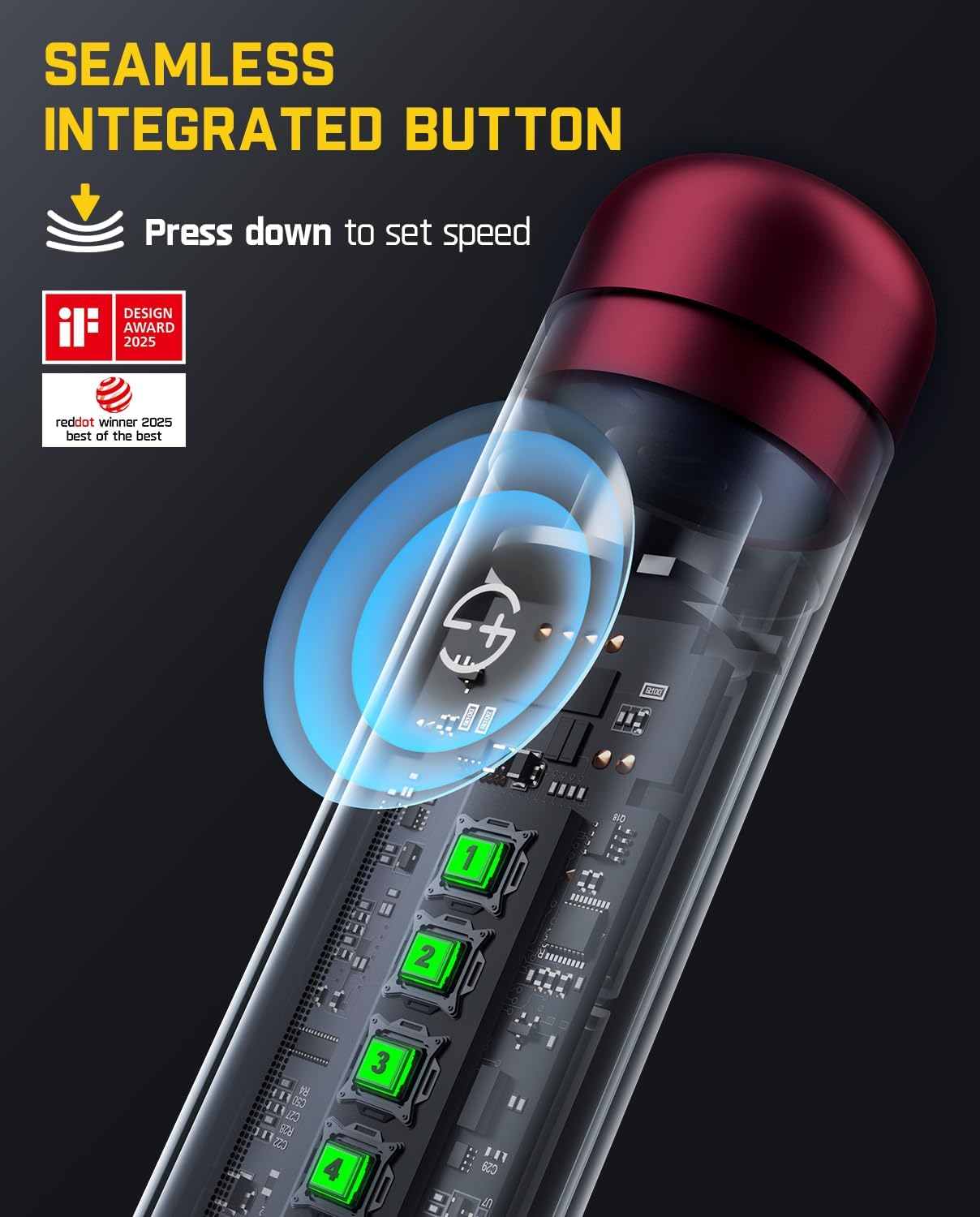
Figure 3: Seamless Integrated Button and Charging Port
3.2 Accessing the Tool and Accessories
The F2 Master and its accessories are stored within a durable aluminum alloy case. To access the tool:
- Locate the "Press Zone" on the aluminum alloy case.
- Press down firmly on the "Press Zone" to activate the one-click pop-out mechanism, revealing the rotary tool.
- The magnetic rotating box (Revostor Hub) can be rotated 360 degrees to easily select the desired accessory.
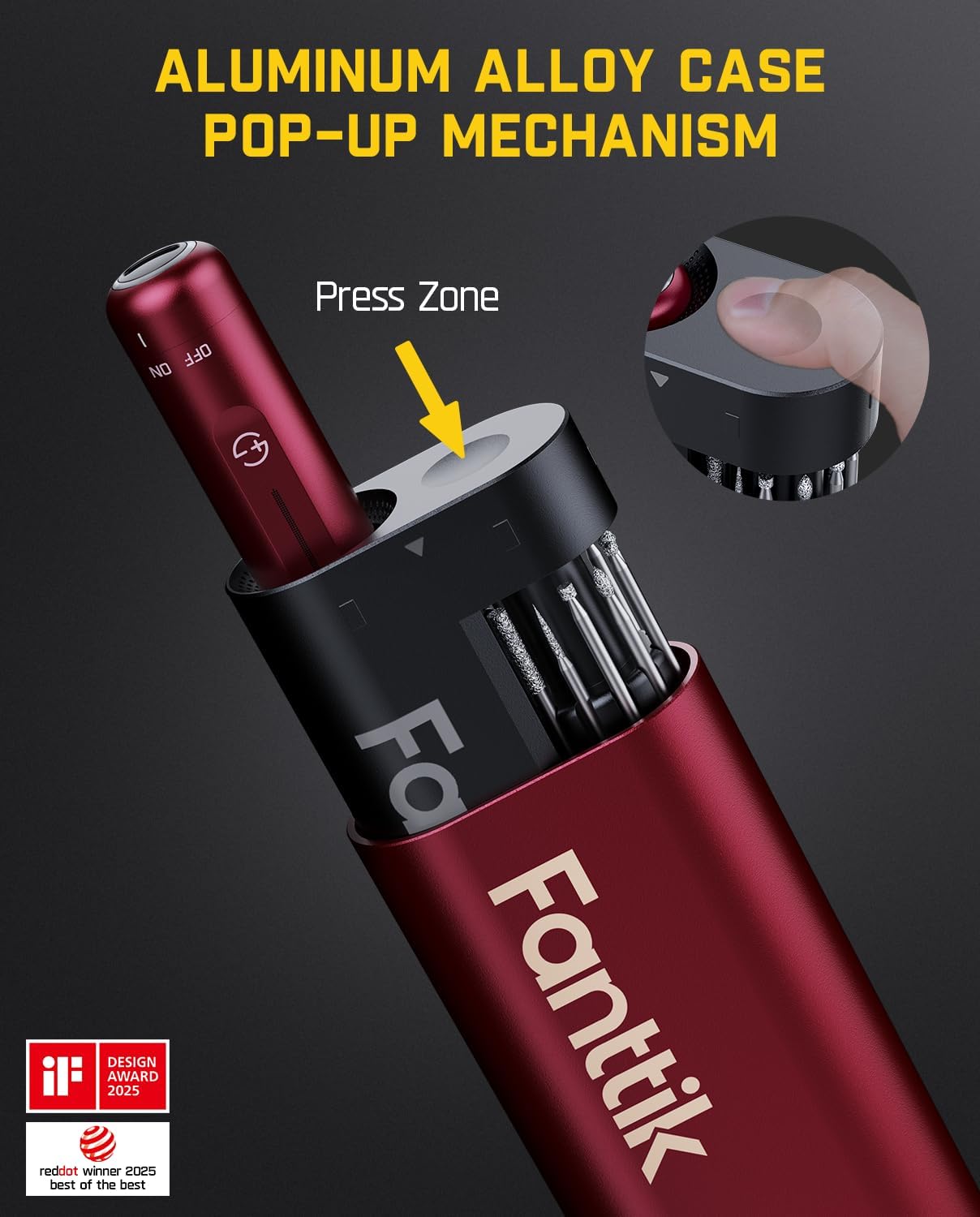
Figure 4: Aluminum Alloy Case Pop-Up Mechanism
4. Operating Instructions
4.1 Power On/Off and Speed Control
The F2 Master features a seamless integrated button for intuitive control:
- To power on the tool, slide the safety switch knob to the "ON" position.
- Press down on the integrated speed control button to cycle through the 5 adjustable speed settings. The LED speed indicator displays the current setting.
- To power off, slide the safety switch knob to the "OFF" position.
4.2 Changing Accessories
Ensure the tool is powered off before changing accessories.
- Unscrew the collet nut at the tip of the rotary tool.
- Insert the desired 3/32" (2.3mm) accessory into the collet.
- Tighten the collet nut securely to hold the accessory in place. Do not overtighten.

Figure 5: Revostor Hub for Accessory Organization
4.3 Recommended Uses
The Fanttik F2 Master is designed for precision use in various applications:
- Polishing: Use appropriate polishing bits for smoothing surfaces.
- Sanding: Ideal for fine sanding and deburring of small objects.
- Drilling: Suitable for precise drilling in soft materials.
- Carving/Engraving: Perfect for intricate details on various materials.
- 3D Printed Models Finishing: Excellent for smoothing and deburring 3D prints.

Figure 6: Applications of the F2 Master

Figure 7: Included Accessories
5. Maintenance
5.1 Cleaning
The Fanttik F2 Master is designed to be waterproof and dustproof for easy cleaning. After use, wipe down the tool with a clean, damp cloth to remove any debris or dust. Ensure the tool is completely dry before storing.
5.2 Storage
Store the rotary tool and its accessories in the provided aluminum alloy case to protect them from dust, moisture, and damage. Store in a cool, dry place away from direct sunlight and extreme temperatures.
6. Troubleshooting
6.1 Tool Not Turning On
- Ensure the safety switch knob is fully in the "ON" position.
- Check the battery level. If the rear power indicator is red, the battery is low and needs charging.
- Ensure the tool is properly charged using the USB-C cable.
6.2 Reduced Performance
- Verify the accessory is securely fastened in the collet.
- Check if the accessory is worn out and needs replacement.
- Ensure the battery is sufficiently charged.
- Select a higher speed setting if the current speed is too low for the task.
6.3 Unusual Noise or Vibration
- Ensure the accessory is correctly inserted and tightened.
- Check for any foreign objects or debris in the collet area.
- If the issue persists, discontinue use and contact customer support.
7. Specifications
| Feature | Detail |
|---|---|
| Brand | Fanttik |
| Model Number | F2 Master |
| Voltage | 4 Volts (DC) |
| Power Source | Battery Powered |
| Maximum Rotational Speed | 25000 RPM |
| Minimum Speed | 12000 RPM |
| Item Weight | 98 Grams (3.46 ounces) |
| Product Dimensions | 7.09 x 0.79 x 0.79 inches |
| Battery Type | 1 Lithium Ion battery (included) |
| Charging Time | Approx. 60 minutes (USB-C) |
| Accessories Included | 35 pieces |
| Collet Compatibility | 3/32" (2.3mm) accessories |
| Special Features | Circular LED Light, Pop-Up Mechanism, Powerful Brushless Motor, Ultra-quiet Idling, RevoStor Hub, Seamless Integrated Button |
8. Warranty and Support
Fanttik products are manufactured to the highest quality standards. For warranty information, technical support, or any inquiries regarding your F2 Master Mini Cordless Rotary Tool Kit, please visit the official Fanttik website or contact their customer service directly.
Official Website: www.fanttik.com
Related documentsF2 Master


Ask a question about this manual
Ask about setup, troubleshooting, compatibility, parts, safety, or missing instructions. Manuals+ will review the question and use this page’s manual context to help answer it.