
Introduction
This manual provides detailed instructions for the assembly, operation, and maintenance of your Armocity 32'' Rolling Standing Desk with Charging Station (Model ADWC-32W). Please read this manual thoroughly before use to ensure proper function and safety. This desk is designed to offer a versatile workspace with adjustable height, integrated charging capabilities, and mobility.

Image: The Armocity 32-inch Rolling Standing Desk in a modern living space, showcasing its compact design and functionality.
Safety Information
Always use the desk on a stable, level surface. Keep fingers and other body parts away from moving parts when adjusting the desk height. Ensure the desk is properly anchored or secured when in use to prevent tipping. Do not exceed the weight capacity of the desk.
Package Contents
Before beginning assembly, verify that all components listed below are present and undamaged. If any parts are missing or damaged, please contact customer support.
- 1x Rolling Standing Desk Frame and Tabletop
- 1x Integrated Power Outlet (2 AC, 3 USB)
- 1x Pack of Assembly Accessories (screws, bolts, tools)
- 2x Hanging Hooks
- 1x Instruction Manual
Assembly Instructions
The Armocity Rolling Standing Desk is designed for quick and straightforward assembly. All necessary tools and accessories are provided, and parts are clearly labeled. One person can typically complete the assembly within 25 minutes.
- Unpack all components and lay them out on a clean, soft surface to prevent scratches.
- Identify all labeled parts according to the included diagram.
- Follow the step-by-step instructions provided in the separate assembly guide to connect the frame components.
- Attach the tabletop to the assembled frame, ensuring all screws are tightened securely.
- Install the power outlet into the designated slot on the tabletop.
- Attach the hanging hooks to the side of the desk frame as desired.
- Ensure all connections are firm and the desk is stable before use.

Image: An illustration detailing the various components and their labels for assembly.
Operating Instructions
Height Adjustment
The desk features a manual height adjustment mechanism, allowing you to set the tabletop height between 27.5 inches and 41 inches. This enables comfortable use while sitting or standing.
- Locate the dual-knob locks on the vertical support poles of the desk.
- Loosen both knobs by turning them counter-clockwise.
- Carefully raise or lower the tabletop to your desired height. Ensure the tabletop remains level during adjustment.
- Once the desired height is reached, tighten both knobs firmly by turning them clockwise to secure the tabletop in place. Verify stability before placing items on the desk.

Image: Visual representation of the desk's height adjustment feature, illustrating comfortable sitting and standing positions.
Charging Station
The desk is equipped with an integrated power strip for convenient charging of your electronic devices.
- The charging station includes 2 standard AC outlets and 3 USB ports.
- Plug the desk's main power cord (6.5 ft long) into a wall outlet.
- Connect your devices to the AC outlets or USB ports as needed.
- Avoid overloading the power strip. Refer to the specifications for maximum electrical load.
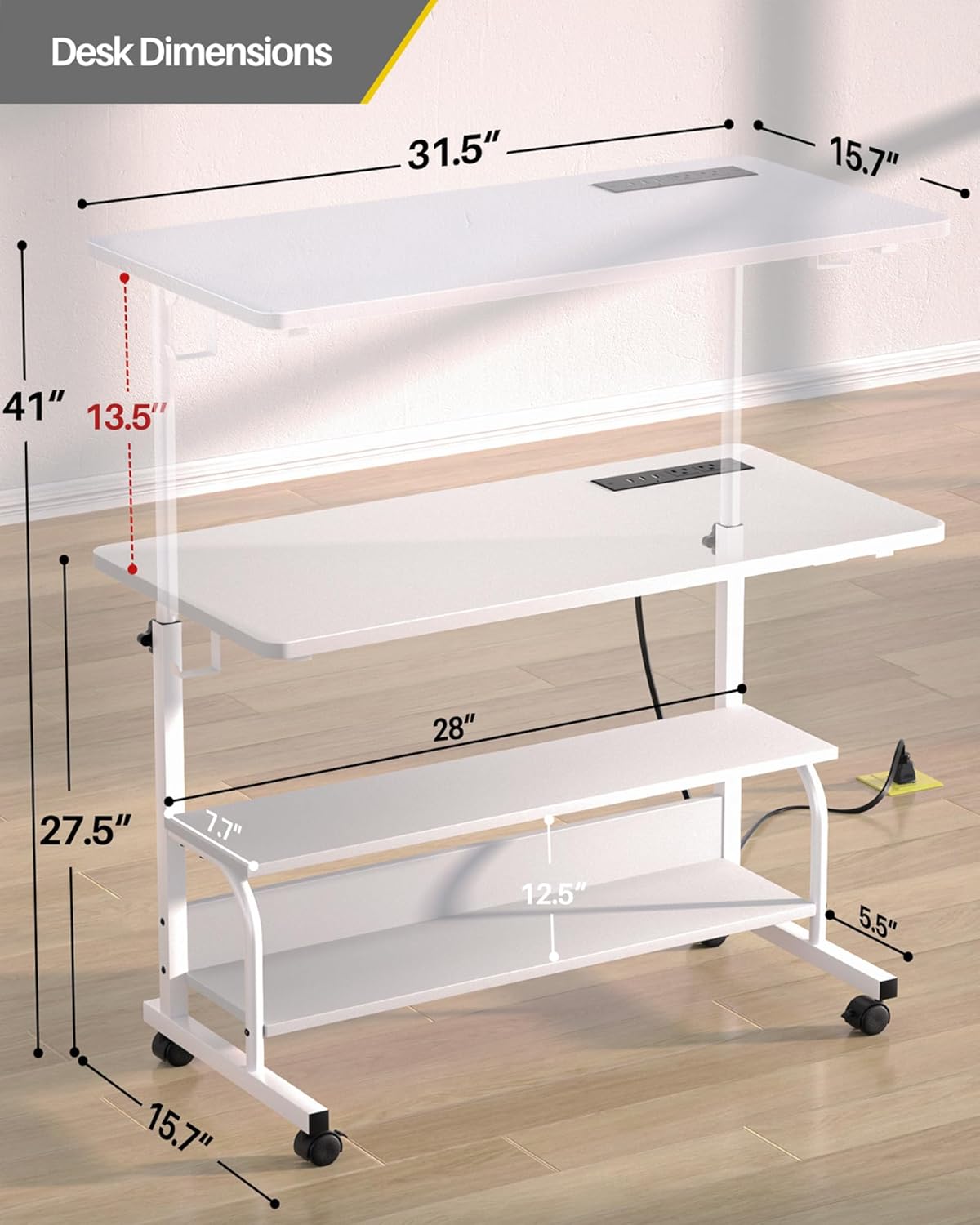
Image: Detail of the built-in charging station with 2 AC outlets and 3 USB ports, demonstrating device charging.
Mobility
The desk features four high-quality PU wheels for easy movement and two lockable brakes for stability.
- To move the desk, ensure the two lockable wheels are in the unlocked position.
- Gently push the desk to its desired location. The PU wheels are designed to glide silently and protect hardwood floors.
- To secure the desk in place, push down the levers on the two lockable wheels until they click into the locked position.
Video: Official Armocity demonstration of the height adjustment and mobility features of the standing desk.
Maintenance
Regular maintenance helps prolong the life and functionality of your desk.
- Cleaning: Wipe the desk surfaces with a soft, damp cloth. Avoid harsh chemicals or abrasive cleaners that may damage the finish.
- Hardware Check: Periodically check all screws and bolts to ensure they are tight. Re-tighten if necessary to maintain stability.
- Wheel Care: Keep the wheels free of debris. If the desk is used on carpet, regularly check the wheels for lint or hair accumulation that may impede movement.
- Power Outlet: Ensure the power cord is not pinched or damaged. Do not attempt to disassemble the power outlet.
Troubleshooting
If you encounter issues with your desk, refer to the following common solutions:
- Desk Wobbles: Ensure all assembly screws are securely tightened. Check that the height adjustment knobs are fully tightened after setting the height. Verify the desk is on a level surface.
- Difficulty Adjusting Height: Loosen the adjustment knobs completely before attempting to change the height. Ensure no objects are obstructing the vertical poles.
- Wheels Not Rolling Smoothly or Locking: Check for debris (e.g., carpet fibers, hair) caught in the wheels. Ensure the locking mechanism is fully disengaged when attempting to roll the desk. If wheels frequently lock on carpet, consider replacing them with larger, more robust casters if suitable.
- Charging Station Not Working: Verify the desk's main power cord is securely plugged into a functional wall outlet. Check if the wall outlet itself is receiving power.
If problems persist, contact Armocity customer support for further assistance.
Specifications
Detailed specifications for the Armocity 32'' Rolling Standing Desk (Model ADWC-32W):
| Feature | Specification |
|---|---|
| Model Number | ADWC-32W |
| Product Dimensions (D x W x H) | 15.7"D x 31.5"W x 41"H |
| Desktop Dimensions (L x W) | 31.5" x 15.7" |
| Height Adjustment Range | 27.5" to 41" |
| Color | White |
| Material | High-quality Wooden Board (MDF) and Sturdy Metal Frame (Alloy Steel) |
| Charging Station | 2 AC Outlets (120V/12A), 3 USB Ports (5V/2A) |
| Power Cord Length | 6.5 ft |
| Wheels | 4 high-quality PU wheels, 2 with lockable brakes |
| Storage | 2-tier open storage shelves, 2 iron hooks |
| Minimum Clearance Required (for sliding under furniture) | 3.5" |

Image: Comprehensive dimensions of the desk, including height, width, depth, and shelf spacing.
Warranty and Support
This Armocity desk comes with a Limited Warranty. For specific details regarding warranty coverage, terms, and conditions, please refer to the warranty information included with your product packaging or contact Armocity customer support directly.
For any questions, technical assistance, or to report missing/damaged parts, please contact Armocity customer support through their official website or the retailer where the product was purchased.