
1. Introduction and Overview
Thank you for choosing the SunJet 47.2-inch 6-Tier Cascading Rock Outdoor Water Fountain. This instruction manual provides essential information for the safe and efficient setup, operation, and maintenance of your new water feature. Designed to bring a tranquil ambiance to your outdoor space, this fountain features a natural stone look, cascading water flow, and integrated LED lights.

Image: The SunJet 47.2-inch 6-Tier Cascading Rock Outdoor Water Fountain, showcasing its natural stone appearance and cascading water flow in an outdoor garden setting.
2. Safety Information
- Electrical Safety: Ensure the power outlet is grounded and protected by a Ground Fault Circuit Interrupter (GFCI). The fountain's pump is UL certified for safety.
- Water Level: Always ensure the pump is fully submerged in water to prevent damage and overheating. Regularly check and refill the water level.
- Stable Placement: Place the fountain on a flat, stable surface to prevent tipping.
- Children and Pets: Keep children and pets away from the fountain during operation to prevent accidents.
- Disconnect Power: Always unplug the fountain from the power outlet before performing any maintenance, cleaning, or moving the unit.
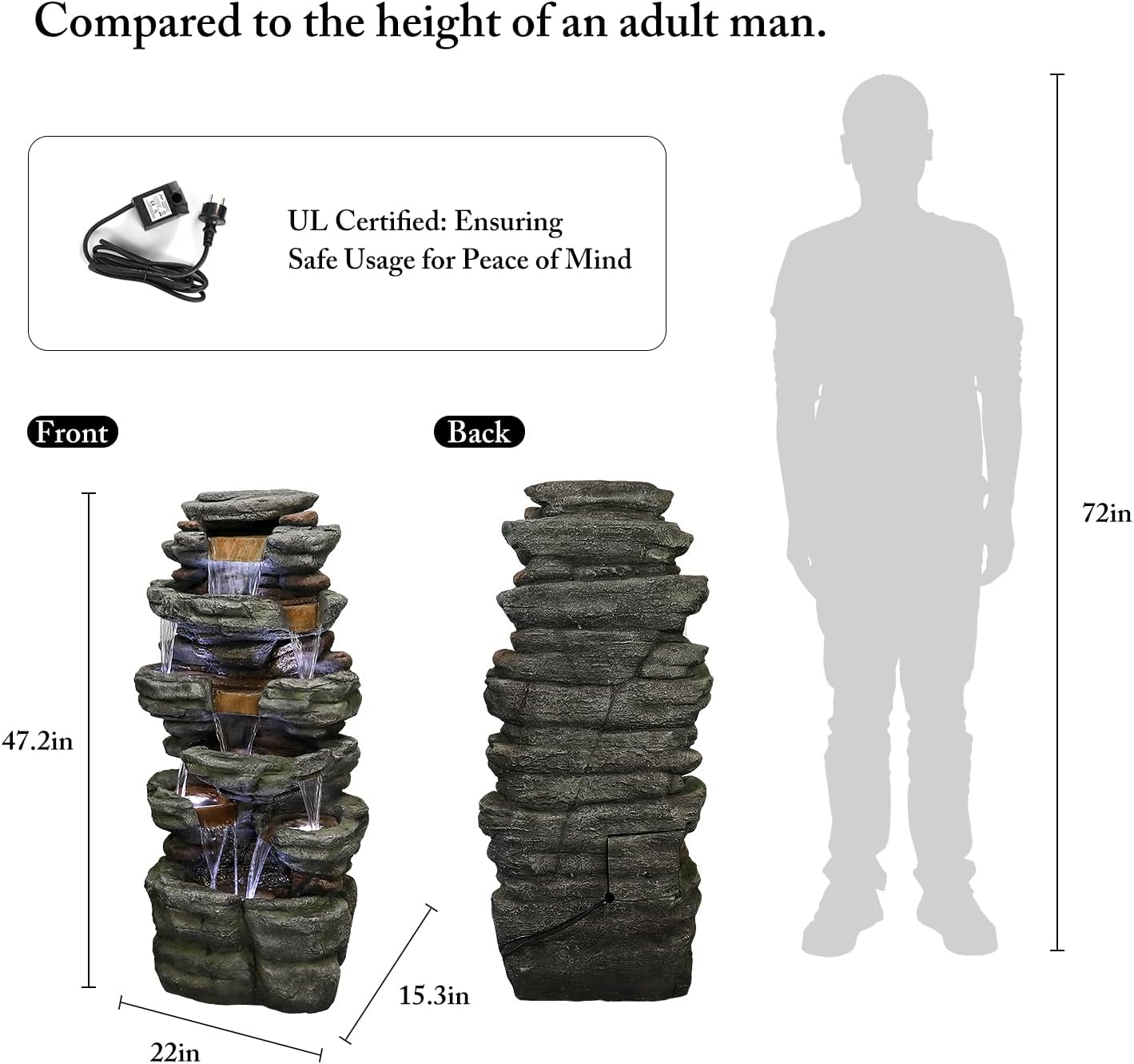
Image: A visual representation of the fountain's dimensions (47.2 inches high) and a close-up of the UL certified power adapter, emphasizing safety and product size.
3. Package Contents
Before beginning assembly, ensure all parts are present and undamaged. If any parts are missing or damaged, please contact customer support.
- Fountain Unit (1)
- Water Pump (1)
- LED Light Assembly (pre-installed or separate)
- Power Adapter/Transformer (1)
- Instruction Manual (1)
4. Setup Instructions
Follow these steps to set up your SunJet water fountain:
- Unpack: Carefully remove all components from the packaging. Retain packaging for future storage or transport.
- Positioning: Choose a level outdoor location for your fountain, ensuring it is near a suitable power outlet.
- Connect Pump: Locate the water pump and the tubing inside the fountain unit. Connect the pump to the end of the tubing.
- Place Pump: Place the pump inside the water reservoir at the bottom of the fountain, ensuring it sits flat.
- Connect LED Lights: If the LED lights are not pre-installed, connect their wiring to the designated connector from the power adapter. Ensure connections are secure and waterproof.
- Route Cables: Carefully route the power cables from the pump and LED lights (if separate) through the access opening at the back of the fountain.
- Fill with Water: Fill the fountain with distilled water until the pump is fully submerged. Avoid overfilling.
- Power On: Plug the power adapter into a grounded outdoor electrical outlet. The pump and LED lights should activate.

Image: A step-by-step diagram showing how to connect the pump and LED lights, place them in the reservoir, and route the cables for the fountain setup.
Video: An official product video from SunJet-A demonstrating the 47.2-inch Outdoor Cascading Water Fountain in operation, highlighting its features and water flow.
5. Operating Instructions
- Power On/Off: The fountain operates continuously when plugged into a live electrical outlet. To turn it off, simply unplug the power adapter.
- Water Level: Due to evaporation, the water level will decrease over time. Check the water level daily and refill as needed to keep the pump fully submerged.
- LED Lights: The LED lights are integrated and will illuminate when the fountain is powered on, enhancing the visual appeal, especially at night.

Image: A comparison image showing the fountain's appearance during daylight hours and its illuminated effect at night, highlighting the integrated LED lights.
6. Maintenance
- Regular Cleaning: To prevent algae buildup and maintain clear water flow, clean the fountain and pump regularly. Use a soft brush and mild soap, then rinse thoroughly.
- Water Quality: Use distilled water to minimize mineral deposits. If using tap water, consider adding a non-toxic algaecide to prevent algae growth.
- Pump Maintenance: Periodically remove the pump and clean any debris from its intake screen and impeller. This ensures optimal performance and longevity.
- Winterization: In freezing climates, drain all water from the fountain and store it indoors in a dry, protected area during winter months to prevent damage from ice expansion.

Image: A detailed close-up of the fountain's resin construction, highlighting the realistic stone texture and finish, which contributes to its durability and aesthetic appeal.
7. Troubleshooting
| Problem | Possible Cause | Solution |
|---|---|---|
| Water not flowing | Low water level, clogged pump, kinked tubing, power issue | Refill water, clean pump/tubing, check power connection |
| LED lights not working | Loose connection, faulty light, power issue | Check connections, ensure power, contact support if faulty |
| Excessive splashing | Uneven surface, water flow too strong, overfilled | Adjust fountain level, reduce pump flow (if adjustable), adjust water level |
| Pump making noise | Low water level, debris in pump | Refill water, clean pump impeller |
8. Specifications
- Model: GPF200032MH
- Dimensions: 22"L x 15.3"W x 47.2"H
- Material: Resin
- Color: Gray_5
- Weight: 46 Pounds
- Power Source: Corded Electric
- Special Features: Corded, Lighted, Weather Resistant
9. Warranty and Support
This SunJet water fountain comes with a 1-year manufacturer's warranty from the date of purchase. This warranty covers defects in materials and workmanship under normal use.
For warranty claims, technical support, or replacement parts, please contact SunJet customer service through the retailer where the product was purchased or visit the official SunJet website for contact information.
Please retain your proof of purchase for warranty validation.