
Introduction
This manual provides detailed instructions for the D-BUGG DBRM-L1098+X PLUS Universal Remote Control, model UTV-1114. This remote is designed for use with various LCD, LED, HD, and 3D televisions, offering a simplified control experience with dedicated buttons for popular streaming services. Please read this manual thoroughly before use to ensure proper operation and to maximize the remote's functionality.
Safety Information
- Do not expose the remote control to direct sunlight, heat sources, or extreme temperatures.
- Avoid dropping the remote or subjecting it to strong impacts.
- Do not immerse the remote control in water or any other liquid.
- Keep out of reach of children to prevent accidental ingestion of batteries.
- Dispose of used batteries according to local regulations. Do not incinerate batteries.
Package Contents
Verify that all items are present in the package:
- 1 x D-BUGG DBRM-L1098+X PLUS Universal Remote Control
- 1 x User Manual (this document)
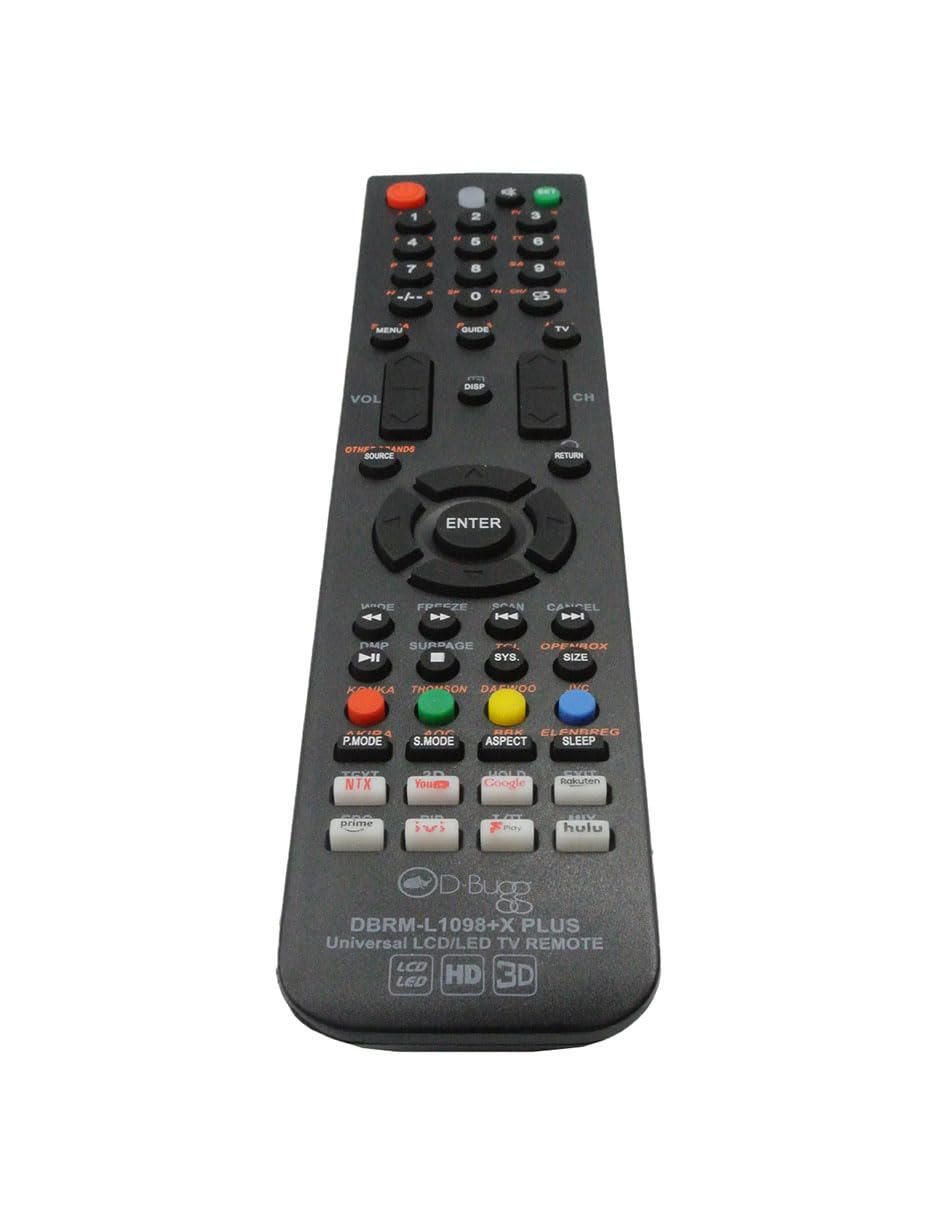
Image: The D-BUGG DBRM-L1098+X PLUS Universal Remote Control sealed in its clear plastic retail packaging, showing the remote and part of the cardboard backing.
Product Overview
The DBRM-L1098+X PLUS remote features an ergonomic design with clearly labeled buttons for intuitive control of your television and streaming services.

Image: A detailed top-down view of the D-BUGG DBRM-L1098+X PLUS Universal Remote Control, highlighting the layout of all buttons, including the navigation pad, number keys, and dedicated streaming service buttons.
Key Features:
- Power Button: Turns the TV on or off.
- Number Pad (0-9): For direct channel input.
- Volume Up/Down: Adjusts the television volume.
- Channel Up/Down: Changes television channels.
- Navigation Pad (Up, Down, Left, Right, ENTER): For menu navigation and selection.
- Netflix Button: Direct access to the Netflix application.
- YouTube Button: Direct access to the YouTube application.
- Hulu Button: Direct access to the Hulu application.
- Source/Input: Selects input sources (HDMI, AV, etc.).
- Menu/Settings: Accesses TV menu or settings.
- Aspect: Adjusts screen aspect ratio.
- Sleep: Sets a sleep timer for the TV.
- 3D: Activates or deactivates 3D mode (if supported by TV).
Setup
1. Battery Installation
- Locate the battery compartment on the back of the remote control.
- Slide the battery cover downwards or press the latch and lift to open.
- Insert two (2) AAA batteries, ensuring the positive (+) and negative (-) terminals match the diagrams inside the compartment.
- Replace the battery cover by sliding it back into place until it clicks securely.
Note: Batteries are not included and must be purchased separately.
2. Initial Use (No Programming Required)
The DBRM-L1098+X PLUS Universal Remote Control is designed for immediate use with most modern LCD, LED, HD, and 3D TV brands without complex programming. Simply install the batteries, point the remote at your TV, and begin using it.
If the remote does not respond to your TV immediately, it may require a simple code search or brand-specific setup. Refer to the "Troubleshooting" section for further assistance if direct operation is not achieved.
Operating Instructions
Basic TV Control:
- Power On/Off: Press the POWER button once.
- Volume Adjustment: Use the VOL+ and VOL- buttons.
- Channel Change: Use the CH+ and CH- buttons, or enter the channel number directly using the number pad.
- Mute: Press the MUTE button to silence the TV. Press again to unmute.
- Input/Source Selection: Press the SOURCE button to cycle through available input sources (e.g., HDMI 1, AV, TV). Use the navigation arrows and ENTER to select.
Streaming Service Access:
The remote features dedicated buttons for quick access to popular streaming platforms:
- Press the NETFLIX button to launch the Netflix application.
- Press the YOUTUBE button to launch the YouTube application.
- Press the HULU button to launch the Hulu application.
Note: Your TV must be a smart TV with these applications installed and connected to the internet for these buttons to function. Functionality may vary based on TV model and software version.
Advanced Functions:
- Aspect Mode: Press the ASPECT button to change the screen's aspect ratio (e.g., 16:9, 4:3, Zoom).
- Sleep Timer: Press the SLEEP button to set a timer for the TV to automatically turn off. Repeated presses may cycle through different time intervals.
- 3D Mode: If your TV supports 3D, press the 3D button to activate or deactivate 3D display.
- Menu/Settings: Use the MENU or SETTINGS button to access your TV's on-screen display for picture, sound, and other settings.
Maintenance
Cleaning:
To clean the remote control, gently wipe it with a soft, dry cloth. Do not use abrasive cleaners, solvents, or chemical sprays, as these can damage the remote's surface or internal components.
Battery Replacement:
Replace batteries when the remote's response becomes sluggish or stops working. Always replace both batteries at the same time with new AAA batteries. Do not mix old and new batteries, or different types of batteries.
Troubleshooting
- Remote is not working:
- Ensure batteries are installed correctly with the correct polarity (+/-).
- Replace old batteries with new AAA batteries.
- Ensure there are no obstructions between the remote and the TV's infrared sensor.
- Point the remote directly at the TV.
- Specific buttons are not working (e.g., Netflix, YouTube):
- Confirm your TV is a smart TV and has the respective applications installed.
- Ensure your TV is connected to the internet.
- Some older smart TV models or specific brands may not fully support direct app launch buttons from universal remotes.
- Remote controls some functions but not others:
- While designed for broad compatibility, some advanced or brand-specific functions may not be fully supported by all universal remotes.
- Try resetting the remote by removing batteries for 30 seconds and reinserting them.
Specifications
| Model Number | UTV-1114 (DBRM-L1098+X PLUS) |
| Compatibility | LCD, LED, HD, and 3D Televisions |
| Power Source | 2 x AAA Batteries (not included) |
| Dimensions | 8.66 x 1.77 x 0.79 inches (22 x 4.5 x 2 cm) |
| Weight | 5.3 ounces (150 grams) without batteries |
| Color | Black |
| Special Features | Dedicated Netflix, YouTube, Hulu buttons; Aspect, Sleep, 3D functions |
Warranty and Support
For warranty information or technical support, please refer to the retailer where the product was purchased or visit the official D-BUGG website. Keep your purchase receipt as proof of purchase.