
Introduction
Thank you for choosing the Bontempi 32-Key Electronic Keyboard with Microphone. This instrument is designed to provide an engaging and educational musical experience for young musicians and beginners. It features a compact design, a variety of sounds and rhythms, and a dedicated learning function to help develop musical skills. Please read this manual carefully to ensure proper use and maintenance of your new electronic keyboard.
Safety Information
- Adult Supervision: This product should be used under adult supervision.
- Power Source: Use only the specified power sources (AC adapter, USB cable, or batteries). Do not mix old and new batteries, or different types of batteries.
- Water and Moisture: Keep the keyboard away from water and moisture to prevent electric shock or damage.
- Cleaning: Clean the keyboard with a soft, dry cloth. Do not use abrasive cleaners or solvents.
- Disassembly: Do not attempt to disassemble or modify the keyboard. Refer all servicing to qualified personnel.
What's in the Box
Upon unpacking, please ensure all items are present:
- Bontempi 32-Key Electronic Keyboard
- Microphone
- User Manual (this document)
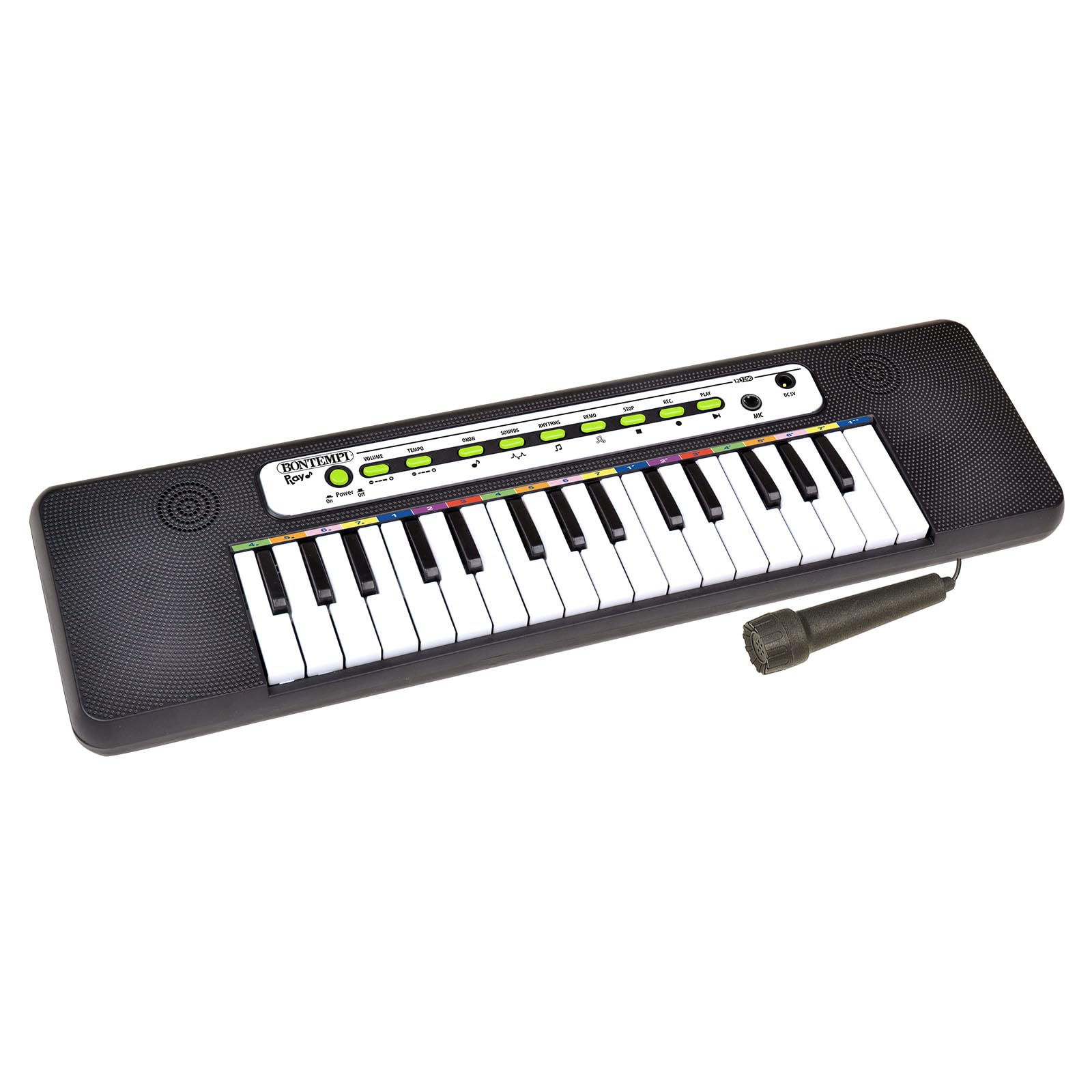
Image: The Bontempi 32-Key Electronic Keyboard with its included microphone, showcasing its compact design.
Setup
- Unpack the Keyboard: Carefully remove the electronic keyboard and all accessories from its packaging.
- Power Connection:
- AC Adapter (not included): Connect a compatible AC adapter (not included) to the keyboard's power input and then to a wall outlet.
- USB Cable (not included): Connect a compatible USB cable (not included) to the keyboard's USB port and to a USB power source (e.g., computer, USB wall adapter).
- Batteries (not included): Open the battery compartment (usually on the underside), insert the required number of batteries (e.g., AA or AAA, refer to compartment markings) ensuring correct polarity (+/-), and close the compartment securely.
- Microphone Connection: Plug the microphone into the designated microphone input jack on the keyboard.
- Power On: Locate the power button (or switch) and turn the keyboard ON.
Operating Instructions
- Playing Notes: Press any of the 32 keys to play musical notes.
- Selecting Sounds: Use the "Sound" or "Tone" selection buttons to switch between the 2 available instrument sounds.
- Choosing Rhythms: Use the "Rhythm" selection buttons to choose from the 8 available rhythmic patterns. Press the "Start/Stop" button to begin or end the rhythm.
- Playing Melodies: Use the "Melody" selection buttons to choose from the 8 pre-programmed melodies. Press the "Play" button to start a melody.
- Learning Function (Okon Mode):
- Activate the "Okon" mode using its dedicated button.
- Follow the illuminated keys or on-screen prompts (if available) to learn how to play specific songs or exercises.
- Recording and Playback:
- Press the "Record" button to begin recording your performance.
- Play your desired notes and rhythms.
- Press the "Stop" button to end recording.
- Press the "Playback" or "Replay" button to listen to your recorded performance.
- Volume Control: Adjust the master volume using the dedicated volume control buttons or knob to your preferred level.
- Using the Microphone: Speak or sing into the microphone while playing the keyboard. The microphone output will be mixed with the keyboard sound.
Features Overview
- 32-Key Electronic Keyboard: Compact design with 32 keys, suitable for beginners and young musicians.
- Integrated Microphone: Allows for singing along or vocal recording.
- 2 Instrument Sounds: Explore different tonal qualities.
- 8 Rhythmic Patterns: Provides various background beats for practice and play.
- 8 Pre-programmed Melodies: Enjoy and learn from built-in songs.
- "Okon" Learning Function: A dedicated mode to assist in learning musical basics.
- Recording and Playback: Capture and review your musical creations.
- Adjustable Volume: Control the output level for comfortable listening.
- Flexible Power Options: Can be powered by AC adapter, USB cable, or batteries (not included).
Maintenance
- Cleaning: Wipe the keyboard surface with a soft, dry cloth. For stubborn dirt, slightly dampen the cloth with water, then wipe dry immediately. Avoid using harsh chemicals or abrasive materials.
- Storage: When not in use, store the keyboard in a cool, dry place, away from direct sunlight and extreme temperatures. If storing for an extended period, remove batteries to prevent leakage.
- Battery Replacement: Replace all batteries at the same time. Do not mix old and new batteries. Dispose of used batteries responsibly according to local regulations.
- Microphone Care: Handle the microphone gently. Avoid dropping it or exposing it to excessive moisture.
Troubleshooting
| Problem | Possible Cause | Solution |
|---|---|---|
| Keyboard does not power on. | No power, low batteries, or incorrect power connection. |
|
| No sound from the keyboard. | Volume too low, mute activated, or faulty connection. |
|
| Microphone is not working. | Microphone not connected, faulty microphone, or volume too low. |
|
| Batteries drain quickly. | Keyboard not fully turning off, or continuous use. |
|
Specifications
| Feature | Detail |
|---|---|
| Brand | Bontempi |
| Model Number | 12 3200 |
| UPC | 047663335391 |
| Number of Keys | 32 |
| Instrument Type | Electronic Keyboard |
| Color | Black |
| Material | Plastic |
| Item Dimensions (L x W x H) | 46.5 x 12.5 x 3.2 cm |
| Power Source | AC Adapter, Battery |
| Educational Objective | Musical Learning |
| Manufacturer Recommended Minimum Age | 3.0 years |
| Manufacturer Recommended Maximum Age | 3 years (Note: This may be a typo in source data, typically for older children) |
Warranty and Support
Warranty Information: The Bontempi 32-Key Electronic Keyboard with Microphone comes with a 2 Year Limited Warranty from the manufacturer. Please retain your proof of purchase for warranty claims.
Customer Support: For technical assistance, troubleshooting beyond this manual, or warranty inquiries, please contact Bontempi customer service. Refer to the product packaging or the official Bontempi website for the most up-to-date contact information.
You can visit the official Bontempi store for more information: Bontempi Store


