
Introduction
This manual provides essential information for the safe and efficient installation, operation, and maintenance of the YUXSOUQ Compressor Controller, model P1900520013 PPBE0613. This controller is designed for compatibility with Atlas Copco Mark 5 Graphic compressor systems. Please read this manual thoroughly before attempting any installation or operation.
Safety Information
Always observe the following safety precautions to prevent personal injury and damage to the equipment:
- Ensure all power is disconnected before installation, maintenance, or troubleshooting.
- Installation and service should only be performed by qualified personnel.
- Verify correct voltage and current ratings before connecting power.
- Protect wiring from sharp edges and moving parts.
- Do not operate the controller if it appears damaged.
Product Overview
The YUXSOUQ Compressor Controller P1900520013 PPBE0613 is a replacement control panel designed for Atlas Copco Mark 5 Graphic compressors. It features various input/output connections, communication ports, and a memory card slot for system management and updates. The unit is housed in a Type 4 enclosure, providing protection against environmental factors.
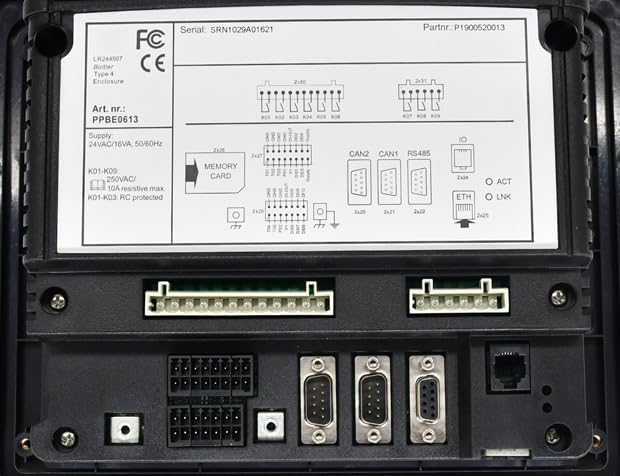
Figure 1: Rear view of the YUXSOUQ Compressor Controller. This image displays the various connection ports, including power input, relay outputs, communication interfaces (CAN, RS485, Ethernet), and a memory card slot. Key labels such as part number P1900520013, article number PPBE0613, and supply specifications (24VAC/16VA, 50/60Hz) are visible.
Setup and Installation
Follow these steps for proper installation of the compressor controller:
- Mounting: Securely mount the controller in a suitable location, ensuring adequate ventilation and protection from excessive vibration or heat. The enclosure is Type 4 rated for environmental protection.
- Power Connection: Connect the power supply to the designated terminals. The controller requires a 24VAC/16VA, 50/60Hz supply. Ensure the power source matches these specifications.
- Relay Outputs: Connect the control circuits to the relay outputs (K01-K09). Note that relays K01-K03 are RC protected. The maximum resistive load for K01-K09 is 250VAC/10A. Refer to the wiring diagram on the unit for specific pin assignments.
- Communication Interfaces: Connect necessary communication cables to the CAN1, CAN2, RS485, and Ethernet (ETH) ports as required by your compressor system configuration.
- Memory Card: If a memory card is used for configuration or firmware updates, insert it into the designated slot.
- Input/Output (IO) Connections: Connect any additional digital or analog inputs/outputs to the IO port (2x24) as per your system requirements.
- Final Check: Before applying power, double-check all connections for correctness and security.
Operating Instructions
Once installed and powered, the controller will typically initialize. Refer to your Atlas Copco Mark 5 Graphic compressor system's specific operational manual for detailed instructions on navigating the graphic interface and configuring parameters. General operational aspects include:
- System Start/Stop: Use the compressor's main control panel to initiate or halt compressor operation.
- Monitoring: The graphic display provides real-time data on compressor status, pressures, temperatures, and other operational parameters.
- Parameter Adjustment: Access system settings and operational parameters through the graphic interface to fine-tune compressor performance.
- Alarm and Event Logging: The controller logs alarms and events, which can be reviewed for diagnostic purposes.
Maintenance
Regular maintenance ensures the longevity and reliable operation of your compressor controller:
- Cleaning: Periodically clean the exterior of the controller with a soft, dry cloth. Do not use abrasive cleaners or solvents. Ensure the enclosure seals are intact.
- Connection Check: Annually inspect all wiring connections for tightness and signs of corrosion or damage.
- Firmware Updates: If new firmware versions are available, follow the manufacturer's instructions for updating via the memory card slot.
- Environmental Inspection: Ensure the operating environment remains within specified temperature and humidity ranges.
Troubleshooting
If you encounter issues with the controller, consider the following common troubleshooting steps:
- No Power: Verify the 24VAC power supply is connected and active. Check fuses or circuit breakers.
- Communication Errors: Check all communication cable connections (CAN1, CAN2, RS485, ETH). Ensure proper termination and addressing if applicable.
- ETH Indicators: The 'ACT' (Activity) and 'LNK' (Link) LEDs on the Ethernet port indicate network status. If 'LNK' is off, check the Ethernet cable and network connection. If 'ACT' is not blinking, there may be no data activity.
- System Malfunctions: Consult the Atlas Copco Mark 5 Graphic compressor manual for specific error codes and diagnostic procedures.
- Memory Card Issues: Ensure the memory card is correctly inserted and formatted.
If problems persist, contact qualified service personnel or YUXSOUQ customer support.
Specifications
| Feature | Specification |
|---|---|
| Model Numbers | P1900520013, 1900-5200-13, PPBE0613 |
| Compatibility | Atlas Copco Mark 5 Graphic Compressor |
| Supply Voltage | 24VAC |
| Supply Power | 16VA |
| Frequency | 50/60Hz |
| Relay Outputs (K01-K09) | 250VAC / 10A resistive max |
| Relay Protection | K01-K03 RC protected |
| Enclosure Type | Type 4 |
| Communication Interfaces | CAN1, CAN2, RS485, Ethernet (ETH) |
| Other Features | Memory Card Slot, IO Port (2x24), ACT/LNK Indicators |
Warranty and Support
This product is covered by the standard manufacturer's warranty. For specific warranty terms and conditions, please refer to the documentation provided with your purchase or contact YUXSOUQ customer service. For technical support, troubleshooting assistance, or spare parts, please contact your supplier or YUXSOUQ directly.
Manufacturer: YUXSOUQ