
1. Introduction
Thank you for choosing the MIZISNR PW-1608 16-Channel Audio Mixer. This professional mixing console is designed to provide high-quality audio processing for various applications, including live performances, DJ events, recording, and home studio setups. It features a comprehensive set of controls, built-in DSP effects, versatile connectivity options, and robust construction to meet the demands of audio professionals and enthusiasts.
2. Safety Information
- Power Supply: Use only the provided power adapter. Ensure the voltage matches your local power supply before connecting.
- Water and Moisture: Do not expose the unit to rain, moisture, or operate it in wet conditions. Keep liquids away from the mixer.
- Ventilation: Ensure adequate ventilation around the unit. Do not block ventilation openings.
- Heat Sources: Keep the unit away from heat sources such as radiators, heat registers, stoves, or other heat-producing appliances.
- Servicing: Do not attempt to service this unit yourself. Refer all servicing to qualified service personnel.
- Cables: Protect power cords from being walked on or pinched, particularly at plugs, convenience receptacles, and the point where they exit from the apparatus.
3. Package Contents
Verify that all items are present in the package:
- MIZISNR PW-1608 Audio Mixer
- Power Adapter
- Instruction Manual

4. Product Overview
The MIZISNR PW-1608 is a 16-channel professional audio mixer designed for comprehensive sound control. It features individual channel adjustments, a wide range of DSP effects, and flexible input/output options.
4.1 Key Features
- 16-Channel Professional Mixing Console: Equipped with XLR and stereo line inputs, each channel offers independent GAIN, EQ, AUX, and PAN controls, plus a mute button for precise sound shaping.
- 99 DSP Effects: Built-in digital signal processing with 99 preset effects for various scenarios, suitable for live gigs, DJ events, karaoke, and parties.
- 7-Band EQ Adjustment: In addition to 3-band EQ per channel, a 7-band EQ is available for the main output, allowing fine-tuning of the overall audio.
- +48V Phantom Power & PAD Switch: Hybrid jack inputs support 48V condenser microphones, dynamic microphones, electric guitars, and DI boxes. The PAD switch attenuates high-level inputs to prevent distortion.
- Bluetooth Connection: Pair with Bluetooth devices (tablets, phones) to stream music or voice directly. Includes controls for play/pause, song switching, and mode selection within a 33-foot range.
- USB Connectivity: Connect smartphones, PCs, or laptops for audio interface functions. Features MP3/USB flash drive input, built-in MP3 player/recorder, and supports MP3, WAV, WMA formats. Also enables computer recording and sound editing via USB.
- Wide Compatibility: Supports headphones, musical instruments, microphones, line inputs, XLR, and unbalanced 1/4" plugs.
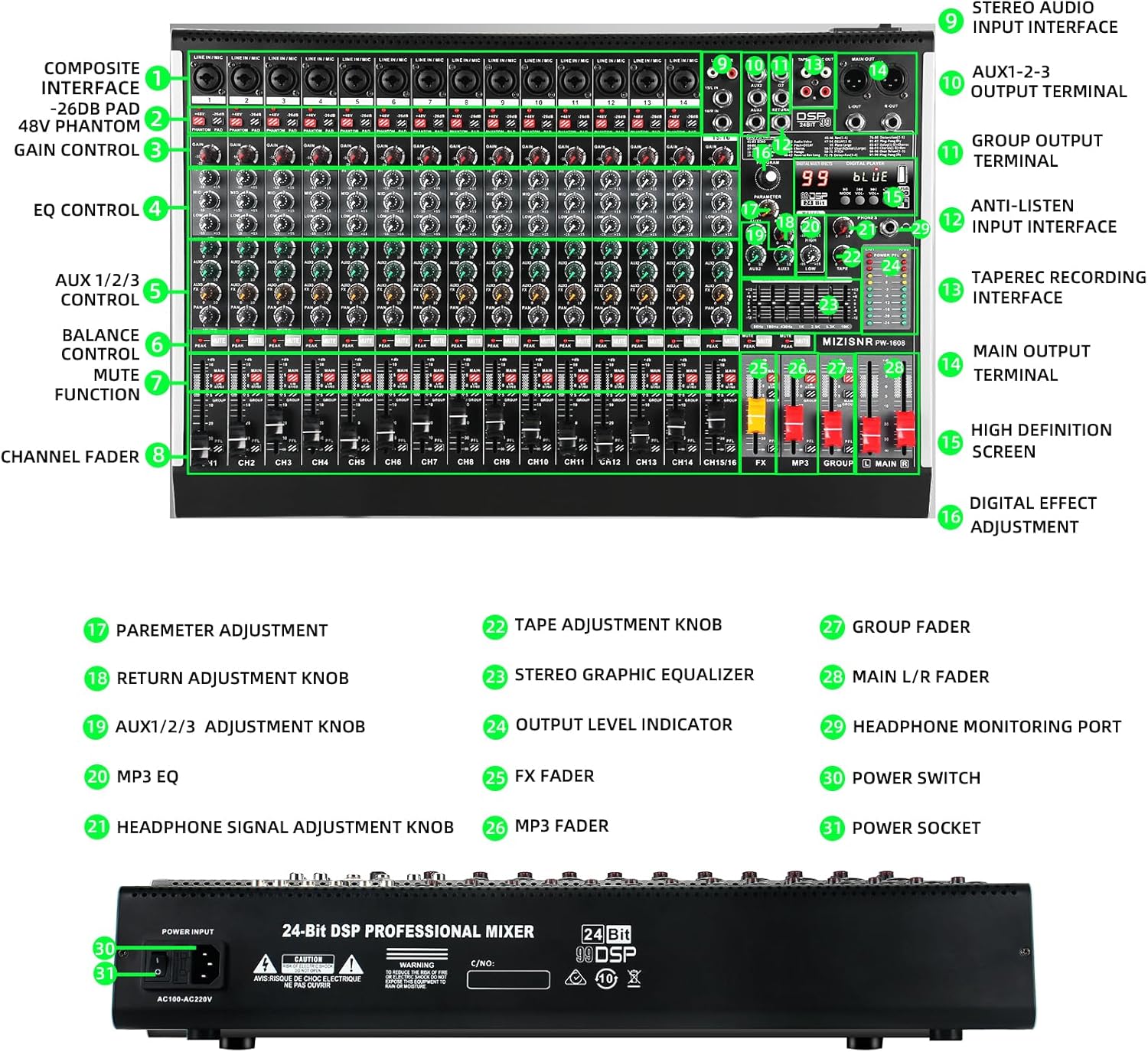
4.2 Control Panel Layout
The mixer's control panel is intuitively designed for ease of use. Refer to the diagram above for the location of each control:
- Composite Interface: XLR/TRS combo jacks for microphone and line inputs.
- +48V Phantom Power & PAD: Buttons to activate phantom power for condenser microphones and attenuate high-level inputs.
- Gain Control: Adjusts the input sensitivity for each channel.
- EQ Control: 3-band equalizer (High, Mid, Low) for each channel.
- AUX 1/2/3 Control: Sends signal to auxiliary outputs for monitoring or external effects.
- Balance Control: Adjusts the stereo panning for each channel.
- Mute Function: Silences individual channels.
- Channel Fader: Adjusts the volume level of each channel.
- Stereo Audio Input Interface: RCA inputs for stereo sources.
- AUX 1-2-3 Output Terminal: Outputs for auxiliary sends.
- Group Output Terminal: Outputs for grouped channels.
- Anti-Listen Input Interface: Headphone monitoring input.
- Tape Recording Interface: RCA outputs for recording.
- Main Output Terminal: XLR and TRS outputs for the main stereo mix.
- High Definition Screen: Displays DSP effect numbers, Bluetooth status, and USB player information.
- Digital Effect Adjustment: Controls for selecting and adjusting DSP effects.
- Parameter Adjustment: Fine-tunes selected DSP effects.
- Return Adjustment Knob: Controls the level of returned effects.
- AUX 1/2/3 Adjustment Knob: Controls the master level of auxiliary sends.
- MP3 EQ: Equalizer for MP3 playback.
- Headphone Signal Adjustment Knob: Adjusts headphone volume.
- Tape Adjustment Knob: Controls the level of tape input.
- Stereo Graphic Equalizer: 7-band graphic EQ for the main output.
- Output Level Indicator: LED meters for main output levels.
- FX Fader: Controls the overall level of effects.
- MP3 Fader: Controls the volume of the MP3/USB player.
- Group Fader: Controls the volume of grouped channels.
- Main L/R Fader: Controls the master volume of the main stereo output.
- Headphone Monitoring Port: 6.35mm jack for headphones.
- Power Switch: Turns the unit on/off.
- Power Socket: Connects the power adapter.
5. Setup
5.1 Power Connection
Connect the provided power adapter to the Power Socket (31) on the rear of the mixer and then to a suitable AC power outlet. Press the Power Switch (30) to turn on the unit. The power indicator lights will illuminate.
5.2 Connecting Microphones and Instruments
Use XLR or 1/4" TRS cables to connect microphones or instruments to the Composite Interface (1) jacks. For condenser microphones, activate the +48V Phantom Power button (2) on the respective channel. If connecting high-output instruments, use the PAD switch (2) to prevent input overload.

5.3 Connecting Output Devices
Connect your main speakers or amplifier to the Main Output Terminal (14) using XLR or 1/4" TRS cables. For monitoring, connect headphones to the Headphone Monitoring Port (29).
6. Operation
6.1 Adjusting Channel Levels
Use the Gain Control (3) to set the initial input level for each channel. Adjust the Channel Fader (8) to control the individual volume in the mix. The Output Level Indicator (24) provides visual feedback on the main output levels.
6.2 Equalization (EQ)
Each channel has a 3-band EQ Control (4) (High, Mid, Low) to shape the tone of individual inputs. For overall mix adjustment, use the 7-Band Stereo Graphic Equalizer (23) for the main output.

6.3 DSP Effects
The mixer includes 99 preset DSP effects. Use the Digital Effect Adjustment (16) to select an effect number displayed on the High Definition Screen (15). Adjust the Parameter Adjustment (17) knob to fine-tune the selected effect. The FX Fader (25) controls the overall level of the effects in the mix.

6.4 Bluetooth Connectivity
To connect a Bluetooth device, activate Bluetooth mode on the mixer (usually indicated on the High Definition Screen (15)). Search for the mixer's Bluetooth name on your device (e.g., 'MIZISNR PW-1608') and pair. Once connected, you can stream audio from your device to the mixer. Use the built-in controls (play/pause, song switching) and the MP3 Fader (26) to manage playback.

6.5 USB Playback and Recording
Insert a USB flash drive with MP3, WAV, or WMA files into the USB port. The mixer will automatically detect and display the files on the High Definition Screen (15). Use the playback controls to navigate and play tracks. The MP3 Fader (26) controls the volume. For recording, connect the mixer to a computer via USB. The mixer acts as an audio interface, allowing you to record the mixed output to your computer's DAW (Digital Audio Workstation) software.

7. Maintenance
- Cleaning: Use a soft, dry cloth to clean the surface of the mixer. Do not use abrasive cleaners or solvents.
- Storage: Store the mixer in a cool, dry place away from direct sunlight and extreme temperatures.
- Cable Management: Ensure cables are neatly organized and not under tension to prevent damage to connectors and ports.
8. Troubleshooting
- No Sound Output:
- Check all cable connections (inputs, outputs, power).
- Ensure the mixer is powered on.
- Verify channel faders (8), main faders (28), and master volume controls are up.
- Check if any channels are muted (7).
- Confirm external speakers/amplifiers are powered on and functioning.
- Distorted Sound:
- Reduce input Gain Control (3) for the affected channel.
- If using high-output instruments, ensure the PAD switch (2) is engaged.
- Check for damaged cables.
- USB Device Not Found:
- Ensure the USB flash drive is properly inserted.
- Verify the USB drive is formatted to a compatible file system (e.g., FAT32).
- Try a different USB drive.
- Bluetooth Connection Issues:
- Ensure Bluetooth mode is active on the mixer.
- Check that the Bluetooth device is within the 33-foot range.
- Unpair and re-pair the device.
- Ensure no other devices are interfering with the Bluetooth signal.
9. Specifications
| Feature | Specification |
|---|---|
| Model Number | PW-1608 |
| Number of Channels | 16 |
| Item Weight | 12.77 pounds |
| Product Dimensions | 14.68 x 22.16 x 3.85 inches |
| Power Source | Corded Electric |
| Voltage | 110 Volts (AC) |
| Connectivity Technology | Bluetooth, USB |
| DSP Effects | 99 Presets |
| Main Output EQ | 7-Band Graphic Equalizer |
| Phantom Power | +48V (Independent per channel) |
10. Warranty and Support
For warranty information and technical support, please refer to the contact details provided with your purchase or visit the official MIZISNR website. Our customer service team is available to assist with any questions or issues you may encounter.
Note: Specifications are subject to change without prior notice.