
Ruitoo M5PRO
Ruitoo M5PRO Peak 2000W Electric Scooter User Manual
1. Introduction
Welcome to the Ruitoo M5PRO Peak 2000W Electric Scooter user manual. This document provides essential information for the safe and efficient operation, maintenance, and troubleshooting of your new electric scooter. Please read this manual thoroughly before your first ride and keep it for future reference.
Safety Guidelines
Always prioritize safety. Wear a helmet and appropriate protective gear. Familiarize yourself with local regulations regarding electric scooter use. Avoid riding in adverse weather conditions or on slippery surfaces. Regular maintenance is crucial for safe operation.
2. What's in the Box
Upon unboxing your Ruitoo M5PRO Electric Scooter, please verify that all the following components are included:
- 1 x Electric Scooter
- 1 x Charger
- 1 x Installation Tools
- 1 x Manual
- 1 x Seats
- 1 x Rear Storage Box
Video: Unboxing and initial assembly of the Electric Scooter Adults M5 PRO. This video demonstrates how to unpack the scooter and its components.
3. Setup
Follow these steps to assemble and prepare your scooter for its first ride.
3.1 Unfolding the Scooter
Carefully remove the scooter from its packaging. Lift the handlebar stem until it locks into place. Ensure all locking mechanisms are securely fastened before proceeding.

Image: The Ruitoo M5PRO electric scooter in its folded and unfolded states, demonstrating its compact design for transport and storage.
3.2 Handlebar Installation
Attach the handlebars to the stem, ensuring all cables are properly routed and not pinched. Secure the handlebars using the provided screws and tools.
3.3 Seat Installation
The seat assembly requires careful attention. Disassemble the two parts of the seat clamp that are not needed for direct mounting. Attach the seat to the seat post, then insert the seat post into the scooter's frame. Adjust the height for comfort and secure it firmly.
Video: Detailed instructions for installing the seat on the Ruitoo M5 Pro Electric Scooter, including disassembling unnecessary parts and securing the seat post.
3.4 Rear Storage Box Installation
The rear storage box can be attached to the back of the scooter for convenience. Secure it using the provided hardware.
4. Operating Your Scooter
Learn how to power on, select speed modes, and utilize the lighting system.
4.1 Power On/Off and Speed Modes
To power on the scooter, long-press the power button on the LCD display. The scooter features multiple speed modes (Eco, Drive, Sport) to suit different riding conditions. Short-press the mode button to cycle through these options. The LCD display shows real-time data such as speed, battery level, and riding mode.

Image: The scooter's colorful LCD display, providing essential riding information at a glance, including speed, battery level, and selected mode.

Image: An illustration of the three distinct speed modes available on the scooter: Eco, Drive, and Sport, each offering different performance characteristics.
4.2 Lighting System
The M5PRO is equipped with a comprehensive 360° lighting system, including a front light, brake light, and turn signals for maximum visibility. Press the light button to activate the headlights. Double-press the power button to turn on the pole light for enhanced visibility.

Image: A detailed view of the scooter's lighting system, including the bright front headlight, LED display, and integrated turn signals and brake lights for safety.
4.3 Unlocking Speed Limit
To unlock the speed limit, press the brake bar and the power button four times. This will allow access to higher speed settings.
4.4 Riding Modes
The scooter supports two main riding modes: standing and seated, thanks to its comfortable seat and detachable storage box. This versatility allows for different riding preferences and needs.

Image: The scooter configured for both standing and seated riding, showcasing the comfortable seat and detachable storage box that enhance its versatility.
Video: This video demonstrates the unboxing, assembly, and basic operational features of the Electric Scooter Adults M5 PRO, including power-on and speed adjustments.
5. Maintenance
Proper maintenance ensures the longevity and safe operation of your scooter.
5.1 Battery Care
The M5PRO is equipped with a 48V/20.8Ah large-capacity lithium battery with BMS (Battery Management System) for safety. Always use the original charger. Do not use the scooter while charging. Avoid completely draining the battery and store it in a cool, dry place when not in use for extended periods.

Image: A visual representation of the scooter's 48V 20.8Ah lithium battery, highlighting its large capacity and integrated safety features like over-temperature, short circuit, and overcharge protection.
5.2 Tire and Suspension
The scooter features 11-inch front and 10-inch rear off-road vacuum tires, designed for various terrains. Regularly check tire pressure and for any signs of wear or damage. The dual suspension system (front hydraulic and rear spring shock absorber) provides a comfortable ride; inspect it periodically for optimal performance.

Image: A detailed view of the scooter's front hydraulic suspension and rear spring shock absorption system, designed for enhanced comfort and shock absorption.

Image: The scooter's robust vacuum tires, engineered for optimal performance across diverse terrains including city streets, concrete, sand, and snow.
5.3 Braking System
The dual disc brake system with ABS enhances safety and improves braking performance. Regularly check brake pads and cables for wear and proper function.

Image: Close-up views of the sensitive front and rear brake system, featuring dual disc brakes and integrated hydraulic and spring shock absorbers for effective stopping power and ride comfort.
6. Troubleshooting
This section addresses common issues you might encounter with your scooter.
- Scooter not turning on: Check battery charge and ensure all connections are secure.
- Reduced range/power: Battery may need charging or could be degrading over time. Ensure tires are properly inflated.
- Brakes not responsive: Inspect brake pads and cables. Adjust as necessary or seek professional service.
- Unusual noises: Check for loose parts, especially around wheels and suspension.
For issues not covered here, please contact customer support.
7. Specifications
| Feature | Specification |
|---|---|
| Brand | Ruitoo |
| Model Name | M5 Pro Electric Scooter |
| Motor Power | Dual 1000W (Peak 2000W total) |
| Max Speed | 34 Mph |
| Max Range | 50 Miles |
| Battery | 48V/20.8Ah Lithium Battery |
| Battery Charge Time | 8 Hours |
| Tire Size | 11 Inches (Front), 10 Inches (Rear) |
| Weight Limit | 264 Pounds |
| Item Weight | 90 Pounds |
| Product Dimensions | 50.4"L x 23.6"W x 41.7"H |
| Frame Material | Alloy Steel |
| Special Features | Adjustable Handlebar Height, Digital Display, Dual Braking System, Foldable, Replaceable Battery |
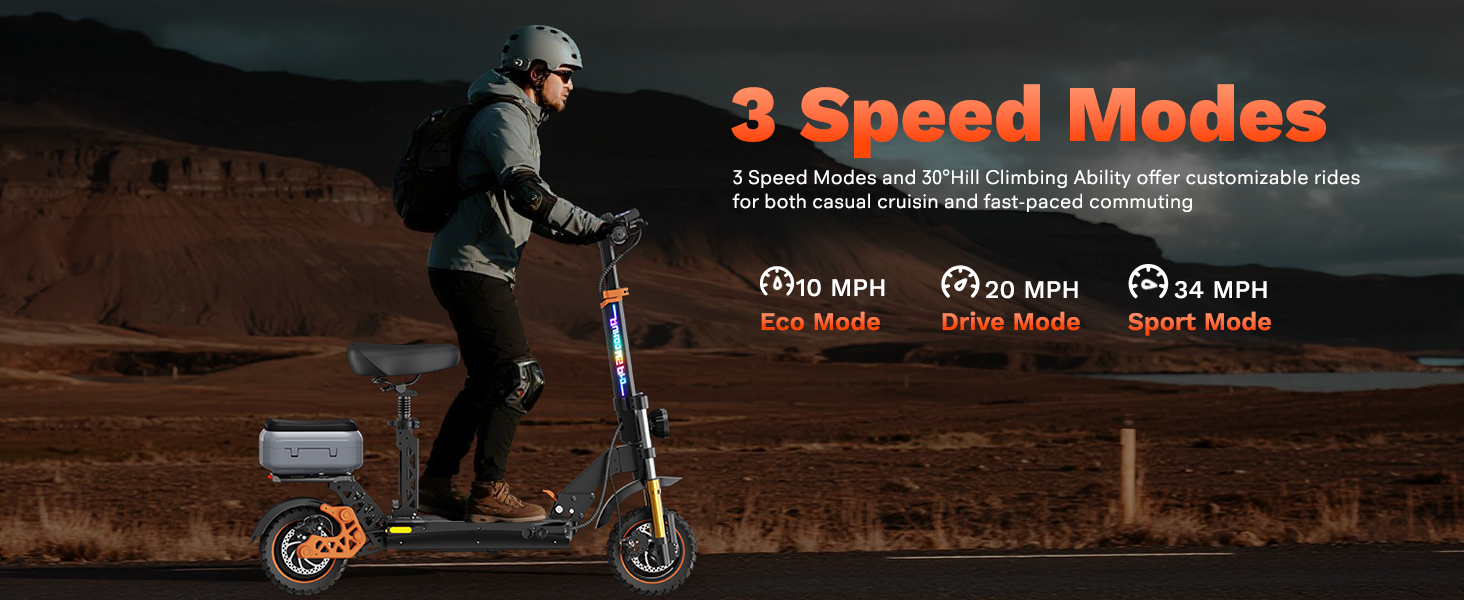
Image: A comprehensive diagram illustrating the key dimensions and weight specifications of the Ruitoo M5 Pro Electric Scooter, including its folded and unfolded states.
8. Warranty and Support
8.1 Warranty Information
The Ruitoo M5PRO Electric Scooter comes with a 1-year limited warranty covering different components. This warranty ensures peace of mind with your purchase.
8.2 Customer Support
For any questions, concerns, or professional service regarding your scooter, please contact our customer support. We are committed to providing fast and reliable assistance to ensure your satisfaction.
Related documentsM5PRO

Ask a question about this manual
Ask about setup, troubleshooting, compatibility, parts, safety, or missing instructions. Manuals+ will review the question and use this page’s manual context to help answer it.