
KAIWEETS KEMF-1
KAIWEETS KEMF-1 EMF Detector User Manual
Model: KEMF-1 | Brand: KAIWEETS
1. Introduction
The KAIWEETS KEMF-1 is a versatile 3-in-1 handheld EMF detector designed to measure electric fields (EF), magnetic fields (MF), and radio frequency (RF) radiation. This device provides real-time readings, features a multi-color backlight display, and includes sound alarms to indicate varying radiation levels. It is suitable for use in homes, offices, and for general environmental monitoring.
1.1 Package Contents
- KAIWEETS KEMF-1 EMF Meter x 1
- USB Charging Cable x 1
- User Manual x 1
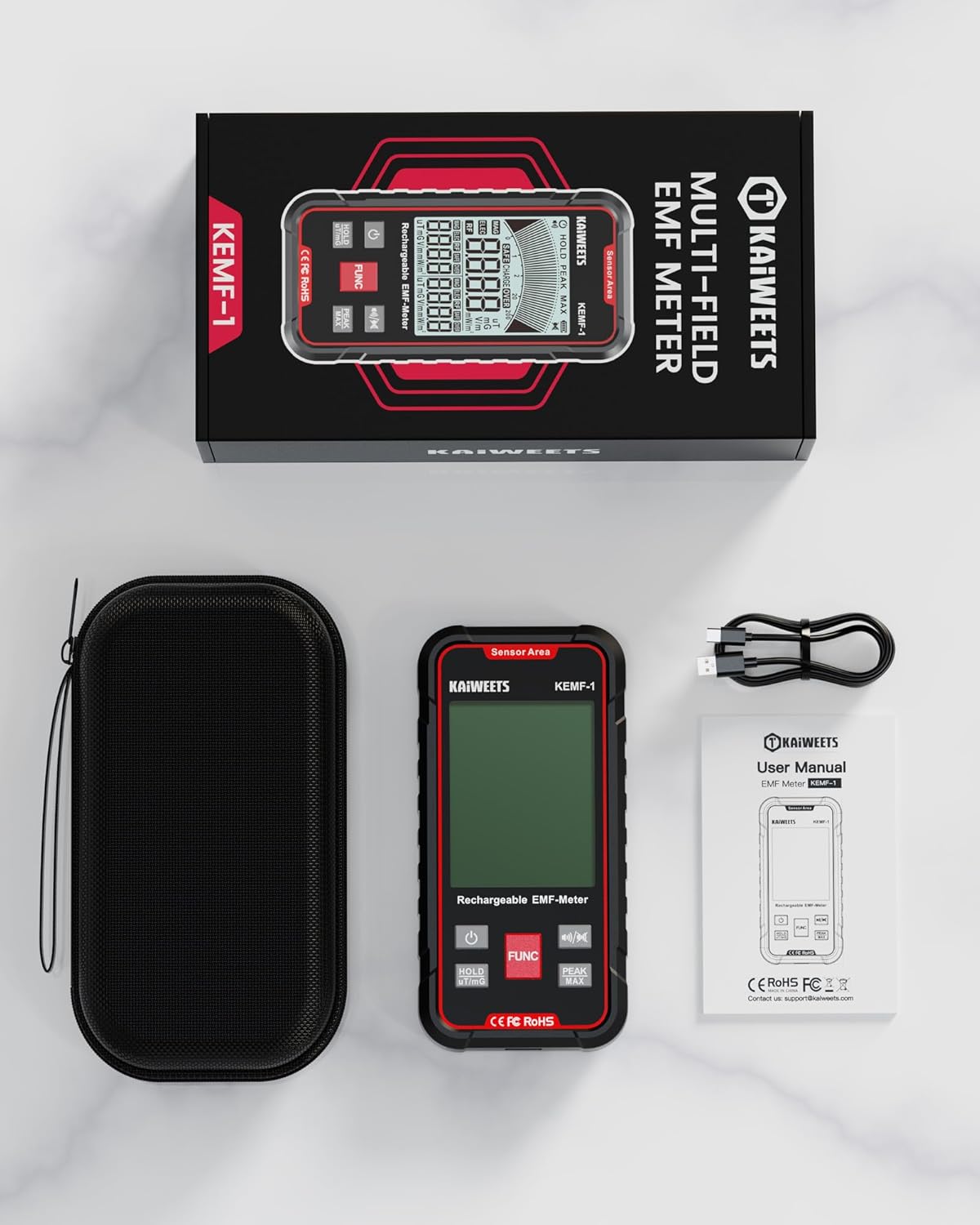
Figure 1.1: KEMF-1 Package Contents
2. Safety Information
Please read all safety warnings and instructions carefully before using this device. Failure to follow these instructions may result in electric shock, fire, or serious injury.
- Do not attempt to disassemble or modify the device.
- Keep the device away from water and other liquids.
- Avoid exposing the device to extreme temperatures or direct sunlight.
- Use only the provided charging cable or a compatible USB Type-C cable for charging.
- This device is for informational purposes and general environmental screening; it is not a substitute for professional-grade laboratory equipment or medical advice.
3. Product Features
- 3-in-1 Measurement: Simultaneously detects Magnetic Fields (MF), Electric Fields (EF), and Radio Frequency (RF) radiation.
- Multi-Color Backlight Display: The screen changes color (Green, Orange, Red) to visually indicate radiation levels, making it easy to interpret.
- Sound Alarm: An audible alarm activates when radiation levels exceed preset safe thresholds.
- Real-Time Trend Graph: Displays radiation changes over time, helping to identify peak exposures and hot spots.
- Data Hold & Peak/Max Measurement: Allows users to freeze current readings or view the highest recorded values.
- Rechargeable Battery: Equipped with a built-in Lithium Polymer battery, rechargeable via a standard USB Type-C port.
- Automatic Power Off: Conserves battery life by automatically shutting down after 15 minutes of inactivity.

Figure 3.1: 3-in-1 Measurement Capability
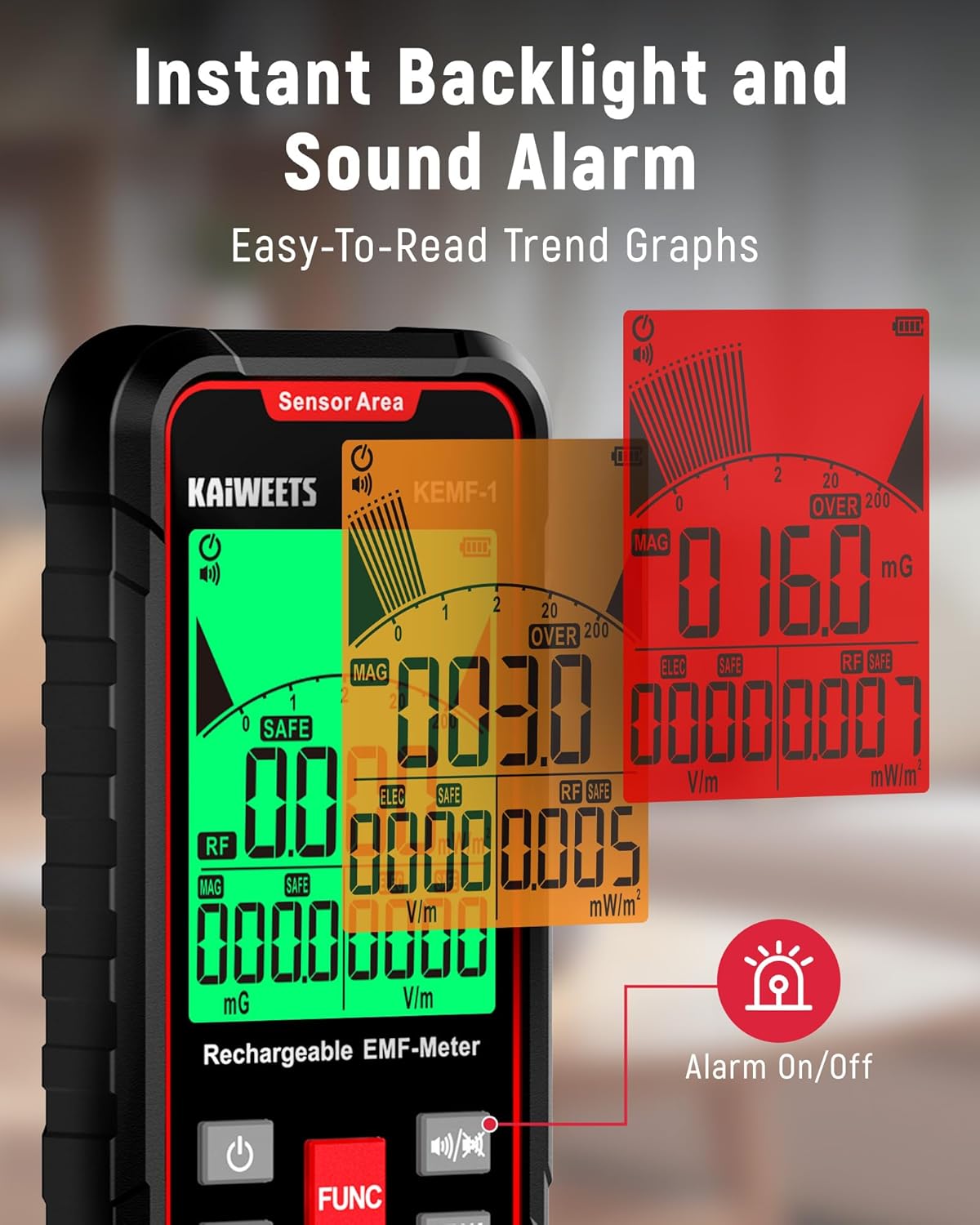
Figure 3.2: Instant Backlight and Sound Alarm
4. Setup
4.1 Charging the Device
Before first use, fully charge the KEMF-1 detector. Connect the provided USB Type-C cable to the charging port on the bottom of the device and plug the other end into a USB power adapter (not included) or a computer USB port. The battery indicator on the display will show charging status.

Figure 4.1: Type-C Rechargeable Port
5. Operating Instructions
5.1 Power On/Off
- Power On: Press the Power Button (
 ) located on the left side of the device. The display will light up.
 - Power Off: Press and hold the Power Button for a few seconds until the display turns off. The device also features an automatic power-off function after 15 minutes of inactivity.
5.2 Measurement Modes
The KEMF-1 simultaneously measures Electric Field (EF), Magnetic Field (MF), and Radio Frequency (RF) radiation. The primary displayed value can be cycled using the FUNC button.
- Electric Field (EF): Measures electric field strength in V/m. Common sources include laptops, power lines, and electrical appliances.
- Magnetic Field (MF): Measures magnetic field strength in µT or mG. Common sources include microwave ovens, washing machines, and refrigerators.
- Radio Frequency (RF): Measures radio frequency power density in mW/m². Common sources include Wi-Fi routers, cell phones, and other wireless devices.
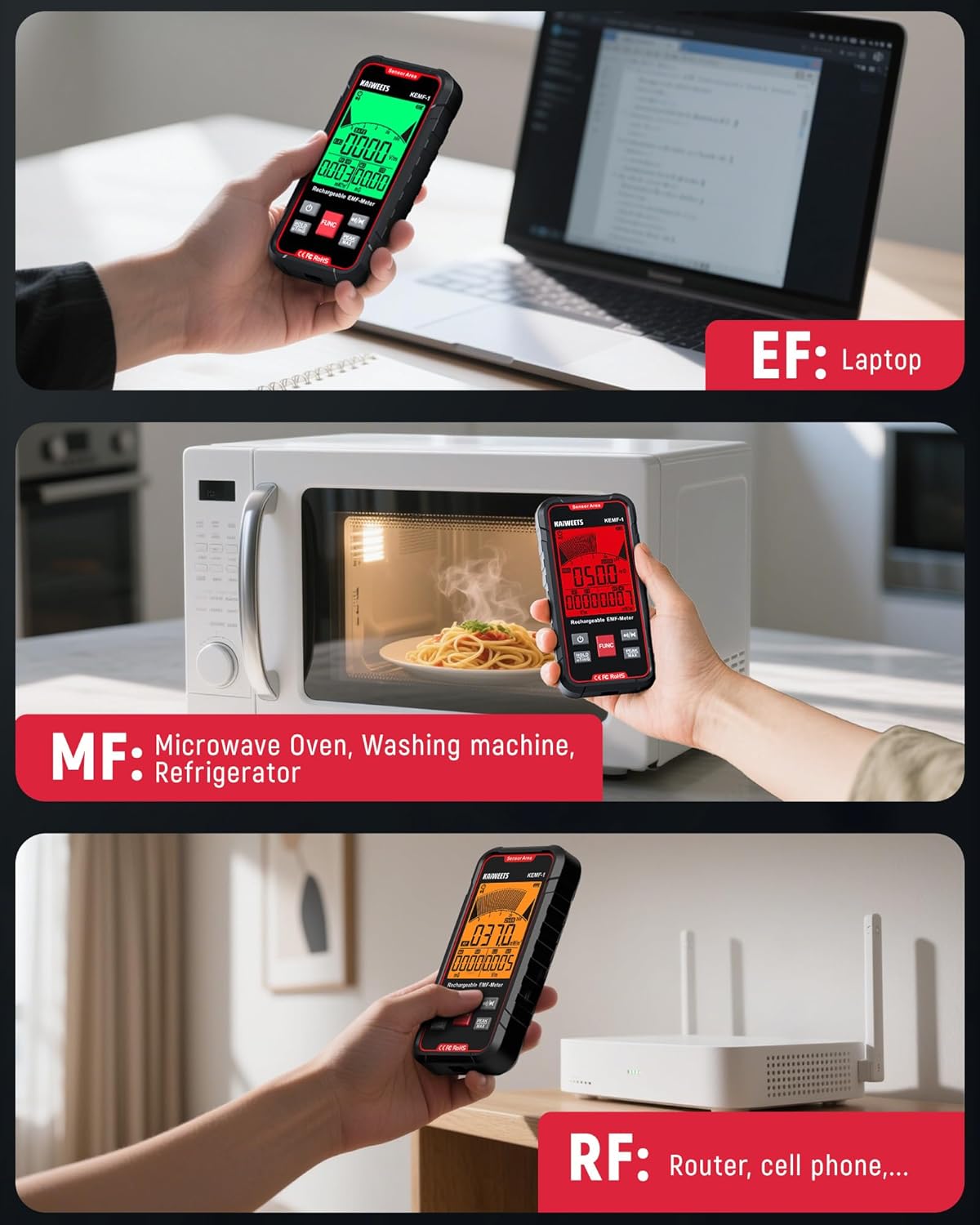
Figure 5.1: Measurement Examples (EF, MF, RF)
5.3 Display and Alarms
The device features a clear, multi-color backlit display. The backlight color changes based on the detected radiation level:
- Green: Safe levels.
- Orange: Elevated levels (caution).
- Red: High levels (danger).
An audible alarm will sound when radiation levels exceed the orange or red thresholds. You can toggle the sound alarm on or off by short pressing the Sound Alarm Button ().

Figure 5.2: Analog Digital Comparison Table for Radiation Levels
5.4 Control Buttons
- FUNC Button: Short press to cycle through the primary measurement display (MF, EF, RF).
- HOLD uT/mG Button: Short press to hold the current data reading on the screen. Long press to switch magnetic field measurement units between µT and mG.
- PEAK MAX Button: Short press to switch between peak value and maximum value display for the current measurement.
- Sound Alarm Button: Short press to turn the alarm sound on or off.
Figure 5.3: Button Functions Overview
5.5 Official Product Video
Video 5.1: KAIWEETS 3-in-1 EMF Detector KEMF-1 Usage Example. This video demonstrates the practical application of the KEMF-1 detector, showcasing its 3-in-1 measurement capabilities for electric, magnetic, and radio frequency fields, as well as the alarm and display features.
6. Maintenance
- Cleaning: Use a soft, dry cloth to clean the device. Do not use abrasive cleaners or solvents.
- Storage: Store the device in a cool, dry place away from direct sunlight and extreme temperatures. If storing for extended periods, ensure the battery is partially charged (around 50%) to prolong its lifespan.
- Battery Care: Avoid fully discharging the battery frequently. Recharge the device regularly, even if not in active use, to maintain battery health.
7. Troubleshooting
| Problem | Possible Cause | Solution |
|---|---|---|
| Device does not power on | Low battery; Device malfunction | Charge the device; Contact customer support if issue persists. |
| Inaccurate readings | Interference from other electronic devices; Incorrect measurement mode | Move away from other electronics; Ensure correct mode is selected using the FUNC button. |
| No sound alarm | Alarm is muted; Radiation levels are below threshold | Press the Sound Alarm button to unmute; Check if readings are in the orange or red zone. |
8. Specifications
| Parameter | Value |
|---|---|
| Model Number | KEMF-1 |
| Magnetic Field Range | 0.01-200µT / 0.1-2000mG |
| Electric Field Range | 1-2000V/m |
| Radio Frequency Range | 0.001-200mW/m² |
| Power Source | 1 Lithium Polymer battery (included) |
| Charging Port | USB Type-C |
| Auto Power Off | Approx. 15 minutes of inactivity |
| Dimensions | 7.09 x 3.98 x 2.32 inches |
| Weight | 10.58 ounces |
9. Warranty and Support
KAIWEETS products are designed and manufactured to the highest quality standards. For any questions, technical support, or warranty claims, please contact KAIWEETS customer service. Refer to the contact information provided on the official KAIWEETS website or your purchase documentation.
Please retain your proof of purchase for warranty purposes.
Related documentsKEMF-1


Ask a question about this manual
Ask about setup, troubleshooting, compatibility, parts, safety, or missing instructions. Manuals+ will review the question and use this page’s manual context to help answer it.