
1. Product Overview
The Yasotek WE150RGBW Water Wave Projector is an advanced outdoor lighting solution designed to create dynamic water ripple, flame, and ocean wave effects. It features smart control options via a dedicated mobile application and an RF remote, offering extensive customization for brightness, color, and dynamic modes. Its robust IP65 waterproof design ensures durability for year-round outdoor use.
Key Features:
- 1-100% Dimmable & 16 Million Colors: Customize brightness and hues via the APP or RF remote to set the desired ambiance.
- Large Coverage & Group Control: Illuminates up to 10,000 sq.ft. max. Multiple projectors can be synced via the APP for seamless landscape lighting.
- Music Sync & Dynamic Effects: Lights can synchronize with music beats, offering Water Ripple, Flame, and Ocean Wave effects.
- 24/7 Timer & Energy Saving: Automate schedules for turning the light on/off to conserve energy.
- IP65 Waterproof & Heavy Duty Build: Constructed to withstand rain, snow, and extreme temperatures, suitable for gardens, patios, and commercial spaces.
2. Package Contents
Verify that all items are present in the package:
- Smart Effect Light (Water Wave Projector)
- Remote Control
- User Manual
3. Setup
3.1 Unboxing and Placement
Carefully remove the projector and its accessories from the packaging. Choose a suitable location for the projector, ensuring it is stable and can project the desired lighting effect. The projector can be ceiling-mounted, floor-mounted, or wall-mounted.

Image: The projector provides a large coverage area, illuminating a house with vibrant colors.
3.2 Power Connection
Connect the projector to a standard 120V AC power outlet using the provided cord. Ensure the connection is secure and protected from moisture, especially for outdoor installations.
3.3 APP Download and Pairing
Download the 'SURPLIFE' APP from your smartphone's app store (iOS or Android). Follow the in-app instructions to pair your projector. This typically involves ensuring your phone is connected to a 2.4GHz Wi-Fi network and following the device discovery process.

Image: The RF remote control allows for convenient operation of the projector.
4. Operating Instructions
4.1 Power On/Off
Press the power button on the RF remote or use the APP to turn the projector on or off.
4.2 Dimmable and Color Changing
Use the APP or RF remote to adjust the brightness from 1% to 100%. Select from 16 million colors to create custom lighting effects. The APP provides a color wheel for precise selection.
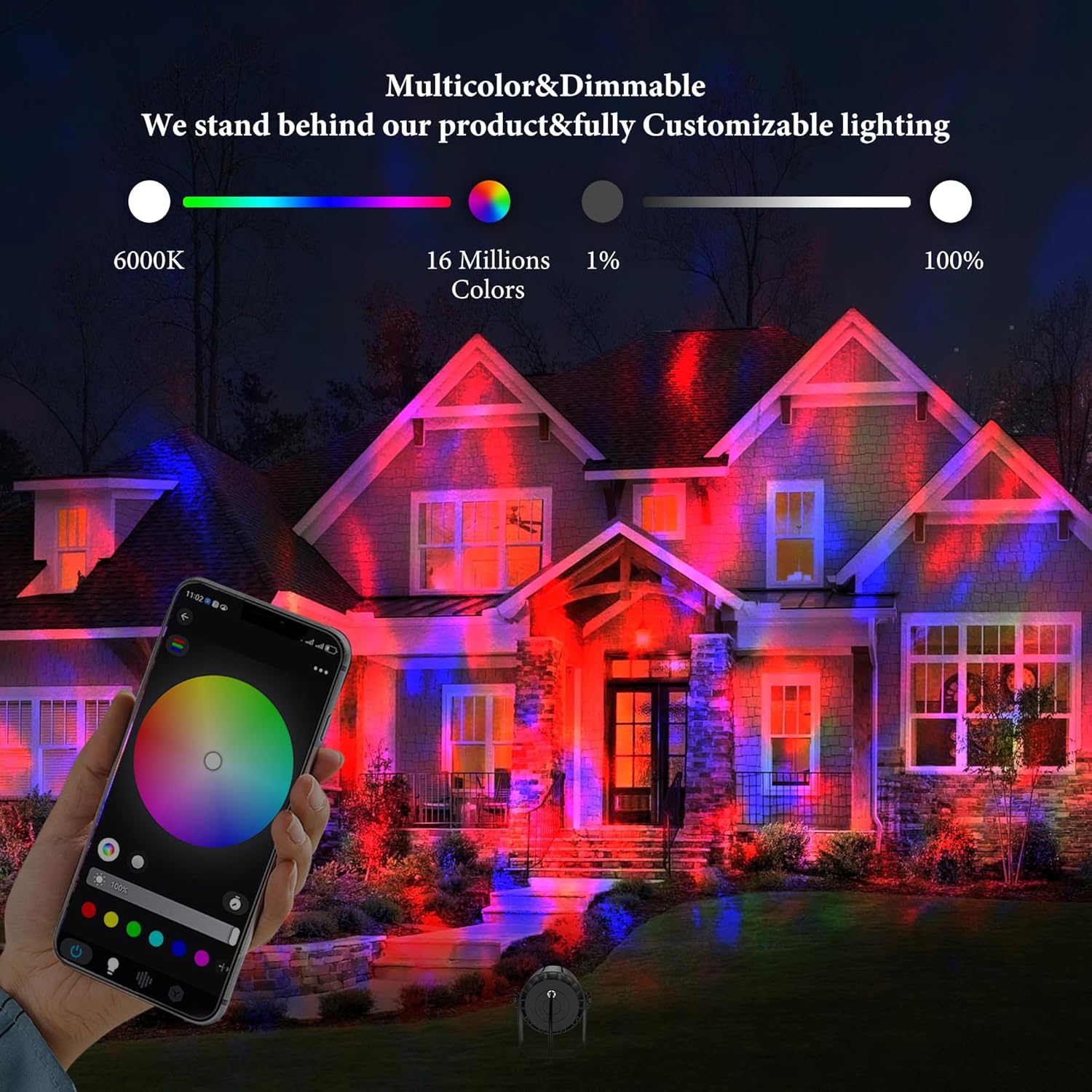
Image: Control the projector's multicolor and dimmable features using the smartphone app.
4.3 Music Sync Mode
Activate the music sync feature via the APP. The projector will analyze ambient sound or music played through your device and synchronize its lighting effects to the rhythm.

Image: The music sync mode enhances events by synchronizing light effects with music.
4.4 Dynamic Effects (Water Ripple, Flame, Ocean Wave)
Select various dynamic effects such as Water Ripple, Flame, or Ocean Wave through the APP to create different visual experiences.

Image: The projector offers versatile dynamic effects suitable for various occasions.
4.5 Timer Function
Set custom schedules for the projector to automatically turn on or off at specific times using the APP. This feature helps in energy management and convenience.

Image: The timer function allows scheduling the projector's operation for convenience and energy saving.
4.6 Group Control
If you have multiple Yasotek WE150RGBW projectors, use the APP to group them and control them simultaneously, or manage them individually for diverse lighting setups.
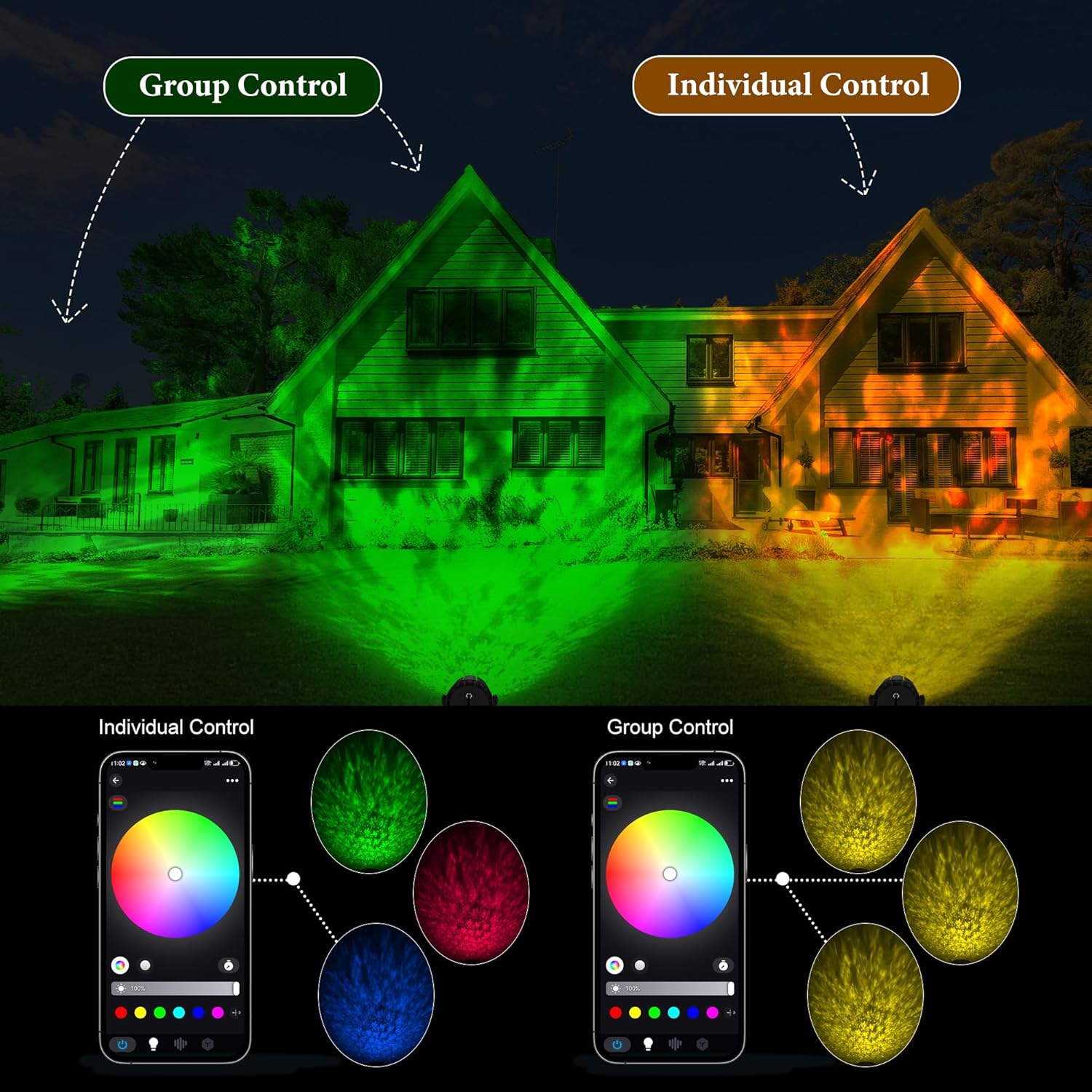
Image: The app allows for both group and individual control of multiple projectors.
5. Maintenance
5.1 Cleaning
Ensure the projector is unplugged before cleaning. Use a soft, dry cloth to wipe the exterior. For the lens, use a microfiber cloth specifically designed for optics to avoid scratches. Do not use harsh chemicals or abrasive cleaners.
5.2 Storage
When not in use for extended periods, store the projector in a cool, dry place, away from direct sunlight and extreme temperatures. It is recommended to keep it in its original packaging to protect it from dust and damage.
5.3 Weather Resistance
The projector is IP65 waterproof, meaning it is protected against dust and low-pressure water jets. While designed for outdoor use, avoid submerging it in water or exposing it to high-pressure water streams.

Image: The IP65 rating ensures the projector's durability against various weather conditions.
6. Troubleshooting
- Projector not turning on: Check power connection. Ensure the power adapter is securely plugged into both the projector and the outlet.
- Remote control not working: Replace the battery in the RF remote. Ensure there are no obstructions between the remote and the projector.
- APP connectivity issues: Ensure your smartphone is connected to a 2.4GHz Wi-Fi network. Restart the APP and the projector. Re-pair the device if necessary.
- Light effect is dim or unclear: Ensure the projector lens is clean. Adjust the brightness settings via the APP or remote.
- Music Sync not responding: Ensure the microphone access is granted to the APP on your smartphone. Check the volume of the music source.
7. Specifications
| Feature | Specification |
|---|---|
| Model Number | WE150RGBW |
| Brand | Yasotek |
| Color | Deep Gray |
| Material | Aluminum, Glass |
| Finish Type | Powder Coated |
| Light Source Type | LED |
| Power Source | Corded Electric |
| Voltage | 120 Volts (AC) |
| Wattage | 159 watts |
| Light Output Maximum | 15000 Lumens |
| Color Temperature | 6000 Kelvin |
| Number of Light Sources | 24 |
| Mounting Type | Ceiling Mount/Floor Mount/Wall Mount |
| Item Dimensions (L x W x H) | 6.5"L x 5.9"W x 6.69"H |
| Special Features | Dimmable, Color Changing, Music Sync & Dynamic Effects |
| Waterproof Rating | IP65 |
8. Warranty and Support
8.1 Manufacturer Warranty
This product comes with a 2-year manufacturer's warranty. Please retain your proof of purchase for warranty claims.
8.2 Customer Support
For any questions, technical assistance, or warranty inquiries, please contact Yasotek customer support. Refer to the contact information provided on the product packaging or the official Yasotek website.