

1. Introduction
This manual provides essential instructions for the safe and effective installation, operation, and maintenance of your new Trimmer Head Speed Feed. This replacement trimmer head is compatible with various Echo SRM series trimmers, including models SRM-2090, SRM-2090L, SRM-2090U, SRM-2010L, SRM-2100, SRM-2100SB, SRM-2101, SRM-2110, SRM-2200, SRM-2201, and SRM-2300. It is designed as a direct replacement for OEM part Stens 385-284. Please read this manual thoroughly before use and retain it for future reference.
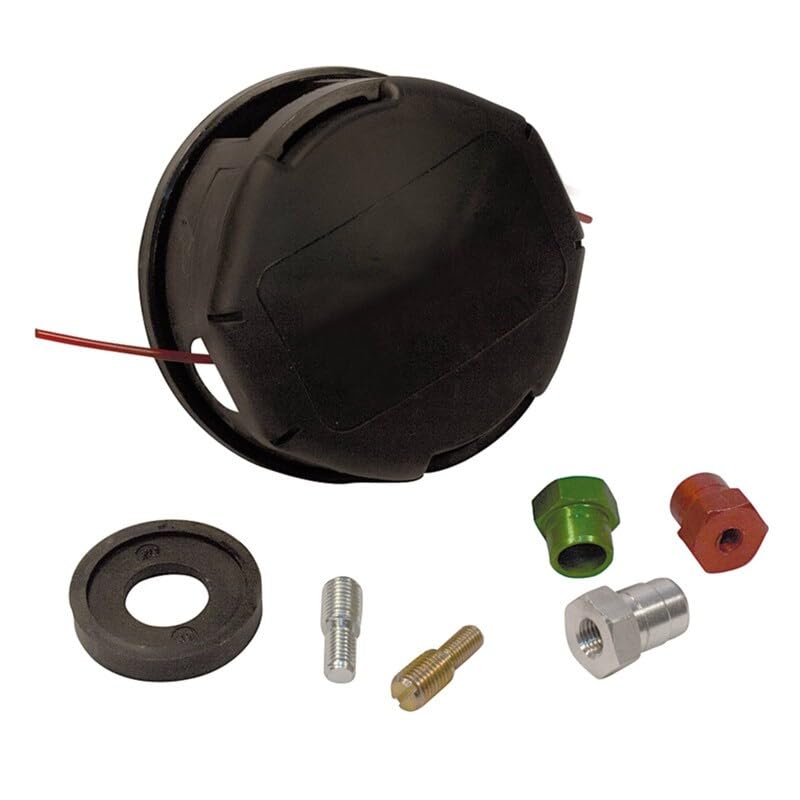
Image 1.1: Trimmer Head Speed Feed
2. Safety Information
Always prioritize safety when working with power tools. Failure to follow safety instructions can result in serious injury.
- Read the Trimmer Manual: Always refer to your Echo trimmer's original instruction manual for specific safety guidelines and operating procedures.
- Personal Protective Equipment (PPE): Wear appropriate PPE, including safety glasses or goggles, hearing protection, heavy-duty gloves, long pants, and sturdy footwear.
- Inspect Before Use: Before each use, inspect the trimmer head for any damage, cracks, or loose parts. Ensure the cutting line is properly installed and not excessively worn.
- Disconnect Power: Always disconnect the spark plug wire (for gas trimmers) or remove the battery/unplug (for electric trimmers) before performing any maintenance, installation, or inspection on the trimmer head.
- Clear Work Area: Ensure the work area is clear of bystanders, pets, and debris that could be thrown by the trimmer line.
- Proper Line Installation: Use only the recommended diameter and type of cutting line for your trimmer head. Incorrect line can cause damage or injury.
3. Package Contents
Verify that all components are present upon opening the package:
- 1 x Trimmer Head Speed Feed (Replacement for Stens 385-284)
- Instruction Manual (this document)
- Note: Cutting line may or may not be pre-installed or included, depending on the specific product variant.
4. Setup and Installation
Follow these steps to install the Trimmer Head Speed Feed onto your compatible Echo SRM series trimmer.
- Prepare the Trimmer: Ensure the trimmer engine is off and cool. Disconnect the spark plug wire (gas models) or remove the battery/unplug (electric models) to prevent accidental starting.
- Remove Old Trimmer Head:
- Locate the locking hole on the trimmer's gear case. Insert a small screwdriver or the provided locking pin into this hole to prevent the shaft from rotating.
- Rotate the old trimmer head clockwise to loosen it (most Echo models have left-hand threads, meaning you turn clockwise to loosen).
- Once loose, remove the old trimmer head and any washers or adapters. Keep these parts in case they are needed for future reference or if the new head requires specific adapters (though this head is designed for direct replacement).
- Install New Trimmer Head:
- Ensure the locking pin is still in place to prevent shaft rotation.
- Thread the new Trimmer Head Speed Feed onto the trimmer shaft counter-clockwise until it is hand-tight.
- Remove the locking pin.
- Give the trimmer head a final firm turn counter-clockwise to secure it. Do not overtighten.
- Install Cutting Line (if not pre-installed): Refer to the "Operating Instructions" section for details on loading the cutting line into the Speed Feed head.

Image 4.1: Example parts diagram for a trimmer head assembly. Consult your trimmer's manual for specific diagrams.
5. Operating Instructions
5.1. Loading Cutting Line (Speed Feed Method)
The Speed Feed design allows for quick and easy line loading without disassembling the head.
- Prepare Line: Cut a length of trimmer line (typically 15-20 feet, refer to your trimmer's manual for exact recommendations) of the appropriate diameter.
- Align Eyelets: Rotate the trimmer head until the eyelets (holes where the line exits) on opposite sides of the head are aligned. You may see an arrow or marking indicating alignment.
- Feed Line: Push one end of the trimmer line through one eyelet and continue pushing it straight through the trimmer head until it exits the opposite eyelet. Pull the line through until an equal length extends from both sides of the head.
- Wind Line: Hold the trimmer head firmly. Rotate the knob or bump button on the bottom of the trimmer head clockwise (or as indicated by arrows) to wind the line into the head. The line will automatically coil inside.
- Trim Excess: Once the line is fully wound, the integrated line cutter on the guard will trim the line to the correct operating length when the trimmer is started.
5.2. Extending Cutting Line During Operation
This Speed Feed head uses a bump-feed mechanism to extend the line.
- While the trimmer engine is running at full throttle, gently tap the bump knob on the bottom of the trimmer head against firm ground.
- The impact will release a small amount of line. The integrated line cutter on the guard will automatically trim the line to the correct length.
- Avoid repeatedly bumping the head, as this can waste line.
6. Maintenance
Regular maintenance ensures optimal performance and extends the life of your trimmer head.
- Clean After Each Use: Remove grass clippings, dirt, and debris from the trimmer head. A stiff brush can be used.
- Inspect for Damage: Periodically check the trimmer head for cracks, excessive wear, or other damage. Replace the head if it shows signs of significant wear or damage.
- Check Eyelets: Ensure the line eyelets are clear and not worn down, which can cause line breakage.
- Lubrication: The internal mechanism of the Speed Feed head typically does not require lubrication. Refer to your trimmer's main manual for gear case lubrication.
- Storage: Store the trimmer head in a clean, dry place when not in use.
7. Troubleshooting
Here are common issues and their solutions related to the trimmer head:
| Problem | Possible Cause | Solution |
|---|---|---|
| Line does not feed out | Line is tangled or fused inside; insufficient line; incorrect line diameter. | Remove the head, untangle/rewind line. Ensure sufficient line is loaded. Use recommended line diameter. |
| Line breaks frequently | Worn eyelets; incorrect line type/diameter; hitting hard objects; line fused. | Inspect/replace head if eyelets are worn. Use correct line. Avoid hitting hard surfaces. Rewind line. |
| Trimmer head vibrates excessively | Improperly installed head; damaged head; unbalanced line. | Re-install head securely. Inspect for damage. Ensure equal line length on both sides. |
| Head difficult to install/remove | Incorrect threading direction; debris in threads. | Remember clockwise to loosen, counter-clockwise to tighten for most Echo models. Clean threads. |
8. Specifications
- Product Type: Trimmer Head Speed Feed
- OEM Replacement For: Stens 385-284
- Compatible Trimmer Models (Echo): SRM-2090, SRM-2090L, SRM-2090U, SRM-2010L, SRM-2100, SRM-2100SB, SRM-2101, SRM-2110, SRM-2200, SRM-2201, SRM-2300
- Manufacturer: Technology Parts Store
- Model Number: Various Models Echo (referring to compatible trimmer models)
- Line Loading: Speed Feed (bump-feed mechanism)
9. Warranty and Support
This Trimmer Head Speed Feed is manufactured by Technology Parts Store. For specific warranty details, please refer to the product listing or contact Technology Parts Store directly. Typically, replacement parts carry a limited warranty against manufacturing defects.
Customer Support:
If you encounter any issues or have questions regarding the installation or operation of your trimmer head, please contact Technology Parts Store customer service. Provide your product details and purchase information for efficient assistance.

Image 9.1: Customer support team ready to assist.
You can often find contact information on the seller's page or through your purchase history on the platform where the product was acquired.