
1. Introduction
This manual provides essential instructions for the safe and effective installation, operation, and maintenance of your new Technology Parts Store Trimmer Head Speed Feed. This product is an OEM replacement for Stens 385-284 and is compatible with specific Makita trimmer models, including EM4251, RB251, RBC221, RBC230, RBC251, RBC252, RBC255, RBC260, RBC261, RBC281, and RBC310. Please read this manual thoroughly before use and retain it for future reference.
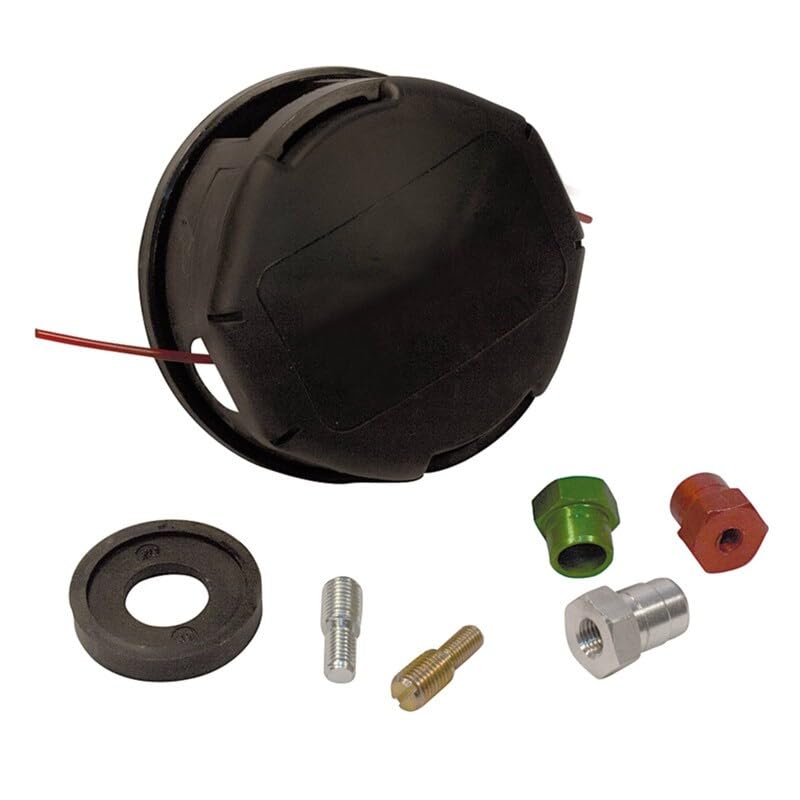
Image 1.1: The Technology Parts Store Trimmer Head Speed Feed. This image displays the complete trimmer head assembly, ready for installation on compatible string trimmers.
2. Safety Information
Always prioritize safety when working with power tools. Failure to follow these safety guidelines may result in serious injury.
- Read Your Trimmer's Manual: Always refer to your specific Makita trimmer's instruction manual for additional safety precautions and operating procedures.
- Wear Personal Protective Equipment (PPE): Always wear safety glasses or goggles, hearing protection, heavy-duty gloves, long pants, and sturdy footwear when operating a string trimmer.
- Inspect Before Use: Before each use, inspect the trimmer head for any damage, cracks, or loose parts. Ensure the cutting line is properly installed and not excessively worn.
- Clear Work Area: Ensure the work area is clear of bystanders, pets, and debris that could be thrown by the trimmer head.
- Disconnect Power: Always disconnect the spark plug wire (for gasoline trimmers) or remove the battery/unplug the power cord (for electric trimmers) before performing any maintenance, installation, or inspection on the trimmer head.
- Use Correct Parts: Only use genuine replacement parts or approved equivalents. Using incorrect parts can lead to malfunction and injury.
3. Package Contents
Upon opening the package, verify that all components are present and undamaged. If any items are missing or damaged, contact your retailer or Technology Parts Store customer service.
- 1 x Technology Parts Store Trimmer Head Speed Feed (OEM replacement for Stens 385-284)
- Instruction Manual (this document)

Image 3.1: Example of various replacement parts. While this image shows a range of parts, your package will specifically contain the Trimmer Head Speed Feed.
4. Setup and Installation
Follow these steps carefully to install the Trimmer Head Speed Feed onto your compatible Makita trimmer. Always ensure the trimmer is turned off and the power source is disconnected before beginning installation.
- Prepare the Trimmer: Place the trimmer on a stable, flat surface. Ensure the engine is off and cool, and the spark plug wire is disconnected (for gas models) or the battery is removed/power cord unplugged (for electric models).
- Remove Old Trimmer Head: Depending on your Makita model, you may need a wrench or a locking pin to hold the shaft while unscrewing the old trimmer head. Most heads unscrew counter-clockwise. Refer to your trimmer's manual for specific removal instructions.
- Clean the Shaft: Clean any debris or grass buildup from the trimmer shaft and mounting area.
- Install New Trimmer Head: Align the new Technology Parts Store Trimmer Head Speed Feed with the trimmer shaft. Screw it onto the shaft clockwise until it is hand-tight. Use a wrench if necessary, but do not overtighten. Ensure it is securely fastened.
- Verify Installation: Gently tug on the trimmer head to ensure it is firmly attached and does not wobble.
5. Operating Instructions
The Speed Feed trimmer head is designed for quick and easy line loading. Follow these steps for optimal performance.
- Loading Trimmer Line:
- Align the eyelets on the trimmer head with the arrows or markings on the head.
- Feed a new length of trimmer line (refer to your trimmer's manual for recommended line diameter) through one eyelet and out the opposite eyelet until both ends are even.
- Twist the knob on the top of the trimmer head (or push and twist, depending on the specific design) in the direction indicated by the arrows to wind the line into the head. Continue until only about 6-8 inches of line extend from each eyelet.
- Operating the Trimmer: Once the line is loaded and the head is securely installed, reconnect the power source to your trimmer. Start the trimmer according to its manufacturer's instructions.
- Advancing Trimmer Line: To advance more line during operation, lightly tap the bottom of the trimmer head on the ground while the trimmer is running at full speed. The centrifugal force will feed out more line, and the cutting blade on the guard will trim it to the correct length.
6. Maintenance
Regular maintenance ensures the longevity and safe operation of your trimmer head.
- Clean After Each Use: Remove grass, dirt, and debris from the trimmer head after each use. This prevents buildup that can affect performance.
- Inspect for Wear: Periodically inspect the trimmer head for cracks, excessive wear, or damage. Replace the head if it shows signs of significant wear or damage.
- Check Line Cutter: Ensure the line cutting blade on your trimmer's guard is clean and sharp. A dull blade can lead to uneven line length and poor cutting performance.
- Storage: Store the trimmer head in a clean, dry place when not in use.
7. Troubleshooting
If you encounter issues with your trimmer head, refer to the following common problems and solutions.
| Problem | Possible Cause | Solution |
|---|---|---|
| Trimmer line does not advance. | Line is tangled or fused inside the head; insufficient line remaining; head not tapping correctly. | Disconnect power, open the head and untangle/replace line. Ensure sufficient line is loaded. Tap the head firmly on the ground while running at full speed. |
| Trimmer head vibrates excessively. | Head not installed correctly; damaged head; unbalanced line. | Disconnect power, re-install the head securely. Inspect for damage and replace if necessary. Ensure line is evenly loaded on both sides. |
| Line breaks frequently. | Incorrect line type/diameter; worn line; cutting against hard surfaces; dull line cutter. | Use recommended line type and diameter. Replace old line. Avoid hitting fences, rocks, or concrete. Check and clean/sharpen the line cutter blade. |
8. Specifications
- Product Type: Trimmer Head Speed Feed
- OEM Replacement For: Stens 385-284
- Compatible Trimmer Models (Makita): EM4251, RB251, RBC221, RBC230, RBC251, RBC252, RBC255, RBC260, RBC261, RBC281, RBC310
- Manufacturer: Technology Parts Store
- Part Number: B0F337TG29 (ASIN)
9. Warranty and Support
This Trimmer Head Speed Feed is an OEM factory part, ensuring quality and compatibility. For specific warranty information, please refer to the terms provided at the time of purchase or contact Technology Parts Store directly.
If you require assistance, have questions about installation, or need to report an issue, please contact Technology Parts Store customer support. You can typically find contact information on your purchase receipt or on the retailer's website where the product was purchased.

Image 9.1: Customer service representatives are available to assist with product inquiries and support.
Thank you for choosing Technology Parts Store.