
1. Introduction
The LYCEBELL SW525S is a professional-grade digital sound level meter designed for industrial safety, environmental monitoring, and residential noise control. It provides reliable measurements from 30 to 130 dB with an accuracy of ±1.5 dB (A-weighted frequency response). Key features include automatic data logging, an adjustable alarm system, and a real-time multi-parameter display for noise, temperature, humidity, and time.
Package Contents:
- 1 LYCEBELL SW525S Sound Level Meter
- 1 USB Type-C Cable
- 1 User Manual
- 1 Warranty Card
2. Safety Information
- Read all instructions thoroughly before operating the device.
- Do not expose the device to extreme temperatures, high humidity, or corrosive environments.
- Avoid strong impacts or dropping the device.
- Do not attempt to disassemble, modify, or repair the device yourself. Refer to qualified personnel for service.
- Keep the device away from strong electromagnetic fields to ensure accurate readings.
3. Product Overview
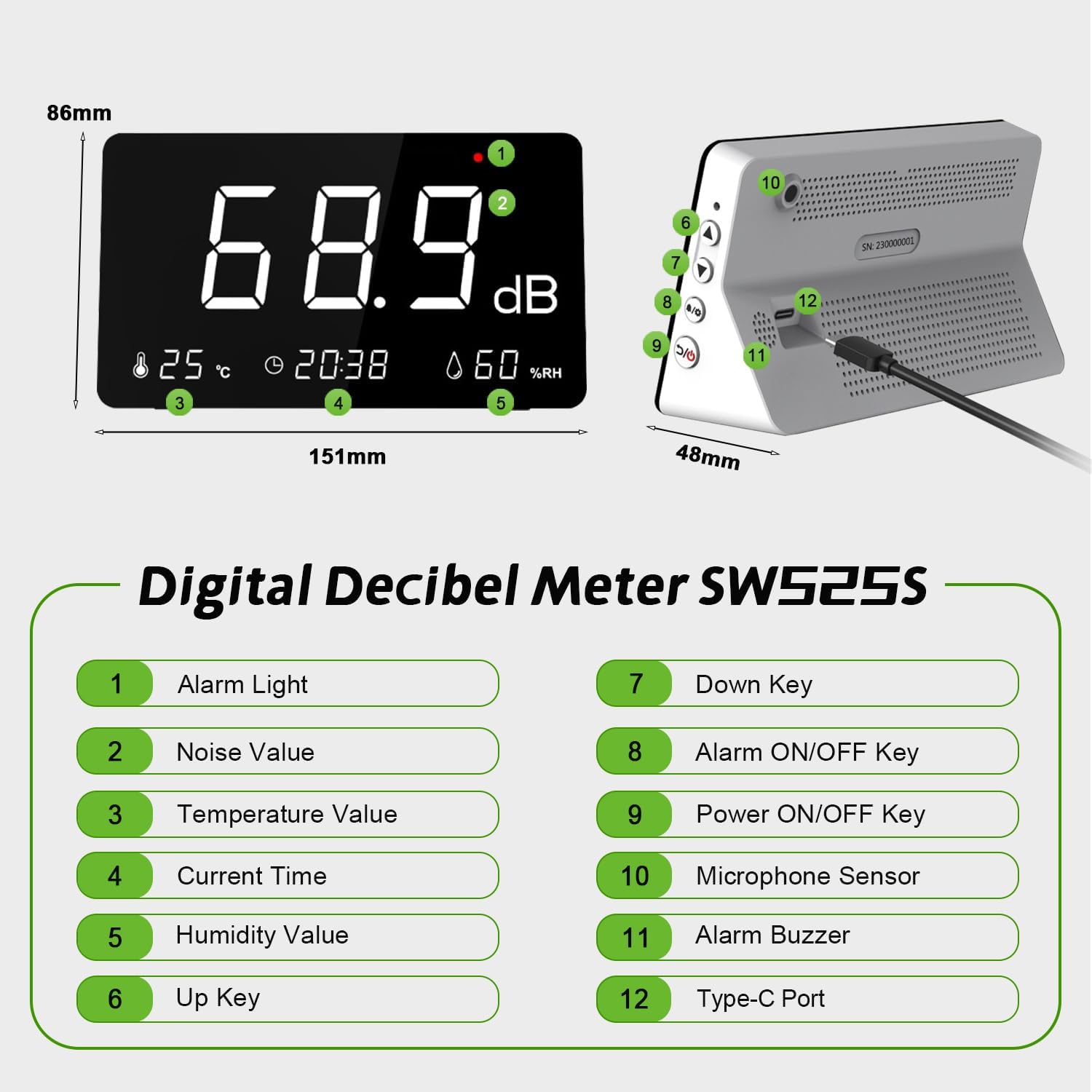
The LYCEBELL SW525S features a clear LED display and intuitive controls. Below is a diagram illustrating the main components and their functions.

Diagram of the LYCEBELL SW525S with numbered components and their functions.
Component Identification:
- Alarm Light: Indicates alarm status.
- Noise Value: Displays the current sound level in decibels (dB).
- Temperature Value: Shows the ambient temperature in Celsius (°C).
- Current Time: Displays the current time.
- Humidity Value: Shows the relative humidity (% RH).
- Up Key: Used for navigating menus and increasing values.
- Down Key: Used for navigating menus and decreasing values.
- Alarm ON/OFF Key: Activates or deactivates the alarm function. May also serve as a selection/confirm button in settings.
- Power ON/OFF Key: Turns the device on or off.
- Microphone Sensor: Detects sound levels.
- Alarm Buzzer: Emits an audible alarm sound.
- Type-C Port: For charging and data export.

The multi-function display provides real-time readings of noise, temperature, time, and humidity.
4. Setup
4.1 Charging the Device
The device is equipped with a 4000 mAh lithium battery. Before first use, fully charge the device. Connect the supplied USB Type-C cable to the device's Type-C port and a suitable USB power adapter (not included). The LED indicator will show the charging status. A full charge provides approximately 16 hours of continuous operation.
The device charges via a USB Type-C port, offering extended battery life.
4.2 Power On/Off
To power on the device, press and hold the Power ON/OFF Key until the display illuminates. To power off, press and hold the Power ON/OFF Key again until the display turns off.
4.3 Initial Settings (Time/Date)
Upon first use or after a factory reset, you may need to set the current time and date. Refer to the detailed instructions in the included user manual for specific steps on how to navigate the settings menu using the Up Key, Down Key, and Alarm ON/OFF Key (which often functions as a selection button).
5. Operating Instructions
5.1 Basic Noise Measurement
Once powered on, the device automatically begins measuring sound levels in real-time. The large numerical display shows the current noise value in decibels (dB). Ensure the microphone sensor is unobstructed and facing the direction of the sound source for accurate readings.
5.2 Alarm Function
The device features an adjustable alarm system. To activate or deactivate the alarm, press the Alarm ON/OFF Key. To set the alarm threshold (range 50-130 dB), use the Up Key and Down Key. When the measured noise level exceeds the set threshold, the Alarm Light will flash, and the Alarm Buzzer will emit an audible beep.

The device features a sound and light alarm that activates when noise levels exceed a set threshold.
5.3 Data Logging and Export
The LYCEBELL SW525S automatically records noise level data every 2 seconds, storing up to one year of measurements. To export this data for analysis:
- Connect the device to a computer using the provided USB Type-C cable.
- The device should be recognized as a storage device or require specific software for data retrieval.
- Refer to the comprehensive user manual for detailed instructions on accessing and exporting data, which may include specific software installation or driver requirements. Data can typically be exported in formats suitable for reporting and analysis.

The device supports automatic data logging and export to a computer for detailed analysis.
5.4 Multi-Parameter Display
In addition to noise levels, the LCD screen simultaneously displays the ambient temperature (°C), relative humidity (% RH), and the current time, providing a comprehensive overview of the environment.
6. Maintenance
6.1 Cleaning
Wipe the device's exterior with a soft, dry cloth. Do not use abrasive cleaners, solvents, or immerse the device in water. Ensure the microphone sensor is kept clean and free of dust or debris.
6.2 Battery Care
To prolong the life of the built-in lithium battery, avoid fully discharging it frequently. Charge the device regularly, especially if it will be stored for an extended period. Store the device in a cool, dry place when not in use.
7. Troubleshooting
- Device not turning on: Ensure the battery is sufficiently charged. Connect the device to a power source using the USB-C cable.
- Inaccurate readings: Verify that the microphone sensor is not obstructed. Avoid placing the device near strong electromagnetic fields or sources of vibration. While the device is pre-calibrated, professional recalibration may be required for highly sensitive or certified applications.
- Data export issues: Ensure the USB cable is securely connected to both the device and the computer. Try a different USB port or computer. If specific software is required for data transfer, ensure it is correctly installed and updated. Consult the full user manual for detailed software instructions.
- Alarm not working: Check if the alarm function is enabled via the Alarm ON/OFF Key and that the alarm threshold is set correctly within the 50-130 dB range.
8. Specifications
| Model | SW525S |
| Measurement Range | 30 – 130 dB |
| Accuracy | ±1.5 dB (A-weighted) |
| Frequency Response | 31.5 Hz – 8.5 kHz |
| Battery | 4000 mAh Lithium-ion |
| Operating Time | Approx. 16 hours (continuous) |
| Charging Port | USB Type-C |
| Dimensions (L x W x H) | 15.1 x 4.8 x 8.6 cm |
| Weight | 300 grams |
| Data Storage | Up to 1 year (2-second sampling rate) |
| Temperature Display Range | 0°C – 40°C |
| Humidity Display Range | 10% – 80% RH |
| Manufacturer | LYCEBELL |
9. Warranty
The LYCEBELL SW525S Digital Sound Level Meter is covered by a limited warranty. Please refer to the included warranty card for specific terms and conditions, including the warranty period, coverage details, and procedures for making a warranty claim. Keep your purchase receipt as proof of purchase.
10. Support
For further assistance, technical support, or to download any necessary software or updated user manuals, please visit the official LYCEBELL website. Contact information for customer service may also be provided on the warranty card or in the full user manual.