1. Introduction
This manual provides instructions for the AULCMEET BN59-01455A TM2360E Solar Voice Remote Control. This remote is designed as a replacement for various Samsung QLED and OLED Smart TV series, offering solar charging capabilities and voice control functionality. Please read this manual carefully before using the remote control.

Compatibility: This remote control is compatible with the following Samsung QLED Smart TV Series: Q60D, Q70D, Q72D, Q80D, QN900D, QN800D, QN90D, QN95D, QN85D, and OLED TV Series: S85D, S90D, S95D. It also supports specific models including QN75Q60DAFXZA, QN65QN85DBFXZA, QN65QN90DDFXZA, QN55QN90DAFXZA, QN85QN850DFXZA, QN83S90DAEXZA, QN75QN900DFXZA, QN50Q80DAFXZA, QN65QN800DFXZA, QN48S90DDEXZA, QN85QN85DBFXZA, QN77S95DAFXZA, QN55QE1DAFXZA, QN85Q60DDFXZA, QN85Q60DAFXZA, QN85Q72DDFXZA, QN55QN85DDFXZA, QN75QN800DFXZA, QN75QN85DDFXZA, QN85Q70DAFXZA, QN55S85DDEXZA, QN55QN85DBFXZA, QN55S85DAEXZA, QN65QN90DAFXZA, QN85QE1DAFXZA, QN75QNX1DAFXZA, QN50Q60DAFXZA, QN85QN95DAFXZA, QN50QN90DAFXZA, QN48S90DAEXZA, QN77S95DDFXZA, QN75QN90DDFXZA, QN77S85DDEXZA, QN75Q60DDFXZA, QN75Q70DAFXZA, QN85Q80DAFXZA, QN43Q60DDFXZA, QN65S95DDFXZA, QN75QN90DAFXZA, QN32Q60DAFXZA, QN55S95DAFXZA, QN70Q60DDFXZA, QN85QN90DAFXZA, QN75QN85DBFXZA, QN85QNX1DAFXZA, QN65Q80DDFXZA, QN55QNX1DAFXZA, QN32Q60DDFXZA, QN77S85DAEXZA, QN75QN95DAFXZA, QN75Q80DDFXZA, QN85QN90DDFXZA, QN75Q80DAFXZA, QN75Q72DDFXZA, QN55Q70DAFXZA, QN65QN850DFXZA, QN65S90DDFXZA, QN55S95DDFXZA, QN75QN850DFXZA, QN65QN85DDFXZA, QN65Q60DAFXZA, QN55Q60DAFXZA, QN55Q60DBFXZA, QN65Q80DAFXZA, QN77S90DAFXZA, QN85Q80DDFXZA, QN98QN90DAFXZA, QN65S85DAEXZA, QN55Q80DAFXZA, QN65QN95DAFXZA, QN55Q72DDFXZA, QN70Q60DAFXZA, QN85QN800DFXZA, QN65Q60DBFXZA, QN43Q60DAFXZA, QN83S90DDEXZA, QN77S90DDFXZA, QN65S90DAFXZA, QN75Q60DBFXZA, QN55Q80DDFXZA, QN65Q70DAFXZA, QN75QE1DAFXZA, QN85QN900DFXZA, QN55Q60DDFXZA, QN85QN85DDFXZA, QN55S90DAFXZA, QN65S95DAFXZA, QN55S90DDFXZA, QN42S90DAEXZA, QN65QNX1DAFXZA, QN65Q72DDFXZA, QN50Q60DDFXZA, QN65QN900DFXZA, LS32DM702UNXGO, LS32DG802SNXZA, LS43DM700UNXGO, LS43DM702UNXGO, QN55QN85DBFXZA, QN65QN900D, QN75QN900D, QN85QN900D, QE65QN900D.
2. Product Features
- Solar Charging: Equipped with a solar panel for convenient charging using ambient light.
- Voice Control: Integrated microphone for voice commands to your compatible Samsung Smart TV.
- Dedicated App Buttons: Quick access buttons for popular streaming services like Netflix, Prime Video, and Disney+.
- Durable Material: Constructed from ABS material for extended product life.
- Ergonomic Design: Provides a comfortable grip and sensitive button response.
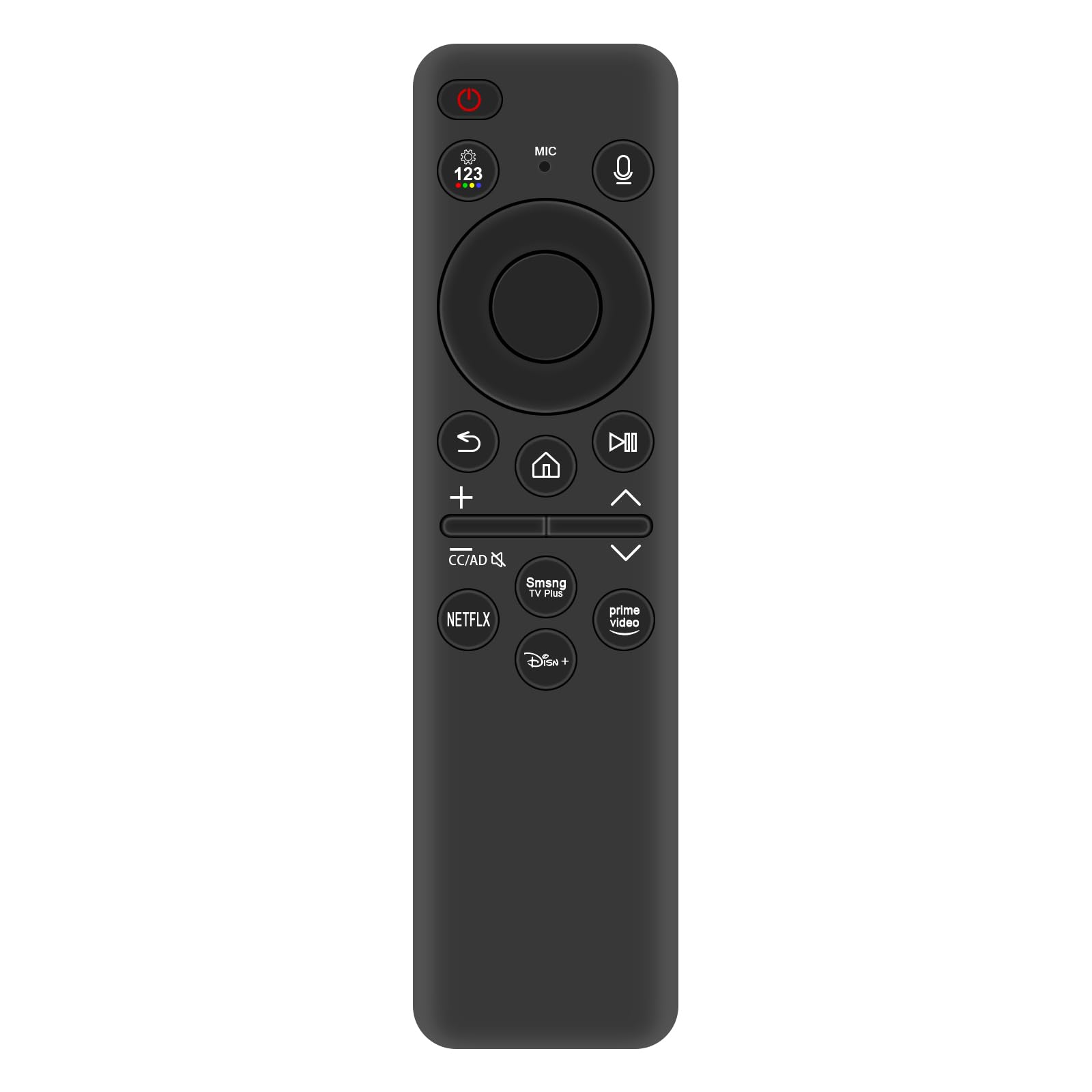

3. Setup
3.1 Powering the Remote
The remote control requires two (2) AA batteries for operation. Insert the batteries into the battery compartment, ensuring correct polarity (+/-). The remote also features a solar charging panel. For optimal performance, expose the solar panel to light regularly.
3.2 Initial Pairing with Your TV
To pair the remote control with your Samsung Smart TV:
- Ensure your TV is powered on.
- Point the remote control towards the TV.
- Press and hold the 'Return' and 'Play/Pause' buttons simultaneously for 3 seconds.
- A pairing message should appear on your TV screen, indicating successful connection.
- If pairing fails, ensure the remote has sufficient power and try again.
4. Operating Instructions
4.1 Button Functions

- Power Button (⏻): Turns the TV on or off.
- Voice Button (🎤): Activates the voice control feature. Press and hold to speak commands.
- Navigation Pad (Circular): Use the directional buttons (Up, Down, Left, Right) to navigate menus and content. The center button acts as 'Select' or 'Enter'.
- Return Button (↩): Returns to the previous screen or menu.
- Home Button (🏠): Accesses the Smart Hub or home screen of your TV.
- Play/Pause Button (⏯): Controls media playback.
- Volume Buttons (+ / -): Adjusts the TV volume.
- Channel Buttons (∧ / ∨): Changes TV channels.
- Netflix, Prime Video, Disney+ Buttons: Direct access to these streaming applications.
4.2 Using Voice Control
To use the voice control feature:
- Press and hold the Voice button (🎤) located near the top of the remote.
- Speak your command clearly into the microphone.
- Release the Voice button when you are finished speaking.

5. Maintenance
5.1 Charging the Remote
The remote control can be charged via its integrated solar panel or through a USB-C cable (not included). For solar charging, place the remote with the solar panel facing a light source. For USB-C charging, connect a compatible USB-C cable to the port on the remote and a power source.
5.2 Cleaning
To clean the remote control, use a soft, dry cloth. Do not use liquid cleaners, aerosols, or abrasive materials, as these may damage the remote's surface or internal components.
5.3 Storage
Store the remote control in a dry place away from direct sunlight and extreme temperatures when not in use for extended periods. Ensure the solar panel is exposed to light periodically to maintain charge.
6. Troubleshooting
If you encounter issues with your remote control, please refer to the following common problems and solutions:
- Remote Not Responding:
- Check battery levels. Replace AA batteries if necessary.
- Ensure the remote is sufficiently charged via solar panel or USB-C.
- Re-pair the remote with your TV (refer to Section 3.2).
- Ensure there are no obstructions between the remote and the TV's receiver.
- Voice Control Not Working:
- Ensure the remote is properly paired.
- Speak clearly and hold the Voice button while speaking.
- Check your TV's settings to ensure voice control is enabled.
- Remote Not Charging (Solar or USB-C):
- For solar charging, ensure the solar panel is exposed to adequate light.
- For USB-C charging, try a different USB-C cable and power adapter to rule out faulty accessories.
- If the remote does not power on or charge after troubleshooting, it may indicate a hardware issue.
7. Specifications
| Feature | Specification |
|---|---|
| Model Number | BN59-01455A TM2360E |
| Brand | AULCMEET |
| Product Dimensions | 5 x 1 x 0.5 inches (12.7 x 2.54 x 1.27 cm) |
| Item Weight | 1.9 ounces (53.86 grams) |
| Power Source | 2 Pcs AA Batteries, Solar Charging, USB-C Charging |
| Compatible Devices | Samsung QLED and OLED Smart TVs |
| Color | Black |

8. Warranty and Support
For warranty information or technical support, please refer to the product packaging or contact the manufacturer directly. Keep your purchase receipt as proof of purchase.


