
1. Introduction
Thank you for choosing the ZIUTY Wireless Earbuds Bluetooth Headphones Model A1. These earbuds are designed to provide a high-quality audio experience with convenience and durability. Featuring a long-lasting battery, an intuitive LED power display, IPX7 waterproof rating, deep bass stereo sound, and responsive touch controls, the Model A1 earbuds are suitable for various activities, from daily commutes to intense workouts.
This manual provides detailed instructions on how to set up, operate, maintain, and troubleshoot your earbuds to ensure optimal performance and longevity.
2. What's in the Box
Please check the package contents to ensure all items are present:
- A1 Wireless Earbuds x 1 pair
- Charging Case x 1
- Eartips (various sizes)
- USB Charging Cable x 1
- User Manual x 1
3. Setup
3.1 Initial Charging
Before first use, fully charge the earbuds and the charging case. Place the earbuds into the charging case. Connect the charging case to a 5V USB power adapter using the provided USB cable. The LED display on the charging case will show the battery level. A full charge typically takes approximately 1-2 hours.
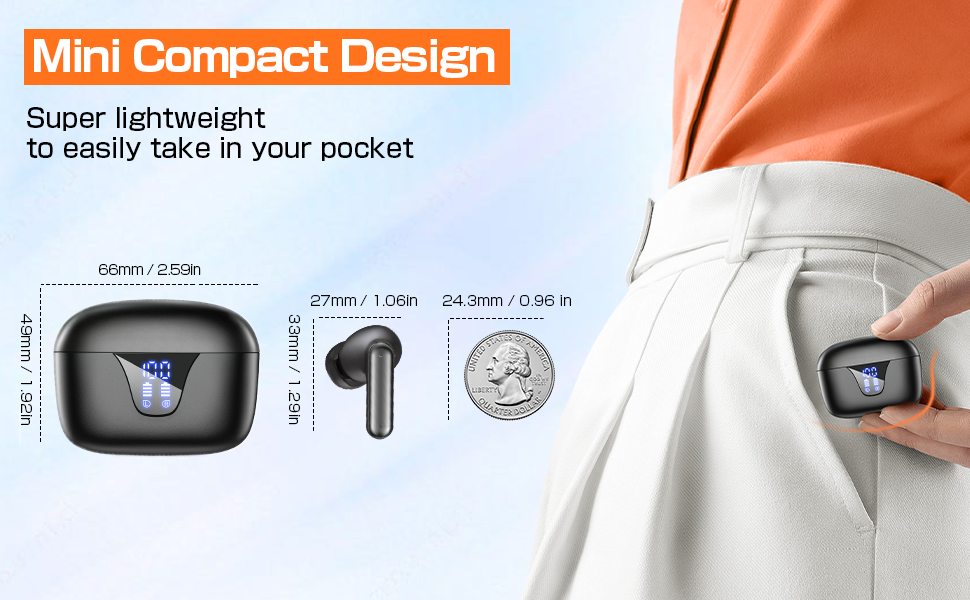
Image: ZIUTY Wireless Earbuds in their charging case, displaying the digital power levels for both the case and individual earbuds.
3.2 Wearing the Earbuds Correctly
For optimal sound quality and comfort, select the appropriate eartip size and ensure the earbuds are securely fitted in your ears.
- Replace the ear caps: Choose the ear caps that best fit your ear canal.
- Insert the earbuds: Gently insert the earbuds into your ears.
- Adjust for fit: Twist the earbuds slightly to adjust the ear wings so they fit firmly in the ear slot.
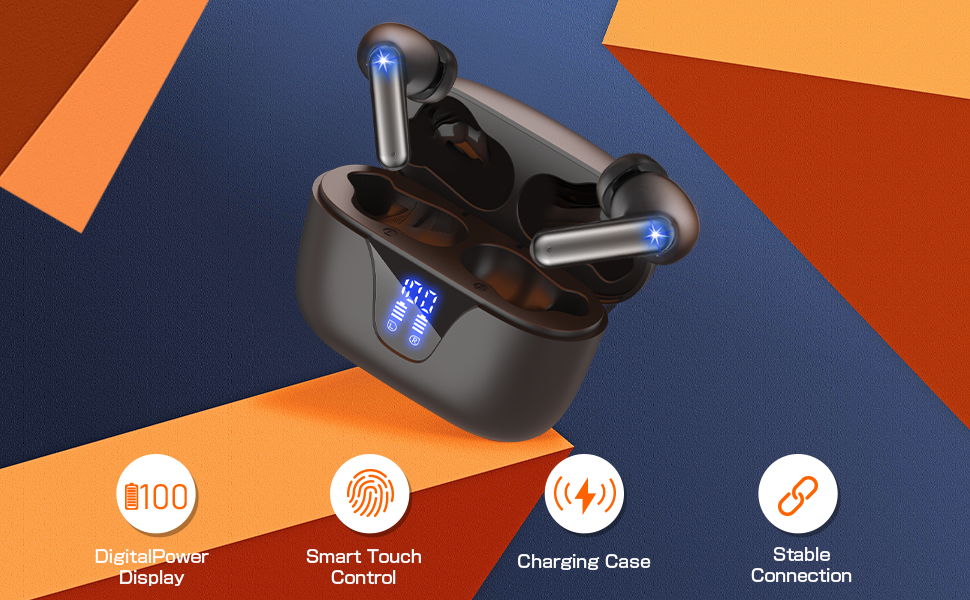
Image: A diagram illustrating the steps for correctly wearing the earbuds, including eartip selection and proper insertion into the ear canal for a secure and comfortable fit.
3.3 Bluetooth Pairing
Follow these steps to pair your earbuds with a Bluetooth-enabled device:
- Power On: Open the charging case, and the earbuds will automatically power on and enter pairing mode. The indicator lights on the earbuds will flash.
- Activate Bluetooth: On your device (e.g., smartphone, tablet), go to the Bluetooth settings and turn on Bluetooth.
- Select Device: Look for 'ZIUTY A1' in the list of available devices and select it to connect.
- Confirmation: Once connected, the earbud indicator lights will stop flashing, and you may hear an audible confirmation.
The earbuds will automatically reconnect to the last paired device when taken out of the case, if Bluetooth is enabled on the device.
4. Operating Instructions
The ZIUTY A1 earbuds feature intuitive touch controls on each earbud. Refer to the diagram below for specific functions:
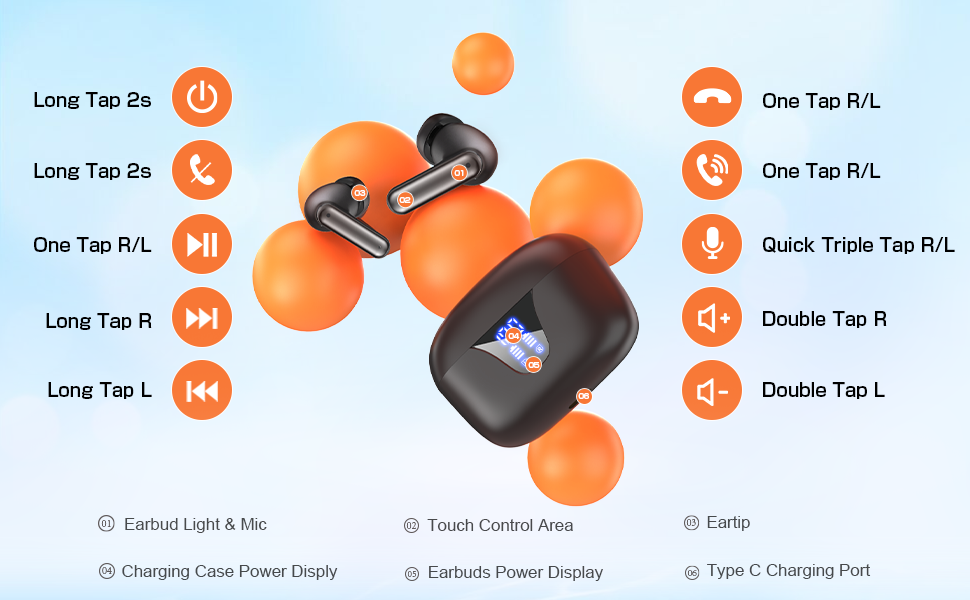
Image: A visual guide detailing the touch control functions for the ZIUTY A1 earbuds, including power, playback, call management, and volume adjustments.
- Power On/Off:
• Power On: Long tap either earbud for 2 seconds, or simply open the charging case.
• Power Off: Long tap either earbud for 2 seconds, or place them back into the charging case and close the lid. - Music Playback:
• Play/Pause: One tap on either the Left (L) or Right (R) earbud.
• Next Track: Long tap the Right (R) earbud.
• Previous Track: Long tap the Left (L) earbud. - Call Management:
• Answer/End Call: One tap on either the Left (L) or Right (R) earbud.
• Reject Call: Long tap either earbud for 2 seconds. - Volume Control:
• Volume Up: Double tap the Right (R) earbud.
• Volume Down: Double tap the Left (L) earbud. - Voice Assistant:
• Activate: Quick triple tap on either the Left (L) or Right (R) earbud.
5. Maintenance
5.1 Cleaning
Regular cleaning helps maintain sound quality and charging efficiency.
- Earbuds: Gently clean the charging contacts and the mesh of the ear tips with a dry cotton swab or a soft, dry cloth. If necessary, use a small amount of alcohol on a cotton pad to remove stubborn dirt.
- Charging Case: Wipe the charging case with a soft, dry cloth. Avoid using liquids near the charging ports.
5.2 Storage
When not in use, store the earbuds in their charging case to protect them from dust, damage, and to keep them charged.
5.3 Battery Care
To prolong battery life:
- Avoid fully discharging the battery frequently.
- Charge the earbuds and case regularly, even if not used for extended periods.
- Use a 5V adapter for charging the case to prevent battery damage.
6. Troubleshooting
If you encounter issues with your ZIUTY A1 earbuds, refer to the common problems and solutions below:

Image: A multi-panel diagram providing solutions for common issues such as incorrect wearing, volume problems, charging difficulties, and the recommendation to use a 5V adapter.
- No Sound or Low Volume:
• Ensure earbuds are properly seated in your ears. Adjust position to avoid accidentally touching the MFB button.
• Check the volume level on both your device and the earbuds.
• Clean the earbud mesh and charging contacts as described in the Maintenance section. Dust or debris can affect sound output. - Earbuds Not Charging:
• Ensure the earbuds are correctly placed in the charging case and the charging contacts are clean.
• Verify the charging cable and adapter are working correctly. Use a 5V adapter.
• Check the charging case battery level. - Connection Issues:
• Ensure Bluetooth is enabled on your device and the earbuds are within range (up to 15 meters).
• Try unpairing and re-pairing the earbuds with your device.
• Restart your device and the earbuds. - One Earbud Not Working:
• Place both earbuds back into the charging case, close the lid, and then take them out again to re-establish the connection between them.
7. Specifications
| Feature | Specification |
|---|---|
| Model Name | A1 |
| Connectivity Technology | Wireless (Bluetooth 5.3) |
| Bluetooth Range | 15 Meters |
| Battery Life | Up to 50 Hours (with charging case) |
| Water Resistance Level | IPX7 Waterproof |
| Noise Control | Sound Isolation |
| Control Type | Touch Control |
| Audio Driver Size | 14.2 Millimeters |
| Impedance | 32 Ohms |
| Material | Acrylonitrile Butadiene Styrene (ABS), Plastic, Silicone |
| Item Weight | 0.1 Kilograms (earbuds) |
8. Warranty & Support
8.1 Warranty Information
ZIUTY products are typically covered by a limited warranty against manufacturing defects from the date of purchase. Please refer to the product packaging or the seller's policy for specific warranty terms and duration. Keep your proof of purchase for warranty claims.
8.2 Customer Support
For any questions, technical assistance, or warranty claims regarding your ZIUTY Wireless Earbuds Model A1, please contact the seller directly through the Amazon platform. They will be able to provide prompt support and guidance.
You can usually find seller contact information on the product page or in your Amazon order history.
© 2025 ZIUTY. All rights reserved.

