
Important Safety Information
Please read all instructions carefully before assembly and use. Retain this manual for future reference.
- Always assemble the nightstands using the provided hardware to ensure stability.
- Keep the nightstands away from high-traffic areas to prevent accidental bumps.
- Secure the nightstands to the wall using the anti-tip design feature if necessary, especially in households with children, to prevent tip-overs.
- Ensure all electrical connections for the charging station and LED light are properly secured and not overloaded.
- Do not place hot items directly on the surface without protection.
Setup Instructions
This nightstand is designed for easy assembly. All necessary hardware and tools are included.
Unpacking and Preparation
- Carefully unpack all components and hardware from the packaging.
- Verify that all parts listed in the assembly guide are present. If any parts are missing or damaged, contact customer support.
- Lay out all components on a clean, soft surface (e.g., a blanket or cardboard) to prevent scratches during assembly.
Assembly Steps
- Follow the step-by-step instructions provided in the included assembly guide.
- Attach the main frame components using the designated screws and connectors. Do not overtighten.
- Install the drawer slides and assemble the drawer according to the guide.
- Secure the back panel.
- Install the LED strip light in the designated area, ensuring the wiring is neatly tucked away.
- Connect the charging station unit to the pre-drilled opening on the top surface.
- Attach the anti-tip hardware to the back of the nightstand and to a wall stud, if desired, for added stability.

Image: Detailed dimensions of the nightstand and its drawer for planning placement.
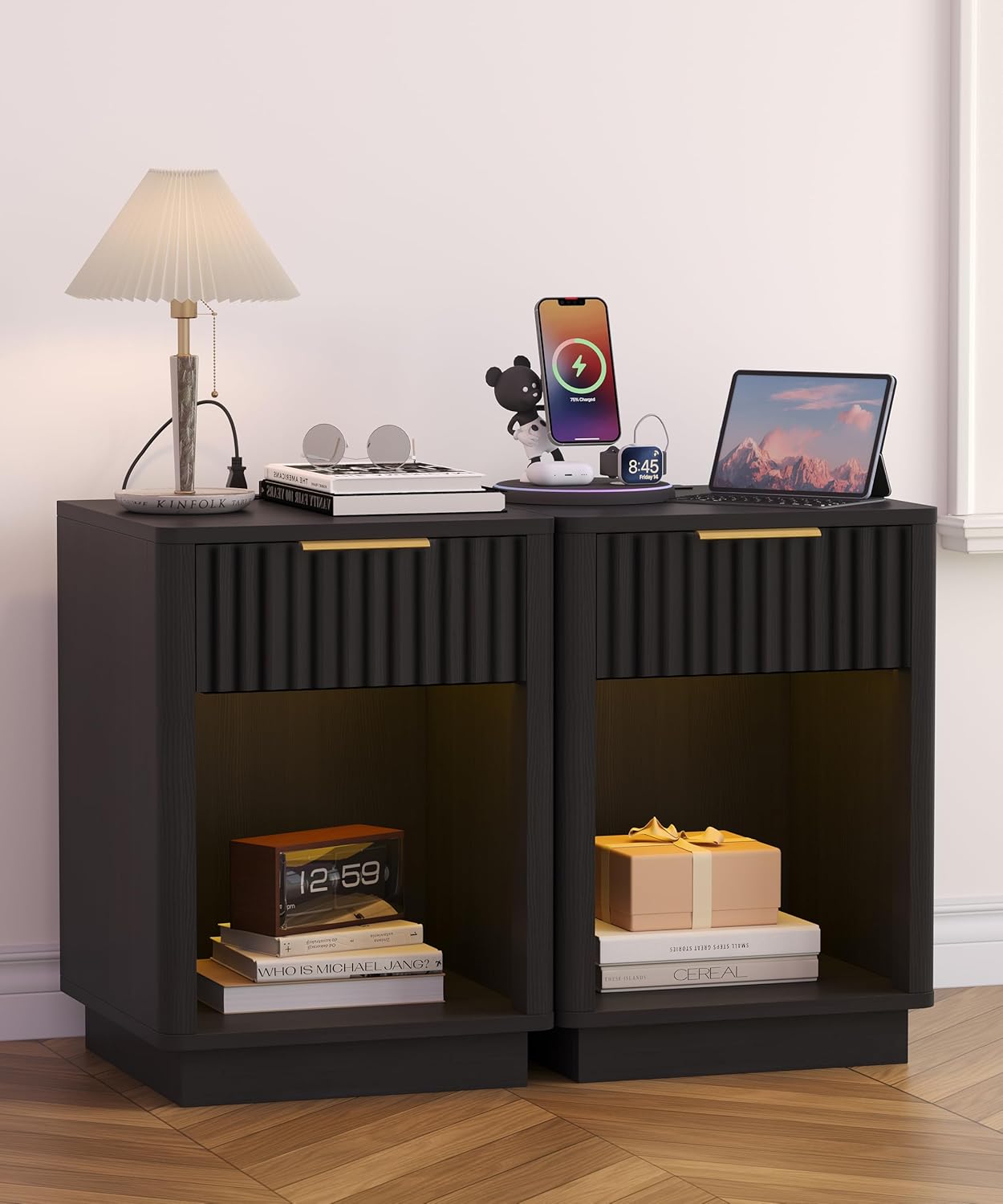
Image: Two assembled nightstands showcasing their design and functionality in a bedroom.
Operating Instructions
Charging Station
- Plug the nightstand's power cord into a standard 120V/12A wall outlet.
- The integrated charging station features 2 standard power outlets and 2 USB ports (5V/2A).
- Connect your electronic devices (phones, tablets, lamps, etc.) to the appropriate ports for charging or power.
- Avoid overloading the outlets. Refer to the power ratings of your devices.

Image: The integrated charging station with power outlets and USB ports in use.
LED Light Operation
- The nightstand includes a built-in LED strip light.
- The LED light can be controlled via a switch or remote (if included) to change colors, dynamic modes, music modes, mic modes, and set timing functions. Refer to the specific LED controller instructions for detailed operation.
- Use the LED light to create ambient lighting in your bedroom or living room.

Image: The nightstand with its RGB LED light illuminated, demonstrating color options.
Drawer Usage
- The nightstand features a smooth-gliding storage drawer.
- Pull the golden handle to open the drawer. Push to close.
- Do not force the drawer if it feels stuck. Ensure nothing is obstructing the slides.

Image: The storage drawer, partially open, highlighting its capacity and smooth operation.
Maintenance
Proper care and maintenance will extend the life and appearance of your nightstand.
- Cleaning: Wipe surfaces with a soft, damp cloth. Avoid harsh chemicals or abrasive cleaners, which can damage the finish.
- Dusting: Regularly dust with a dry, soft cloth.
- Spills: Blot spills immediately with a clean, dry cloth.
- Hardware: Periodically check and tighten all screws and fasteners to ensure stability.
- Electrical Components: Ensure the charging station and LED light connections remain dry and free from dust. Do not attempt to repair electrical components yourself.
Troubleshooting
If you encounter any issues, refer to the following common solutions:
| Problem | Possible Cause | Solution |
|---|---|---|
| LED light not working | Loose connection, power outage, faulty LED strip | Check all power connections. Ensure the main power cord is plugged in. If still not working, contact customer support. |
| Charging station not providing power | Nightstand not plugged in, circuit breaker tripped, device cable faulty | Verify the nightstand is plugged into a live outlet. Check your home's circuit breaker. Try a different charging cable or device. |
| Drawer is stiff or stuck | Obstruction in slides, misaligned drawer | Remove any items that might be blocking the drawer. Gently push and pull to realign. Check drawer slide installation. |
| Nightstand feels wobbly | Loose hardware, uneven floor | Tighten all assembly screws. Place shims under the legs if the floor is uneven. Ensure anti-tip kit is installed if applicable. |
Specifications
| Feature | Detail |
|---|---|
| Brand | Akxomel |
| Model Number | 103D |
| Product Dimensions | 15"D x 15.7"W x 22.6"H (38cm D x 40cm W x 57.5cm H) |
| Item Weight | 41.8 pounds |
| Frame Material | Engineered Wood |
| Color | Black |
| Number of Drawers | 1 |
| Charging Station | 2 Power Outlets (120V/12A), 2 USB Ports (5V/2A) |
| Power Cord Length | 4.9 feet |
| LED Light | RGB with Dynamic, Music, Mic Modes, and Timing Function |
| Included Components | Assembly Guide, Charging Station, Installation Tool |
Warranty Information
Akxomel products are manufactured with quality and care. This product comes with a standard manufacturer's warranty against defects in materials and workmanship under normal use. Please refer to the warranty card included in your packaging for specific terms, conditions, and duration. Keep your proof of purchase for warranty claims.
Customer Support
For any questions, assistance with assembly, missing parts, or troubleshooting, please contact Akxomel customer support. Our team is available to help you.
- Online Support: Visit the official Akxomel website for FAQs and support resources.
- Email: Refer to your product packaging or the Akxomel website for customer service email contact.
- Phone: Refer to your product packaging or the Akxomel website for customer service phone number.