
AXIAOLIFH ZL02D
AXIAOLIFH ZL02D Smart Watch User Manual
Model: ZL02 / ZL02D
1. Introduction
Thank you for choosing the AXIAOLIFH ZL02D Smart Watch. This manual provides detailed instructions on how to set up, operate, and maintain your new smartwatch. Please read this manual carefully before using the device to ensure proper functionality and a satisfying user experience.
The ZL02D Smart Watch is designed to be a versatile companion for your daily life, offering features such as heart rate monitoring, blood pressure measurement, sleep tracking, smart notifications, and various sports modes, all within a sleek, lightweight, and waterproof design.
2. Product Overview

The ZL02D Smart Watch features a round dial with a clear display and a comfortable silicone strap.

Experience a stylish and comfortable wear with the ZL02D's modern design, available in multiple colors.

The watch boasts an ultra-thin body and exquisite craftsmanship, ensuring a premium feel.

Designed for a super clear and non-feeling wearing experience, thanks to its lightweight and flexible silicone strap.
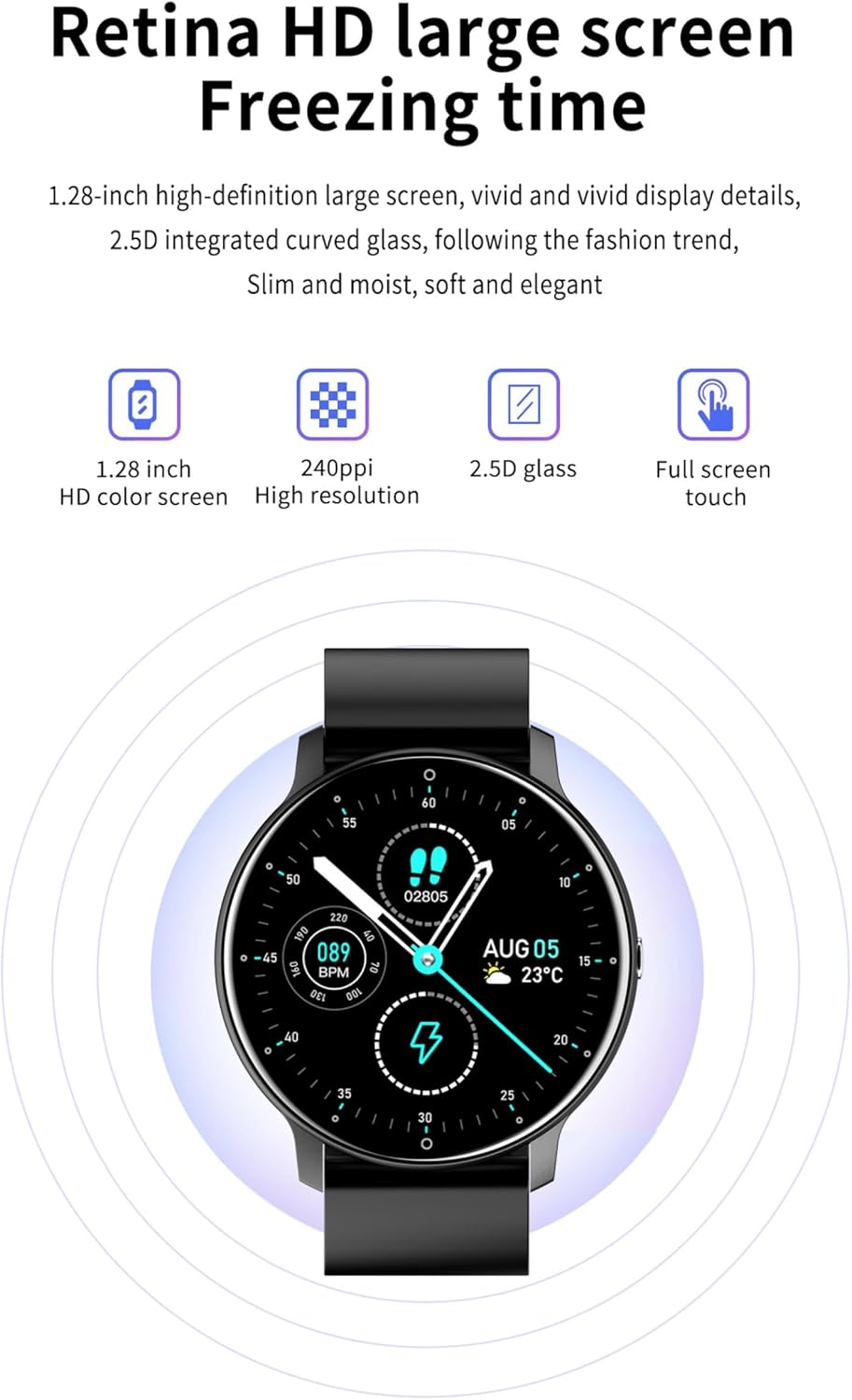
Equipped with a 1.28-inch high-definition large screen and 2.5D curved glass for vivid display details and a sleek look.
3. Setup
3.1 Charging the Device
Before first use, please fully charge your smartwatch.
- Connect the charging cable to the charging contacts on the back of the watch.
- Plug the USB end of the cable into a standard USB power adapter (5V/1A recommended) or a computer's USB port.
- The watch screen will indicate charging status. A full charge typically takes about 2-3 hours.
3.2 App Installation and Pairing
The ZL02D Smart Watch is compatible with Android devices. To unlock its full potential, download and install the companion app.
- Download the App: Search for "DaFit" in the Google Play Store on your Android smartphone and install it.
- Enable Bluetooth: Ensure Bluetooth is enabled on your smartphone.
- Pairing: Open the DaFit app, navigate to the device section, and search for your ZL02D watch. Select your watch from the list to pair. Follow any on-screen prompts to complete the pairing process.
- Permissions: Grant necessary permissions to the app for features like notifications, health data synchronization, etc.
4. Operating Instructions
4.1 Basic Navigation
- Touch Screen: Swipe left/right to navigate between different functions and screens. Swipe up/down to access quick settings or notifications.
- Side Button: Press the side button to wake up the screen, return to the home screen, or access the main menu.
4.2 Health Monitoring
The ZL02D Smart Watch can monitor various health indicators. Please note: Measurement data is for reference only and cannot be used as medical data.
- Heart Rate: Access the heart rate function on the watch to measure your current heart rate. Data will synchronize with the DaFit app.
- Blood Pressure: Access the blood pressure function to take a measurement. Ensure the watch is worn correctly for accurate readings.
- Sleep Tracking: Wear the watch to bed, and it will automatically track your sleep patterns, including deep sleep, light sleep, and awake times. View detailed reports in the DaFit app.
4.3 Smart Features
- Smart Reminders/Notifications: Once paired with your smartphone, the watch can receive notifications for calls, messages, and app alerts.
- Bluetooth Call: The watch supports Bluetooth calls. You can answer or reject incoming calls directly from your wrist.

Conveniently manage incoming calls directly from your ZL02D smartwatch.
4.4 Sports Modes
The watch includes various sports modes to track your activities. Select the desired sport mode before starting your workout to record data such as steps, distance, calories burned, and heart rate during exercise.
4.5 Weather Forecast
Stay informed about the weather directly from your wrist.

Your personal weather steward, providing real-time weather conditions for your convenience.
5. Maintenance
5.1 Cleaning
- Regularly clean your watch and strap to prevent skin irritation and maintain hygiene.
- Wipe the watch screen and body with a soft, lint-free cloth. If necessary, dampen the cloth slightly with water.
- Do not use harsh chemicals, abrasive cleaners, or solvents.
5.2 Water Resistance
The ZL02D Smart Watch features an IP67 professional waterproof design.

IP67 professional waterproof design means splashing water and washing hands will not affect wearing, providing worry-free use.
- It is resistant to splashes, rain, and brief immersion in water (up to 1 meter for 30 minutes).
- Avoid wearing the watch during hot showers, sauna, or diving, as steam and high water pressure can compromise the seal.
- After contact with water, especially saltwater, dry the watch thoroughly.
6. Troubleshooting
| Problem | Solution |
|---|---|
| Watch does not turn on | Ensure the watch is fully charged. If it still doesn't turn on, try resetting it by pressing and holding the side button for 10-15 seconds. |
| Cannot pair with phone | Make sure Bluetooth is enabled on your phone and the watch is within range. Restart both the watch and phone. Ensure the DaFit app has Bluetooth permissions. |
| Inaccurate health data | Ensure the watch is worn snugly on your wrist, about one finger's width from your wrist bone. Avoid excessive movement during measurement. Remember, data is for reference only. |
| Notifications not received | Check if the watch is connected to the app. Ensure notification permissions are granted to the DaFit app in your phone's settings. Verify that app notifications are enabled within the DaFit app. |
| Short battery life | Reduce screen brightness, turn off unnecessary features like continuous heart rate monitoring if not needed, and limit frequent screen wake-ups. |
7. Specifications

Detailed dimensions and key parameters of the ZL02D Smart Watch.
| Feature | Detail |
|---|---|
| Model | ZL02 / ZL02D |
| Display | 1.28-inch HD Color Screen, 240*240px, 2.5D Curved Glass |
| Operation Mode | Full Touch Screen + Side Button |
| CPU | GR5515 |
| Connectivity | Bluetooth 4.0 (Support Bluetooth 5.0) |
| Waterproof Rating | IP67 Professional Waterproof |
| Battery Capacity | 220 mAh (200 mAh in some specifications) |
| Strap Material | Silicone Strap |
| Compatible Platform | Android 5.0+ (Operating System: Android Wear 2.9) |
| Memory Storage | 128 MB |
| Product Size | 45.5mm (Diameter) x 10mm (Thickness) |
| Weight | Approx. 35g |
8. Warranty and Support
For warranty information and customer support, please refer to the documentation provided with your purchase or contact the seller directly. Keep your purchase receipt as proof of purchase.
Manufacturer: AXIAOLIFH
Ask a question about this manual
Ask about setup, troubleshooting, compatibility, parts, safety, or missing instructions. Manuals+ will review the question and use this page’s manual context to help answer it.