
KALINCO IDW25
KALINCO Smart Watch IDW25 User Manual
Model: IDW25
1. Introduction
The KALINCO IDW25 Smart Watch is a versatile fitness tracker designed for daily use, offering comprehensive health monitoring, smart communication features, and extensive sports tracking capabilities. This manual provides essential information for setting up, operating, and maintaining your device.
What's in the Box
- KALINCO IDW25 Smart Watch (44mm case, 1.83" HD screen)
- Rose-pink Metal Strap
- Pink Silicone Strap
- USB Charging Cable
- Operation Manual

2. Setup Guide
2.1 Initial Activation and App Connection
To activate your KALINCO IDW25 Smart Watch and connect it to your smartphone, follow these steps:
- Charge the Watch: Plug in the charging cable to a USB power source and align the magnetic contacts with the charging port on the back of the watch. Ensure it connects securely. The watch will activate once charging begins.
- Download the App: Search for and download the 'VeryFit' app from your smartphone's app store (compatible with Android 6.0+ and iOS 9.0+).
- Enable Bluetooth: Turn on Bluetooth on your smartphone.
- Pair the Device: Open the VeryFit app, navigate to 'Device' -> 'Add Device' -> 'Watch/bracelet' -> 'IDW25'. Follow the on-screen prompts to complete the pairing process.
2.2 Basic Information Settings
After successful pairing, the app will guide you to set up your basic information and preferences:
- Personal Data: Enter your gender, birth date, height, and weight to ensure accurate health and fitness tracking.
- Goals: Set your desired fitness goals, such as daily step count, water intake, and target weight.
- Language & Unit: Select your preferred language and measurement units (e.g., metric or imperial).

3. Operating Your Smartwatch
3.1 Making and Answering Calls
The KALINCO IDW25 Smart Watch allows you to make and answer calls directly from your wrist when connected to your smartphone via Bluetooth.
- Enable Call Function: Ensure the call function is enabled in the VeryFit app settings.
- Sync Contacts: Sync up to 20 frequent contacts from your phone to the watch via the app ('Device' -> 'Calls' -> 'Call Alert' -> 'Frequent Contacts' -> 'Add').
- Make a Call: Press the side button twice to enter the menu, select 'Phone', then choose from 'Call History', 'Frequent Contacts', or 'Dialpad' to initiate a call.
- Answer/Reject Call: When an incoming call is received, you can answer or reject it directly on the watch screen.

3.2 Message Notifications
Stay connected by receiving message notifications directly on your smartwatch. You can customize which app notifications appear on your watch.
- Enable Notifications: In your phone's Bluetooth settings, ensure 'Share System Notifications' is turned on for your IDW25 device.
- App Notifications: In the VeryFit app, go to 'Device' -> 'Notifications'. Turn on 'Red dot mark' and enable notifications for desired apps (e.g., SMS, Calendar, Emails, WhatsApp, Facebook, Instagram).
- View Messages: Messages will appear on your watch screen. A red dot on the watch homepage indicates unread messages.
Note: The smartwatch supports receiving notifications but does not allow replying to text messages directly.

3.3 Alexa Voice Assistant
The KALINCO IDW25 Smart Watch features built-in Alexa, allowing you to perform tasks hands-free using voice commands.
- Activate Alexa: Log into your Amazon account within the VeryFit app to enable Alexa functionality on your watch.
- Voice Commands: Use your voice to set alarms, check the weather, control smart home devices, and more.

3.4 Health Monitoring
The smartwatch provides comprehensive health monitoring features to help you stay informed about your well-being.
24/7 Health Management
- Monitors heart rate, stress levels, sleep patterns, and breathing quality continuously.

One-Tap Health Measurement
- Measure heart rate, SpO2 (blood oxygen), and stress levels simultaneously with a single tap. Automatic monitoring can be enabled in the VeryFit app.

Sleep Tracking
- Provides personalized analysis of your sleep cycles (awake, REM, light, deep sleep) and offers sleep aid music for improved rest.

Women's Health Tracking
- Features dedicated menstrual cycle reminders and wellness management tools.

Smart Health Reminders
- Receive gentle reminders for hand-washing, drinking water, and walking to stay hydrated and active.

3.5 Sports Modes and Activity Tracking
The smartwatch offers over 100 sports modes to accurately track your workouts and daily activity.
- 100+ Sports Modes: Covers a wide range of activities including running, swimming, yoga, and more. Modes are customizable via the app.
- Real-time Data: Displays real-time data such as calories burned, distance, and heart rate during workouts.
- Accurate Tracking: For precise fitness data, ensure you walk 30+ consecutive steps to activate effective workout recording. Movements under 30 steps may not be logged.


3.6 Water Resistance
The KALINCO IDW25 Smart Watch is IP68 waterproof, making it suitable for daily use and water activities.
- Usage: Wear it confidently for swimming, in rain, or during daily activities.
- Drain Tech: After water exposure, tap the drainage icon on the watch to protect it.
- Limitations: Avoid hot baths, saunas, and diving to prevent damage.

3.7 Battery Life
The smartwatch is designed for extended battery performance.
- Charging Time: Approximately 2 hours for a full charge.
- Usage Time: Up to 7 days with typical use.
- Power Saving Mode: Up to 20 days.
- Standby Time: Up to 30 days.

3.8 Customization
Personalize your smartwatch to match your style and preferences.
- Watch Faces: Access over 100 watch faces through the VeryFit app. You can also upload custom images to create your own unique watch face.
- Interchangeable Straps: The watch comes with two interchangeable straps (rose-pink metal and pink silicone) to suit different occasions and activities.


3.9 Other Functions
The smartwatch includes several other useful tools:
- Drinking Reminder: Get alerts to maintain adequate hydration.
- Do-Not-Disturb Mode: Silence notifications during specific times.
- Music Control: Control music playback on your phone (no audio playback on watch).
- Find My Phone: Locate your misplaced smartphone.
- Weather Push: Receive real-time weather updates.
- Alarm: Set alarms directly from your wrist.
- Timer & Stopwatch: Utilize built-in timing functions.
- Remote Camera Control: Trigger your phone's camera remotely.
- Wrist-Flip to Wake: Raise your wrist to activate the screen.
- Brightness Adjustment: Customize screen brightness.
- Breathe Training: Guided breathing exercises for relaxation.

4. Maintenance and Care
Proper maintenance ensures the longevity and optimal performance of your KALINCO IDW25 Smart Watch.
4.1 General Care
- Cleaning: Regularly clean the watch screen and straps with a soft, damp cloth. Avoid harsh chemicals.
- Storage: Store the watch in a cool, dry place when not in use.
- Avoid Extreme Conditions: Do not expose the watch to extreme temperatures or direct sunlight for prolonged periods.
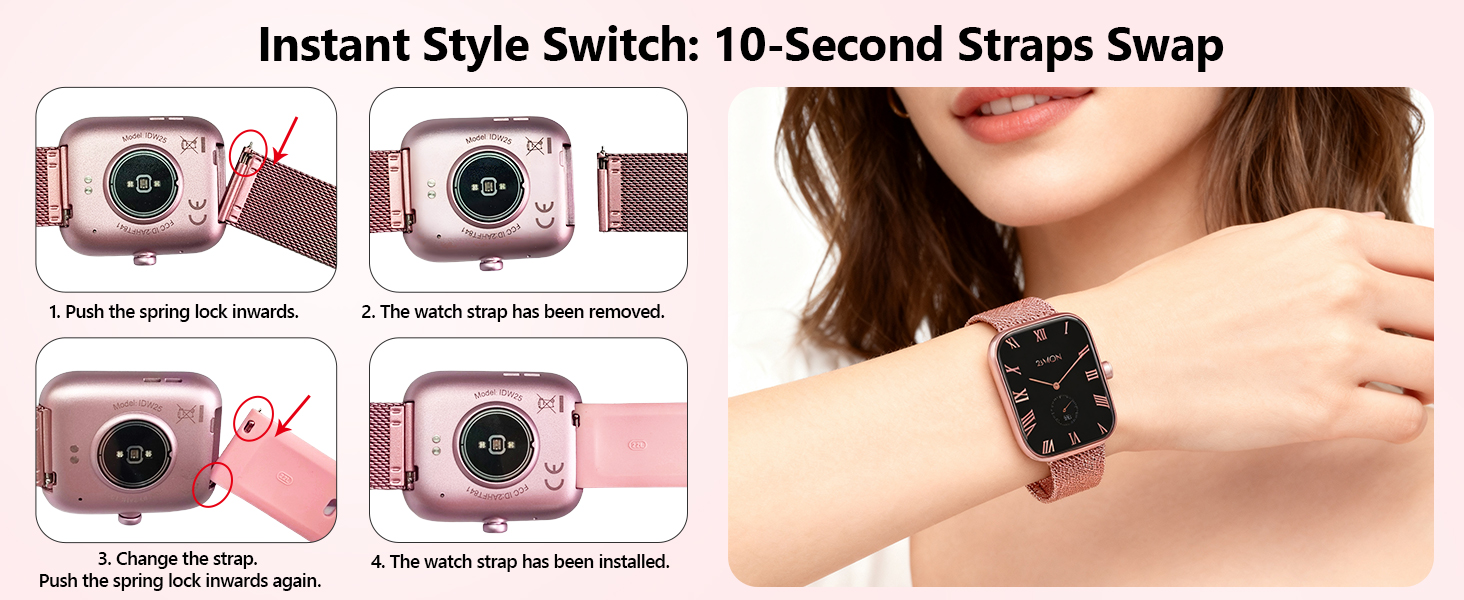
4.2 Changing Watch Bands
The watch bands are easily interchangeable to customize your look.
- Remove Band: Push the spring lock inwards on the underside of the watch to release the current band.
- Attach New Band: Align the new band with the watch lugs and push the spring lock inwards. Slide the band into place until the spring lock clicks securely.
5. Troubleshooting
If you encounter issues with your smartwatch, refer to the following common solutions:
- Bluetooth Connection Issues: If the watch frequently disconnects from Bluetooth, ensure the VeryFit app is running in the background and has necessary permissions. Restarting both the watch and phone, then re-pairing, may resolve the issue.
- Inaccurate Fitness Tracking: For precise step tracking, ensure continuous movement of at least 30 steps. Short, intermittent movements may not be recorded.
- Notifications Not Received: Verify that 'Share System Notifications' is enabled in your phone's Bluetooth settings for the IDW25. Also, check the VeryFit app's notification management to ensure specific app notifications are turned on.
- Weather Forecast Not Updating: If the weather forecast is not syncing, check the VeryFit app to ensure it has location permissions and is properly connected to the watch. Re-syncing the app may be necessary.
- Call Function Glitches (e.g., Unknown Caller): Ensure your contacts are properly synced to the watch via the VeryFit app. If issues persist, try re-syncing contacts or restarting the watch and phone.
- Screen Wake Gesture Not Working: Check the watch settings for 'Wrist-Flip to Wake' and ensure it is enabled. Adjust sensitivity if available.
6. Product Specifications
| Feature | Specification |
|---|---|
| Brand | KALINCO |
| Model Number | IDW25 (abb122bd-63d2-4471-aa70-3608ec2a7e00) |
| Operating System | iOS & Android |
| Compatible Phone Models | iOS 9.0+ and Android 6.0+ devices |
| Screen Size | 1.83 Inches |
| Resolution | 240 x 284 |
| Display Type | LCD |
| Connectivity Technology | Bluetooth |
| Special Features | Alexa Built-in, Make/Answer Calls, Heart Rate/Stress/Sleep Monitoring, 100+ Sports Modes |
| Water Resistance Level | IP68 Waterproof (1.5 Meters) |
| Battery Capacity | 300 Milliamp Hours |
| Battery Charge Time | 2 Hours |
| Item Weight | 78 Grams |
| Item Dimensions | 9.88 x 1.65 x 0.47 inches |
| Band Material Type | Metal, Silicone |
7. Warranty and Support
7.1 Purchase Quality Assurance
KALINCO is committed to quality. Each item has a unique code that is verified before shipping.
- Quality Commitment: Ensured product quality.
- 1-Year Quality Assurance: Your purchase is covered by a 1-year quality assurance.
7.2 Customer Service
For any questions or assistance, KALINCO offers 24/7 online customer service. To access support, log into your Amazon account, click 'Your Order', and find the watch order for help.

Related documentsIDW25


Ask a question about this manual
Ask about setup, troubleshooting, compatibility, parts, safety, or missing instructions. Manuals+ will review the question and use this page’s manual context to help answer it.