
SHARE SUNSHINE M109
SHARE SUNSHINE Wireless Mini Bluetooth Mouse with TF Card Reader
Model: M109
Your comprehensive guide to setup, operation, and maintenance.
Product Overview
The SHARE SUNSHINE Wireless Mini Bluetooth Mouse (Model M109) is a compact and versatile peripheral designed for portability and efficiency. It features Bluetooth 5.1 connectivity, a built-in TF card reader, and silent click switches, making it suitable for various computing environments.
- Mini Bluetooth Mouse: Offers high-speed performance with a 3000FPS refresh rate and a lightweight 27g design. Connects via Bluetooth 5.1 for reliable operation.
- TF Card Functionality: Includes a built-in TF card reader supporting up to 2TB, with read/write speeds of 20MB/s for direct file transfers.
- Silent Operation: Features silent switches for a quiet clicking experience, ideal for shared spaces. Designed for durability with a lifespan of up to 3 million clicks.
- Wide Compatibility: Universally compatible with Windows, MacOS, Linux, iOS, Android, and other Bluetooth-enabled devices.
- Portable and Lightweight: Weighing only 27g and measuring 7.8cm in length, it is ultra-portable and designed for small hands or mobile work scenarios.
Setup Instructions
- Charging the Mouse:
Connect the included USB-C cable to the charging port located at the front of the mouse and the other end to a power source. The mouse has a built-in rechargeable battery. A full charge takes approximately 2 to 3 hours and provides over 30 hours of runtime.

Image: The SHARE SUNSHINE Wireless Mini Bluetooth Mouse connected to a USB-C cable for charging.
- Powering On/Off:
Locate the ON/OFF switch on the underside of the mouse. Slide the switch to the 'ON' position to power on the device.
- Bluetooth Pairing:
With the mouse powered on, press and hold the Bluetooth pairing button (often labeled with a Bluetooth icon) on the underside of the mouse for approximately 5 seconds until the indicator light begins to flash, indicating it is in pairing mode.
On your device (laptop, tablet, phone), navigate to Bluetooth settings and select 'BT5.1 Mouse' or 'Wireless Mouse M109' from the list of available devices to connect.
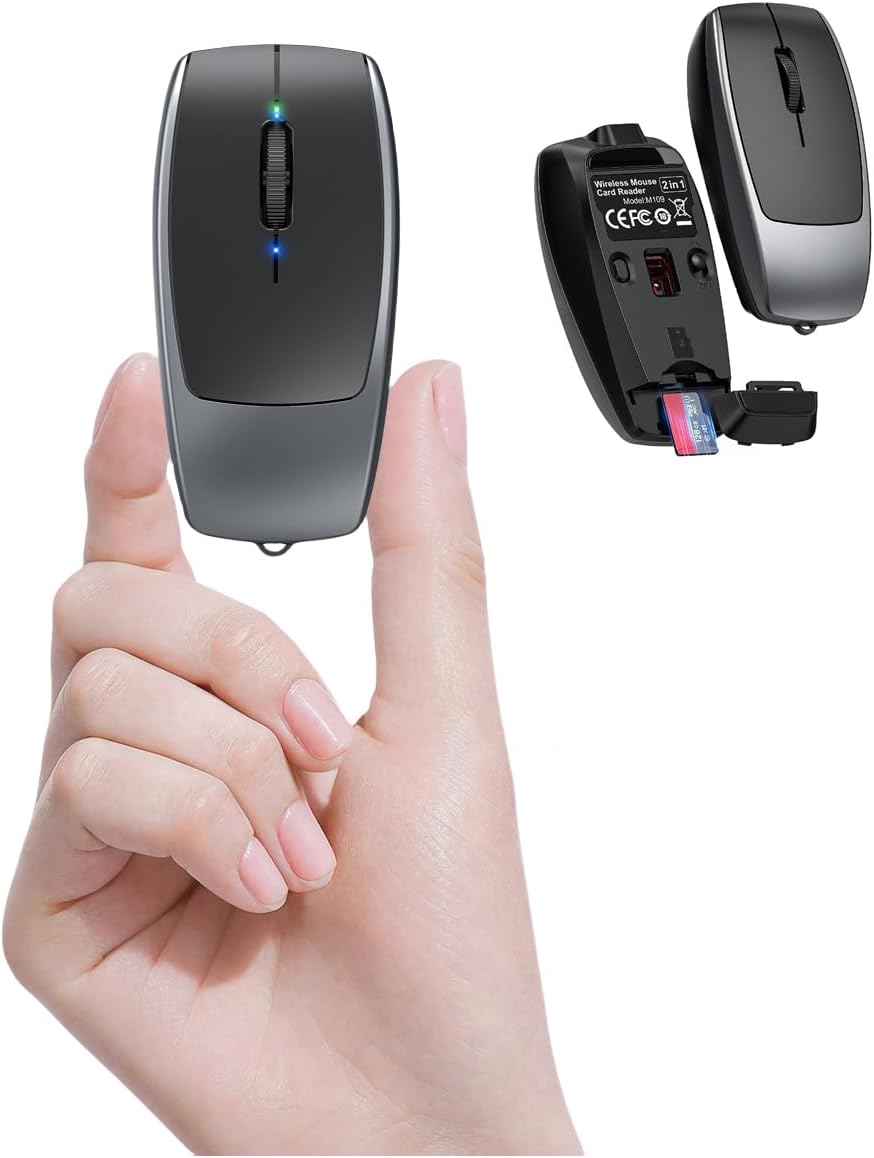
Image: The compact SHARE SUNSHINE Wireless Mini Bluetooth Mouse held between two fingers, illustrating its small form factor.
- Inserting a TF Card:
Open the TF card slot cover on the underside of the mouse. Gently insert a TF (Micro SD) card into the slot until it clicks into place. The mouse supports cards up to 2TB.

Image: The bottom of the SHARE SUNSHINE Wireless Mini Bluetooth Mouse with the TF card slot open, ready for card insertion.
Operating Instructions
- Basic Mouse Functions:
Use the left and right buttons for clicking and the scroll wheel for navigation. The mouse features silent click switches for a quiet user experience.
- Using the TF Card Reader:
To access data on the inserted TF card, connect the mouse to your computer or compatible device using the provided USB-C cable. The device will recognize the mouse as an external storage drive, allowing you to transfer files.
- DPI Adjustment:
The mouse supports adjustable DPI settings (800/1200/1600) for varying cursor sensitivity. Refer to the product's specific instructions for how to cycle through DPI settings, usually via a dedicated button or combination of clicks.
Maintenance
- Cleaning:
Wipe the mouse with a soft, dry cloth. Avoid using harsh chemicals or abrasive materials that could damage the surface.
- Charging:
Ensure the mouse is charged regularly to maintain optimal performance. Use only the provided USB-C cable or a compatible alternative.
- Storage:
Store the mouse in a cool, dry place away from direct sunlight and extreme temperatures. The compact size and included lanyard make it easy to store and carry securely.

Image: The SHARE SUNSHINE Wireless Mini Bluetooth Mouse shown with its anti-lost lanyard, highlighting its portability.
Troubleshooting
- Mouse Not Pairing:
Ensure the mouse is fully charged and powered on. Press and hold the Bluetooth pairing button on the underside of the mouse for at least 5 seconds to enter pairing mode. Check your device's Bluetooth settings to ensure it is discoverable and try re-scanning for devices.
- TF Card Not Recognized:
The TF card reader functionality requires the mouse to be connected to your computer or device via the USB-C cable. Ensure the cable is securely connected to both the mouse and your device. Verify that the TF card is properly inserted into the slot.
- Lag or Disconnections:
Ensure the mouse is within the effective range of your Bluetooth device (typically up to 10 meters). Check for any interference from other wireless devices. Ensure the mouse has sufficient battery charge.
Specifications
| Feature | Detail |
|---|---|
| Model Number | M109 |
| Connectivity Technology | Bluetooth 5.1, USB |
| Movement Detection Technology | Optical |
| Item Weight | 27g (0.95 ounces) |
| Package Dimensions | 4.49 x 2.76 x 1.18 inches |
| TF Card Reader Support | Up to 2TB (20MB/s read/write speed) |
| DPI Settings | 800/1200/1600 |
| Special Features | Silent Click, Anti-slip frosted shell, Metal key ring, Type-C Charging |
Official Product Video
Video: An official product video from SHARE SUNSHINE demonstrating the features of the Mini Small Bluetooth Mouse with TF Card Reader.
Warranty and Support
The SHARE SUNSHINE Wireless Mini Bluetooth Mouse with TF Card Reader comes with a one-year worry-free warranty.
For technical support, troubleshooting assistance, or warranty claims, please refer to the contact information provided in your product packaging or visit the official SHARE SUNSHINE website.
Included in the box: 1*small bluetooth mouse with TF Card Reader, 1*metal key ring.
Ask a question about this manual
Ask about setup, troubleshooting, compatibility, parts, safety, or missing instructions. Manuals+ will review the question and use this page’s manual context to help answer it.