
1. Introduction
The TRENDnet TI-IG30 is a robust Hardened Industrial Gigabit PoE+ Injector designed for demanding industrial environments. This device provides Power over Ethernet (PoE+) to compatible network devices, such as IP cameras, wireless access points, and VoIP phones, when connected to a non-PoE Gigabit switch. Its hardened, IP30-rated housing ensures durability, and it supports power delivery over distances up to 100 meters (328 ft.). Featuring dual redundant power inputs and overload current protection, the TI-IG30 is built for continuous, reliable operation in mission-critical settings, even across an extreme temperature range of -40° to 75°C (-40° to 167°F).
2. Package Contents
- TI-IG30 Hardened Industrial Gigabit PoE+ Injector
- DIN-Rail Mounting Kit
- Wall-Mounting Kit
Note: A compatible power supply (models TI-S15052 or TI-S12048) is sold separately and is required for operation.
3. Product Features
- PoE+ Power: Supports high-power PoE+ for powering a variety of network devices.
- Long-Distance Power Delivery: Enables power delivery up to 100 meters (328 ft.) for flexibility in installations.
- Hardened Design: IP30-rated housing for durability in industrial settings.
- Extreme Temperature Range: Reliable performance in temperatures from -40° to 75°C (-40° to 167°F).
- Redundant Power Inputs: Ensures uninterrupted operation with overload current protection.
- Flexible Installation: Comes with DIN-rail and wall-mount hardware.
4. Physical Description
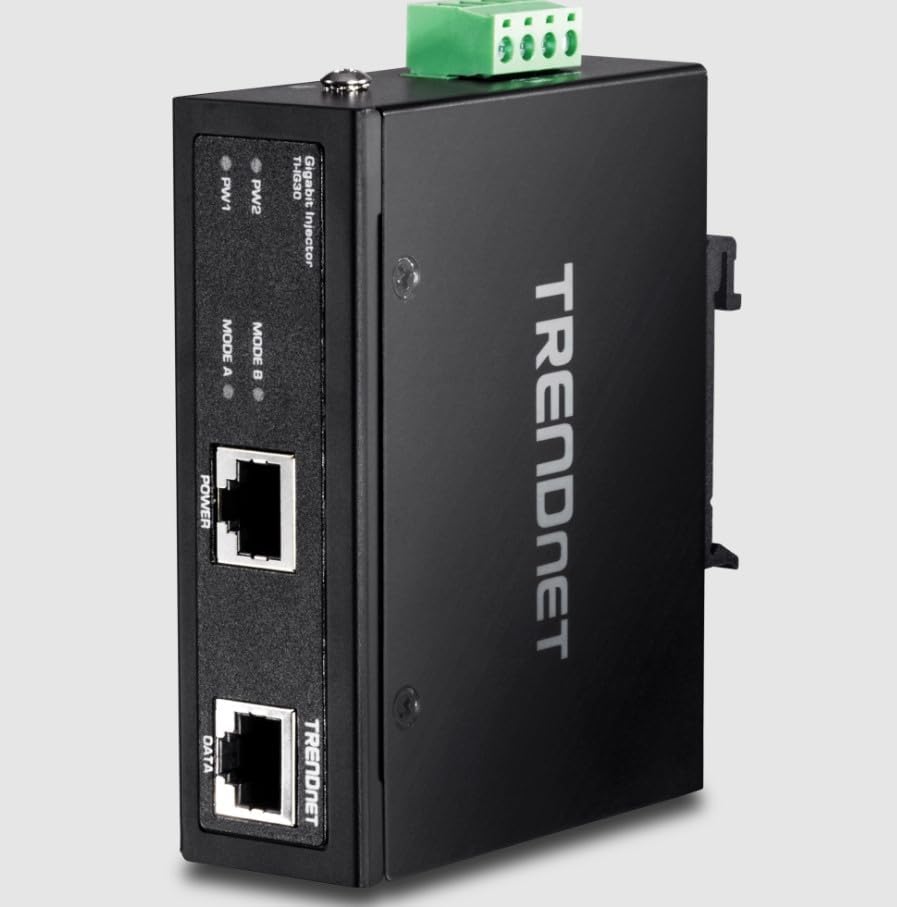
Figure 4.1: Front and Top View of the TI-IG30 Injector. The front panel features two RJ-45 ports labeled 'POWER' (PoE+ output) and 'DATA' (data input), along with LED indicators for 'PW1', 'PW2' (power status), 'MODE A', and 'MODE B' (PoE mode). The top panel includes a green terminal block for dual redundant power input connections.
The TI-IG30 features a compact, black metal housing designed for industrial environments. The front panel includes two RJ-45 Ethernet ports: one labeled POWER, which provides both data and PoE+ power to the connected device, and another labeled DATA, which connects to your non-PoE network switch. Above these ports are LED indicators: PW1 and PW2 indicate the status of the primary and secondary power inputs, respectively. MODE A and MODE B LEDs indicate the active PoE power mode. On the top of the unit, a green terminal block provides connections for dual redundant power inputs, ensuring continuous operation.
5. Installation and Setup
The TI-IG30 offers flexible installation options, including DIN-rail and wall-mount. Ensure the installation location is within the specified temperature range and provides adequate ventilation.
5.1. Mounting the Injector
- DIN-Rail Mounting: Attach the provided DIN-rail clip to the back of the TI-IG30. Securely snap the unit onto a standard DIN-rail.
- Wall Mounting: Use the provided wall-mount brackets. Attach the brackets to the unit, then secure the unit to a wall or flat surface using appropriate screws (not included).
5.2. Power Connection
The TI-IG30 requires an external power supply (e.g., TRENDnet models TI-S15052 or TI-S12048), which is sold separately. Connect the power supply to the green terminal block on the top of the injector. The unit supports dual redundant power inputs for enhanced reliability. Ensure correct polarity when connecting the power wires.
5.3. Network Connection
- Connect an Ethernet cable from your non-PoE Gigabit network switch or router to the DATA port on the TI-IG30.
- Connect another Ethernet cable from the POWER (PoE+) port on the TI-IG30 to your PoE-compatible device (e.g., IP camera, wireless access point).
6. Operation
Once properly installed and powered, the TI-IG30 will automatically detect and provide PoE+ power to the connected device through the POWER port. Data communication will also be facilitated through this port.
6.1. LED Indicators
- PW1 / PW2 (Power):
- Solid Green: Indicates power is supplied to the respective input (PW1 or PW2).
- Off: No power is detected on the respective input.
- MODE A / MODE B (PoE Mode):
- Solid Green: Indicates PoE power is being delivered using the corresponding mode (Mode A or Mode B).
- Off: PoE power is not being delivered via that mode.
7. Maintenance
The TI-IG30 is designed for minimal maintenance. To ensure optimal performance and longevity:
- Keep the unit clean and free from dust and debris. Use a soft, dry cloth for cleaning.
- Ensure proper ventilation around the unit, especially in enclosed spaces.
- Operate the device within its specified temperature range of -40° to 75°C (-40° to 167°F).
- Regularly inspect power and network cable connections for secure fit.
8. Troubleshooting
| Problem | Possible Cause | Solution |
|---|---|---|
| No Power (PW1/PW2 LEDs Off) | No power supply connected or faulty power supply/cable. | Verify the power supply is correctly connected to the terminal block and is functional. Ensure the power outlet is active. |
| No Data Connection | Ethernet cable issue or incorrect port connection. | Check the Ethernet cable between the network switch and the TI-IG30's DATA port. Ensure the switch is operational. |
| PoE Device Not Receiving Power | PoE device not compatible, faulty cable, or power budget exceeded. | Ensure the connected device is PoE/PoE+ compatible. Check the Ethernet cable between the TI-IG30's POWER port and the device. Verify the device's power requirements do not exceed the injector's capacity. |
| Intermittent Connection | Loose cable connections or environmental interference. | Secure all Ethernet and power cable connections. Ensure the operating environment is stable and within specified temperature limits. |
9. Specifications
| Feature | Detail |
|---|---|
| Model | TI-IG30 |
| Standards | IEEE 802.3, 802.3u, 802.3ab, 802.3at (PoE+) |
| Data Rate | 10/100/1000 Mbps (Gigabit Ethernet) |
| PoE Output | Up to 30W (PoE+) |
| Power Input | Dual Redundant Terminal Block (Power Supply Sold Separately) |
| Operating Temperature | -40° to 75°C (-40° to 167°F) |
| Housing | IP30-rated Metal Enclosure |
| Installation | DIN-Rail and Wall-Mount (hardware included) |
10. Warranty and Support
For warranty information, technical support, or further assistance with your TRENDnet TI-IG30, please refer to the official TRENDnet website or contact their customer support department. Keep your purchase receipt for warranty claims.


