
1. Introduction
This manual provides essential information for the safe and efficient operation of your ApoloSign 32-inch FHD Smart Portable TV. Please read this manual thoroughly before using the device and retain it for future reference.
Key Features:
- 32-inch 1080P FHD Touchscreen: Features a 1920x1080 resolution display with ten-point touch support.
- Android 15 OS & Google EDLA Certified: Provides access to the Google Play Store and popular streaming applications.
- 16(8+8)GB RAM & 128GB Storage: Ensures smooth operation and ample space for applications and media.
- Built-in 15000mAh Battery: Offers up to 8 hours of portable use.
- Full Swivel Rotation & Adjustable Height: Allows for flexible viewing angles and easy movement.
- 8MP HD Camera & Voice Remote Control: Enhances functionality for video calls and hands-free operation.
- Wireless & Wired Casting: Supports screen projection from various devices (Android/iOS/Mac/Windows) via HDMI, USB 3.0, and USB 2.0 ports.
- Custom Widget Dashboard & AI Voice Assistant: Includes calendar widgets, digital screensavers, and Google Gemini integration.
2. Setup
2.1 Unpacking and Components
Carefully unpack all items from the box. Ensure all components are present:
- 1 x 32 Inch 1080P FHD Touchscreen Display
- 1 x 8MP HD Camera & Bluetooth Voice Remote
- 1 x Charging Base & Stand & Power Adapter
- 1 x Installation Kit
- 1 x User Manual (this document)
2.2 Assembly
Follow the instructions provided in the separate Installation Kit for assembling the stand and attaching the display. Ensure all connections are secure before proceeding.
2.3 Initial Power On and Network Connection
- Connect the power adapter to the charging base and plug it into a power outlet.
- Press the power button on the device to turn it on.
- Follow the on-screen prompts to select your language and connect to a Wi-Fi network.
- Log in with your Google account to access Google services and the Play Store.
3. Operating Instructions
3.1 Navigating the Android 15 OS
The ApoloSign Smart Portable TV runs on Android 15. Navigate using the touchscreen or the included voice remote control.
- Touchscreen: Interact directly with the display by tapping, swiping, and pinching.
- Voice Remote Control: Use the directional pad, selection buttons, and dedicated voice button for navigation and commands.
3.2 Application Management
Access the Google Play Store to download and install your preferred applications, including streaming services like Netflix and YouTube.

Image: The ApoloSign TV showcasing its Android 15 operating system and access to the Google Play Store, with icons for various applications.
3.3 Voice Assistant (Google Gemini)
The device is preloaded with Google Gemini AI Voice Assistant. Press and hold the voice button on the remote control to activate it for instant commands, smart suggestions, and natural language interactions.
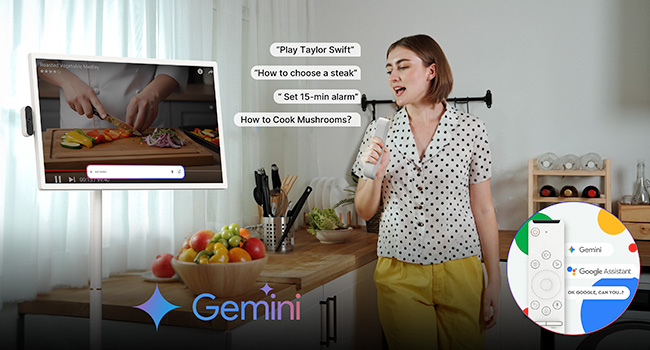
Image: A user interacting with the ApoloSign TV using voice commands, demonstrating the Google Gemini AI Voice Assistant feature in a kitchen environment.
3.4 Screen Casting and Connectivity
The ApoloSign TV supports both wireless and wired screen projection. It is compatible with Android, iOS, Mac, and Windows devices.
- Wireless Casting: Use the built-in casting features to mirror content from your phone, tablet, or laptop.
- Wired Connectivity: Utilize the HDMI, USB 3.0, and USB 2.0 ports for direct connections to external devices.

Image: A user playing a video game on the ApoloSign TV, demonstrating the wireless screen casting feature from a console.

Image: The ApoloSign TV displaying content from a laptop, illustrating its wireless screen casting capabilities for work or presentations.
3.5 Adjustable Viewing Angles
The TV features full swivel rotation, height adjustment, tilt, and pivot capabilities for optimal viewing comfort in various settings.

Image: A visual representation of the ApoloSign TV's flexible angle adjustments, including rotation, tilt, lift, and pivot, for comfortable viewing.
3.6 Custom Widget Dashboard & Digital Screensavers
Customize your home screen with widgets for weather, time, calendar, news, music, and to-do lists. Sync with Google/Outlook Calendar and Google Tasks. Utilize rich digital screensavers for aesthetic display when not actively in use.

Image: A user relaxing while the ApoloSign TV displays a custom widget dashboard with calendar, tasks, and other information.

Image: The ApoloSign TV screen showing various custom widgets, including Google Calendar, iCloud Calendar, and Google Tasks, for family organization.
3.7 Parental Controls
The device includes parental control features to manage content access and usage for children. Refer to the on-screen settings for configuration.
4. Media Integration
4.1 Product Images

Image: The ApoloSign 32-inch Smart Portable TV in a living room setting, demonstrating its full swivel rotation capability.
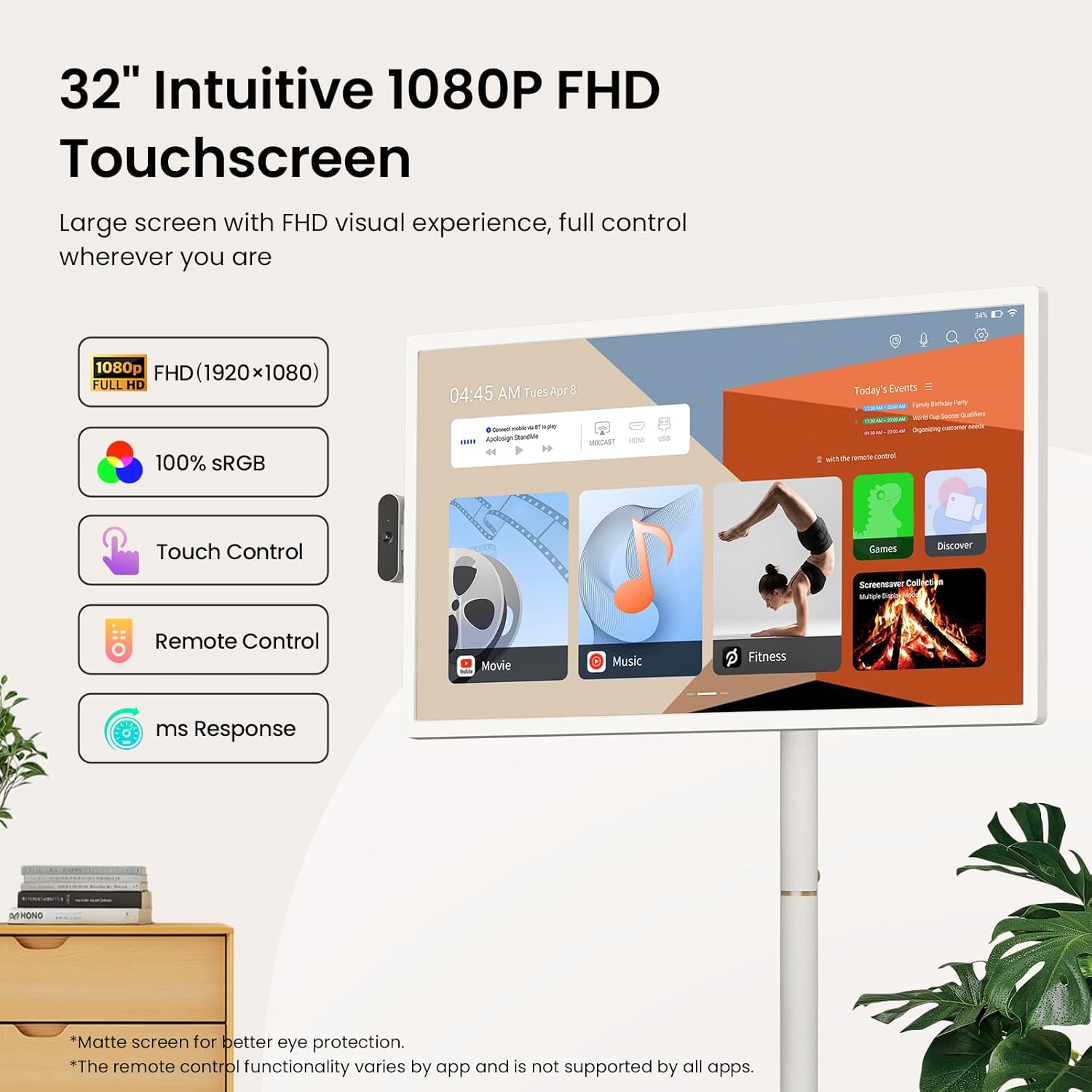
Image: A close-up of the ApoloSign 32-inch FHD Touchscreen, highlighting its 1080P resolution, 100% sRGB, touch control, remote control, and fast response time.

Image: A woman effortlessly moving the ApoloSign TV, emphasizing its wireless design with a built-in 15000mAh battery for up to 8 hours of use and quiet 360-degree rotating wheels.

Image: The ApoloSign TV presented as an all-in-one device, integrating functions of a monitor, digital calendar, Bluetooth speaker, television, and tablet.

Image: A collage showing the ApoloSign TV being used in various daily scenarios, including for makeup tutorials, cooking recipes, and yoga exercises, highlighting its versatility.
4.2 Official Product Videos
Video: ApoloSign 32-inch Smart Portable TV on full rolling stand. This video demonstrates the portability and full rolling stand functionality of the ApoloSign TV, showcasing its ease of movement and adjustable features.
Video: ApoloSign 32 inch Smart Portable TV, On-the-Go Entertainment. This video highlights the ApoloSign TV as a versatile entertainment solution for various locations, emphasizing its portability and smart features.
Video: Stream, Watch, Work, Enjoy - ApoloSign Portable TV Tablet. This video illustrates the multi-functional capabilities of the ApoloSign TV, suitable for streaming, watching, working, and general enjoyment.
5. Maintenance
5.1 Cleaning the Display
To clean the screen, gently wipe it with a soft, lint-free cloth. For stubborn marks, slightly dampen the cloth with water or a screen-cleaning solution. Avoid using harsh chemicals or abrasive materials.
5.2 Battery Care
The device features a built-in 15000mAh battery. For optimal battery life:
- Avoid fully discharging the battery frequently.
- Store the device in a cool, dry place when not in use for extended periods.
- Charge the device using only the provided power adapter.
6. Troubleshooting
6.1 Common Issues and Solutions
| Issue | Possible Solution |
|---|---|
| Device does not power on | Ensure the power adapter is securely connected and the device is charged. |
| Cannot connect to Wi-Fi | Check your Wi-Fi router and network settings. Restart the device and try again. |
| Touchscreen unresponsive | Restart the device. Ensure the screen is clean and free of obstructions. |
| Remote control not working | Check battery levels in the remote. Ensure there are no obstructions between the remote and the TV. Re-pair the remote if necessary. |
| Screen casting issues | Ensure both devices are on the same Wi-Fi network. Check compatibility and casting settings on both devices. |
6.2 Further Assistance
If you encounter issues not covered in this section, please refer to the support information in Section 8.
7. Specifications
| Feature | Detail |
|---|---|
| Product Dimensions | 16.14"D x 28.87"W x 60.26"H |
| Item Weight | 48.2 pounds |
| Item Model Number | SW3299T |
| Batteries | 1 x 12V battery (included) |
| Screen Size | 32 Inches |
| Display Technology | LCD |
| Resolution | 1080P FHD (1920x1080) |
| Refresh Rate | 60 Hz |
| Aspect Ratio | 16:9 |
| Connectivity Technology | Bluetooth 5.3, HDMI, IEEE 802.11b/g/n/a/ac/ax (Wi-Fi 6), USB 2.0 Host, USB 3.0 Host |
| Special Features | 1080P FHD Touch Screen, Android 15 OS & Google Play Store Support, Bluetooth Speaker Mode, 128GB Storage, Parental Controls, Detachable Camera, Voice-activated Remote Control, Multi-angle Swivel, Height Adjustment, Movable Bracket, Wireless Screen Casting, Multiple Interfaces |
8. Warranty and Support
8.1 Customer Support
ApoloSign is committed to providing continuous technical support and 24/7 customer service. For any setup questions, feature guidance, or usage issues, please reach out to ApoloSign customer service. Responses are typically provided within 24 hours with tailored solutions.
8.2 Warranty Information
This product includes a lifetime warranty. Please refer to the official ApoloSign website or contact customer service for detailed warranty terms and conditions.

