
1. Introduction and Overview
This manual provides detailed instructions for the setup, operation, maintenance, and troubleshooting of your MUDDY Mitigator 2.0 24MP Cellular Camera. The Mitigator 2.0 is designed for reliable performance in various outdoor conditions, capturing high-quality images and videos.
Key features include a 24MP photo resolution, 720p video recording, a fast 0.5-second trigger speed, and cellular connectivity for remote monitoring via the Command Pro App.

Figure 1: MUDDY Mitigator 2.0 Cellular Camera Combo with included accessories.
2. Setup
2.1 Battery Installation
- Open the camera's battery compartment.
- Insert 16 AA batteries into the 8-piece battery tray, ensuring correct polarity (+/-).
- Close the battery compartment securely to maintain weather resistance.
2.2 SD Card Insertion
- Locate the SD card slot on the camera.
- Insert one of the included SD cards into the slot until it clicks into place. Ensure the card is oriented correctly.
2.3 Mounting the Camera
The Mitigator 2.0 offers versatile mounting options:
- Integrated Multi-Position Mount: Utilize the built-in mount for quick attachment to trees or posts.
- 1/4-20 Threaded Insert: For more flexible positioning, attach the camera to a tripod or other compatible mounting accessories using the 1/4-20 threaded insert.
- Python Cable Provision: For enhanced security, a python cable can be threaded through the designated provision to deter theft.
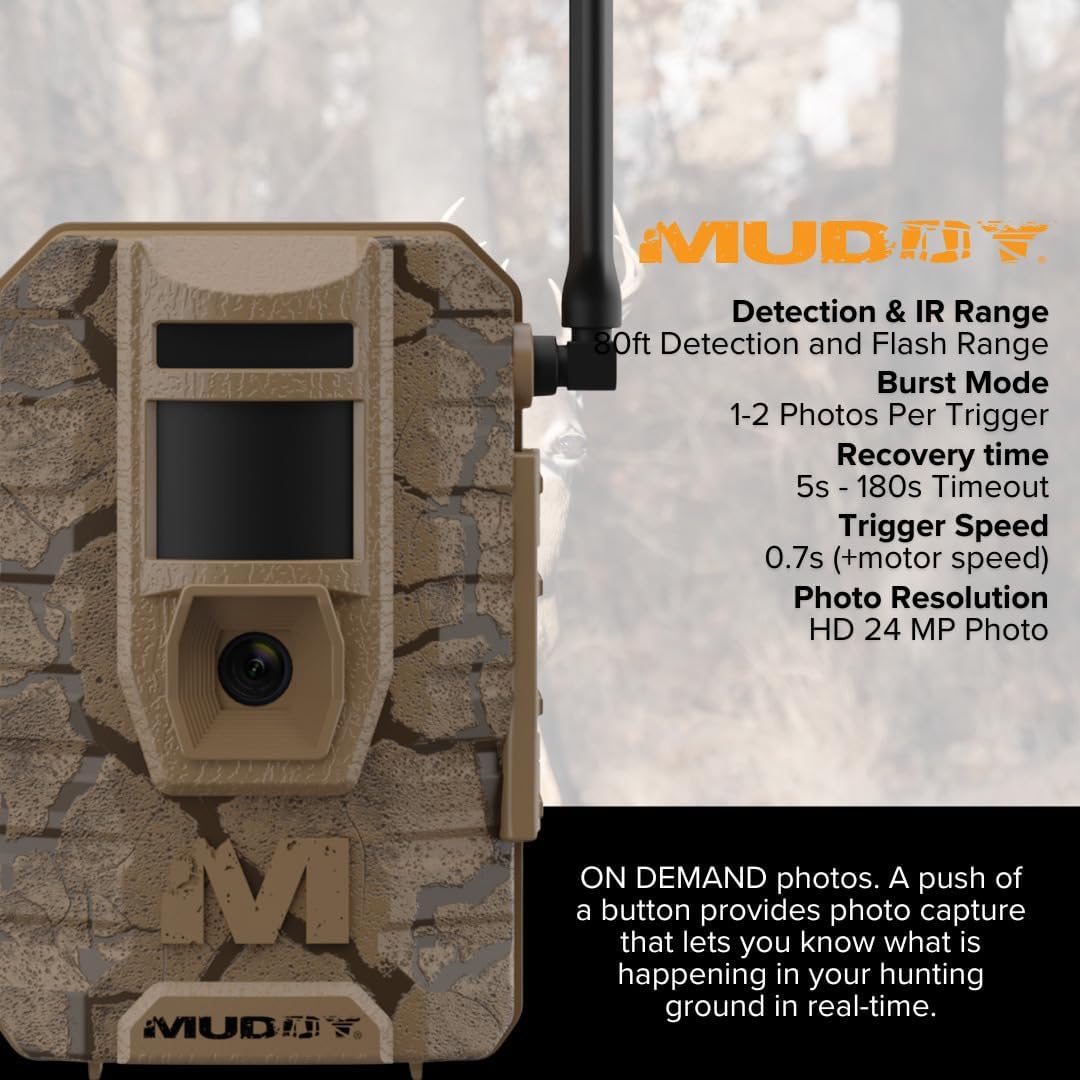
Figure 2: Proper camera placement and mounting in a natural environment.
2.4 Command Pro App Setup
Download the Command Pro App from your device's app store. Follow the in-app instructions to register your camera and configure cellular settings for remote access and control.
3. Operating Instructions
3.1 Powering On/Off
Locate the power switch inside the camera compartment. Toggle it to the 'ON' position to power on the camera. The camera will perform a self-check and enter monitoring mode.
3.2 Photo and Video Settings
- Photo Resolution: Selectable between 4MP, 8MP, 16MP, or 20MP. The camera supports up to 24MP. Adjust this setting via the camera's menu or the Command Pro App.
- Video Recording: Records in 720p resolution.
- Trigger Speed: The camera features a fast 0.5-second trigger speed to capture quick movements.
- Photo Burst Mode: Set the camera to capture 1 to 3 photos in rapid succession per trigger event.
- Time-Out Delay: Customize the delay between trigger events from 2 to 59 seconds or 1 to 59 minutes.

Figure 3: Overview of MUDDY Mitigator 2.0 camera features.
3.3 Detection and Flash Range
The camera has an 80-foot detection range and an 80-foot flash range, ensuring clear captures even in low-light conditions.
3.4 Photo and Video On Demand
Through the Command Pro App, you can request photos and videos on demand, allowing you to monitor your area in real-time.
3.5 External Power
For extended operation, the camera includes a 12V DC auxiliary jack, compatible with external power packs (sold separately).
4. Maintenance
4.1 Cleaning
Wipe the camera's exterior with a soft, damp cloth. Do not use abrasive cleaners or solvents. Ensure the lens and sensor are clean for optimal image quality.
4.2 Battery Replacement
When the battery indicator shows low power, replace all AA batteries with new ones. Always use high-quality batteries for best performance.
4.3 SD Card Management
Regularly check the SD card capacity. Format the SD card periodically to maintain optimal performance and prevent data corruption. Back up important photos and videos before formatting.
5. Troubleshooting
5.1 Camera Not Powering On
- Ensure batteries are inserted correctly with proper polarity.
- Check if batteries are fully charged or replace them with new ones.
- Verify the power switch is in the 'ON' position.
5.2 Poor Image/Video Quality
- Clean the camera lens and sensor.
- Ensure the camera is within the optimal detection and flash range of the subject.
- Check photo resolution settings; higher resolution provides better quality.
5.3 No Cellular Connectivity
- Verify that the camera is in an area with adequate cellular signal.
- Check your subscription status and settings within the Command Pro App.
- Ensure the camera's antenna is securely attached and positioned correctly.
5.4 Camera Not Triggering
- Check the time-out delay settings; a long delay might prevent frequent triggers.
- Ensure the detection area is clear of obstructions.
- Verify the camera is positioned correctly to detect movement.
6. Specifications
| Feature | Specification |
|---|---|
| Photo Resolution | 24MP (Selectable: 4MP, 8MP, 16MP, 20MP) |
| Video Resolution | 720p |
| Trigger Speed | 0.5 seconds |
| Photo Burst Mode | 1-3 photos per trigger |
| Time-Out Delay | 2-59 seconds or 1-59 minutes |
| Detection Range | 80 feet |
| Flash Range | 80 feet |
| Power Source | 16 AA batteries (8-piece tray), 12V DC auxiliary jack |
| App Compatibility | Command Pro App |
| Mounting Options | Integrated multi-position mount, 1/4-20 threaded insert, python cable provision |
| Product Dimensions | 9.1 x 9.1 x 9.1 inches |
| Item Weight | 18.51 pounds |
| UPC | 196271185826 |
7. Warranty and Support
7.1 Warranty Information
For specific warranty details, please refer to the documentation included with your product or visit the official MUDDY website. Warranty terms typically cover manufacturing defects for a specified period from the date of purchase.
7.2 Customer Support
If you encounter issues not covered in this manual or require further assistance, please contact MUDDY customer support. You can find contact information on the official MUDDY website or through your retailer. The manufacturer of this product is GSM Outdoors.


