
1. Introduction
Thank you for choosing the HIFIT Upholstered LED Twin Bed Frame. This manual provides essential information for the safe assembly, operation, and maintenance of your new bed frame. Please read all instructions carefully before beginning assembly and retain this manual for future reference.
2. Safety Information
- This bed frame has a maximum weight capacity of 750 lbs. Do not exceed this weight limit to prevent damage or injury.
- Always follow the instructions provided with the charging station to ensure safe electrical use. Do not overload the outlets.
- Ensure all bolts and screws are tightened securely during assembly. Periodically check and re-tighten fasteners as needed.
- Keep small parts and packaging materials away from children to prevent choking hazards.
- Assemble the bed frame on a soft, clean surface (e.g., carpet) to avoid scratching the floor or the product.
3. Package Contents
Before assembly, verify that all components and hardware are present. Refer to the included installation manual for a detailed list of parts. If any parts are missing or damaged, please contact customer service.
- Upholstered LED Bed Frame components
- Hardware Bag (screws, bolts, Allen wrenches)
- Installation Manual
- LED Light Strip with remote and power adapter
- Storage Drawer(s)
4. Setup and Assembly Instructions
Assembly is estimated to take approximately 30 minutes with two people. Do not fully tighten all screws until the entire frame is assembled, then tighten all fasteners completely.
4.1 Preparation
Clear an adequate space for assembly. Lay out all components on a soft surface to prevent damage. Identify all parts according to the included parts list.

Figure 1: Overview of bed frame components and dimensions.
4.2 Headboard Assembly
Attach the side supports to the main headboard section. Ensure the charging station is correctly oriented and secured. The headboard features a storage space and integrated LED lighting.
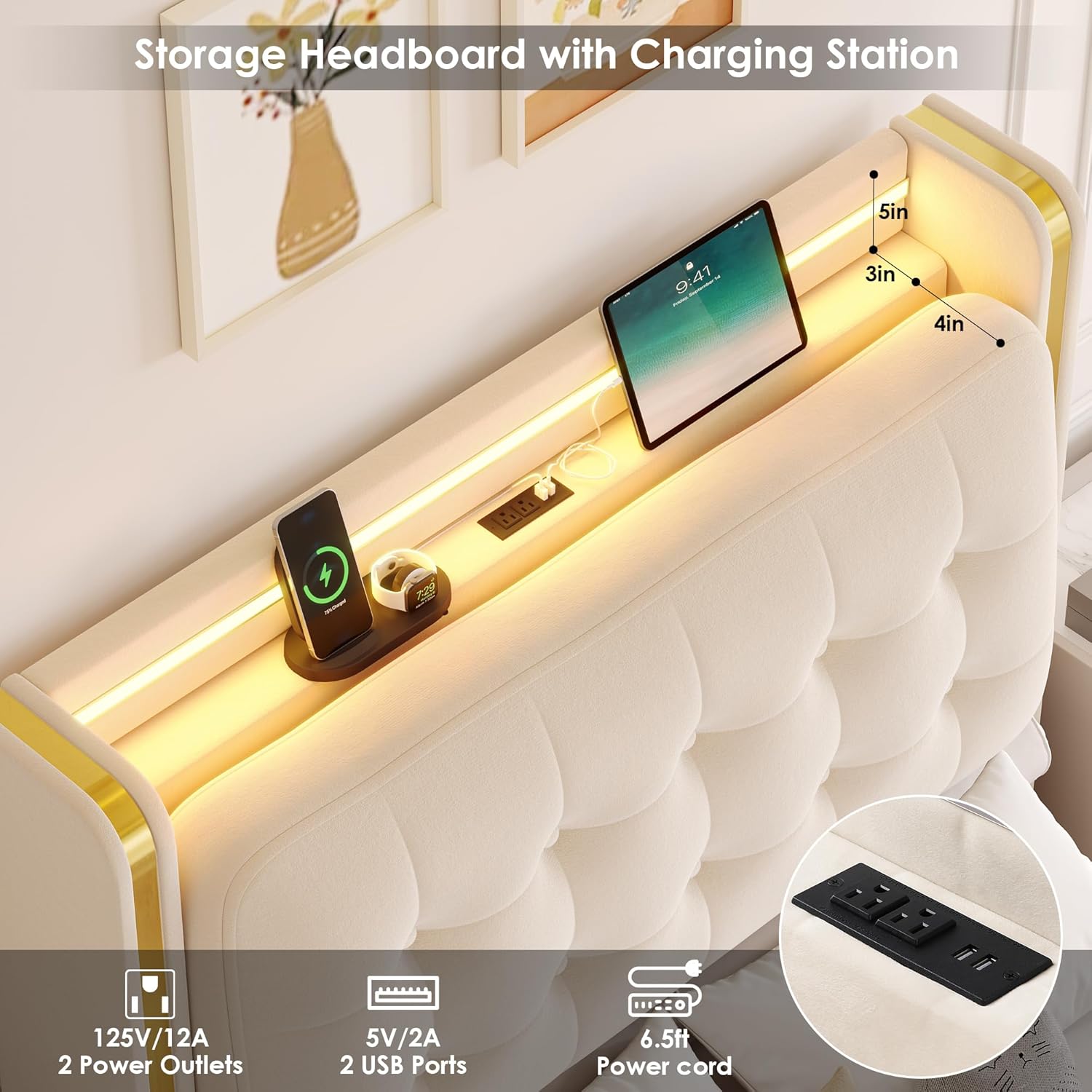
Figure 2: Detail of the headboard's charging station and storage area.
4.3 Frame Assembly
Connect the side rails and footboard to the headboard using the provided hardware. Ensure all connections are firm but do not fully tighten yet.
Video 1: HIFIT Upholstered LED Twin Bed Assembly Overview. This video demonstrates the general assembly process for the bed frame.
4.4 Slat Installation
Place the solid wood slats across the frame. The slats are designed with Velcro strips and silent strips to ensure a secure, noise-free fit. Press firmly to secure the Velcro.

Figure 3: Detail of noise-free strips on the wooden slats for quiet operation.
4.5 Storage Drawer Assembly
Assemble the steel storage drawers according to the separate instructions. Each drawer includes two secure locking devices and four smooth, silent wheels for easy operation. Insert the assembled drawers into the designated slots under the bed frame.

Figure 4: The spacious steel storage drawer, ideal for organizing various items.
4.6 Final Tightening
Once all components are in place, fully tighten all bolts and screws. Ensure the frame is stable and level.
5. Operating Instructions
5.1 Multi-Function RGB LED Lighting
The headboard features a built-in RGB light strip. Control the lights via the provided remote control or a compatible smartphone application. Multiple colors and modes are available, including music sync functionality.

Figure 5: RGB LED lighting with remote and app control options.
5.2 Integrated Charging Station
The headboard includes a charging station with 2 AC outlets and 2 USB ports. Connect your electronic devices for convenient charging. Ensure devices are compatible with the power output specifications.
Figure 6: The built-in charging station for electronic devices.
5.3 Storage Drawers
The bed frame includes spacious steel drawers for organizing toys, bedding, clothes, or books. The drawers feature smooth, silent wheels for easy access and secure locking devices to keep them in place.
6. Maintenance
- Cleaning the Upholstery: For velvet upholstery, gently vacuum with a soft brush attachment to remove dust. For spills, blot immediately with a clean, dry cloth. For stubborn stains, use a mild upholstery cleaner following the product instructions. Test on an inconspicuous area first.
- Frame Care: Wipe the metal and wood components with a soft, damp cloth. Avoid harsh chemicals or abrasive cleaners.
- Fastener Check: Periodically inspect all bolts and screws to ensure they remain tight. Re-tighten as necessary to maintain stability and prevent squeaking.
- Electrical Components: Ensure the charging station and LED light strip connections are secure and free from damage. Do not attempt to repair electrical components yourself.
7. Troubleshooting
- Bed Frame Squeaks: Check all frame connections and ensure bolts are fully tightened. Ensure slats are properly seated and the noise-free strips are intact.
- LED Lights Not Working: Verify the power adapter is securely plugged into both the wall outlet and the LED strip. Check the remote control battery. If using the app, ensure Bluetooth connection is active.
- Charging Station Not Functioning: Ensure the power cord for the charging station is fully plugged into a working wall outlet. Test the outlets with another device.
- Drawers Not Sliding Smoothly: Check for any obstructions in the drawer tracks. Ensure the wheels are clean and free of debris. Verify the drawer locking mechanisms are disengaged when attempting to open/close.
8. Specifications
| Feature | Detail |
|---|---|
| Size | Twin |
| Product Dimensions | 82.3"L x 42.1"W x 45.9"H |
| Weight Capacity | 750 lbs |
| Color | Beige |
| Material | Velvet, Wood, Metal |
| Headboard Material | Velvet |
| Special Features | 4 Inches Thick Back Cushions, Convenient Charging Station (2 AC outlets, 2 USB ports), No Box Spring Needed, Smart RGB LED Lighting, Storage Drawer and Headboard |
| Compatible Mattress Size | Twin (8-12" mattress recommended) |
| Assembly Required | Yes |
9. Warranty and Support
For any questions regarding assembly, missing parts, or product issues, our customer service team is available 24/7 to assist you. Please refer to your purchase documentation for specific warranty details.
You can contact HIFIT customer service via the contact information provided with your purchase or through the seller's platform.