
1. Important Safety Instructions
Please read all instructions carefully before assembly and use. Retain this manual for future reference.
- Ensure the power supply is disconnected before assembly, disassembly, or cleaning.
- Do not operate the lamp with a damaged cord or plug. If damaged, contact qualified service personnel.
- This lamp is intended for indoor use only. Do not expose to water or high humidity.
- Do not modify the lamp or its components. Use only specified bulb types.
- Keep the lamp away from heat sources and flammable materials.
- Do not exceed the maximum electrical ratings for the AC outlet and USB ports.
2. Package Contents
Verify that all components are present and undamaged upon opening the package. If any parts are missing or damaged, contact customer support.
- 1 x Lamp Base with Power Cord
- 1 x Lampshade
- 1 x E26 LED Bulb (3000K/4000K/6500K)
- 1 x Fixing Ring

Image: Overview of the Addtam ADTJ100 Table Lamp, highlighting its design, integrated charging ports, and variable light color temperatures.
3. Setup and Assembly
Follow these steps to assemble your Addtam ADTJ100 table lamp:
- Unscrew the fixing ring from the lamp holder.
- Place the lampshade onto the lamp holder.
- Screw the fixing ring back onto the lamp holder to secure the lampshade.
- Install the included E26 LED bulb into the lamp holder and rotate to tighten.

Image: Step-by-step visual guide for assembling the lamp, from securing the lampshade to installing the bulb.
4. Operating Instructions
4.1 Power On/Off and Color Temperature Adjustment
The lamp features a convenient switch control for power and light color adjustment.
- To turn the lamp on or off, press the switch located on the lamp base.
- To change the color temperature, turn the lamp off and then immediately turn it back on. Each subsequent turn-on will cycle through the available color temperatures:
- 3000K Warm White
- 4000K Natural White
- 6500K Cool White

Image: Detail of the push-button switch on the lamp base, used for turning the lamp on/off and cycling through color temperatures.
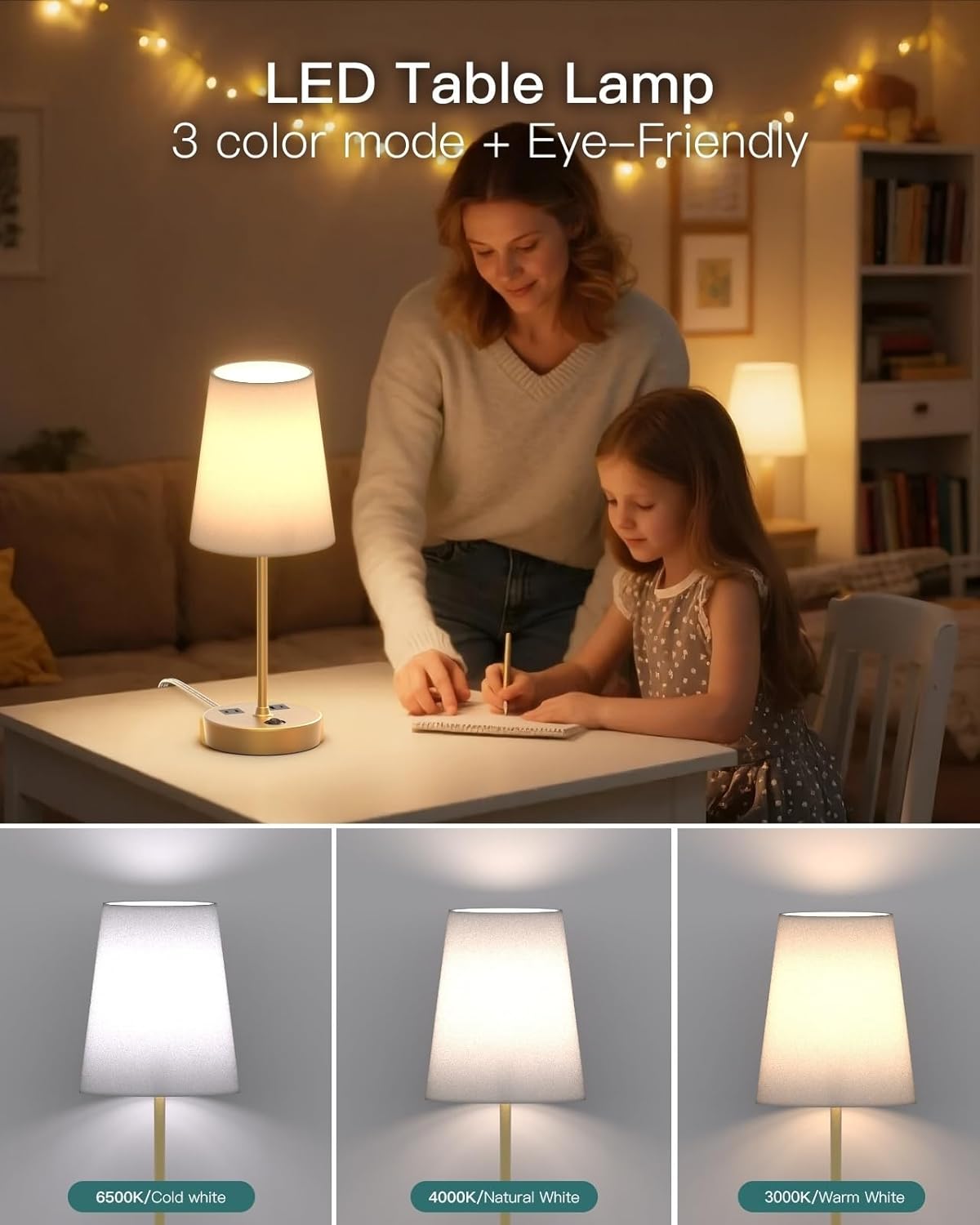
Image: Visual representation of the three distinct color temperatures the lamp can produce.
4.2 Using the Charging Ports and AC Outlet
The lamp base includes an AC outlet, a USB-A port, and a USB-C port for charging devices.
- AC Outlet: 125V/10A/1250W. Connect standard electrical devices.
- USB-C Port (PD 20W Max): 5V/3A, 9V/2.22A, 12V/1.67A. Supports Power Delivery for fast charging compatible devices.
- USB-A Port (QC 18W Max): 5V/3A, 9V/2A, 12V/1.5A. Supports Quick Charge for compatible devices.
- Note: The charging ports and AC outlet function independently of the lamp's light being on or off. For maximum power output from a single USB port, use only one at a time. Total output for USB-A + USB-C is 5V/3.1A.

Image: Close-up of the integrated AC outlet, USB-C, and USB-A charging ports on the lamp base, demonstrating their use.
5. Maintenance
To ensure the longevity and proper functioning of your lamp, follow these maintenance guidelines:
- Cleaning: Disconnect the lamp from the power source before cleaning. Use a soft, dry cloth to wipe the lamp base and shade. Do not use abrasive cleaners or solvents.
- Bulb Replacement: Ensure the lamp is unplugged and the bulb has cooled before attempting to replace it. Use only E26 base LED bulbs.
- Storage: If storing the lamp for an extended period, disassemble it if necessary and store in a dry, cool place, preferably in its original packaging.
6. Troubleshooting
| Problem | Possible Cause | Solution |
|---|---|---|
| Lamp does not turn on. |
|
|
| Charging ports are not working. |
|
|
| Cannot change color temperature. |
|
|
7. Specifications
| Feature | Detail |
|---|---|
| Model Name | ADTJ100 |
| Brand | Addtam |
| Product Dimensions | 5.25"D x 4.75"W x 17.2"H |
| Item Weight | 2.3 Pounds |
| Material | Metal, Plastic |
| Finish Type | Polished |
| Shade Material | Linen |
| Bulb Base | E26 |
| Light Source Type | LED |
| Color Temperatures | 3000K Warm White, 4000K Natural White, 6500K Cool White |
| Switch Type | Push Button |
| AC Outlet Rating | 125V/10A/1250W |
| USB-C Output | PD 20W Max (5V/3A, 9V/2.22A, 12V/1.67A) |
| USB-A Output | QC 18W Max (5V/3A, 9V/2A, 12V/1.5A) |
| Total USB Output | 5V/3.1A (when both USB ports are used simultaneously) |
| Power Source | Corded Electric |
| Indoor/Outdoor Usage | Indoor |
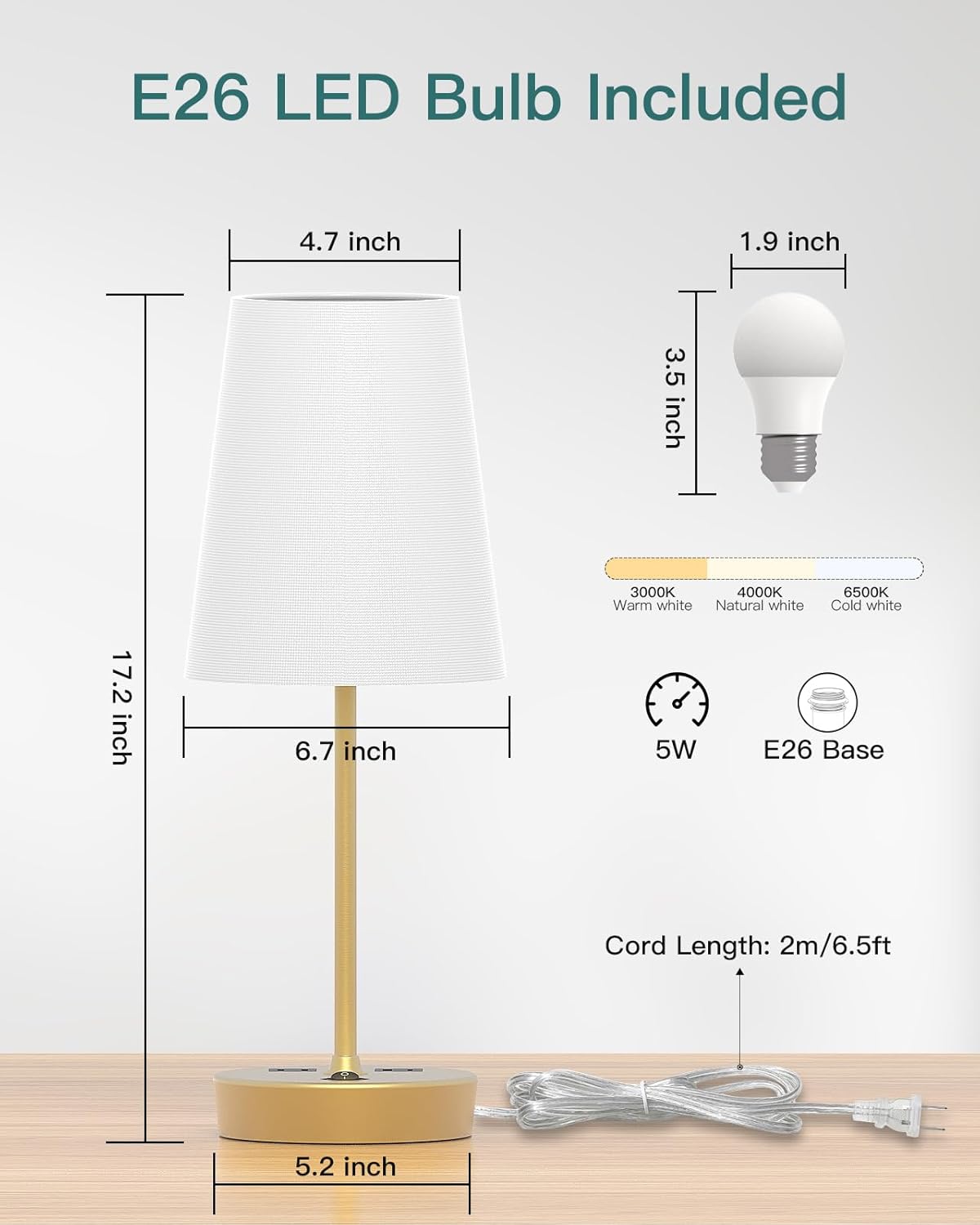
Image: Dimensional drawing of the lamp and its components, including the bulb specifications.
8. Warranty and Support
Addtam products are designed for quality and reliability. For warranty information, technical support, or assistance with your product, please refer to the contact information provided with your purchase or visit the official Addtam website.
Please have your model number (ADTJ100) and purchase date available when contacting support.