
Redkey W15
Redkey W15 Wireless Wet and Dry Vacuum Cleaner User Manual
Model: W15 | Brand: Redkey
Introduction
The Redkey W15 is a versatile wireless wet and dry vacuum cleaner designed for efficient cleaning of hard floors. It integrates vacuuming, washing, and wiping functions into a single device, offering a comprehensive cleaning solution for your home. This manual provides detailed instructions on the assembly, operation, maintenance, and troubleshooting of your Redkey W15 vacuum cleaner.
Key features include a powerful scrubbing function, impressive suction, 3 cleaning modes (standard, absorbent, powerful), a 35-minute running time, and an innovative edge cleaning capability.
Important Safety Instructions
Please read all instructions carefully before using this appliance. Failure to follow these instructions may result in electric shock, fire, or serious injury.
- Do not use outdoors or on wet surfaces.
- Do not allow to be used as a toy. Close attention is necessary when used by or near children.
- Use only as described in this manual. Use only manufacturer's recommended attachments.
- Do not use with damaged cord or plug. If appliance is not working as it should, has been dropped, damaged, left outdoors, or dropped into water, return it to a service center.
- Do not pull or carry by cord, use cord as a handle, close a door on cord, or pull cord around sharp edges or corners. Do not run appliance over cord. Keep cord away from heated surfaces.
- Do not unplug by pulling on cord. To unplug, grasp the plug, not the cord.
- Do not handle plug or appliance with wet hands.
- Do not put any object into openings. Do not use with any opening blocked; keep free of dust, lint, hair, and anything that may reduce air flow.
- Keep hair, loose clothing, fingers, and all parts of body away from openings and moving parts.
- Turn off all controls before unplugging.
- Use extra care when cleaning on stairs.
- Do not use to pick up flammable or combustible liquids, such as gasoline, or use in areas where they may be present.
- Do not pick up anything that is burning or smoking, such as cigarettes, matches, or hot ashes.
- Use only Redkey cleaning solutions intended for this appliance.
- Always turn off the appliance before connecting or disconnecting the motorized brush.
Package Contents
Carefully unpack your Redkey W15 and ensure all items are present and in good condition. The package should contain the following:
- Redkey W15 Main Unit (Vacuum Body with Handle)
- Charging Base
- Power Adapter
- Self-Cleaning Brush Roll
- HEPA Filter
- Cleaning Brush Tool
- User Manual (this document)

Image: The Redkey W15 vacuum cleaner shown with its main components including the vacuum body, charging base, power adapter, brush roll, and HEPA filter.
Product Components
Familiarize yourself with the different parts of your Redkey W15 vacuum cleaner.
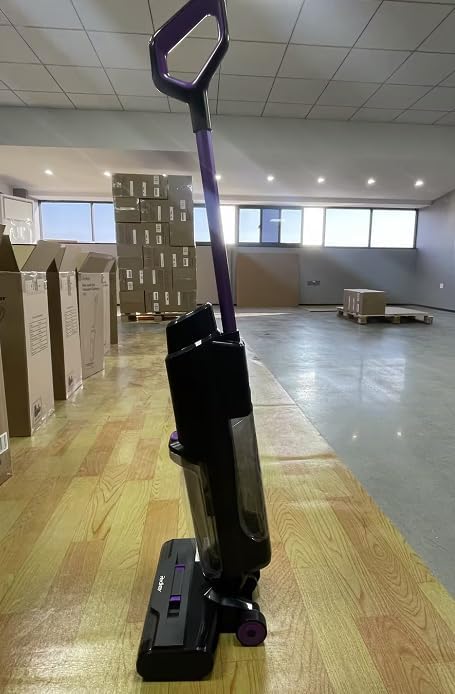
Image: Side view of the Redkey W15 vacuum cleaner, highlighting its sleek design and the clear dirty water tank.

Image: Front view of the Redkey W15 vacuum cleaner, showing the main body and the brush head.

Image: Close-up view of the Redkey W15 brush head, illustrating the design for effective edge cleaning.

Image: Close-up view of the Redkey W15 main body, showing the transparent dirty water tank and the purple accent button.
- Handle: Ergonomically designed for comfortable grip and control.
- Clean Water Tank (910 ml): Holds fresh water and cleaning solution.
- Dirty Water Tank (600 ml): Collects dirty water and debris.
- Brush Head: Contains the self-cleaning brush roll for scrubbing and vacuuming.
- LED Display: Provides real-time information on battery life, cleaning modes, and status.
- Voice Prompt System: Offers audio reminders and status updates.
- Charging Base: For convenient storage and charging of the unit.
Setup and Assembly
Follow these steps to assemble your Redkey W15 vacuum cleaner before first use.
- Attach the Handle: Insert the handle into the main body of the vacuum cleaner until it clicks securely into place. Ensure it is firmly attached.
- Install the Brush Roll: Open the brush roll cover on the brush head. Align the brush roll with its slot and press it down until it is securely seated. Close the cover.
- Install the HEPA Filter: Locate the filter compartment, usually within the dirty water tank or a separate section. Insert the HEPA filter, ensuring it is properly seated to prevent dust leakage.
- Charge the Battery: Place the assembled vacuum cleaner onto the charging base. Connect the power adapter to the charging base and plug it into a wall outlet. The LED display will indicate charging status. Fully charge the unit before first use (approximately 3-4 hours).
- Fill the Clean Water Tank: Remove the clean water tank from the main unit. Fill it with clean tap water up to the MAX line. For enhanced cleaning, you may add a small amount of Redkey-approved cleaning solution according to the solution's instructions. Reattach the tank securely.
Operating Instructions
Your Redkey W15 offers multiple cleaning modes for various needs.
Starting the Cleaning Process
- Ensure the clean water tank is filled and the dirty water tank is empty.
- Press the Power button on the handle to turn on the vacuum cleaner. The LED display will light up.
- Tilt the vacuum cleaner back to engage the brush roll and start the cleaning function.
Cleaning Modes
Press the Mode button on the handle to cycle through the available cleaning modes:
- Standard Mode: Ideal for everyday cleaning of light dirt and spills.
- Absorbent Mode: Designed for picking up larger liquid spills, minimizing water output.
- Powerful Mode: Provides maximum suction and water flow for stubborn stains and heavily soiled areas.
Edge Cleaning
The Redkey W15 features a 6mm edge cleaning capability. Position the brush head close to walls or furniture edges to effectively clean these hard-to-reach areas.
Voice Prompts and LED Display
The vacuum cleaner provides voice prompts for important notifications such as low battery, full dirty water tank, or self-cleaning initiation. The LED display shows real-time information including battery level, current cleaning mode, and maintenance alerts.
Maintenance
Regular maintenance ensures optimal performance and extends the lifespan of your Redkey W15.
Self-Cleaning Function
- After each cleaning session, place the vacuum cleaner back on the charging base.
- Ensure there is sufficient clean water in the clean water tank.
- Press the Self-Clean button (usually indicated by a water drop icon) on the handle or base. The unit will automatically clean the brush roll and internal tubing.
- Once the self-cleaning cycle is complete, empty the dirty water tank.
Emptying and Cleaning the Dirty Water Tank
- Always empty the dirty water tank after each use or when the "Dirty Water Tank Full" voice prompt is given.
- Remove the dirty water tank from the main unit.
- Open the tank and dispose of the dirty water and debris.
- Rinse the tank thoroughly with clean water. Allow it to air dry completely before reattaching.
Cleaning the Brush Roll
- Even with self-cleaning, it is recommended to manually inspect and clean the brush roll regularly.
- Turn off the vacuum cleaner and remove the brush roll cover.
- Remove the brush roll. Use the provided cleaning brush tool to remove any tangled hair or debris.
- Rinse the brush roll under running water. Allow it to air dry completely before reinstalling.
Cleaning the HEPA Filter
- The HEPA filter should be cleaned regularly, ideally after every few uses.
- Remove the HEPA filter from its compartment.
- Tap the filter gently over a trash can to remove loose dust. You may also rinse it under running water.
- Important: Ensure the HEPA filter is completely dry before reinstalling it. A wet filter can damage the motor.
Troubleshooting
If you encounter any issues with your Redkey W15, refer to the following common problems and solutions.
| Problem | Possible Cause | Solution |
|---|---|---|
| Vacuum does not turn on. | Battery is low or depleted. | Charge the vacuum cleaner fully. |
| No suction or weak suction. | Dirty water tank is full. Brush roll is clogged. HEPA filter is clogged. | Empty the dirty water tank. Clean the brush roll. Clean or replace the HEPA filter. |
| Water leakage. | Clean or dirty water tank not properly installed. Tank seals are damaged. | Ensure tanks are securely latched. Contact customer support for replacement parts. |
| Self-cleaning function not working. | Insufficient water in clean water tank. Dirty water tank is full. | Fill the clean water tank. Empty the dirty water tank. |
| Unpleasant odor during use. | Dirty water tank or brush roll needs cleaning. | Thoroughly clean the dirty water tank and brush roll. Ensure they are dry before reassembly. |
If the problem persists after trying these solutions, please contact Redkey customer support.
Specifications
| Feature | Detail |
|---|---|
| Model | W15 |
| Type | Wireless Wet and Dry Vacuum Cleaner |
| Running Time | Up to 35 minutes |
| Clean Water Tank Capacity | 910 ml |
| Dirty Water Tank Capacity | 600 ml |
| Edge Cleaning | 6 mm |
| Cleaning Modes | Standard, Absorbent, Powerful |
| Weight | 6.2 Kilograms |
| Filter Type | HEPA Filter |
| Surface Recommendation | Hard Floor |
| Power Source | Battery Powered |
Warranty and Support
Redkey offers comprehensive support for your W15 Wireless Wet and Dry Vacuum Cleaner.
- Warranty: Your Redkey W15 comes with a 2-year warranty. This warranty covers manufacturing defects and malfunctions under normal use.
- Customer Service: For any spare parts, technical assistance, or after-sales problems, please contact Redkey customer support. We aim to reply to all inquiries within 24 hours.
- Please retain your proof of purchase for warranty claims.
Related documentsW15

Ask a question about this manual
Ask about setup, troubleshooting, compatibility, parts, safety, or missing instructions. Manuals+ will review the question and use this page’s manual context to help answer it.