
Introduction
This manual provides comprehensive instructions for the assembly, operation, maintenance, and troubleshooting of your TOPSKY DF03.02 Electric L-Shaped Desk Frame. Please read this manual thoroughly before installation and use to ensure proper function and safety. This product is designed to provide a versatile and ergonomic workspace, allowing for seamless transitions between sitting and standing positions.
Safety Information
- Ensure all components are securely fastened before use.
- Do not overload the desk frame beyond its specified weight capacity of 270 lbs (122 kg).
- Keep children and pets away from the desk during operation to prevent injury.
- Avoid placing liquids directly on the control panel or near electrical components.
- Disconnect power before cleaning or performing any maintenance.
- The anti-collision feature is designed to prevent damage; however, always be aware of surroundings during height adjustments.
Package Contents
Please verify that all parts are present and undamaged before beginning assembly. If any parts are missing or damaged, contact customer support.
- L-Shaped Desk Legs (3 units)
- Adjustable Crossbars (2 units)
- Control Box
- Handset Controller
- Power Adapter and Cable
- Mounting Hardware (screws, washers, etc.)
- Cable Management Accessories
- Instruction Manual (this document)

Image: TOPSKY DF03.02 Electric L-Shaped Desk Frame components and control panel, showing the three legs, crossbars, and the separate control unit.
Setup and Assembly
Assembly typically takes approximately 15 minutes. It is recommended to assemble the frame upside down on a soft, clean surface to prevent scratches. A second person may be helpful for certain steps, especially when flipping the assembled frame.
- Unpack Components: Carefully remove all parts from the packaging and lay them out.
- Assemble Legs and Crossbars: Attach the adjustable crossbars to the desk legs using the provided hardware. Ensure all screws are tightened securely.
- Install Control Box: Mount the control box to the designated area on the frame.
- Connect Motors and Handset: Plug the motor cables from each leg into the control box. Connect the handset controller to the control box.
- Attach Power Cable: Connect the power adapter to the control box and then to a power outlet.
- Mount Desktop (Not Included): Place your L-shaped desktop onto the assembled frame. Secure the desktop to the frame using appropriate screws (ensure screw length is suitable for your desktop thickness to avoid damage).
- Cable Management: Use the included cable management accessories to organize and secure all cables.
For detailed visual instructions, please refer to the official installation manual PDF: Download Installation Manual (PDF)
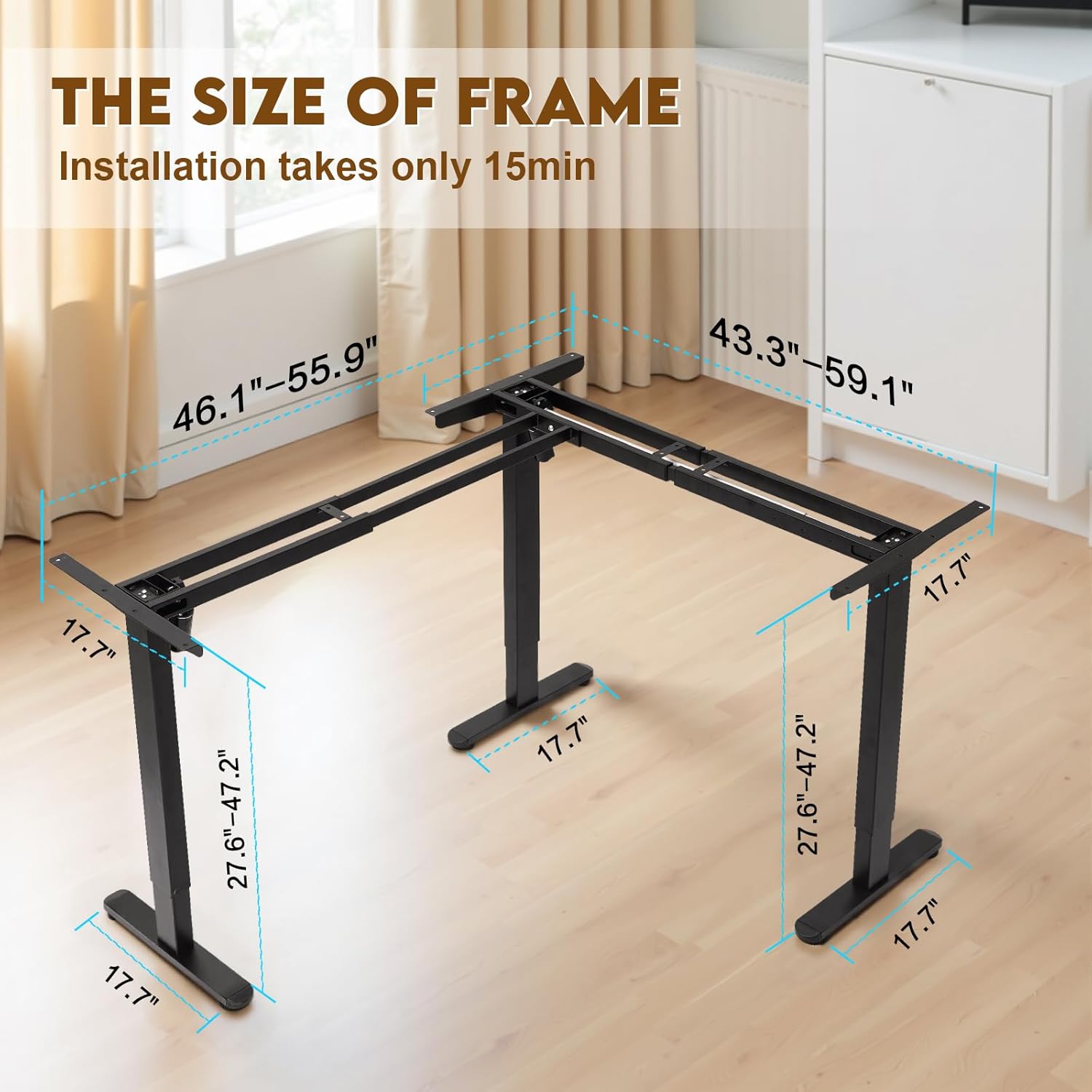
Image: Detailed dimensions of the TOPSKY L-shaped desk frame, showing adjustable widths for both main sections (43.3"-59.1" and 46.1"-55.9") and leg base dimensions.
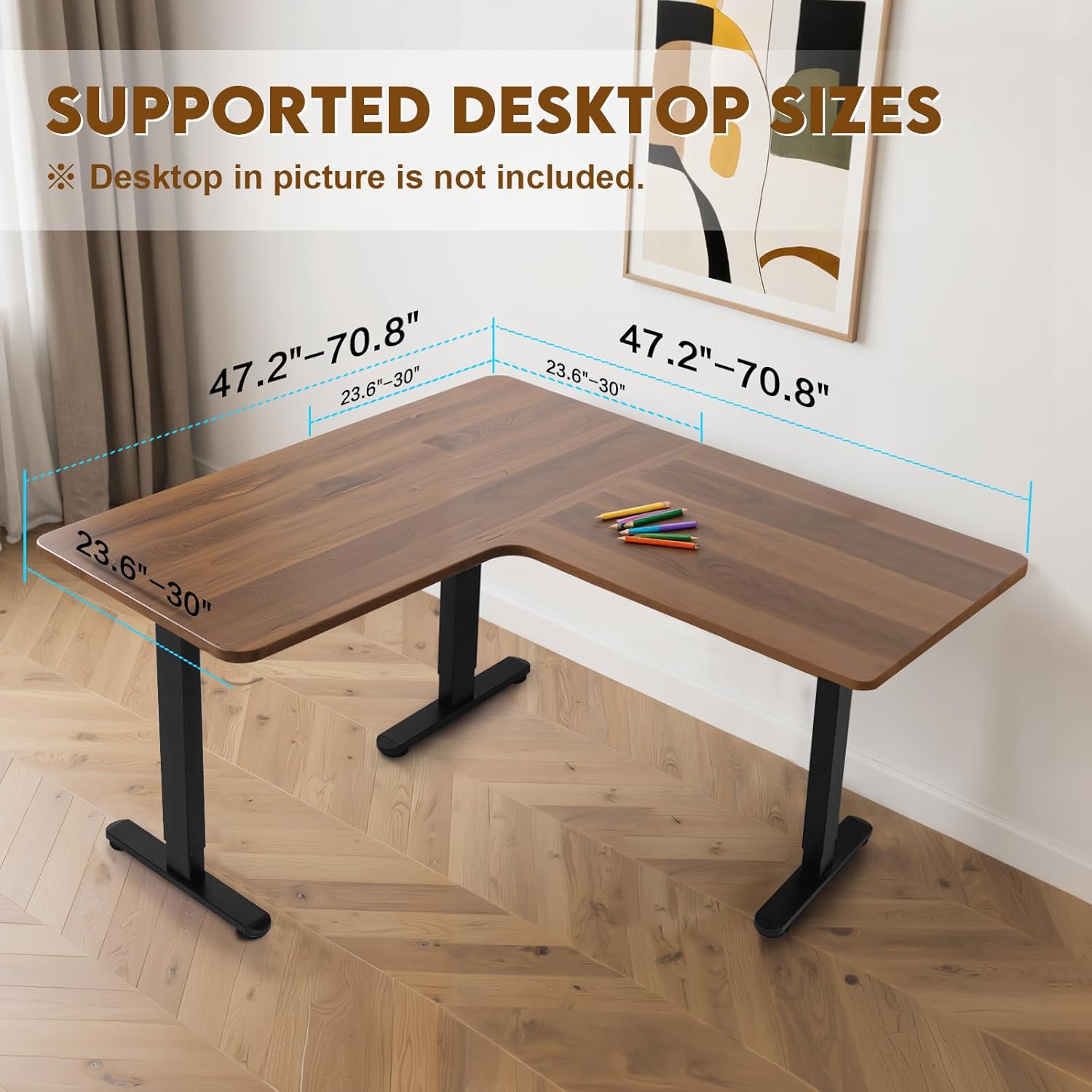
Image: Diagram illustrating the range of L-shaped desktop sizes supported by the frame, with depths from 23.6"-30" and lengths up to 70.8" on each side.
Operating Instructions
The TOPSKY DF03.02 desk frame features an intuitive multi-function controller for easy height adjustment and personalized settings.

Image: Close-up of the multi-function controller, showing up/down arrows, three memory preset buttons (1, 2, 3), and a 'S' (Save) button.
Height Adjustment
- Raise Desk: Press and hold the Up Arrow button to raise the desk to your desired standing height.
- Lower Desk: Press and hold the Down Arrow button to lower the desk to your desired sitting height.
- The LED display will show the current height in inches.
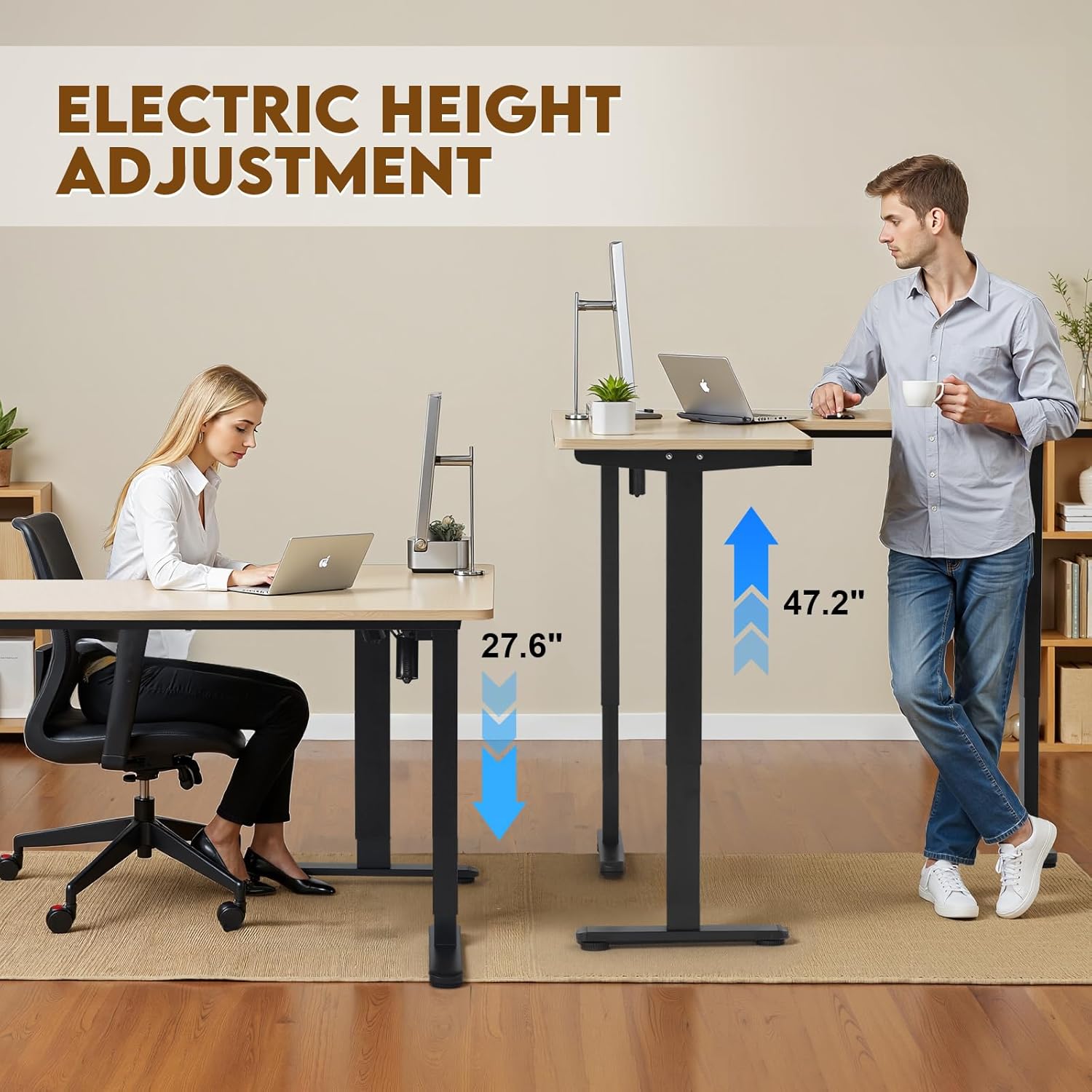
Image: Two individuals demonstrating the height adjustment feature, with one seated at 27.6 inches and another standing at 47.2 inches, indicating the adjustable range.
Memory Presets
The controller allows you to save up to three preferred height settings for quick adjustments.
- Adjust the desk to your desired height using the Up/Down arrows.
- Press the S (Save) button. The LED display will show 'S-'.
- Within 3 seconds, press one of the memory buttons (1, 2, or 3) to save the current height to that position. The display will show 'S-1', 'S-2', or 'S-3' to confirm.
- To recall a saved height, simply press the corresponding memory button (1, 2, or 3). The desk will automatically move to the saved position.
Anti-Collision Function
The desk frame is equipped with an anti-collision system to prevent damage to the desk or objects in its path during height adjustment.
- If the desk encounters an obstacle while moving up or down, it will automatically stop and reverse slightly.
- Remove the obstacle before attempting to adjust the height again.
Setting High and Low Limitation Positions
You can customize the maximum and minimum height limits for the desk.
- Set Minimum Height: Lower the desk to your desired minimum height. Press and hold the S button until 'S-' appears, then press the Down Arrow button. The display will show 'Min' to confirm.
- Set Maximum Height: Raise the desk to your desired maximum height. Press and hold the S button until 'S-' appears, then press the Up Arrow button. The display will show 'Max' to confirm.
- To clear limits, press and hold the S button for 5 seconds until 'RST' appears.
Maintenance
- Cleaning: Wipe the desk frame with a soft, damp cloth. Avoid harsh chemicals or abrasive cleaners.
- Inspection: Periodically check all screws and connections to ensure they remain tight.
- Cable Management: Ensure cables are not pinched or tangled, which could affect operation.
- Motor Care: The dual motors are designed for long-term use and require no special lubrication. Avoid obstructing the motor mechanisms.
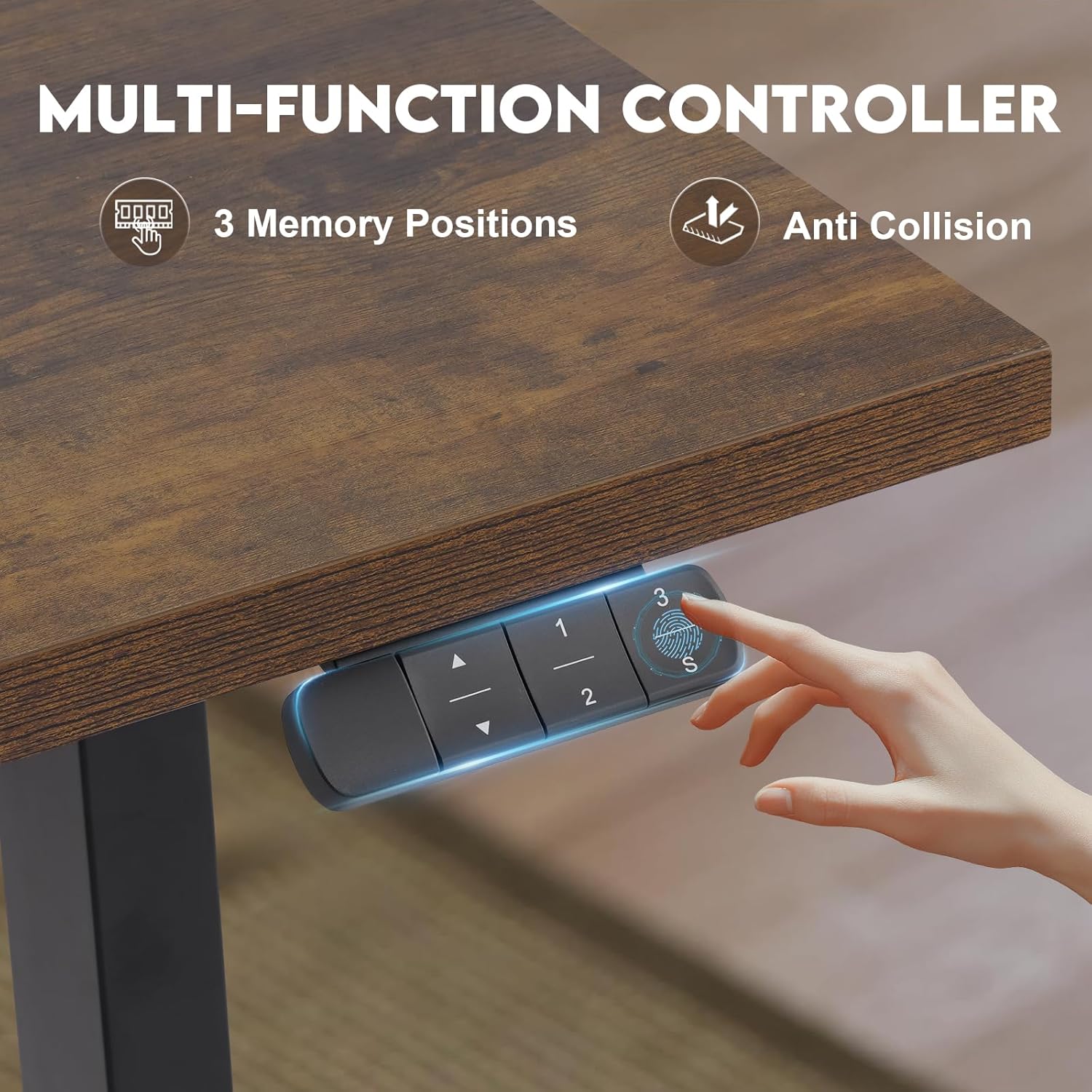
Image: A cat sleeping on a desk, symbolizing the quiet operation of the dual motors (less than 45dB) during height adjustments.
Troubleshooting
If you encounter any issues with your TOPSKY DF03.02 desk frame, please refer to the following table for common problems and solutions.
| Problem | Possible Cause | Solution |
|---|---|---|
| Desk does not move | Power cable disconnected; Control box or motor cable loose; Overload; Reset required. | Check power connection; Ensure all cables are securely plugged in; Reduce weight on desk; Perform a reset (see below). |
| Uneven movement or shaking | Loose connections; Uneven weight distribution; Damaged leg. | Check all frame connections and tighten screws; Redistribute weight evenly; Contact support if a leg appears damaged. |
| Error code on display | Specific error (e.g., overload, motor fault). | Refer to the full PDF manual for specific error code meanings. Often requires a reset or power cycle. |
| Anti-collision activates too often | Sensitivity setting; Obstacles. | Ensure no objects are in the desk's path. Some models allow sensitivity adjustment (refer to PDF manual). |
Reset Procedure
If the desk is not functioning correctly, a reset may resolve the issue:
- Press and hold the Down Arrow button until the desk reaches its lowest position.
- Continue holding the Down Arrow button for approximately 5-10 seconds until the display shows 'RST' or the desk slightly lowers and then rises a small amount.
- Release the button. The desk should now be reset to factory settings.
Specifications
- Brand: TOPSKY
- Model: DF03.02
- Type: Electric L-Shaped Desk Frame (Frame Only)
- Color: Black
- Material: Alloy Steel
- Motor Type: Dual Motor System
- Height Adjustment Range: 27.6 inches to 47.3 inches
- Speed: 1 inch per second
- Noise Level: <45dB
- Load Capacity: 270 lbs (122 kg)
- Adjustable Frame Width (Side 1): 43.3 inches - 59.1 inches
- Adjustable Frame Width (Side 2): 46.1 inches - 55.9 inches
- Supported Desktop Depth: 23.6 inches - 30 inches
- Maximum Supported Desktop Size: Up to 70.9 inches x 70.9 inches x 29.9 inches (L-shape)
- Assembly Required: Yes
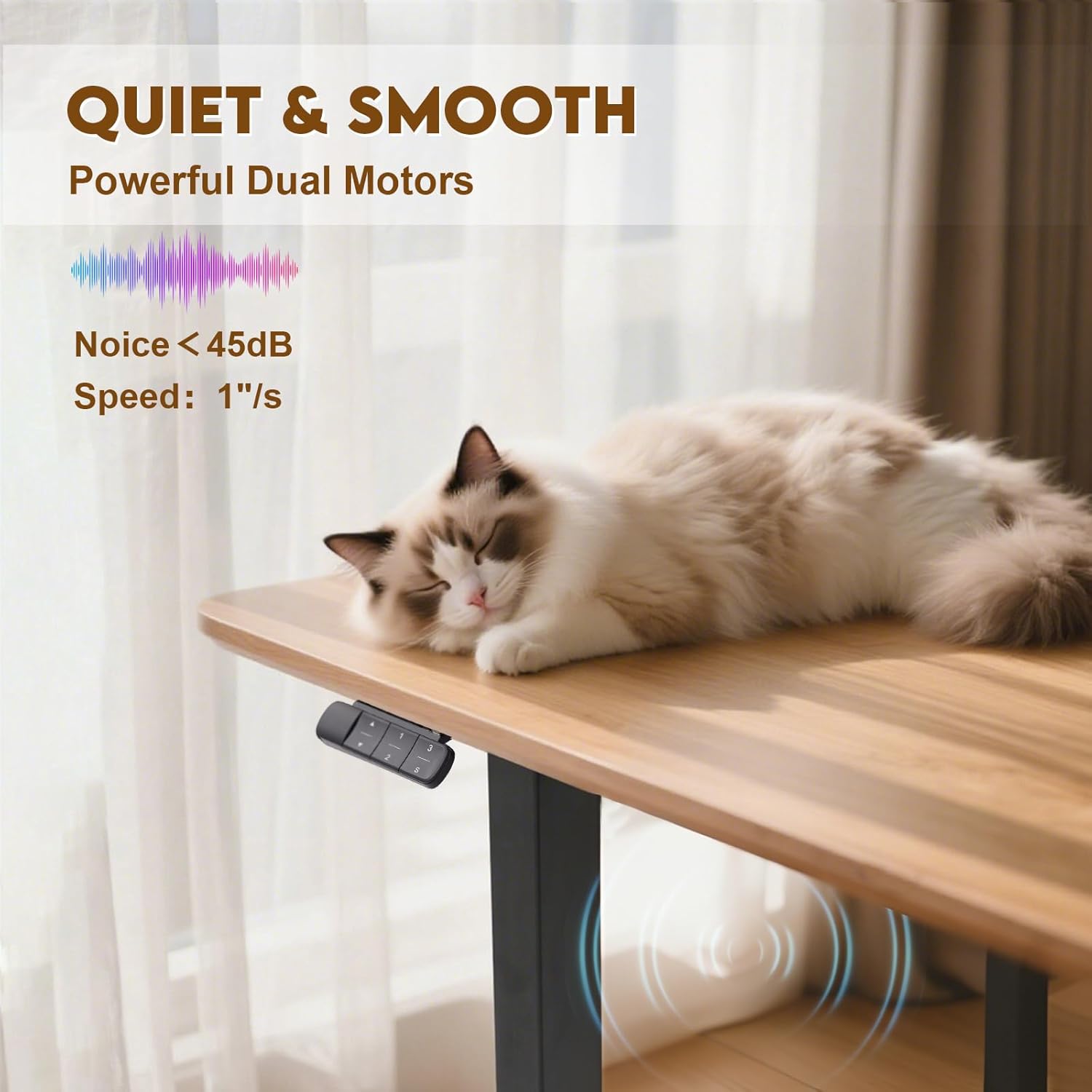
Image: A fully assembled TOPSKY L-shaped desk with a desktop, showcasing its sturdy construction and ability to hold multiple monitors and office equipment.
Warranty and Support
TOPSKY provides a 5-year after-sales service for the DF03.02 Electric L-Shaped Desk Frame, ensuring peace of mind regarding your purchase.
For any questions, technical assistance, or warranty claims, please contact TOPSKY customer support:
- Phone Support Hours: Monday - Friday, 9:00 AM - 4:00 PM PST
- Email Support: Available 24/7
You can find detailed contact information, including email and other support options, by visiting the official TOPSKY Amazon Store Page: TOPSKY Amazon Store

Image: TOPSKY customer service representatives wearing headsets, ready to assist with inquiries.