
1. Introduction
The xDuoo TA-32 is a high-performance desktop DAC and tube balanced headphone amplifier. It integrates advanced audio decoding capabilities with tube amplification to deliver a rich and refined audio experience. This manual provides essential information for setting up, operating, and maintaining your device.
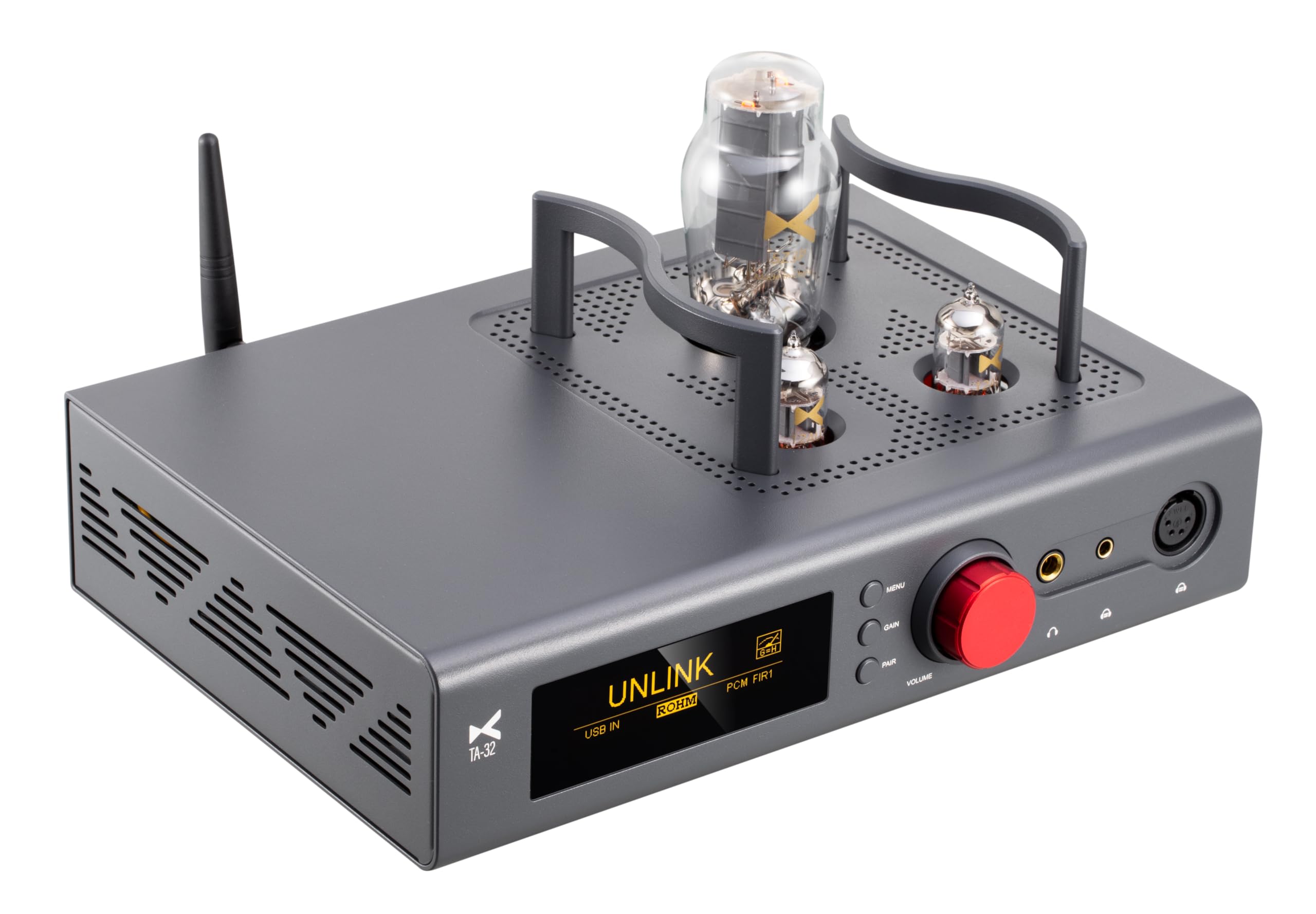
Figure 1: Front view of the xDuoo TA-32 DAC Tube Balanced Headphone Amplifier.
2. Product Features
- High-Performance DAC: Features the flagship BD34301EKV DAC chip for excellent audio parameters.
- Advanced USB Audio: Utilizes the XMOS XU316 chip for asynchronous USB transmission, supporting PCM up to 32Bit/768kHz, MQA, and DSD512.
- Powerful Headphone Output: Delivers up to 3000mW (32Ω) output power via 4-pin XLR and 4.4mm balanced outputs, driving headphones with impedance from 16-600Ω.
- Tube Rectification & Amplification: Incorporates a 5U4G tube for rectification and two ECC82 (12AU7) tubes for audio signal amplification, providing a warm and sweet sound signature.
- Class A Buffer: Transistor-based Class A buffer ensures strong output power and compatibility with various headphones.
- Bluetooth 5.1: Equipped with Qualcomm QCC5125 chip, supporting SBC, AAC, aptX, aptX_LL, aptX_HD, and LDAC formats for high-quality wireless audio.
- Multiple Digital Inputs: Supports AES, Coaxial, and Optical inputs up to PCM 24Bit/192kHz and DSD64 (DOP).
- Replaceable DAC Module: The DAC chip module is user-replaceable, allowing for customization of sound characteristics.
- OLED Display: A 3.12-inch OLED screen displays essential information such as sampling rate, input, and volume.
- Optimized Power Supply: Built-in filter and high-efficiency power conversion circuits with LDOs provide separate, clean power to critical components.
- Digital Volume Control: Ensures balanced left and right channels even at low volume levels.
- Mute Circuit: Prevents 'POP' noise during power-on and ensures optimal tube operation.

Figure 2: Front panel of the TA-32 showing the OLED display and control knob.
3. Setup Guide
3.1 Unpacking
Carefully remove the TA-32 unit and all accessories from the packaging. Ensure all items listed in the 'Accessories' section are present and undamaged.
3.2 Power Connection
- Connect the provided AC power cable to the power input on the rear panel of the TA-32.
- Plug the other end of the AC power cable into a suitable wall outlet (AC100-120V or 220-240V, depending on your region).
3.3 Audio Source Connection
The TA-32 supports various digital audio inputs:
- USB Input: Connect your computer, laptop, HIFI player, or smartphone (with appropriate adapter, not included) to the USB-B input on the rear panel using the supplied USB cable.
- Optical/Coaxial/AES Inputs: Connect your digital audio source (e.g., CD player, streamer) to the corresponding OPT, COAX, or AES input on the rear panel.
- Bluetooth: Attach the provided Bluetooth antenna to the antenna connector on the rear panel for optimal wireless reception.

Figure 3: Rear panel connections including USB, Optical, Coaxial, AES, and balanced/unbalanced outputs.
3.4 Headphone/Amplifier Connection
- Headphones: Connect your headphones to the 6.5mm single-ended, 4.4mm balanced, or 4-pin XLR balanced headphone outputs on the front panel.
- External Amplifier/Speakers: Use the AUX OUT (RCA unbalanced) or BAL-LO (XLR balanced) outputs on the rear panel to connect to an external amplifier or active speakers.
4. Operating Instructions
4.1 Power On/Off
Press the power button on the front panel to turn the unit on or off. The OLED screen will illuminate upon power-on.
4.2 Input Selection
Rotate the multi-function knob on the front panel to cycle through available input sources (USB, OPT, COAX, AES, BT). The selected input will be displayed on the OLED screen.
4.3 Volume Control
Rotate the large volume knob on the front panel to adjust the output volume. The volume level is displayed on the OLED screen. The digital volume adjustment ensures precise control and channel balance.
4.4 Bluetooth Pairing
- Select 'BT' as the input source using the multi-function knob.
- On your Bluetooth device (e.g., smartphone), search for available devices and select 'xDuoo TA-32'.
- Once paired, the OLED screen will indicate a successful connection, and you can stream audio wirelessly.

Figure 4: Diagram illustrating Bluetooth connectivity with the TA-32.
4.5 DAC Module Replacement
The TA-32 features a replaceable DAC module. To replace the module, power off the device and carefully follow the instructions provided with the new DAC module. Ensure proper alignment and secure installation to avoid damage.

Figure 5: View of the replaceable DAC module inside the TA-32.
5. Maintenance
5.1 Cleaning
Wipe the exterior of the TA-32 with a soft, dry cloth. Avoid using liquid cleaners or abrasive materials, as they may damage the finish. Ensure the device is powered off and unplugged before cleaning.
5.2 Tube Replacement
The vacuum tubes (5U4G and ECC82/12AU7) have a finite lifespan. If you notice a degradation in sound quality or if a tube fails, they can be replaced. Power off and unplug the unit, allow the tubes to cool completely, then carefully remove and replace them. Consult a qualified technician if you are unsure.

Figure 6: Detail of the vacuum tubes on the TA-32.
5.3 Storage
When not in use for extended periods, store the TA-32 in a cool, dry place away from direct sunlight and extreme temperatures. Disconnect all cables.
6. Troubleshooting
- No Power: Ensure the AC cable is securely connected to both the unit and the power outlet. Check the power switch.
- No Sound:
- Verify the correct input source is selected on the TA-32.
- Check headphone connections and volume level.
- Ensure the audio source is playing and its volume is not muted.
- If using external speakers/amplifier, check their connections and power.
- Distorted Sound:
- Reduce the volume level on both the TA-32 and the source device.
- Check cable connections for looseness or damage.
- Ensure the impedance of your headphones is within the supported range (16-600Ω).
- Bluetooth Connection Issues:
- Ensure the Bluetooth antenna is properly attached.
- Make sure the TA-32 is in Bluetooth input mode.
- Delete the TA-32 from your device's Bluetooth list and attempt to re-pair.
- Move your Bluetooth device closer to the TA-32.
- OLED Screen Not Displaying: Power cycle the unit. If the issue persists, contact customer support.
7. Specifications
| Parameter | Value |
|---|---|
| Model Number | XDUOO TA-22 (Note: Product title refers to TA-32) |
| Screen | 3.12 inch OLED |
| Power Supply | AC100-120V/220-240V |
| Compliant OS | Linux, Windows, macOS, iOS, Android |
| USB IN Sampling Rate (PCM) | 16-32Bit/44.1k-768kHz |
| USB IN Sampling Rate (DSD) | DSD64~DSD512 |
| USB IN Sampling Rate (MQA) | 8X |
| OPT/COAX IN Sampling Rate (PCM) | 16-24Bit/44.1k-192kHz |
| OPT/COAX IN Sampling Rate (DSD) | DSD64(DOP) |
| Bluetooth Formats | SBC, AAC, aptX, aptX LL, aptX HD, LDAC |
| 6.5mm Headphone Output Power | 2300mW (32Ω) |
| 6.5mm Headphone Frequency Response | 20Hz-60kHz (±0.5dB) |
| 6.5mm Headphone THD+N | ≤0.01% |
| 6.5mm Headphone SNR | 116 dB |
| 6.5mm Headphone Crosstalk | 75dB |
| 4.4mm and XLR Headphone Output Power | 3000mW (32Ω) |
| 4.4mm and XLR Headphone Frequency Response | 20Hz-60kHz (±0.5dB) |
| 4.4mm and XLR Headphone THD+N | 0.03% |
| 4.4mm and XLR Headphone SNR | 118dB |
| 4.4mm and XLR Headphone Crosstalk | ≥104dB |
| AUX OUT Output Level | 2.0Vrms |
| AUX OUT Frequency Response | 20Hz~20kHz (+0.5dB) |
| AUX OUT SNR | 117dB |
| AUX OUT Crosstalk | ≥108dB |
| AUX OUT THD+N | 0.0007% |
| BAL-LO Output Level | 4.0Vrms |
| BAL-LO Frequency Response | 20Hz~20kHz (+0.5dB) |
| BAL-LO SNR | 125dB |
| BAL-LO Crosstalk | 113dB |
| BAL-LO THD+N | 0.0006% |
| Suitable Headphone Impedance | 16-600Ω |
| Dimensions | 31 x 24 x 17 cm (12.2 x 9.45 x 6.69 inches) |
| Weight | 5.2 kg (11.44 pounds) |

Figure 7: Physical dimensions of the TA-32 unit.
8. Included Accessories
The following items are included with your xDuoo TA-32:
- AC Cable
- USB Cable
- User's Manual (this document)
- 6.35 to 3.5 converter
- Bluetooth antenna
9. Warranty & Support
The xDuoo TA-32 comes with a standard manufacturer's warranty. For detailed warranty information, please refer to the warranty card included in your packaging or visit the official xDuoo website. For technical support, troubleshooting assistance, or service inquiries, please contact xDuoo customer service through their official channels.


