1. Introduction
Thank you for choosing LIVIKEY Clip-On Earbuds. These open-ear headphones are designed for ultimate comfort and a secure fit, perfect for daily use, sports, and workouts. Featuring Bluetooth 5.4, long battery life, and IPX5 water resistance, they provide a superior audio experience while keeping you aware of your surroundings. Please read this manual carefully before using the product to ensure proper operation and maintenance.

Image: LIVIKEY Clip-On Earbuds in their charging case, with one earbud shown separately. The earbuds are black with a sleek, open-ear clip design.
2. Package Contents
Please check the package for the following items:
- LIVIKEY Clip-On Earbuds (Left & Right) x 1 pair
- Charging Case x 1
- USB Type-C Charging Cable x 1
- User Manual x 1

Image: A visual representation of the package contents, including the open-ear earbuds, charging case, user manual, and Type-C charging cable.
3. Setup
3.1 Charging the Earbuds and Case
Before first use, fully charge the earbuds and the charging case. Connect the provided USB Type-C cable to the charging port on the case and a power source. The indicator light on the case will show charging status.
- A single charge provides up to 10 hours of playback.
- The charging case provides an additional 40 hours, totaling up to 50 hours of listening time.
- Fast-charging: 5 minutes of charging provides 1 hour of playback.

Image: A graphic showing the battery performance: 10 hours on a single charge, 50 hours with the charging case, and 100 days of standby time.
3.2 Pairing with Your Device
- Open the charging case. The earbuds will automatically enter pairing mode, and the indicator lights will flash.
- On your device (smartphone, tablet, computer), enable Bluetooth.
- Search for "LIVIKEY T20" in the list of available Bluetooth devices.
- Select "LIVIKEY T20" to connect. Once connected, the earbud indicator lights will turn off.
The earbuds will automatically reconnect to the last paired device when taken out of the case, if Bluetooth is enabled on the device.
3.3 How to Wear the Earbuds
The LIVIKEY Clip-On Earbuds are designed for a comfortable and secure fit. Follow these steps for optimal wearing:
- Identify the small and big parts of the earbud.
- Place the small part on your ear, with the big part positioned behind your earlobe.
- Adjust the earbud downward until it sits comfortably and securely on your ear.

Image: A three-step diagram illustrating how to properly wear the clip-on earbuds: identifying parts, placing on the ear, and adjusting for comfort.

Image: A comparison graphic highlighting the benefits of the ear clip design over traditional in-ear, ear hook, and headset designs, emphasizing comfort and stability.
4. Operating Instructions
4.1 Touch Controls
The LIVIKEY Clip-On Earbuds feature smart touch controls for easy management of music and calls.

Image: A visual guide to the touch controls on the earbuds, showing actions for single tap, double tap, triple tap, and long press.
| Action | Function | Earbud (L/R) |
|---|---|---|
| Tap X1 | Play/Pause Music | L/R |
| Tap X1 | Answer/End Call | L/R |
| Tap X2 | Access Voice Assistant | L/R |
| Tap X3 | Previous Song | L |
| Tap X3 | Next Song | R |
| Long Press | Volume Down | L |
| Long Press | Volume Up | R |
4.2 Power On/Off
- Power On: Open the charging case, and the earbuds will automatically power on.
- Power Off: Place the earbuds back into the charging case and close the lid. They will automatically power off and begin charging.
5. Maintenance
5.1 Cleaning
- Regularly clean the earbuds and charging case with a soft, dry, lint-free cloth.
- Do not use abrasive cleaners, alcohol, or chemical solvents.
- Ensure charging contacts on both earbuds and case are clean and dry.
5.2 Storage
- Store the earbuds in their charging case when not in use to protect them and keep them charged.
- Avoid storing in extreme temperatures (hot or cold) or high humidity.

Image: A close-up of a man wearing an earbud while it's raining, illustrating the IPX5 water resistance feature. While the earbuds are water-resistant, they should not be submerged.
6. Troubleshooting
| Issue | Possible Cause | Solution |
|---|---|---|
| Earbuds not pairing | Low battery, out of range, pairing mode not active | Charge earbuds and case. Ensure earbuds are in pairing mode. Move closer to the device. |
| No sound from one earbud | Low battery, not properly connected, individual earbud issue | Ensure both earbuds are charged. Re-pair the earbuds. Try resetting the earbuds (refer to manufacturer's website for specific reset instructions if needed). |
| Poor sound quality | Weak Bluetooth signal, interference, dirty earbuds | Move closer to the device. Avoid strong electromagnetic interference. Clean earbuds. |
| Earbuds not charging | Dirty charging contacts, faulty cable/charger | Clean charging contacts on earbuds and case. Try a different USB-C cable and charger. |
7. Specifications
| Feature | Description |
|---|---|
| Model Name | T20 |
| Connectivity Technology | Wireless (Bluetooth 5.4) |
| Earbud Weight | 4.3g (per earbud) |
| Speaker Size | 12mm |
| Playtime (Single Charge) | Up to 10 hours |
| Total Playtime (with Case) | Up to 50 hours |
| Charging Port | USB Type-C |
| Water Resistance | IPX5 |
| Control Method | Touch |
| Noise Control | Passive Noise Cancellation (CVC for calls) |
| Frequency Range | 20 Hz - 20,000 Hz |
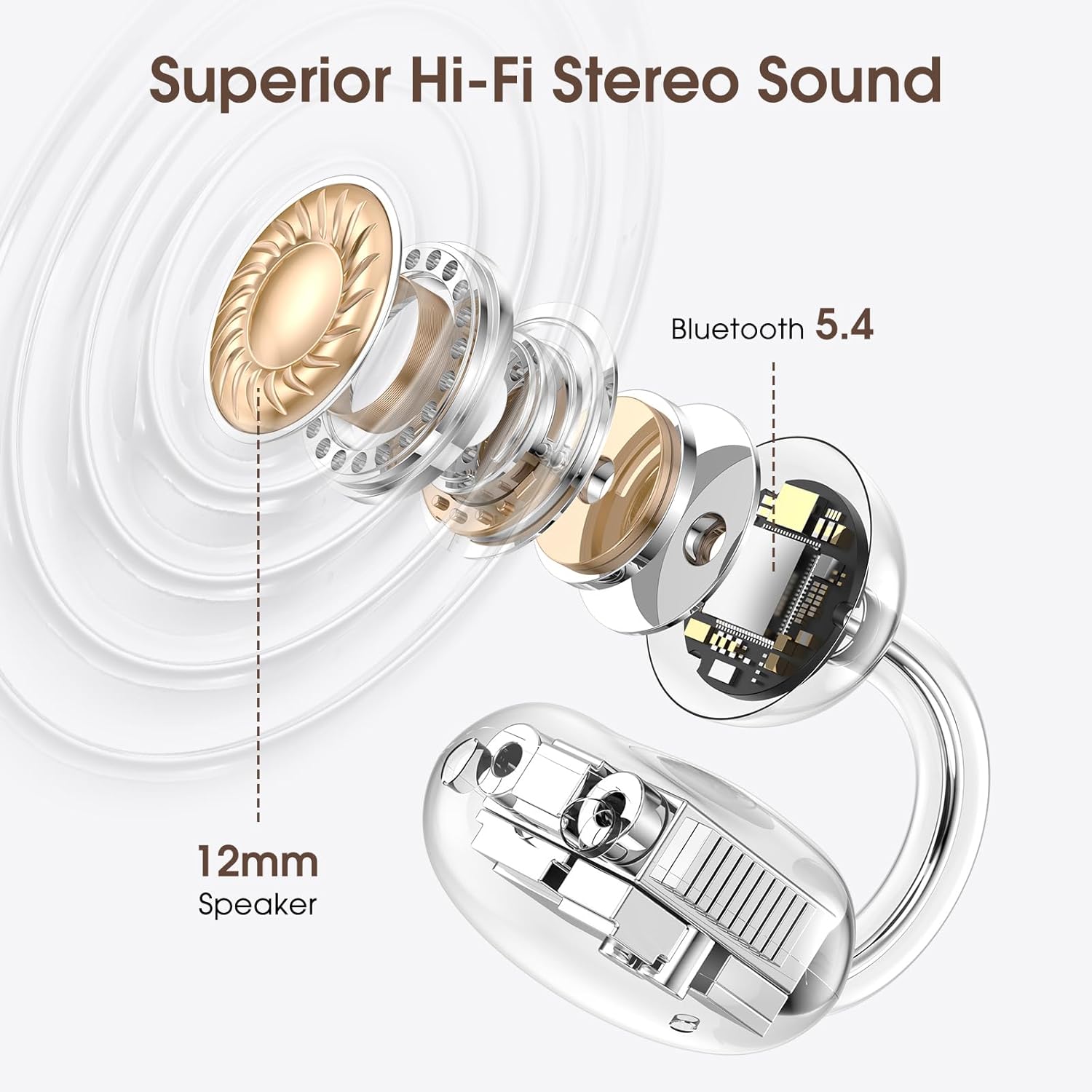
Image: An exploded view diagram highlighting the 12mm speaker for superior Hi-Fi stereo sound and the integrated Bluetooth 5.4 chip for stable connectivity.

Image: A detailed view of a Bluetooth 5.4 chip, emphasizing its role in providing faster transmission speeds and more stable connections for the earbuds.
8. Warranty and Support
LIVIKEY products are designed and manufactured to the highest quality standards. This product is covered by a standard manufacturer's warranty. For detailed warranty information, please refer to the warranty card included in your package or visit the official LIVIKEY website.
If you encounter any issues or have questions regarding your LIVIKEY Clip-On Earbuds, please contact our customer support team:
- Email: [Refer to product packaging or official website]
- Website: LIVIKEY Official Store on Amazon
Please have your product model (T20) and purchase information ready when contacting support.


