
Redkey W15
Redkey W15 Wet and Dry Vacuum Cleaner
Model: W15-O1 | Brand: Redkey
User Manual
1. Introduction
Thank you for choosing the Redkey W15 Wet and Dry Vacuum Cleaner. This appliance is designed to provide efficient and versatile cleaning for various sealed hard floor types, combining vacuuming, washing, and mopping functions in one device. Please read this manual thoroughly before operation to ensure proper use, maintenance, and to maximize the lifespan of your product.
2. Safety Instructions
Always follow basic safety precautions when using electrical appliances to reduce the risk of fire, electric shock, or injury.
- Do not immerse the appliance in water or other liquids.
- Use only as described in this manual. Use only manufacturer's recommended attachments.
- Do not use with a damaged cord or plug. If the appliance is not working as it should, has been dropped, damaged, left outdoors, or dropped into water, return it to a service center.
- Do not pull or carry by cord, use cord as a handle, close a door on cord, or pull cord around sharp edges or corners. Keep cord away from heated surfaces.
- Do not handle plug or appliance with wet hands.
- Keep hair, loose clothing, fingers, and all parts of body away from openings and moving parts.
- Do not pick up anything that is burning or smoking, such as cigarettes, matches, or hot ashes.
- Use extra care when cleaning on stairs.
- Do not use to pick up flammable or combustible liquids, such as gasoline, or use in areas where they may be present.
- Unplug from outlet when not in use and before servicing.
- This appliance is for household use only.
3. Package Contents
Verify that all items are included in your package:
- Redkey W15 Wet and Dry Vacuum Cleaner Unit
- Charging Dock
- Power Adapter
- Brush Roller (Pre-installed)
- Extra Brush Roller (x1)
- HEPA Filter (Pre-installed)
- Extra HEPA Filter (x1)
- Cleaning Tool
- User Manual

Image: Redkey W15 vacuum cleaner with its accessories including extra filters, brush rollers, and charging dock.
4. Product Overview
Familiarize yourself with the main components of your Redkey W15:
- Handle: Ergonomically designed for comfortable grip and control.
- Clean Water Tank (910 ml): Holds fresh water for cleaning.
- Dirty Water Tank (600 ml): Collects dirty water and debris.
- LED Display: Shows battery level, cleaning mode, and alerts.
- Brush Head: Contains the roller brush for scrubbing and vacuuming.
- Self-Cleaning Button: Initiates the automatic self-cleaning cycle.
- Power Button: Turns the unit on/off and switches modes.
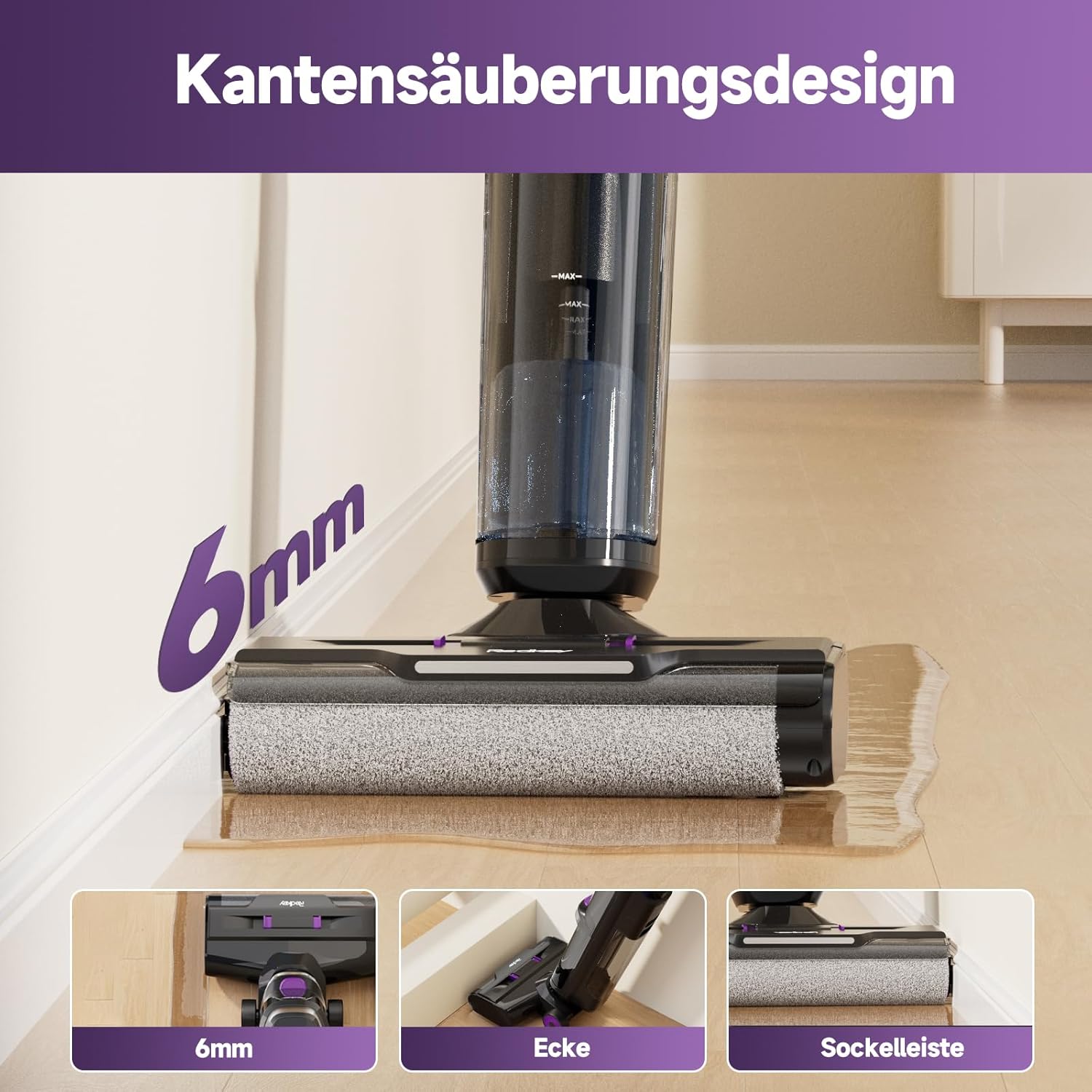
Image: Detailed view of the Redkey W15, highlighting its dual water tanks and brush head.
5. Setup
5.1 Assembly
- Insert the handle into the main body until it clicks into place.
- Ensure the clean water tank and dirty water tank are securely installed.
5.2 Charging
- Place the vacuum cleaner on the charging dock.
- Connect the power adapter to the charging dock and a power outlet.
- The LED display will indicate charging status. A full charge takes approximately 3-4 hours.

Image: The Redkey W15 vacuum cleaner docked for charging, showing the charging station.
6. Operating Instructions
6.1 Filling the Clean Water Tank
- Remove the clean water tank from the main unit.
- Open the tank cap and fill with clean tap water. For enhanced cleaning, a small amount of non-foaming floor cleaning solution can be added (refer to solution instructions).
- Close the cap securely and reinsert the tank into the unit.
6.2 Starting Operation
- Press the Power Button to turn on the vacuum cleaner. It will start in Standard mode.
- The LED display will show the current mode and battery level.
- To switch between cleaning modes (Standard, Suction, Powerful), press the Power Button repeatedly.
6.3 Cleaning Modes
- Standard Mode: For general daily cleaning of light dirt and dust.
- Suction Mode: Primarily for vacuuming liquids or wet spills without dispensing water.
- Powerful Mode: For stubborn dirt, dried stains, and heavy-duty cleaning.

Image: The Redkey W15 demonstrating its ability to clean various types of messes, including dry debris, wet spills, and sticky residue.
6.4 Edge Cleaning
The Redkey W15 features a 6mm edge cleaning design, allowing it to clean close to baseboards and into corners effectively. Simply guide the brush head along the edges of your room.
Image: The Redkey W15 cleaning along a wall, showcasing its 6mm edge cleaning capability.
7. Maintenance
7.1 Self-Cleaning Function
- After each use, place the vacuum cleaner on the charging dock.
- Ensure there is sufficient clean water in the clean water tank.
- Press the Self-Cleaning Button. The unit will automatically clean the brush roller and internal pipes.
- The process takes a few minutes and will stop automatically.
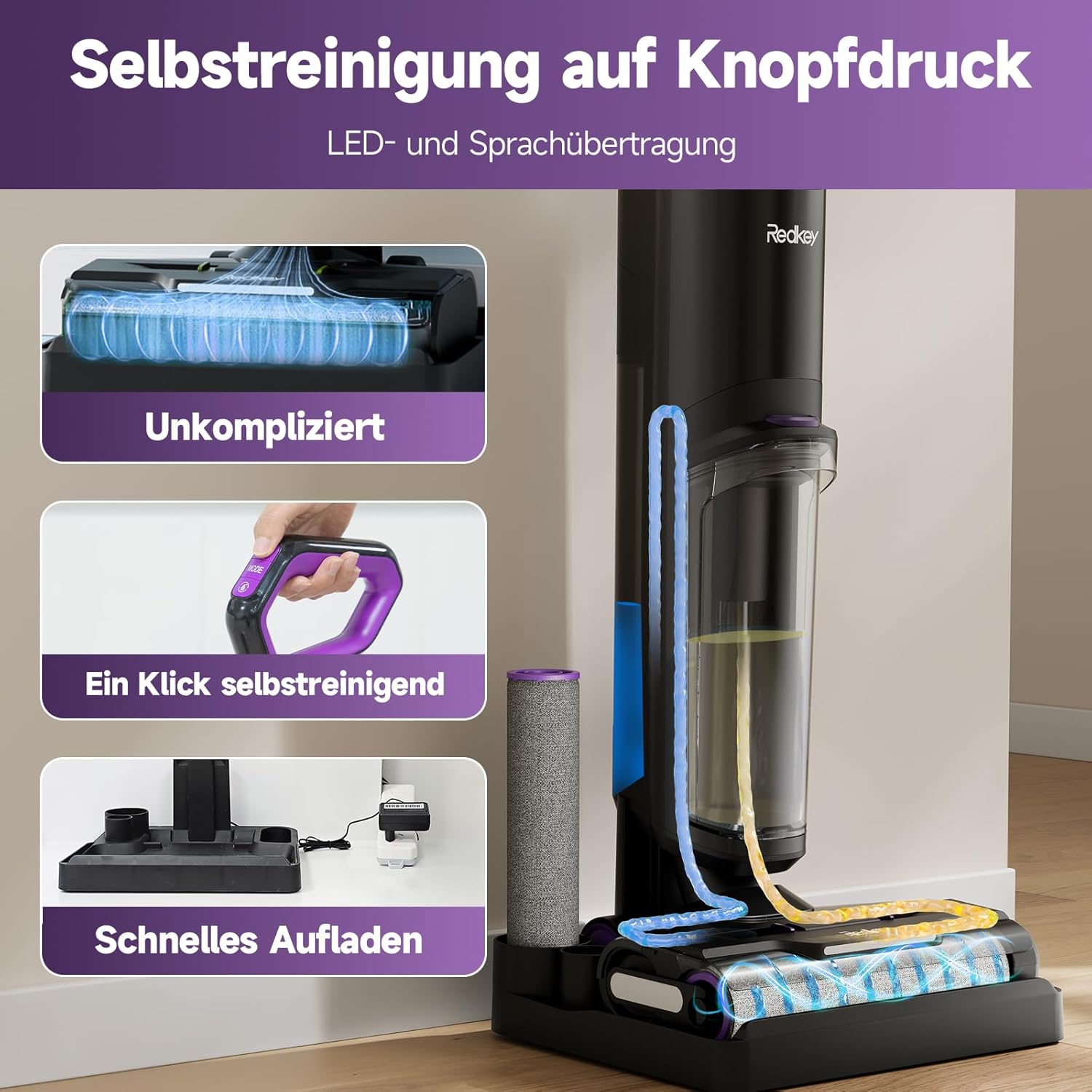
Image: Illustration of the Redkey W15's one-touch self-cleaning function, showing water circulation to clean the roller and internal components.
7.2 Emptying and Cleaning the Dirty Water Tank
- Remove the dirty water tank from the unit.
- Carefully open the tank and dispose of the dirty water and debris.
- Rinse the tank thoroughly with clean water.
- Allow the tank to air dry completely before reinserting.
7.3 Cleaning the Roller Brush and Filter
- Remove the roller brush cover and then the roller brush.
- Rinse the roller brush under running water to remove any hair or debris. Use the provided cleaning tool if necessary.
- Remove the HEPA filter from the dirty water tank. Rinse it under running water.
- Allow the roller brush and HEPA filter to air dry completely for at least 24 hours before reassembling. Do not use if still wet.

Image: A person rinsing the HEPA filter under running water, demonstrating easy maintenance.
8. Troubleshooting
| Problem | Possible Cause | Solution |
|---|---|---|
| Unit does not turn on. | Battery is low or depleted. | Charge the unit fully. |
| No water dispensed. | Clean water tank is empty. | Refill the clean water tank. |
| Poor suction. | Dirty water tank is full or clogged. Filter is dirty. Brush roller is tangled. | Empty and clean the dirty water tank. Clean or replace the HEPA filter. Clean the brush roller. |
| Abnormal noise. | Brush roller obstructed or damaged. | Check and clean the brush roller for obstructions. If damaged, replace it. |
| Voice prompts are in English only. | Current software version limitation. | This is a known limitation. Updates for other languages are in progress. |
9. Specifications
- Model: W15
- Brand: Redkey
- Functions: 3-in-1 (Vacuum, Wash, Mop)
- Clean Water Tank Capacity: 910 ml
- Dirty Water Tank Capacity: 600 ml
- Battery Runtime: Up to 35 minutes
- Edge Cleaning: 6 mm
- Weight: 4.0 kg (unit only), 6.9 kg (packaged)
- Dimensions: 70 x 31 x 33 cm (packaged)
- Filter Type: HEPA Filter
- Display: LED with Voice Prompts (English only currently)
10. Warranty and Support
Redkey offers comprehensive support for your W15 Wet and Dry Vacuum Cleaner.
- Product Warranty: 2-year warranty for the wet and dry vacuum cleaner.
- Battery Warranty: 2-year warranty for the battery.
For any spare parts or after-sales issues, please contact us through the following channel:
Your Account > Orders > Order Details > Sold by: WHSJ EU > Ask a Question
We aim to respond within 24 hours.

Image: A customer service representative, illustrating Redkey's commitment to support.
Related documentsW15


Ask a question about this manual
Ask about setup, troubleshooting, compatibility, parts, safety, or missing instructions. Manuals+ will review the question and use this page’s manual context to help answer it.