
Behringer BC1200
Behringer BC1200 Professional 7-piece Drum Microphone Kit
Model: BC1200
1. Introduction
The Behringer BC1200 Professional 7-piece Drum Microphone Kit is designed to capture high-quality audio from drum kits in various settings, including studio recording, live performances, and practice sessions. This comprehensive kit provides specialized microphones for each component of a drum set, ensuring optimal sound reproduction and clarity. It includes all necessary accessories for setup and transport, offering a complete solution for drummers, producers, and audio engineers.
2. Package Contents
Verify that all items listed below are present in your package:
- 1 x BC1200 Bass Drum Microphone
- 4 x TM1200 Tom/Snare Microphones
- 2 x CM1200 Overhead Condenser Microphones
- Microphone clamps for all microphones
- Windscreens for overhead microphones
- 1 x Sturdy, latching carrying case
- 7 x XLR Cables (for connecting microphones)
- 1 x SMA Series 8-channel 25' XLR Drop Snake
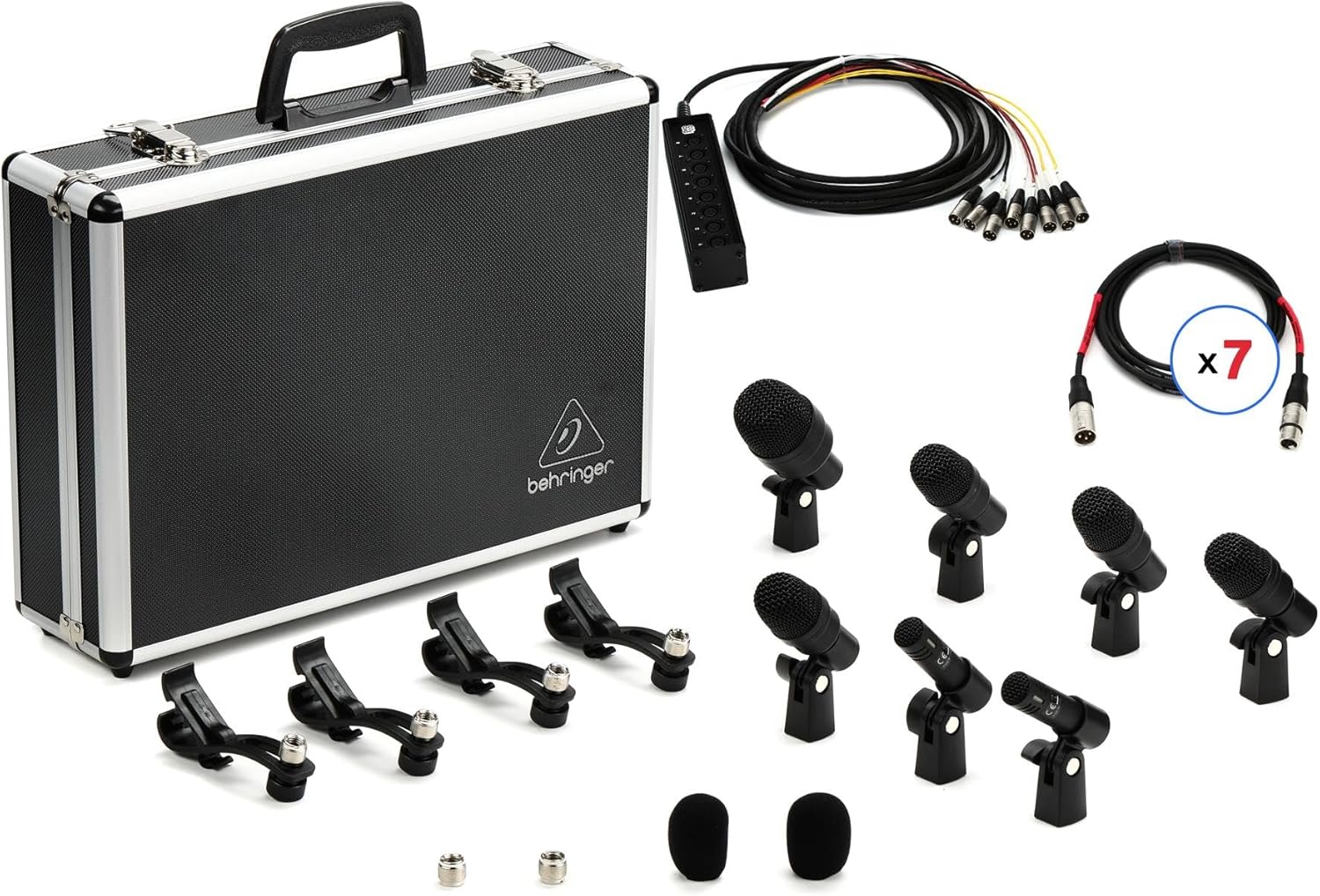
Image 1: Complete Behringer BC1200 Drum Microphone Kit. This image displays all components included in the kit: the hard-shell carrying case, the 8-channel XLR drop snake, seven individual XLR cables, one large bass drum microphone, four smaller tom/snare microphones, two slender overhead condenser microphones, and various mounting clips and windscreens.
3. Setup
3.1 Unpacking and Inspection
Carefully remove all components from the carrying case. Inspect each microphone, cable, and accessory for any signs of damage during transit. Report any discrepancies to your vendor immediately.
3.2 Microphone Placement Guidelines
Optimal microphone placement is crucial for capturing the best sound from your drum kit. Use the included clamps for secure mounting.
- BC1200 Bass Drum Microphone: Position this microphone inside or just outside the bass drum's resonant head. Experiment with distance and angle to achieve the desired punch and low-end response. Closer placement typically yields more attack and less resonance.
- TM1200 Tom/Snare Microphones (4 units): Attach these microphones to the rims of your snare drum and tom-toms using the provided clamps. Aim the microphone capsule towards the center of the drum head, approximately 1-2 inches above the rim. Adjust the angle to balance the attack of the stick with the resonance of the drum.
- CM1200 Overhead Condenser Microphones (2 units): These microphones are designed to capture the cymbals and the overall stereo image of the drum kit. Position them above the drum kit, typically one over the hi-hat/snare side and one over the floor tom/ride cymbal side. Ensure they are equidistant from the snare drum for phase coherence. Adjust height to control the balance between cymbals and drums. Apply the windscreens to reduce plosives or wind noise if applicable.
3.3 Cable Connections
Connect each microphone to an input on your audio mixer or interface using the provided XLR cables. The SMA Series 8-channel 25' XLR Drop Snake can simplify cable management, especially in live settings or larger studios. Connect the individual XLR cables from the microphones to the input box of the snake, and then connect the fan-out end of the snake to your mixer's inputs.
- Connect the male end of an XLR cable to the female XLR output on each microphone.
- Connect the female end of the XLR cable to an available input on your mixer or the input box of the SMA Drop Snake.
- If using the drop snake, connect the fan-out XLR male connectors to the corresponding inputs on your mixer or audio interface.
- Ensure all connections are secure to prevent signal loss or intermittent audio.
4. Operating the Microphone Kit
4.1 Gain Staging
Proper gain staging is essential for optimal sound quality and to prevent distortion. Adjust the input gain on your mixer or interface for each microphone so that the signal is strong but does not clip (peak into the red). The CM1200 overhead microphones are condenser microphones and require 48V phantom power from your mixer/interface. Ensure phantom power is enabled for these channels.
4.2 Monitoring
Listen to the individual microphone signals and the overall drum mix through headphones or studio monitors. Adjust microphone positions and EQ settings on your mixer to achieve a balanced and clear drum sound.
4.3 Application Tips
- Recording: For studio recording, aim for isolation between drums where possible. Use gates on individual drum mics to reduce bleed from other drums. The overheads will capture the overall kit sound and cymbals.
- Live Performance: In live settings, focus on reinforcing the natural sound of the drums. Use the bass drum and tom/snare mics for punch and clarity, and the overheads for cymbal presence and overall kit ambience.
- Experimentation: Microphone placement is an art. Experiment with different distances, angles, and positions to find the sound that best suits your specific drum kit, room acoustics, and musical style.
5. Maintenance
Proper care and maintenance will extend the lifespan of your Behringer BC1200 microphone kit.
- Cleaning Microphones: Use a soft, dry cloth to wipe down the microphone bodies after each use. Avoid using liquid cleaners or solvents, as these can damage the microphone capsules or finishes. For grilles, a soft brush can remove dust or debris.
- Cable Care: Always coil cables neatly after use to prevent kinks and damage to the internal wiring. Avoid sharp bends or placing heavy objects on cables. Store cables in a way that prevents tangling.
- Storage: When not in use, store all microphones, cables, and accessories in the provided sturdy carrying case. This protects the equipment from dust, moisture, and physical damage during transport and storage. Ensure all components are dry before storing.
- Environmental Conditions: Avoid exposing the microphones to extreme temperatures, high humidity, or direct sunlight for prolonged periods.
6. Troubleshooting
If you encounter issues with your microphone kit, refer to the following common problems and solutions:
| Problem | Possible Cause | Solution |
|---|---|---|
| No Sound from a Microphone |
|
|
| Distorted or Clipping Sound |
|
|
| Hum or Buzzing Noise |
|
|
7. Specifications
| Feature | Detail |
|---|---|
| Product Type | 7-piece Drum Microphone Kit |
| Brand | Behringer |
| Model | BC1200 |
| Kit Components | 1x BC1200 (Bass Drum), 4x TM1200 (Tom/Snare), 2x CM1200 (Overhead) |
| Included Accessories | Microphone clamps, windscreens, carrying case, 7x XLR cables, 1x 8-channel 25' XLR Drop Snake |
| Item Weight | 1 pound (16 ounces) |
| Package Dimensions | 27 x 18 x 14 inches |
| ASIN | B0F2PR8RZ2 |
| UPC | 727252613023 |
| Manufacturer | Behringer |
8. Warranty & Support
8.1 Warranty Information
For detailed warranty information regarding your Behringer BC1200 Professional 7-piece Drum Microphone Kit, please refer to the warranty card included with your product or visit the official Behringer website. Warranty terms and conditions may vary by region and product.
8.2 Technical Support
Should you require technical assistance, have questions about product operation, or need to report a defect, please contact Behringer customer support. Support contact details, including phone numbers and online support portals, can typically be found on the official Behringer website:
Visit Behringer Support Website
Please have your product model (BC1200) and serial number (if applicable) ready when contacting support.
Related documentsBC1200


Ask a question about this manual
Ask about setup, troubleshooting, compatibility, parts, safety, or missing instructions. Manuals+ will review the question and use this page’s manual context to help answer it.