
Product Overview
The NOVETE Countertop Reverse Osmosis Water Filter (Model CRF0A-QS) provides an advanced 8-stage water filtration system, combining RO membrane technology with UV purification. It is designed to remove 98.91% of TDS, PFAS, heavy metals, chlorine, and odors, delivering pure, fresh water. This system also features powerful cooling capabilities, dispensing water as cold as 32°F (0°C).
The compact design (15.8"H × 18.1"L × 9.8"W) makes it suitable for various spaces, including kitchens, RVs, and boats. It operates with an innovative sleep mode for energy saving and includes an auto-clean function for internal pipe maintenance.
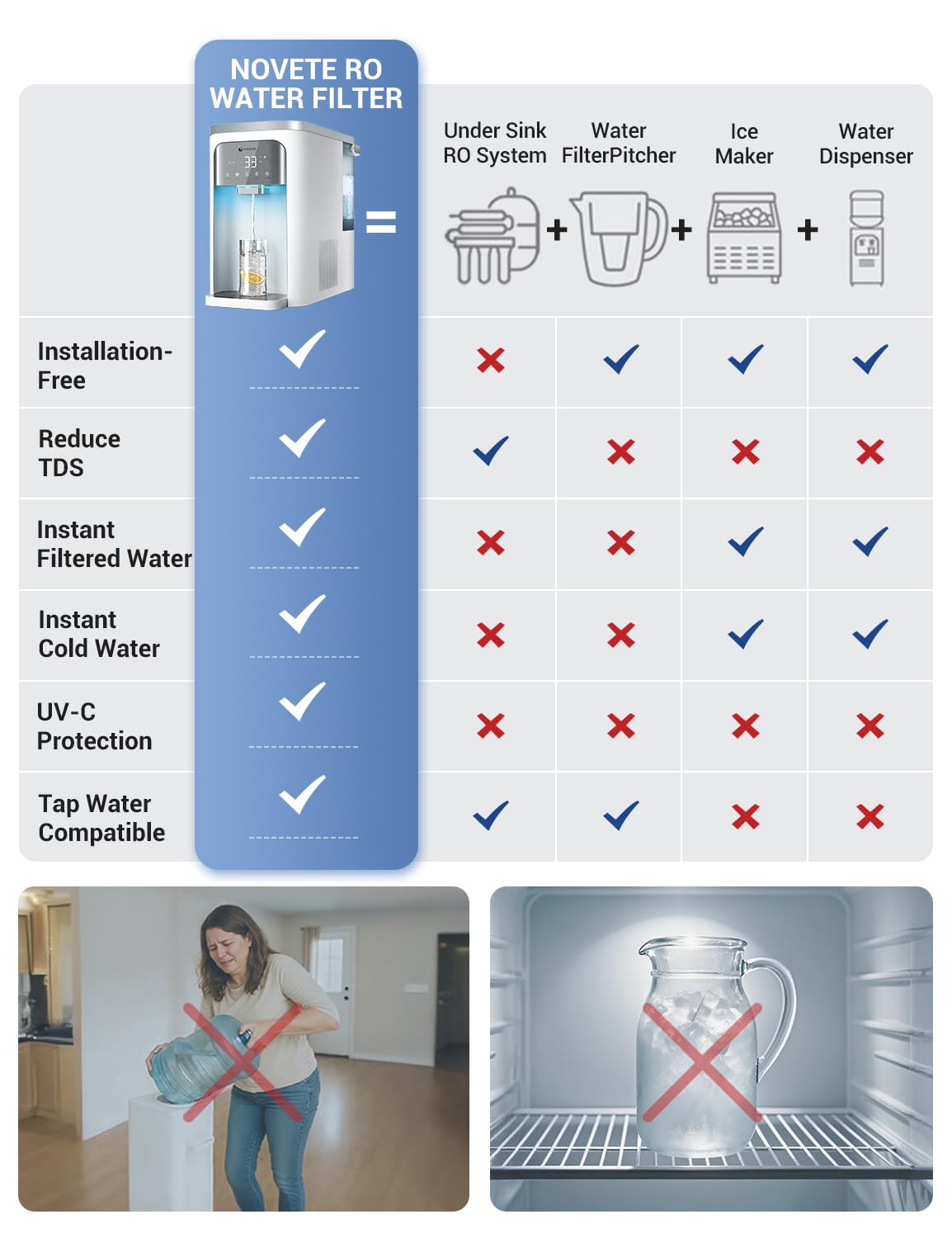
Figure 1: NOVETE RO Water Filter features compared to other water purification systems.
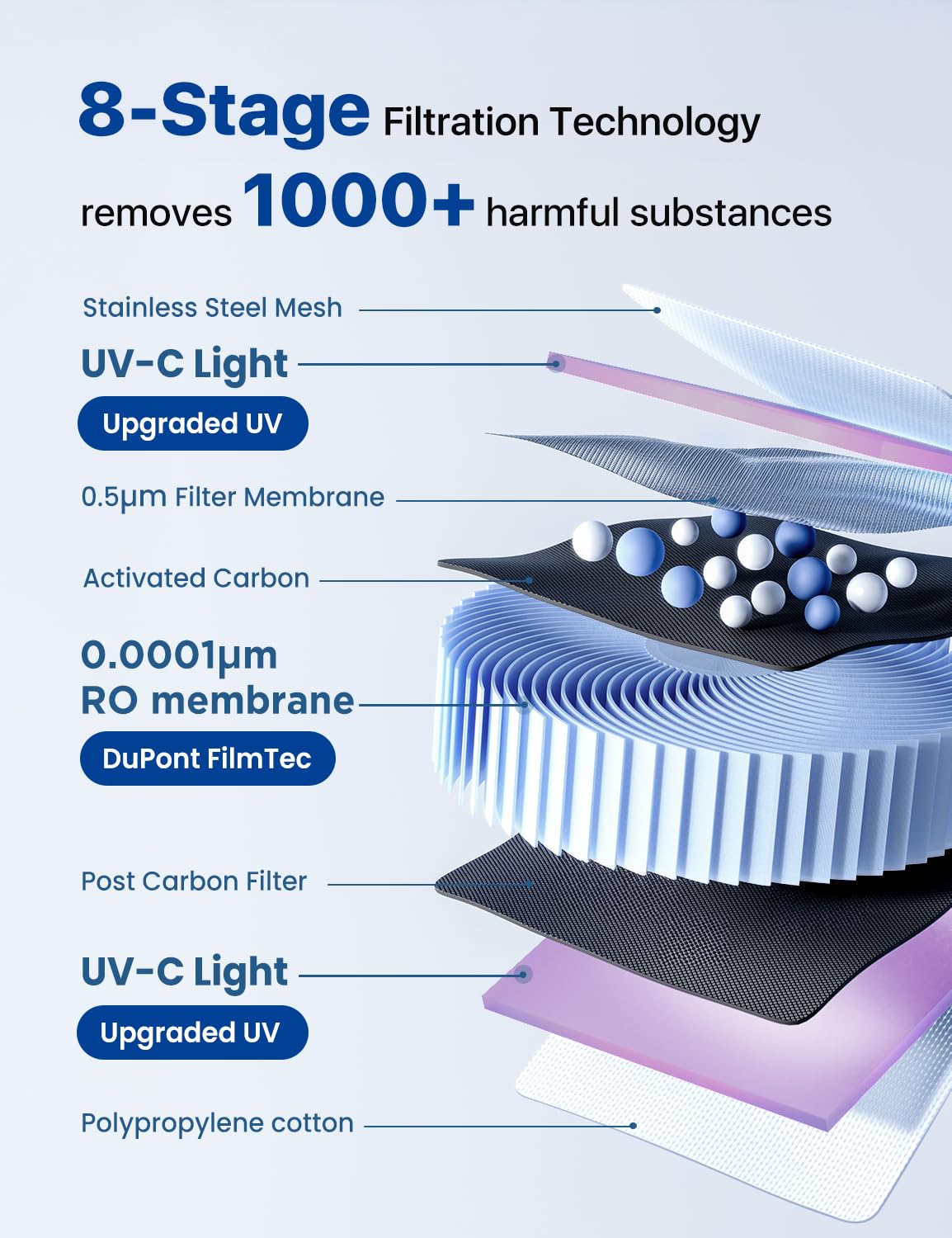
Figure 2: Detailed view of the 8-stage filtration technology, including UV-C light and RO membrane.

Figure 3: Filtration efficiency for TDS, chlorine, PFAS, and lead. For a complete report, visit SGS Report.
Setup
- Unpacking and Initial Placement: After delivery, allow the unit to sit upright for at least 4 hours before plugging it in. This ensures the compressor's internal fluids settle correctly.
- Remove Protective Label: Locate and remove the protective label from the water outlet.
- Water Tank Preparation: Remove the raw water tank from the unit. Fill it with municipal tap water up to the 'BEST LEVEL' line.
- Install Water Tank: Carefully place the filled water tank back into the unit. Ensure it is seated correctly. The unit will automatically enter auto-flushing mode.
- Initial Flushing Process: The unit requires an initial flushing to prepare the filters. This process involves refilling and draining the raw water tank 3-4 times. The display will guide you, indicating when to 'Change Water'. Each flush cycle runs for approximately 5 minutes.
- Compressor Activation: After the flushing process is complete, allow approximately 20 minutes for the cooling compressor to reach optimal temperature for cold water dispensing.
Video 1: Step-by-step guide on how to set up the NOVETE water filter system, including initial flushing.

Figure 4: Recommended clearance for easy water tank removal and refilling.
Operating Instructions
The NOVETE water filter features an intuitive control panel for easy operation.
- Power On/Off: Press the power button to turn the unit on or off.
- Water Temperature Selection: Use the 'Cooling' button (snowflake icon) to toggle between cold water and room temperature water. The display will show the current temperature.
- Volume Selection: Press the 'Volume' button (cup icon) to select the desired water volume (e.g., 4 oz, 8 oz, 17 oz, or continuous flow).
- Dispensing Water: Place your cup or bottle under the dispenser. Press the 'Start' button (water drop icon) to begin dispensing. Press again to stop if using continuous flow.
- Sleep Mode: Activate 'Sleep Mode' (moon icon) for 8 hours of reduced noise and energy saving. The unit will remain on standby for 16 hours daily without needing a reset.
- Auto-Clean/Flush: The system automatically flushes pipes to maintain cleanliness. You can also manually flush by pressing the 'Sleep/Flush' button.
Video 2: Overview of the NOVETE Reverse Osmosis Water Filter System's features and operation.

Figure 5: Intuitive control panel displaying real-time temperature, filter life, volume, and other functions.

Figure 6: The unit in Sleep Mode, designed for less noise and more energy saving.
Maintenance
- Filter Replacement: The system uses two filters: PPC (CRF0A-PPC) and RO (CRF0A-RO). The PPC filter lasts approximately 6 months (4,000 bottles), and the RO filter lasts up to 12 months (8,000 bottles). The display will indicate when filters need replacement. To replace, twist the filter counter-clockwise to unlock, remove, insert the new filter, and twist clockwise to lock. After replacement, run a flush cycle.
- Water Tank Cleaning: Regularly discard any remaining water in the raw water tank before refilling with municipal tap water. This prevents residual high-TDS water from reducing performance and filter lifespan. The drain tube and rear outlet are for storage or transport only; keep the sealing plug and cover closed during daily use.
- Auto-Clean Function: Utilize the auto-clean function regularly to maintain internal pipe cleanliness.
Video 3: Demonstration of the 8-stage purification process and filter function.

Figure 7: Guide for replacing PPC and RO filters, indicating their lifespan.
Troubleshooting
- Slow Water Flow: If water flow becomes slow, check the filter life indicators in the NOVETE app or on the unit's display. Replace filters if necessary. Ensure the water tank is filled to the 'BEST LEVEL'.
- Water Not Cold Enough: Ensure the unit has been allowed to sit for 4 hours after delivery before initial use. Verify that the 'Cooling' function is activated on the control panel.
- 'Change Water' Indicator: This indicator signals that the water in the raw tank needs to be replaced. Discard old water and refill with fresh municipal tap water.
- Unusual Noises: Some operational noises are normal, especially during cooling cycles. If unusual or loud noises persist, refer to the detailed troubleshooting section in the included user manual or contact customer support.
Specifications
| Feature | Detail |
|---|---|
| Brand | NOVETE |
| Model Name | Reverse Osmosis Water Filter Cold (CRF0A-QS) |
| Product Dimensions | 18.1"L x 9.8"W x 15.8"H |
| Item Weight | 36.8 pounds |
| Purification Method | Reverse Osmosis |
| Special Features | Change Filter Indicator, LED Display, Reduce TDS, Self Cleaning, Tankless |
| Lower Temperature Rating | 32 Degrees Fahrenheit (0°C) |
| Supported Water TDS Level Maximum | 100 PPM |
| Material | Plastic |
| Capacity | 1.2 Gallons |
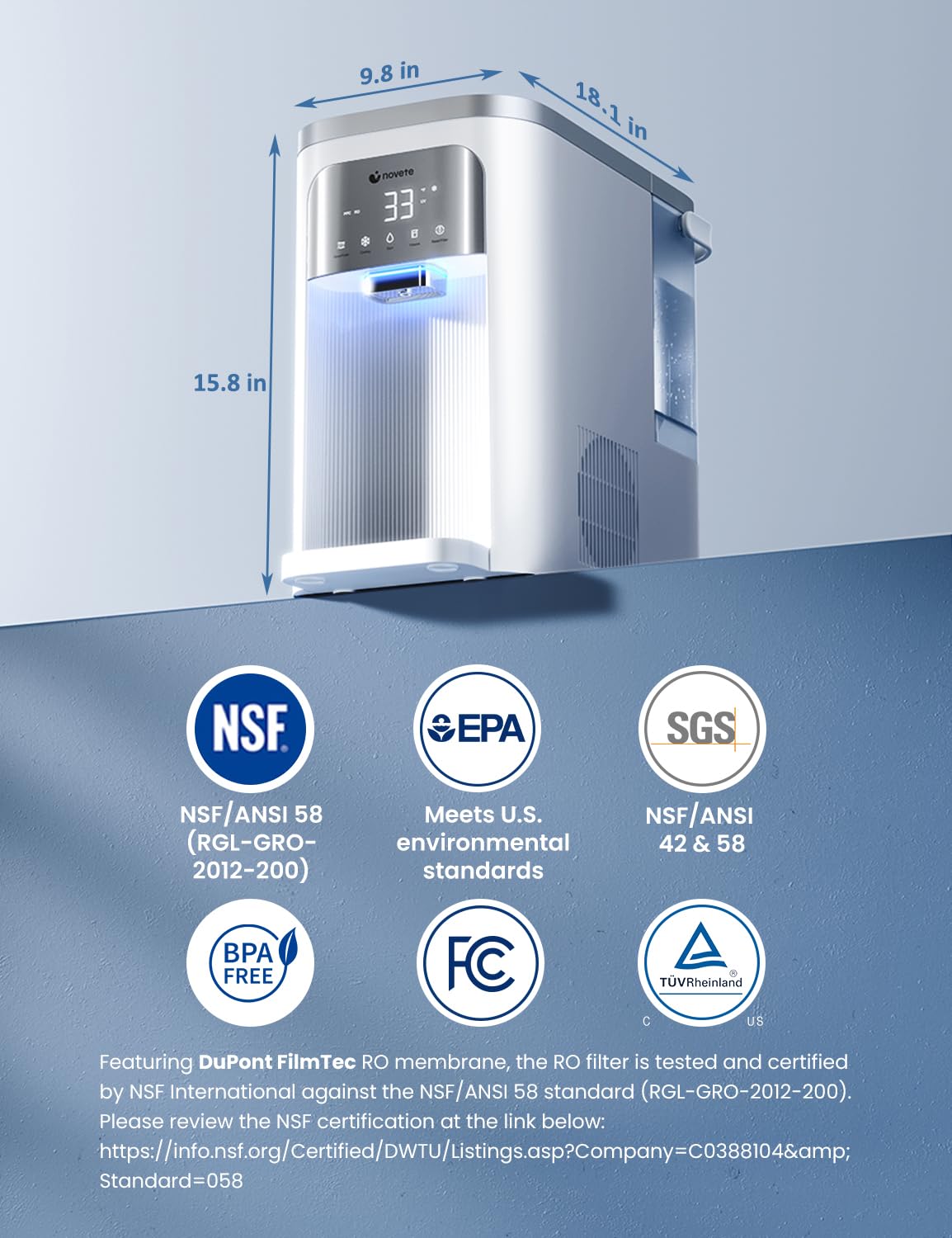
Figure 8: Product dimensions and certifications including NSF/ANSI 58. For NSF certification details, visit NSF Listing.
Warranty and Support
NOVETE provides 1-year product coverage and lifetime expert assistance. Our dedicated water specialist support team is based in the USA, ensuring fast and professional responses.
For support, please refer to the contact information provided in your product packaging or on the official NOVETE website.

Figure 9: NOVETE customer support information.