
1. Introduction
Thank you for choosing the Lukirch 670nm Red Light Therapy Glasses V2.0. This device is designed to provide home-based red light therapy to support eye comfort, visual wellness, and overall eye health. By emitting gentle, UV-free red light at a specific 670nm wavelength, these glasses aim to help reduce eye fatigue and encourage relaxation. This manual provides essential information for the safe and effective use of your new red light therapy glasses.

Figure 1: Lukirch 670nm Red Light Therapy Glasses V2.0
The image displays the Lukirch 670nm Red Light Therapy Glasses V2.0 from a slightly elevated front angle, showcasing the light blue frame and the internal red LED array. The arms of the glasses are folded inwards.
2. Important Safety Information
Please read all safety instructions carefully before using the device. Failure to follow these instructions may result in injury or damage to the product.
- Consult a Healthcare Professional: This device is designed to support eye wellness and comfort. It is not intended to diagnose, treat, cure, or prevent any disease or health condition. Consult with a qualified healthcare professional before using this device, especially if you have pre-existing eye conditions, are pregnant, or have any medical concerns.
- Gentle and Non-Invasive: The device emits low-energy, UV-free red light. It is designed to be gentle on the eyes. Avoid looking directly into the LED lights for extended periods.
- Individual Experiences: Individual results and experiences may vary. Regular and consistent use is recommended for potential benefits.
- Children: Keep out of reach of children. Adult supervision is recommended if used by minors.
- Cleaning: Do not immerse the device in water or any other liquids. Clean only with a soft, dry cloth.
- Damage: Do not use the device if it appears damaged or is not functioning correctly. Contact customer support for assistance.
- Charging: Use only the provided charging cable. Do not attempt to open or modify the device or its battery.
3. Product Overview
3.1 Components
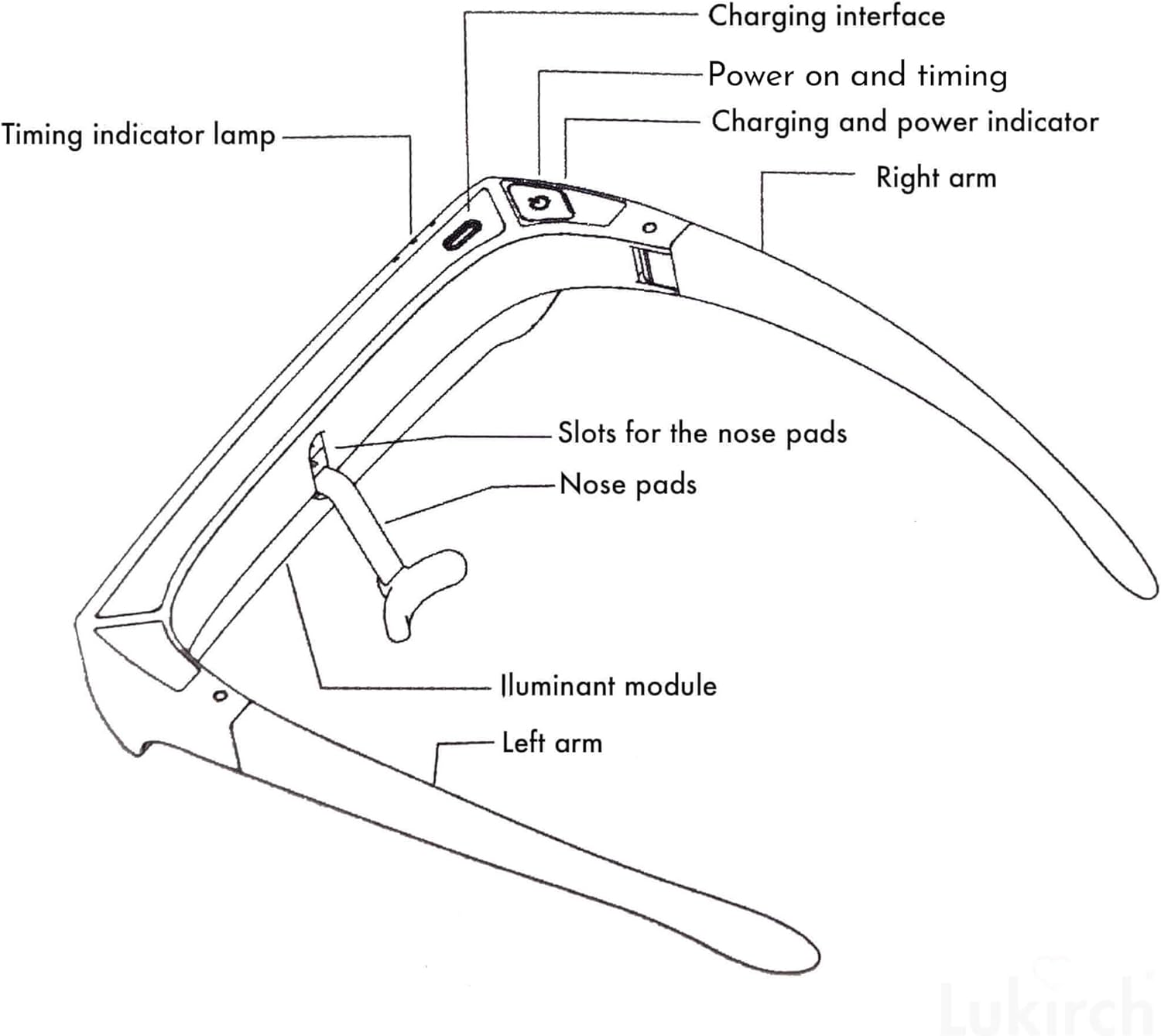
Figure 2: Device Components
This diagram illustrates the key components of the Lukirch Red Light Therapy Glasses. Labels include: Charging interface, Power on and timing button, Charging and power indicator lights, Right arm, Timing indicator lamp, Slots for the nose pads, Nose pads, Illuminant module, and Left arm.
- Charging Interface: USB-C port for charging the device.
- Power On and Timing Button: Single button for power control and session timing.
- Charging and Power Indicator: LED lights indicating charging status and power level.
- Timing Indicator Lamp: Lights indicating the selected session duration.
- Illuminant Module: Contains the 670nm red LED lights.
- Nose Pads: Removable pads for comfortable fit.
- Arms: The side frames of the glasses.
3.2 Key Features
- 670nm Red Light Therapy: Emits a specific wavelength of red light known for supporting eye health.
- Easy-to-Use & Hands-Free Design: Simple one-button operation for convenient daily use.
- 4 Timer Functions: Customizable session durations of 10, 15, 20, or 30 minutes with automatic shut-off.
- Gradual Brightness: Light intensity gradually increases over 60 seconds for comfortable eye adaptation.
- Comfortable Fit: Designed to be worn over regular prescription glasses.
- Rechargeable: Built-in lithium-ion battery for portability.

Figure 3: Key Features in Use
This image shows a person wearing the Lukirch Red Light Therapy Glasses while using a smartphone. Icons next to the person indicate "Rechargeable," "10-15-20-30 Min" for session duration, and an eye icon for "eye Health," emphasizing the product's core functionalities.
4. Setup
4.1 Initial Charging
Before first use, fully charge the device.
- Locate the charging interface (USB-C port) on the device.
- Connect the provided USB charging cable to the device and a suitable USB power source (e.g., computer USB port, wall adapter).
- The charging indicator lights will illuminate to show charging progress. Once fully charged, the indicators may change color or turn off, depending on the model.
4.2 Attaching Nose Pads
Ensure the nose pads are securely inserted into their designated slots for comfortable wear. Refer to Figure 2 for the location of the nose pads and slots.
5. Operating Instructions
5.1 Wearing the Glasses
Place the glasses comfortably on your face. The design allows them to be worn over most regular prescription glasses, enabling you to continue daily activities such as reading or working.

Figure 4: Versatile Use
This composite image shows three individuals wearing the Lukirch Red Light Therapy Glasses in different scenarios: one person in an office setting, another working on a laptop, and a third relaxing. This illustrates the hands-free and versatile nature of the device.
5.2 Starting a Session
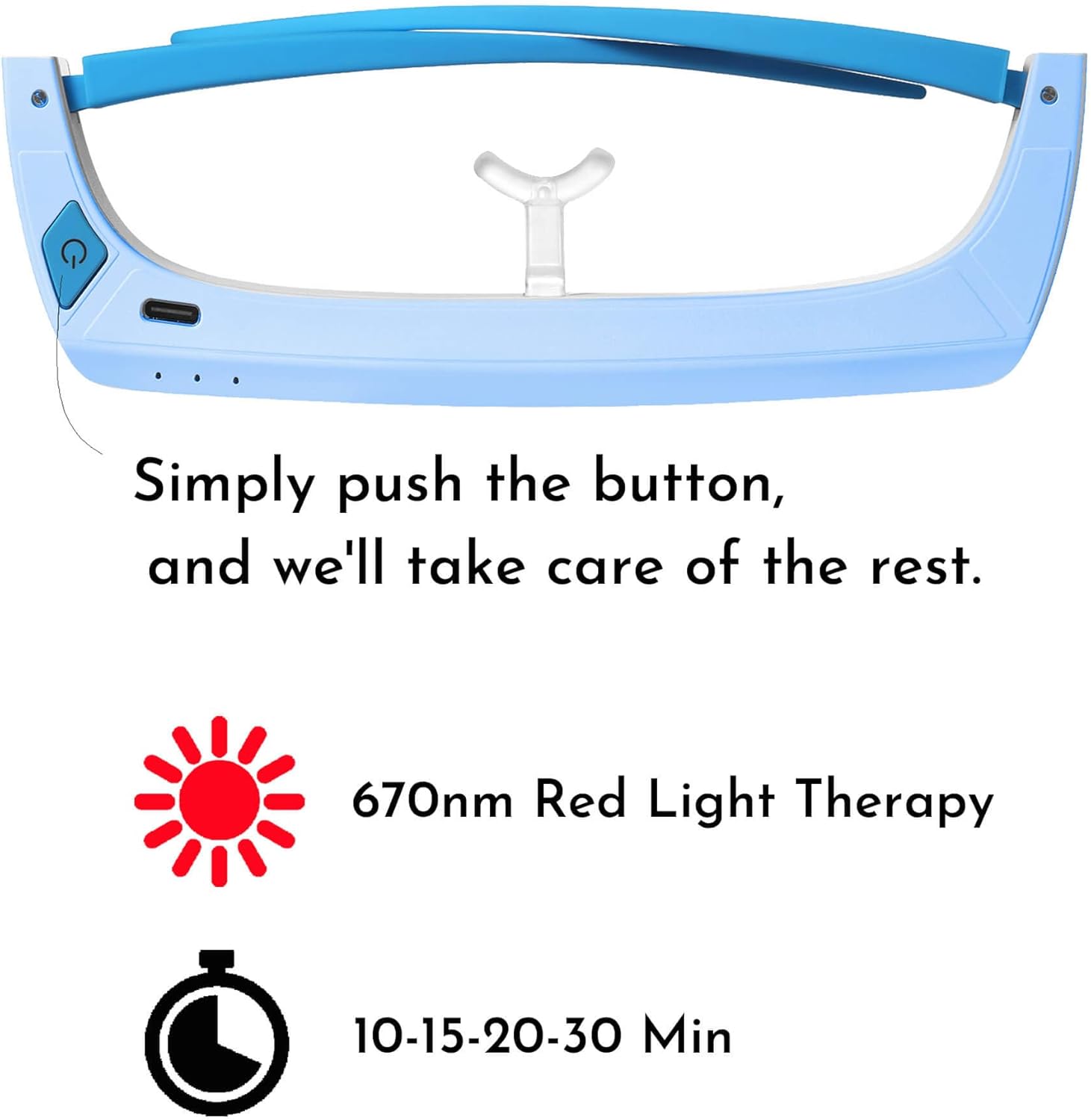
Figure 5: Controls and Timer Settings
This image highlights the power button and the available timer settings (10, 15, 20, 30 minutes) for the 670nm Red Light Therapy Glasses, indicating simple one-button operation.
- Power On: Press and hold the Power On/Timing button for a few seconds until the red lights illuminate.
- Select Session Duration: Briefly press the Power On/Timing button repeatedly to cycle through the available timer options: 10, 15, 20, or 30 minutes. The timing indicator lamps will show the selected duration.
- Gradual Brightness: The red light will gradually increase in brightness over 60 seconds to allow your eyes to adapt comfortably.
- Automatic Shut-off: The device will automatically power off once the selected session duration is complete.
5.3 Recommended Usage
For optimal results, short daily sessions are recommended. The duration can be adjusted between 10 to 30 minutes per session based on personal comfort and needs. Consistency is key for supporting overall visual comfort and reducing eye fatigue.
6. Maintenance
6.1 Cleaning
To clean your Lukirch Red Light Therapy Glasses:
- Ensure the device is powered off and disconnected from any charging source.
- Wipe the surface of the glasses with a soft, dry, lint-free cloth.
- Do not use abrasive cleaners, solvents, or immerse the device in water.
6.2 Storage
Store the device in a cool, dry place away from direct sunlight and extreme temperatures.
7. Troubleshooting
| Problem | Possible Cause | Solution |
|---|---|---|
| Device does not turn on. | Battery is depleted. | Charge the device fully using the provided USB cable. |
| Red light is not visible or too dim. | Device not powered on correctly or low battery. | Ensure the device is fully charged and powered on by pressing and holding the button. The brightness increases gradually over 60 seconds. |
| Device shuts off unexpectedly. | Session timer completed or low battery. | This is normal if the timer has completed. If not, recharge the device. |
| Nose pads are uncomfortable or fall off. | Nose pads not properly inserted or incorrect fit. | Ensure nose pads are securely inserted into their slots. Adjust position for comfort. |
8. Specifications
| Feature | Detail |
|---|---|
| Product Name | Red Light Therapy Glasses |
| Model | 670nm Red Light Therapy Glasses V2.0 |
| Brand | Lukirch |
| Wavelength | 670nm (Red Light) |
| Timer Settings | 10, 15, 20, 30 minutes |
| Battery Type | 1 Lithium Ion battery (included) |
| Package Dimensions | 7.99 x 4.29 x 2.64 inches |
| Weight | 12.63 ounces |
| Manufacturer | LUKIRCH |
9. Warranty and Support
For information regarding warranty coverage, technical support, or any product-related inquiries, please contact Lukirch customer service. Refer to the product packaging or the official Lukirch website for contact details.
Legal Disclaimer: Statements regarding dietary supplements have not been evaluated by the FDA and are not intended to diagnose, treat, cure, or prevent any disease or health condition.