
Introduction
This manual provides comprehensive instructions for the assembly, operation, and maintenance of your WLIVE TV Stand, Model ADSG064BL. Please read these instructions carefully before beginning assembly or use to ensure proper function and longevity of your product. Keep this manual for future reference.

Image: The WLIVE TV Stand, Model ADSG064BL, showcasing its design with integrated LED lighting and storage compartments.
Setup and Assembly
Careful assembly is crucial for the stability and safety of your TV stand. We recommend two individuals for the assembly process.
Required Tools (Not Included)
- Phillips head screwdriver
- Hammer (for dowels, if applicable)
Assembly Steps
- Unpack Components: Carefully remove all parts from the packaging. Verify that all components and hardware listed in the included parts list are present.
- Identify Parts: Familiarize yourself with each part by comparing them to the diagrams in the assembly guide provided with your product. All parts are labeled for easy identification.
- Follow Diagrammatic Instructions: Refer to the step-by-step diagrams in the separate assembly manual. Ensure each piece is oriented correctly before fastening.
- Secure Connections: Tighten all screws and fasteners securely, but do not overtighten to avoid damaging the engineered wood.
- Install LED Lights: Follow the specific instructions for attaching and connecting the LED light strips. Ensure all connections are firm.
- Place Glass Shelves: Insert the tempered glass shelves into the desired adjustable positions.
Safety Note: The TV stand features rounded edges for enhanced child and pet safety. Always ensure the stand is placed on a level surface.
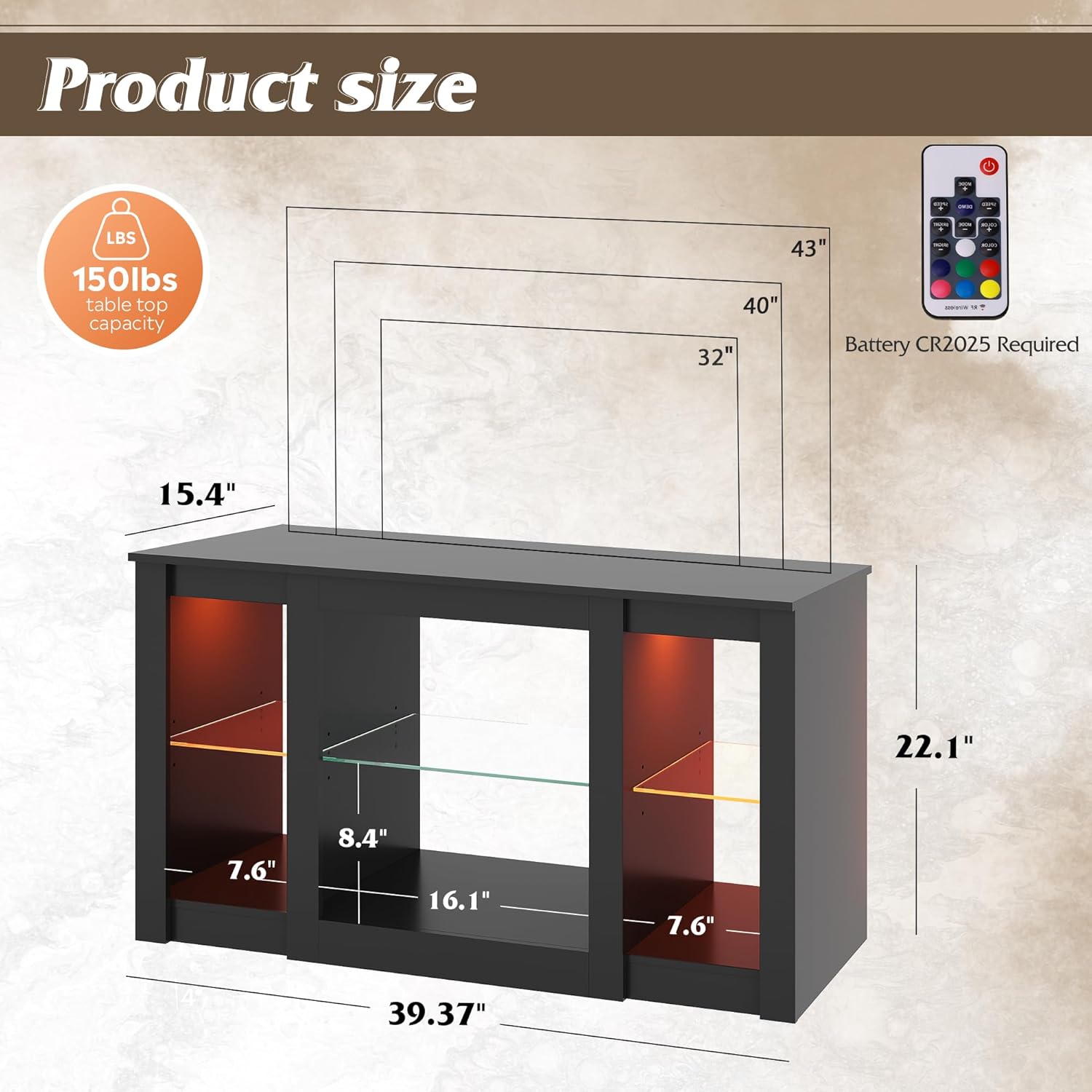
Image: Detailed dimensions of the TV stand (39.37"W x 15.43"D x 22.1"H) and its 150 lbs table top capacity.

Image: Visual representation of the TV stand's sturdy structure, thickened base, and easy-to-clean surface.
Operating Instructions
LED Lighting System
The integrated LED lighting system offers customizable ambiance for your living space. Use the provided remote control to manage the lighting features.
- Colors: Choose from 7 main colors to match your mood or decor.
- Modes: Select from 22 dynamic modes for various lighting effects.
- Brightness & Speed: Adjust the brightness intensity and the speed of dynamic modes to your preference.
Ensure the remote control battery (CR2025, not included) is correctly installed and the remote is pointed towards the LED receiver for optimal functionality.

Image: The TV stand with its multifunctional RGB LED lights, illustrating 5 adjustable levels, 22 modes, 7 main colors, and 10 speed levels, controlled by a remote.
Adjustable Glass Shelves
The TV stand features three tempered glass shelves that can be adjusted or removed to accommodate various media devices, gaming systems, or decorative items.
- Adjustment: The shelves offer 3 levels of height adjustment. To adjust, carefully lift the shelf, reposition the support pins to the desired height, and then place the shelf back onto the pins.
- Removal: To remove a shelf, simply lift it out of its position.

Image: Illustration demonstrating how to adjust or remove the tempered glass shelves, showing upper, lower, and removed positions.
Maintenance and Care
To maintain the appearance and extend the lifespan of your WLIVE TV Stand, follow these care guidelines:
- Cleaning: Wipe the surfaces with a dry, soft cloth. Avoid using harsh chemicals, abrasive cleaners, or excessive moisture, as these can damage the engineered wood finish.
- Spills: Immediately wipe up any spills with a dry cloth to prevent staining or damage to the material.
- Dusting: Regularly dust the stand to prevent buildup.
- Glass Shelves: Clean glass shelves with a glass cleaner and a soft cloth.
- Inspection: Periodically check all fasteners and connections to ensure they remain tight. Retighten if necessary.
Troubleshooting
If you encounter any issues with your WLIVE TV Stand, refer to the following common solutions:
- LED Lights Not Working:
- Check if the remote control battery (CR2025) is installed correctly and has power.
- Ensure all LED strip connections are secure and properly plugged into the power source.
- Verify that the LED receiver is not obstructed.
- Assembly Difficulties:
- Review the assembly manual diagrams carefully, paying close attention to part orientation.
- Ensure all hardware is correctly used for each step.
- Do not force parts together; if a part does not fit, re-check the instructions.
- Stand Instability:
- Ensure the stand is placed on a flat, level surface.
- Check that all screws and fasteners are fully tightened.
If problems persist, please contact customer support for further assistance.
Specifications
| Feature | Detail |
|---|---|
| Model Number | ADSG064BL |
| Dimensions (W x D x H) | 39.37 x 15.43 x 22.13 inches |
| Item Weight | 38.4 pounds |
| Material | Engineered Wood |
| Maximum Load Capacity (Table Top) | 150 pounds |
| Special Features | LED Lighting (7 colors, 22 modes, adjustable brightness/speed), Adjustable Tempered Glass Shelves, Rounded Edges |
| Recommended TV Size | Up to 43 inches |
| Product Care Instructions | Wipe with Dry Cloth |
Warranty Information
WLIVE products are manufactured to high-quality standards. For specific warranty details regarding your ADSG064BL TV Stand, please refer to the warranty card included with your purchase or visit the official WLIVE website. The warranty typically covers manufacturing defects under normal use.
Customer Support
If you have any questions, require assistance with assembly, or need to report a missing or damaged part, please contact WLIVE customer support. Have your model number (ADSG064BL) and purchase information ready when contacting support.
You can often find support contact information on the WLIVE official website or through the retailer where you purchased the product.


