
1. Introduction
Thank you for choosing Torkase 100FT Solar Powered LED Outdoor String Lights. This manual provides essential information for the safe and efficient use of your new string lights. Designed for outdoor use, these lights offer an energy-efficient and durable lighting solution for various settings.

Figure 1: Torkase 100FT Solar Powered LED Outdoor String Lights.
2. Product Components
Please ensure all components are present in the package before installation:
- 100FT LED String Lights with 25+2 S14 Shatterproof Bulbs
- Solar Panel with Ground Stake
- Remote Control
- USB Charging Cable
- Mounting Clip
- Screws and Wall Anchors
- Zip Ties

Figure 2: Included components.
3. Setup & Installation
3.1 Solar Panel Placement
For optimal performance, position the solar panel in a location that receives direct sunlight for at least 6-8 hours daily. Avoid shaded areas or locations under eaves that may obstruct sunlight.

Figure 3: Solar panel placement guide.
3.2 Mounting the String Lights
The string lights can be installed using the provided ground stake for the solar panel or the mounting clip for attachment to surfaces like fences or walls. Ensure the bulbs are securely fastened along your desired path.

Figure 4: Installation options.
3.3 Initial Charging
Before first use, allow the solar panel to charge for a full day in direct sunlight. For faster or supplementary charging, the solar panel also supports USB charging. A full solar charge takes approximately 8 hours, providing 8-10 hours of light. USB charging takes about 6 hours for a full charge.
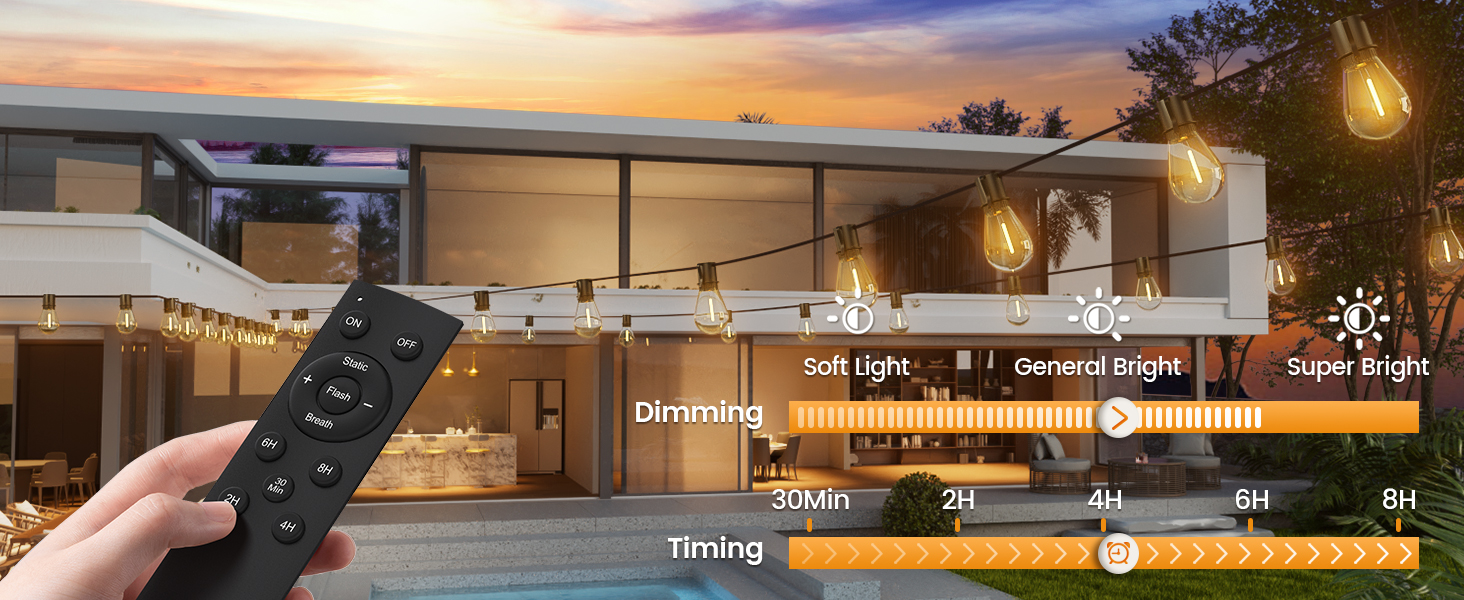
Figure 5: Solar and USB charging options.
4. Operating Instructions
4.1 Automatic Operation
The lights feature a built-in daylight sensor. They will automatically charge during the day and illuminate at night when the ambient light level drops.

Figure 6: Dusk to Dawn automatic operation.
4.2 Remote Control Functions
Use the provided remote control to manage your string lights:
- ON/OFF: Turn the lights on or off.
- Dimming: Adjust brightness from 10% to 100%. (Note: Dimmer is not included with the lights, but the lights are dimmable if connected to a compatible dimmer system).
- Lighting Modes: Select from three distinct lighting modes:
- Breath: Lights gently fade in and out.
- Flash: Lights blink on and off.
- Static: Lights remain constantly on.
- Timer Function: Set the lights to automatically turn off after a specified duration (30 minutes, 2 hours, 4 hours, 6 hours, or 8 hours). The default timing is 6 hours.

Figure 7: Dimmable feature.

Figure 8: Remote control functions.
Video 1: Demonstration of Torkase Outdoor Solar String Light features including dimming, auto-on, and lighting modes.
5. Maintenance
To ensure the longevity and optimal performance of your Torkase string lights, follow these maintenance guidelines:
- Cleaning the Solar Panel: Periodically wipe the solar panel with a soft, damp cloth to remove dust, dirt, or debris that may hinder charging efficiency.
- Bulb Care: The S14 bulbs are shatterproof, designed for durability. If a bulb needs replacement, ensure it is an S14 type with an E12 base.
- Weather Resistance: The lights are designed with IP65 waterproof rating, making them safe for use in various weather conditions, including rain and snow. However, avoid submerging the lights or solar panel in water.

Figure 9: IP65 Waterproof design.
6. Troubleshooting
If you encounter issues with your Torkase string lights, refer to the table below for common problems and solutions:
| Problem | Possible Cause | Solution |
|---|---|---|
| Lights do not turn on at night. | Insufficient solar charge. | Ensure solar panel is in direct sunlight for 6-8 hours daily. Consider USB charging if sunlight is limited. |
| Lights are dim or flicker. | Low battery charge. | Allow more charging time or use USB charging. Clean the solar panel surface. |
| Lights turn off unexpectedly. | Timer function activated. | Check remote control settings and deactivate timer if not desired. |
| Remote control not working. | Remote battery depleted or obstruction. | Replace remote battery. Ensure no obstructions between remote and solar panel. |
7. Specifications
| Feature | Detail |
|---|---|
| Model | Solor Powered-100FT |
| Length | 100 feet |
| Bulb Type | S14 LED, Shatterproof |
| Bulb Quantity | 25 + 2 spare bulbs |
| Color Temperature | 2200 Kelvin (Warm White) |
| Power Source | Solar Powered (with USB charging option) |
| Water Resistance Level | IP65 Waterproof |
| Material | PET |
| Special Features | Dimmable, 3 Lighting Modes (Breath, Flash, Static), Timer Function, Auto ON/OFF |
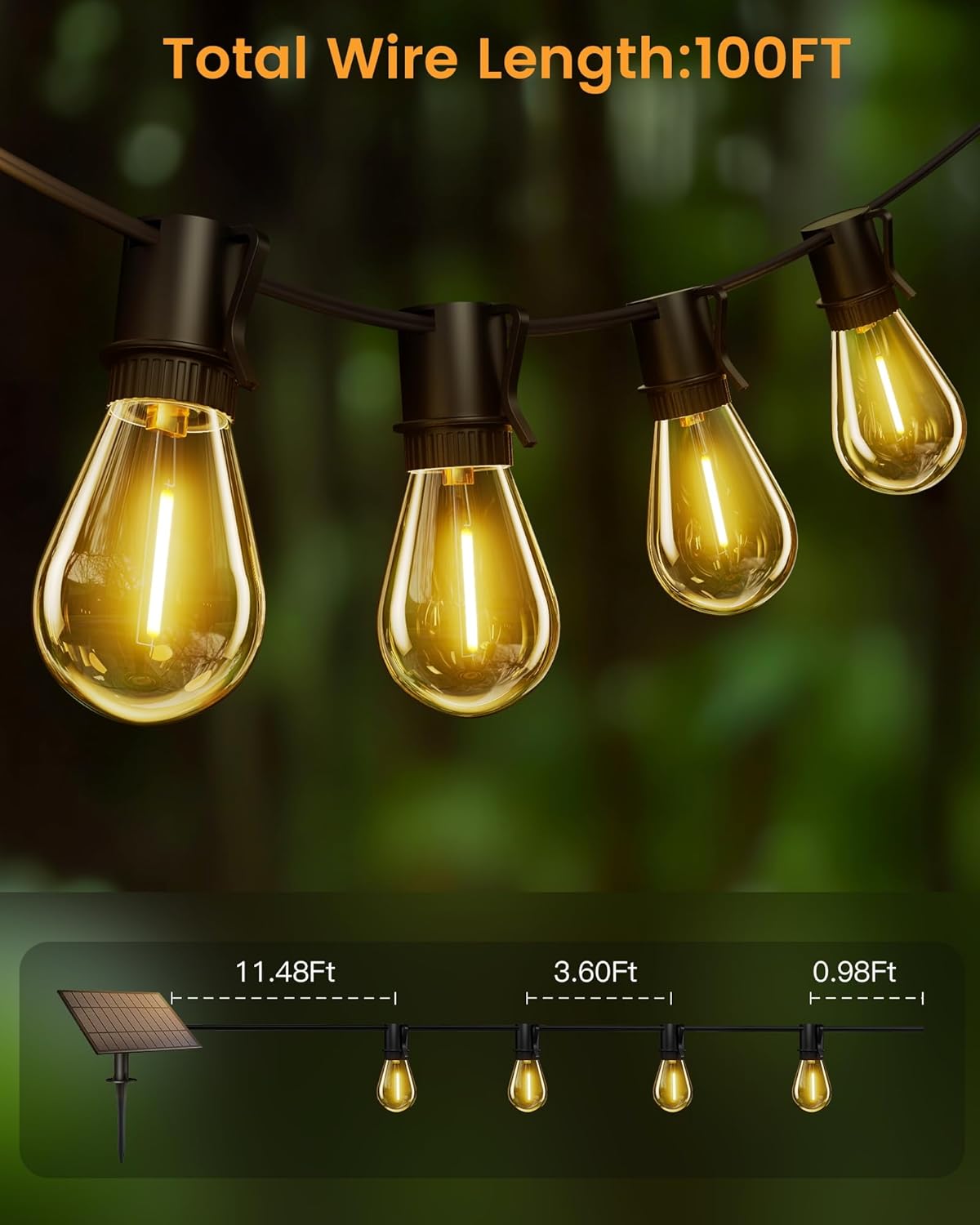
Figure 10: String light dimensions.
8. Warranty & Support
Torkase provides 2 years of dedicated customer support for your solar string lights. If you encounter any issues or have questions regarding your product, please do not hesitate to contact our customer service team. We are committed to ensuring a hassle-free and satisfying experience with your purchase.
For assistance, please refer to the contact information provided on your product packaging or the official Torkase website.