
taopodo s28
taopodo s28 Wireless Earbuds Instruction Manual
Model: s28
Introduction
Thank you for choosing the taopodo s28 Wireless Earbuds. These earbuds are designed to provide a superior audio experience with advanced features for daily use. Equipped with Bluetooth 5.3, they offer stable and efficient wireless connectivity. The lightweight design ensures comfort during extended wear, and the IPX5 waterproof rating makes them suitable for various activities, including workouts. Featuring a 6mm diameter speaker, these earbuds deliver a powerful and wide sound range, with dynamic treble and robust bass. The integrated dual microphones are optimized for clear AI-enhanced calls.
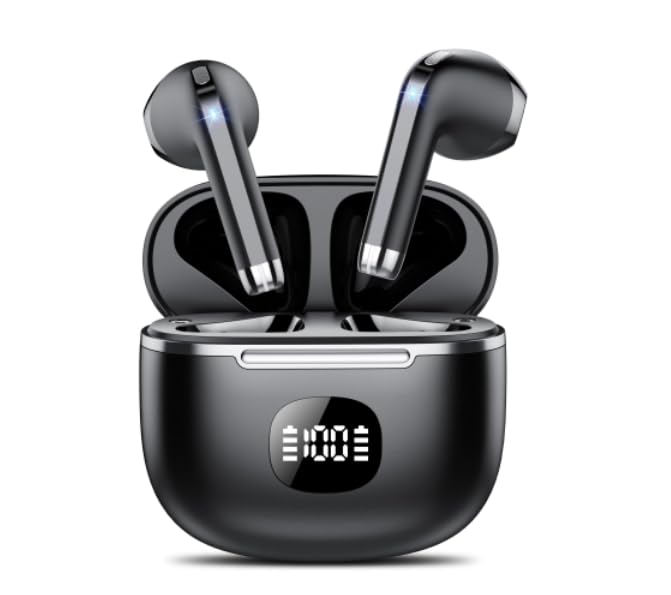
Image: The taopodo s28 Wireless Earbuds are shown in their black charging case. The case features a digital display indicating a 100% charge level. Both earbuds are seated securely in their respective slots within the open case, showcasing their sleek black design with metallic accents.
Setup
Charging the Earbuds and Case
- Initial Charge: Before first use, fully charge the charging case and earbuds. Connect the charging case to a USB power source using a compatible cable. The digital display on the case will indicate the charging status.
- Earbud Charging: Place the earbuds into the charging case. They will automatically begin charging. The case's display may show individual earbud charge levels or a combined status.
- Battery Indicator: The digital display on the charging case shows the remaining battery percentage of the case.
Pairing with Your Device
- Step 1: Ensure the earbuds are charged. Open the charging case. The earbuds will automatically enter pairing mode.
- Step 2: On your smartphone or Bluetooth-enabled device, go to the Bluetooth settings.
- Step 3: Search for available devices. Select "taopodo s28" from the list.
- Step 4: Once connected, a voice prompt will confirm successful pairing. The earbuds are now ready for use.
- Automatic Reconnection: After initial pairing, the earbuds will automatically reconnect to the last paired device when removed from the case and the device's Bluetooth is active.
Operating Instructions
Basic Controls
The taopodo s28 earbuds feature touch controls for easy operation:
| Action | Control |
|---|---|
| Play/Pause | Single tap on either earbud |
| Next Track | Double tap on the right earbud |
| Previous Track | Double tap on the left earbud |
| Volume Up | Triple tap on the right earbud |
| Volume Down | Triple tap on the left earbud |
| Activate Voice Assistant | Long press (2 seconds) on either earbud |
Call Functions
- Answer/End Call: Single tap on either earbud during an incoming call.
- Reject Call: Long press (2 seconds) on either earbud during an incoming call.
AI Call Features
The taopodo s28 earbuds are equipped with two microphones designed to enhance call clarity, especially when utilizing AI-powered call features on compatible devices. This technology helps to reduce background noise and optimize voice pickup for clearer conversations.
Maintenance and Care
- Cleaning: Regularly clean the earbuds and charging case with a soft, dry, lint-free cloth. Do not use abrasive cleaners or solvents.
- Storage: When not in use, store the earbuds in their charging case to protect them and keep them charged. Store in a cool, dry place away from extreme temperatures.
- Battery Care: To prolong battery life, avoid fully discharging the earbuds and case frequently. Charge them regularly, even if not in constant use.
- Water Resistance: The earbuds have an IPX5 waterproof rating, meaning they are resistant to a sustained, low-pressure water jet spray. They are suitable for light rain and sweat during workouts. Do not submerge them in water or expose them to heavy rain or strong water jets. Ensure the charging port is dry before charging.
Troubleshooting
- Earbuds not pairing:
- Ensure both earbuds are charged.
- Turn off Bluetooth on your device, then turn it back on.
- Forget/delete "taopodo s28" from your device's Bluetooth list and try pairing again.
- Place earbuds back in the case, close the lid, wait a few seconds, then open and try again.
- No sound from one earbud:
- Ensure both earbuds are charged.
- Try placing both earbuds back in the charging case, close the lid, and then take them out again.
- Clean the charging contacts on both the earbuds and the case.
- Earbuds not charging:
- Ensure the charging cable and power adapter are working correctly.
- Check if the charging contacts on the earbuds and inside the case are clean and free of debris.
- Ensure the earbuds are correctly seated in the charging case.
- Poor sound quality:
- Ensure the earbuds are fully charged.
- Check for interference from other wireless devices.
- Ensure the earbuds are clean and free of earwax buildup.
- Try moving closer to your paired device.
Specifications
- Model Name: s28
- Brand: taopodo
- Connectivity Technology: Wireless (Bluetooth 5.3)
- Ear Placement: In Ear
- Form Factor: In Ear
- Color: Black
- Waterproof Rating: IPX5
- Speaker Diameter: 6mm
- Microphones: 2 (for AI Calls)
- Included Components: Charging Station
- Item Weight: Approximately 3.17 ounces (90 grams)
- Package Dimensions: Approximately 3.15 x 3.15 x 1.18 inches (8 x 8 x 3 cm)
- Manufacturer: taopodo
- Country of Origin: China
Warranty and Support
For information regarding warranty coverage, technical support, or service inquiries, please refer to the product packaging or contact the retailer/manufacturer directly. Specific warranty terms and conditions may vary by region and purchase location.
Ask a question about this manual
Ask about setup, troubleshooting, compatibility, parts, safety, or missing instructions. Manuals+ will review the question and use this page’s manual context to help answer it.