
1. Introduction
This manual provides detailed instructions for the installation, operation, and maintenance of your LUTEC 80W Dusk to Dawn Flood Light. This outdoor security light features 9000 lumens of 5000K daylight illumination, a built-in photocell for automatic dusk-to-dawn operation, and four adjustable heads for broad coverage. Designed for hardwired installation, it is IP65 waterproof for reliable outdoor performance.

Image 1.1: LUTEC 80W Dusk to Dawn Flood Lights (2-pack)
2. Safety Information
Please read and understand all instructions before beginning installation. Failure to follow these instructions may result in electric shock, fire, or other hazards that could cause property damage or personal injury.
- Disconnect Power: Always turn off power at the circuit breaker or fuse box before installing, servicing, or cleaning the fixture.
- Qualified Electrician: If you are unsure about the installation process, consult a qualified electrician.
- Grounding: Ensure the fixture is properly grounded to avoid potential electrical hazards.
- Wiring: All wiring connections must be made in accordance with local electrical codes and ordinances.
- Fixture Integrity: Do not alter the fixture in any way. Any modifications may void the warranty and create safety risks.
- Operating Temperature: Do not operate the fixture in temperatures outside its specified range.
3. Package Contents
Verify that all components are present before beginning installation:
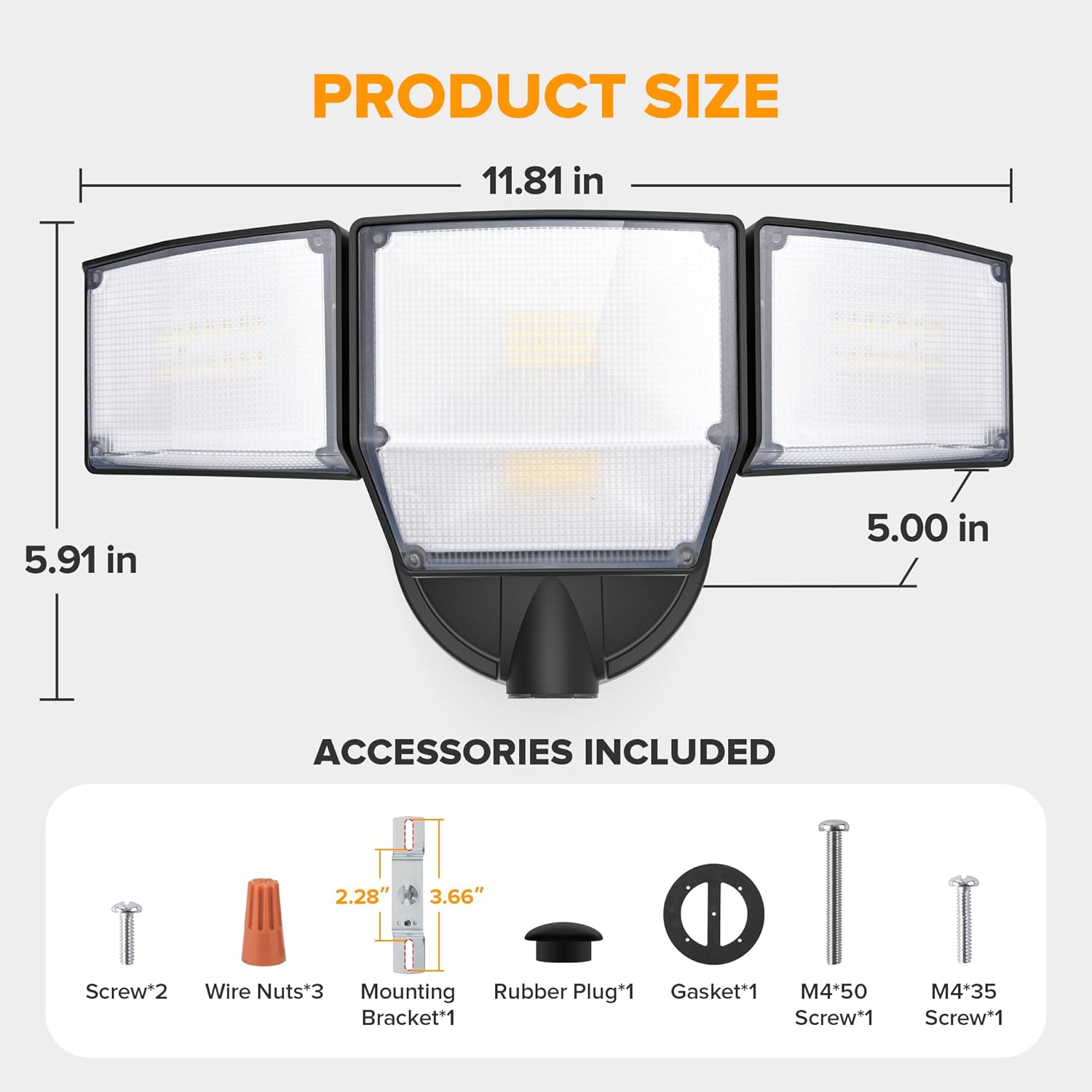
Image 3.1: Product Dimensions and Included Accessories
- LUTEC 80W Flood Light (2 units)
- Mounting Bracket (1)
- Wire Nuts (3)
- Screws (2)
- Rubber Plug (1)
- Gasket (1)
- M4*50 Screw (1)
- M4*35 Screw (1)
4. Specifications
| Feature | Specification |
|---|---|
| Brand | LUTEC |
| Model | B0F2MQ3BMM |
| Wattage | 80W |
| Brightness | 9000 Lumens |
| Color Temperature | 5000K Daylight |
| Light Source Type | LED |
| Number of Light Heads | 4 |
| Illumination Angle | Max. 300° (adjustable) |
| Coverage Area | Up to 2,370 sq. ft. |
| Power Source | Corded Electric (Hardwired) |
| Switch Type | Dusk to Dawn (Photocell) |
| Water Resistance | IP65 Waterproof |
| Material | Aluminum |
| Product Dimensions | 13.98"L x 9.25"W x 6.89"H |
| Item Weight | 4.62 pounds |
| Assembly Required | Yes |
5. Setup and Installation
This flood light requires hardwired installation. A junction box is required but not included. Ensure power is disconnected at the circuit breaker before proceeding.

Image 5.1: Hardwired Installation Steps
- Prepare Wiring: Turn off power at the main circuit breaker. Ensure the power is off before touching any wires.
- Mounting Bracket Installation (Step 1): Secure the provided mounting bracket to your existing outdoor junction box. The mounting base diameter is approximately 4.37 inches. Use the included screws to firmly attach the bracket.
- Wire Connections (Step 2): Connect the electrical wires from the fixture to your household wiring using the provided wire nuts.
- Connect the Live Wire (usually black) from the fixture to the Live Wire from the junction box.
- Connect the Neutral Wire (usually white) from the fixture to the Neutral Wire from the junction box.
- Connect the Earth Wire (usually green or bare copper) from the fixture to the Earth Wire from the junction box.
- Fixture Attachment (Step 3): Carefully align the flood light fixture with the mounting bracket and secure it in place. Use the appropriate screws to fasten the fixture to the bracket. Ensure the gasket is properly seated to maintain the IP65 waterproof rating.
- Seal and Test: Once the fixture is securely mounted, apply the rubber plug if necessary to seal any openings. Restore power at the circuit breaker and test the light.
6. Operating Instructions
6.1. Dusk to Dawn Functionality
The LUTEC flood light is equipped with a built-in photocell sensor for automatic dusk-to-dawn operation. This feature eliminates the need for manual switching.

Image 6.1: Dusk to Dawn Mode Operation
- At Dusk: As ambient light levels decrease, the photocell sensor detects the onset of darkness, and the flood light will automatically turn on to full brightness.
- Throughout the Night: The light will remain illuminated at full brightness until daylight.
- At Dawn: As ambient light levels increase, the photocell sensor detects the return of daylight, and the flood light will automatically turn off.
Ensure the photocell sensor is not obstructed by objects, dirt, or debris, as this can interfere with its proper operation.
6.2. Adjusting Light Heads
The flood light features four flexible light heads that can be adjusted independently to direct illumination where needed. This allows for a customizable coverage area with a maximum illumination angle of 300°.

Image 6.2: Max Light Range and Adjustable Beam Angle
- Gently grasp each light head and pivot it to the desired angle.
- Avoid excessive force when adjusting to prevent damage to the fixture.
7. Maintenance
Regular maintenance ensures optimal performance and longevity of your flood light.
- Cleaning: Periodically clean the fixture with a soft, damp cloth. Do not use abrasive cleaners or solvents, as they may damage the finish or electrical components. Ensure power is off before cleaning.
- Photocell Sensor: Keep the photocell sensor free from dirt, dust, and obstructions (e.g., leaves, spiderwebs) to ensure accurate dusk-to-dawn operation.
- Inspection: Annually inspect the wiring and mounting for any signs of wear, damage, or loosening. Tighten any loose screws or connections.
- Waterproof Seal: The fixture has an IP65 waterproof rating. Ensure the gasket and seals remain intact and undamaged to prevent water ingress.

Image 7.1: IP65 Waterproof Design for All-Weather Durability
8. Troubleshooting
If you encounter issues with your flood light, refer to the following common problems and solutions:
| Problem | Possible Cause | Solution |
|---|---|---|
| Light does not turn on at dusk. | No power to the fixture. Photocell obstructed or dirty. Faulty wiring connection. | Check circuit breaker. Clean photocell sensor. Ensure no objects block it. Verify all wire connections are secure (with power off). |
| Light stays on during the day. | Photocell obstructed or dirty. Light from another source (e.g., street light) hitting the photocell. | Clean photocell sensor. Ensure no objects block it. Relocate the fixture or shield the photocell from external light sources. |
| Light flickers or dims. | Loose wiring connection. Voltage fluctuations. | Check and secure all wiring connections (with power off). Consult an electrician if voltage issues are suspected. |
| One or more light heads not working. | Internal component failure. | Contact customer support for assistance. |
If the problem persists after attempting these solutions, please contact LUTEC customer support.
9. Warranty and Support
LUTEC provides high-quality after-sales service for its products. If you encounter any issues or have questions regarding your 80W Dusk to Dawn Flood Light, please do not hesitate to contact us.
Customer Service: We offer 7*24 hour after-sales support. For assistance, please refer to the contact information provided with your purchase or visit the official LUTEC website.


