
1. Product Overview
The LYCEBELL 535G is a professional ammonia (NH3) gas detector designed for monitoring ammonia levels in various environments, including households, farms, and industrial facilities. It features an advanced electrochemical sensor for accurate readings, a dual alarm system, and real-time display of temperature and humidity. This portable device is built for reliability and ease of use, ensuring timely detection of ammonia leaks to protect personnel and the environment.
Key Features:
- High Precision Sensor: Utilizes an electrochemical sensor for accurate NH3 detection from 0-100ppm with 0.1ppm resolution and a fast response time of less than 120 seconds.
- Dual Alarm System: Configurable alarm thresholds (AL1 and AL2) with an 80 dB audible alarm and flashing light for immediate alerts.
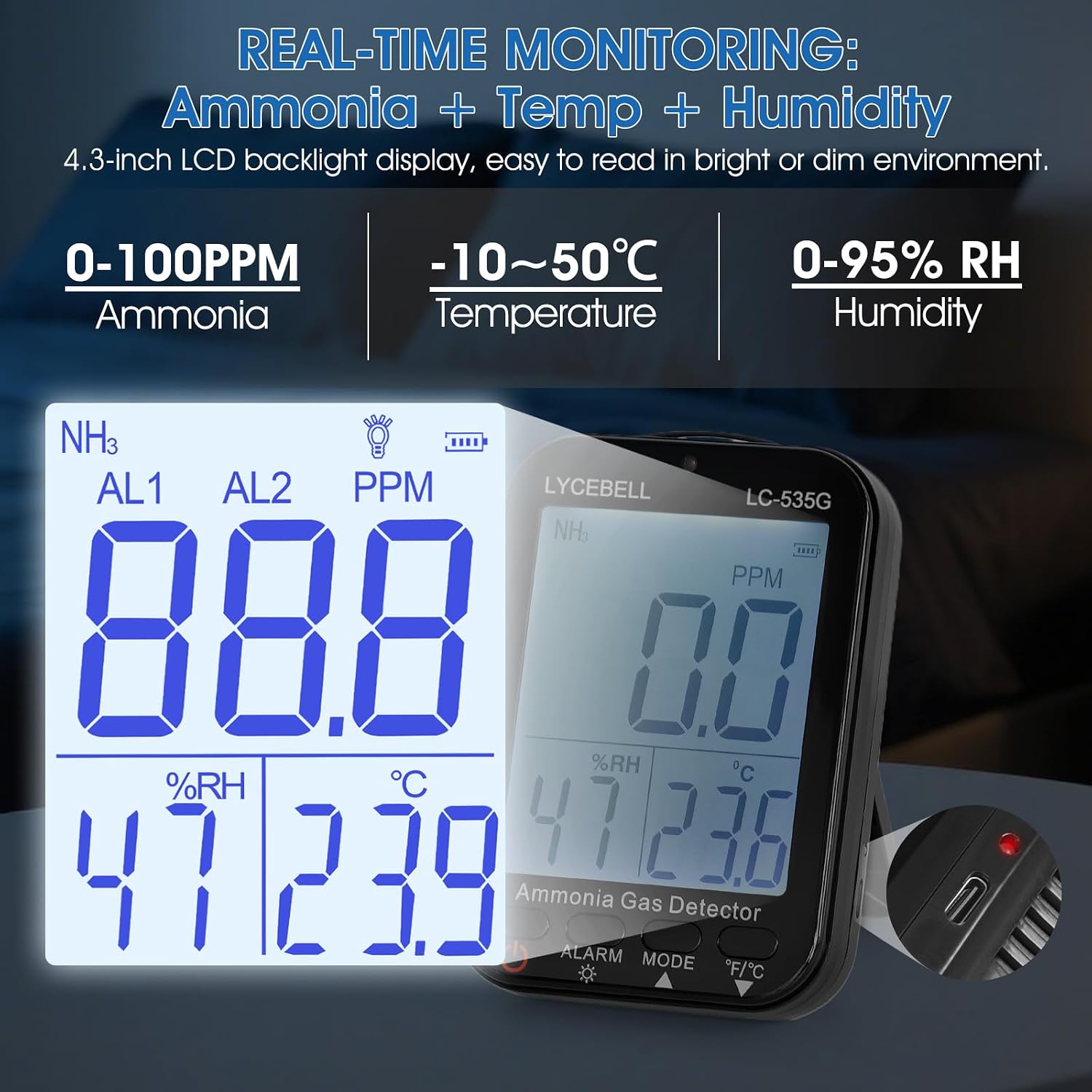
- Real-time Monitoring: Displays NH3 concentration, temperature (-10°C to 50°C), and relative humidity (0-95%RH) simultaneously on a large LCD backlight display.
- Portable and Durable: Equipped with a rechargeable lithium battery providing over 8 hours of continuous operation, APO auto shut-off, and IP54 dust/water protection.
- User-Friendly: One-touch control for alarm settings, unit conversion (°C/°F), and backlight.

2. Package Contents
Carefully unpack the box and ensure all items are present and in good condition. If any items are missing or damaged, contact your retailer immediately.
- 1 x LYCEBELL 535G Ammonia Gas Detector
- 1 x USB Charging Cable
- 1 x User Manual
- 1 x Probe Protective Cover

3. Device Layout and Controls
Familiarize yourself with the device's components and control buttons.

- Ammonia chemical formula (NH3)
- Ammonia concentration display area
- Ammonia gas unit (PPM)
- Level 1 alarm indication (AL1)
- Level 2 alarm indication (AL2)
- Backlight display
- Battery power indicator
- Temperature unit (°C/°F)
- Temperature value display area
- Humidity unit (%RH)
- Humidity value display area
- Power button
- Alarm and backlight button
- Mode and up button
- °C/°F conversion and down button
4. Setup and Initial Use
4.1 Battery Installation (if applicable)
Before first use, ensure the internal rechargeable battery is properly connected. Refer to Figure 2 for an illustration:
- Unscrew the screws of the battery compartment cover.
- Connect the battery, ensuring correct polarity.
- Replace the battery compartment cover and secure with screws.
4.2 Charging the Device
Connect the provided USB charging cable to the Type-C port on the device and to a standard USB power adapter (not included) or computer USB port. The battery indicator on the display will show charging status. A full charge provides over 8 hours of continuous operation.
4.3 Powering On/Off
- To power on: Press and hold the Power button (12) until the display illuminates.
- To power off: Press and hold the Power button (12) until the display turns off. The device features an Automatic Power Off (APO) function to conserve battery.
4.4 Device Placement
The detector can be placed on a flat surface using its integrated stand or mounted on a wall using the hanging hole on the back.

5. Operating Instructions
5.1 Real-time Monitoring
Upon powering on, the device will begin real-time monitoring of ammonia concentration (PPM), temperature (°C or °F), and relative humidity (%RH). These values are displayed prominently on the LCD screen.
5.2 Setting Alarm Thresholds
The device features two adjustable alarm levels, AL1 (warning) and AL2 (emergency). When the ammonia concentration exceeds these thresholds, the device will trigger an 80 dB audible alarm and a flashing light.
- Press the Alarm button (13) to enter alarm setting mode.
- Use the Mode (Up) button (14) and °C/°F (Down) button (15) to adjust the AL1 value.
- Press the Alarm button (13) again to switch to AL2 setting and adjust its value.
- Press the Alarm button (13) a third time to save settings and exit.
Recommended Alarm Levels:
- AL1 (Warning): e.g., 20 ppm (for early detection)
- AL2 (Emergency): e.g., 250 ppm (for critical exposure levels)

5.3 Unit Conversion (°C/°F)
To switch between Celsius (°C) and Fahrenheit (°F) for temperature display, briefly press the °C/°F (Down) button (15).
5.4 Backlight Control
To toggle the display backlight, briefly press the Alarm button (13).
6. Maintenance
6.1 Cleaning
Wipe the device with a soft, dry cloth. Do not use abrasive cleaners or solvents, as these can damage the casing or sensor. Ensure the device is powered off before cleaning.
6.2 Battery Care
Recharge the device when the battery indicator shows low power. Avoid fully discharging the battery frequently to prolong its lifespan. If storing the device for an extended period, charge it periodically to maintain battery health.
6.3 Sensor Protection
Always use the provided probe protective cover when the device is not in use to shield the sensor from dust and physical damage.
6.4 Storage
Store the device in a cool, dry place, away from direct sunlight and extreme temperatures. Keep it out of reach of children.
7. Troubleshooting
If you encounter issues with your LYCEBELL 535G Ammonia Gas Detector, refer to the following common problems and solutions:
| Problem | Possible Cause | Solution |
|---|---|---|
| Device does not power on. | Low battery or battery not connected. | Charge the device using the USB cable. Ensure the internal battery is correctly connected (refer to Section 4.1). |
| Inaccurate readings. | Sensor contamination or device not calibrated. | Ensure the sensor area is clean and free from obstructions. Avoid exposing the sensor to extreme conditions. If issues persist, contact customer support for potential recalibration. |
| Alarm not sounding/flashing. | Alarm thresholds set too high or alarm function disabled. | Check and adjust alarm thresholds (AL1, AL2) as described in Section 5.2. Ensure the ammonia concentration exceeds the set thresholds. |
| Display is dim or unreadable. | Backlight off or low battery. | Press the Alarm button (13) to toggle the backlight. Charge the device if the battery is low. |
If the problem persists after attempting these solutions, please contact LYCEBELL customer support or your retailer for further assistance.
8. Specifications
Technical specifications for the LYCEBELL 535G Ammonia Gas Detector:
| Parameter | Value |
|---|---|
| Model Number | LC-535G |
| Detection Gas | Ammonia (NH3) |
| Sensor Type | Electrochemical |
| Measuring Range | 0-100 ppm |
| Resolution | 0.1 ppm |
| Basic Error | ±5% (F.S) |
| Response Time | <120 seconds |
| Repeatability | <1% |
| Temperature Range | -10°C to 50°C (±2°C accuracy) |
| Humidity Range | 0-95% RH (non-condensing) |
| Alarm Type | Audible (80 dB) and Visual (flashing light) |
| Battery | Rechargeable Lithium Battery |
| Battery Life | >8 hours (continuous use) |
| Charging Port | Type-C USB |
| Protection Rating | IP54 (Dust and splash protected) |
| Dimensions (L x W x H) | 12.8 x 0.9 x 3.7 cm (5.03 x 0.35 x 1.46 inches) |
| Weight | 320 grams |
9. Warranty and Support
9.1 Warranty Information
For detailed warranty information regarding your LYCEBELL 535G Ammonia Gas Detector, please refer to the warranty card included with your purchase or contact the retailer from whom you purchased the product. Warranty terms and conditions may vary by region and retailer.
9.2 Customer Support
If you have any questions, require technical assistance, or need to report an issue that cannot be resolved using the troubleshooting guide, please contact LYCEBELL customer support or your authorized retailer. Please have your product model number (LC-535G) and purchase details ready when contacting support.