
HEALTHY CHOICE B0F2LZ81XH
Healthy Choice 6L Digital Pressure Cooker
Instruction Manual
1. Introduction and Overview
Welcome to the Healthy Choice 6L Digital Pressure Cooker. This versatile appliance combines the functions of a pressure cooker, rice cooker, and slow cooker, designed to simplify your cooking process and deliver delicious, healthy meals. With its intuitive digital control panel and multiple cooking programs, preparing a wide variety of dishes has never been easier.
Please read this manual thoroughly before first use to ensure safe and optimal operation of your new appliance. Keep this manual for future reference.
2. Important Safety Precautions
When using electrical appliances, basic safety precautions should always be followed, including the following:
- Read all instructions carefully before operating the appliance.
- Do not touch hot surfaces. Use handles or knobs.
- To protect against electrical shock, do not immerse cord, plugs, or the main unit in water or other liquid.
- Close supervision is necessary when any appliance is used by or near children.
- Unplug from outlet when not in use and before cleaning. Allow to cool before putting on or taking off parts.
- Do not operate any appliance with a damaged cord or plug or after the appliance malfunctions or has been damaged in any manner.
- The use of accessory attachments not recommended by the appliance manufacturer may cause injuries.
- Do not use outdoors.
- Do not let cord hang over edge of table or counter, or touch hot surfaces.
- Do not place on or near a hot gas or electric burner, or in a heated oven.
- Extreme caution must be used when moving an appliance containing hot oil or other hot liquids.
- Always attach plug to appliance first, then plug cord into the wall outlet. To disconnect, turn any control to "off", then remove plug from wall outlet.
- Do not use appliance for other than intended use.
- This appliance cooks under pressure. Improper use may result in scalding injury. Make certain unit is properly closed before operating.
- Never force open the pressure cooker. Do not open until unit has cooled and internal pressure has been released.
- Do not fill the unit over 2/3 full. When cooking foods that expand during cooking, such as rice or dried vegetables, do not fill the unit over 1/2 full.
- This appliance is not intended for use by persons (including children) with reduced physical, sensory or mental capabilities, or lack of experience and knowledge, unless they have been given supervision or instruction concerning use of the appliance by a person responsible for their safety.
3. Product Components
Familiarize yourself with the parts of your Healthy Choice Digital Pressure Cooker:
- Main Unit (Housing)
- Lid with Pressure Release Valve and Safety Valve
- Inner Pot (Non-stick aluminium)
- Condensation Collector
- Measuring Cup
- Spoon
- Steam Plate
- Power Cord

Image: Front view of the Healthy Choice 6L Digital Pressure Cooker, showing the control panel and overall design.
4. Setup and First Use
- Unpacking: Carefully remove all packaging materials and accessories.
- Initial Cleaning: Before first use, wash the inner pot, lid, measuring cup, spoon, and steam plate with warm, soapy water. Rinse thoroughly and dry all parts completely. Wipe the exterior of the main unit with a damp cloth. Do not immerse the main unit in water.
- Assembly:
- Place the inner pot into the main unit. Ensure it sits properly.
- Attach the condensation collector to the back of the main unit.
- Ensure the sealing gasket is properly seated around the lid's inner rim.
- Align the lid with the main unit, turn clockwise until it locks into place.
- Power Connection: Plug the power cord into the appliance, then into a grounded electrical outlet. The digital display will illuminate.
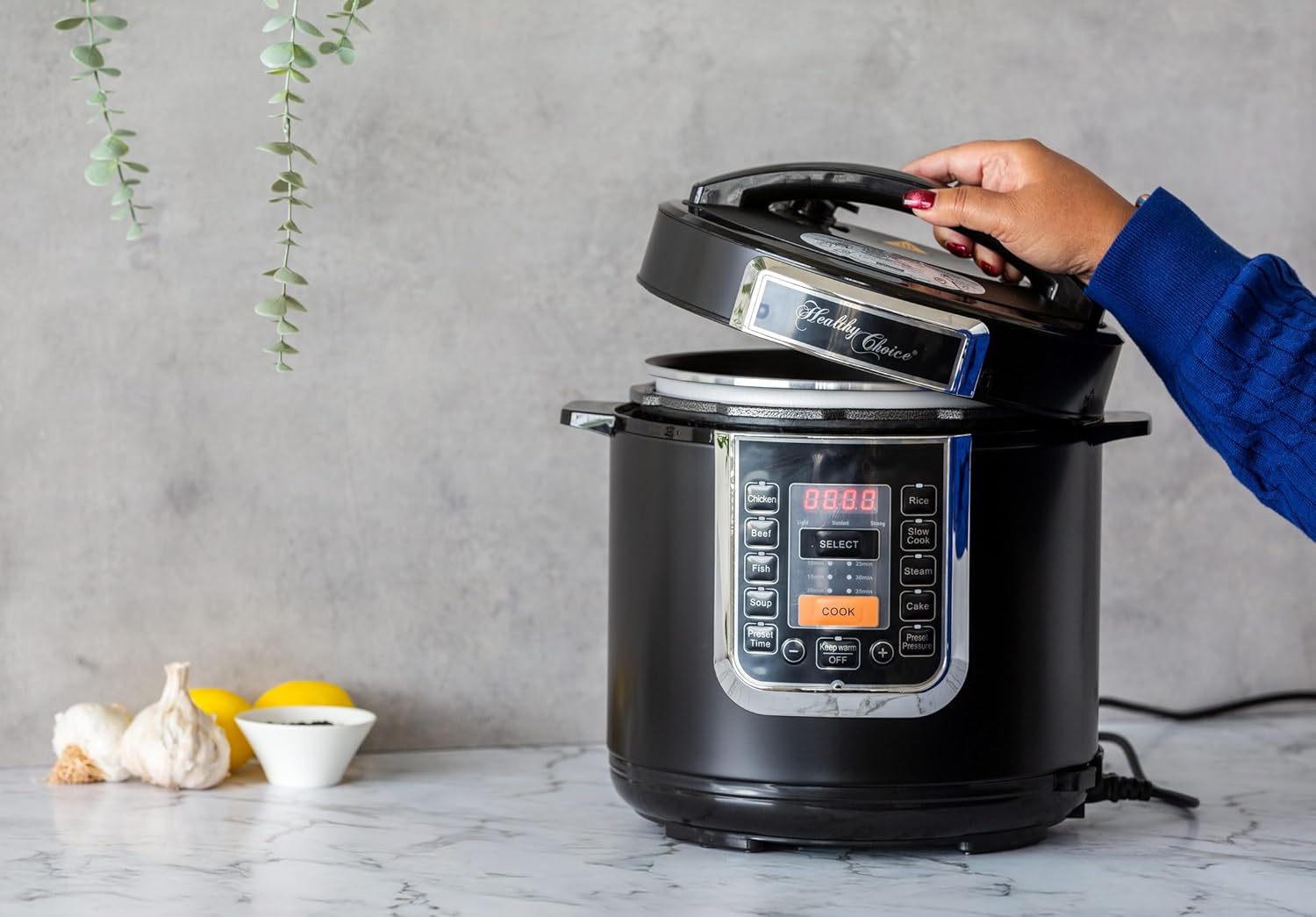
Image: A hand demonstrating how to open the lid of the pressure cooker, showing the inner pot and lid mechanism.
5. Operating Instructions
The Healthy Choice Digital Pressure Cooker features a user-friendly control panel with 8 cooking programs and various time selections.
Control Panel Overview:
- Digital Display: Shows cooking time, pressure level, and status.
- Program Buttons: Chicken, Meat, Stew, Steam, Rice, Fish, Soup, Cake.
- SELECT Button: Used to confirm selections or cycle through options.
- COOK Button: Starts the selected cooking program.
- Preset Time Button: Activates the 24-hour delay timer.
- Keep Warm/OFF Button: Toggles Keep Warm mode or turns off the appliance.
- +/- Buttons: Adjust cooking time or delay time.
- Preset Pressure Button: Adjusts pressure level for certain programs.
Cooking Programs:
This appliance offers 8 pre-set cooking programs:
- Chicken: Ideal for poultry dishes.
- Meat: For various cuts of meat.
- Stew: Perfect for hearty stews and casseroles.
- Steam: For steaming vegetables, fish, etc. (Use with steam plate).
- Rice: For perfectly cooked rice.
- Fish: Gentle cooking for delicate fish.
- Soup: For broths and soups.
- Cake: For baking cakes.
General Cooking Steps:
- Add ingredients to the inner pot. Ensure liquid levels are within min/max markings.
- Close the lid securely, ensuring it is locked. Make sure the pressure release valve is set to the "Sealing" position.
- Plug in the appliance.
- Select your desired cooking program (e.g., "Chicken"). The default time for that program will display.
- If needed, adjust the cooking time using the "+" or "-" buttons. The quick time selections are 10, 15, 20, 25, 30, or 35 minutes.
- Press the COOK button to start. The cooker will preheat, then begin the pressure cooking cycle.
- Once cooking is complete, the cooker will beep and automatically switch to "Keep Warm" mode (60°- 80°C).
- Pressure Release:
- Natural Release: Allow the pressure to release naturally. This is recommended for foamy foods or large cuts of meat.
- Quick Release: Carefully turn the pressure release valve to the "Venting" position. Steam will rapidly escape. Do not place hands or face over the valve.
- Once the float valve drops, indicating pressure is fully released, you can safely open the lid.
Using the 24-Hour Delay Timer:
The delay timer allows you to set a deferred start time for your cooking program.
- Prepare your ingredients and place them in the inner pot.
- Close and lock the lid.
- Select your desired cooking program and adjust the cooking time if necessary.
- Press the Preset Time button. The display will show a default delay time.
- Use the "+" or "-" buttons to adjust the delay time in hours.
- Press the COOK button to confirm. The display will count down the delay time, and then the cooking program will automatically start.
Keep Warm Function:
After cooking, the appliance automatically enters "Keep Warm" mode to maintain food temperature between 60°C and 80°C. To manually activate or deactivate this function, press the Keep Warm/OFF button.
6. Maintenance and Cleaning
Regular cleaning ensures the longevity and optimal performance of your pressure cooker.
- Always unplug the appliance and allow it to cool completely before cleaning.
- Inner Pot: The non-stick aluminium inner pot is dishwasher safe, but hand washing with warm, soapy water is recommended to preserve the non-stick coating.
- Lid: Wash the lid with warm, soapy water. Pay special attention to the pressure release valve and safety valve areas, ensuring no food particles are lodged. The detachable steam vent and inner lid can be removed for thorough cleaning.
- Sealing Gasket: Remove the sealing gasket from the lid and wash it with warm, soapy water. Ensure it is completely dry before re-installing. If the gasket becomes brittle or damaged, replace it.
- Condensation Collector: Empty and wash the condensation collector after each use.
- Main Unit: Wipe the exterior of the main unit with a damp cloth. Never immerse the main unit in water or any other liquid.
- Storage: Ensure all parts are clean and dry before storing. Store the appliance in a cool, dry place.
7. Troubleshooting
If you encounter issues with your pressure cooker, refer to the following common problems and solutions:
| Problem | Possible Cause | Solution |
|---|---|---|
| Cooker not building pressure. | Lid not properly closed; Sealing gasket not installed correctly or damaged; Pressure release valve in "Venting" position; Insufficient liquid. | Ensure lid is fully locked; Check and re-seat sealing gasket; Turn pressure release valve to "Sealing"; Add more liquid as per recipe. |
| Steam leaking from lid. | Sealing gasket dirty or damaged; Food debris on rim; Lid not closed properly. | Clean or replace sealing gasket; Clean lid rim and inner pot rim; Re-close lid securely. |
| Food is undercooked. | Insufficient cooking time; Too much food in the pot. | Increase cooking time; Reduce food quantity. |
| Display shows error code. | Specific internal malfunction. | Unplug the unit, wait a few minutes, then plug back in. If error persists, contact customer support. |
8. Product Specifications
| Feature | Detail |
|---|---|
| Brand | HEALTHY CHOICE |
| Model | B0F2LZ81XH |
| Capacity | 6 Litres |
| Power | 1000W |
| Material | Stainless steel (exterior), Non-stick aluminium (inner pot) |
| Colour | Silver |
| Cooking Programs | 8 (Chicken, Meat, Stew, Steam, Rice, Fish, Soup, Cake) |
| Delay Timer | Up to 24 hours |
| Keep Warm Function | Automatic, 60°- 80°C |
| Item Weight | 6.12 kg |
| Package Dimensions | 39.4 x 34 x 33.8 cm |
9. Warranty and Support
For warranty information and customer support, please refer to the warranty card included with your purchase or visit the official HEALTHY CHOICE website. Please retain your proof of purchase for any warranty claims.
For further assistance or troubleshooting not covered in this manual, please contact HEALTHY CHOICE customer service.
Related documentsB0F2LZ81XH


Ask a question about this manual
Ask about setup, troubleshooting, compatibility, parts, safety, or missing instructions. Manuals+ will review the question and use this page’s manual context to help answer it.