
Marea B59009/1
Marea Smartwatch B59009/1 User Manual
Comprehensive instructions for your Marea Smartwatch B59009/1
1. Introduction
This manual provides detailed instructions for the Marea Smartwatch B59009/1. Please read this manual carefully before using your device to ensure proper operation and to maximize its features. Keep this manual for future reference.
The Marea Smartwatch B59009/1 is a versatile and modern device designed for individuals seeking technology and style in a single accessory. Its 1.85-inch color display provides a clear and bright viewing experience, while the rectangular black case offers an elegant and functional design. This smartwatch features a 280 mAh battery, providing up to 3 days of normal use and up to 7 days in standby mode. Equipped with Bluetooth, it allows synchronization with mobile devices to receive call, message, and social network notifications. Additionally, it includes multiple health and fitness tracking functions, making it an ideal companion for daily use.
2. Package Contents
Ensure all items are present in the package:
- Marea Smartwatch B59009/1
- Charging Cable
- User Manual (this document)
3. Product Overview
Familiarize yourself with the components and features of your Marea Smartwatch B59009/1.
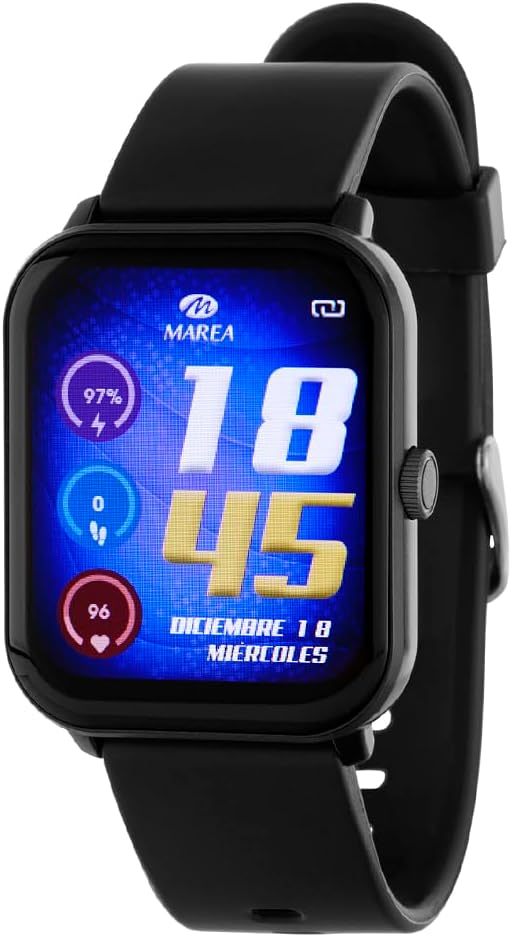
Figure 1: Marea Smartwatch B59009/1 Front View
This image displays the Marea Smartwatch B59009/1, featuring a rectangular black case and a black silicone strap. The vibrant color display shows the time (18:45), date (December 18, Wednesday), battery percentage (97%), step count (0), and heart rate (96 bpm). A physical button is visible on the right side of the watch case.
Key Features:
- 1.85-inch color display for a clear and intuitive user experience.
- Long-lasting battery: Up to 3 days in normal use and 7 days in standby mode.
- Advanced health functions: Heart rate monitoring, blood pressure, blood oxygen, and sleep tracking.
- Ideal for physical activity: Pedometer, calorie counter, distance traveled, and multiple sports modes.
- Smart notifications: Receive alerts for calls, messages, and social networks on your wrist.
- Multimedia remote control: Manage music and your phone's camera without taking it out of your pocket.
- Comfortable and modern design: Durable plastic case and silicone strap with buckle closure.
- Additional functions: Voice assistant, alarm, stopwatch, games, SOS signal, and more.
4. Setup and Initial Use
4.1 Charging the Device
- Connect the charging cable to the charging port on the back of the smartwatch.
- Plug the other end of the charging cable into a USB power adapter (not included) or a computer's USB port.
- The watch display will indicate charging status. Ensure the device is fully charged before first use. A full charge typically takes approximately 2 hours.
4.2 Powering On/Off
- To Power On: Press and hold the side button for a few seconds until the Marea logo appears.
- To Power Off: From the watch face, swipe down or navigate to the settings menu, then select "Power Off" or "Shutdown". Confirm your selection. Alternatively, press and hold the side button and select "Power Off" from the options.
4.3 App Installation and Pairing
To unlock the full potential of your smartwatch, download the companion app on your smartphone.
- Scan the QR code provided in the quick start guide (if applicable) or search for the official Marea Smartwatch app in your smartphone's app store (Google Play Store for Android, Apple App Store for iOS).
- Install the app and create an account if prompted.
- Enable Bluetooth on your smartphone.
- Open the Marea app, navigate to the "Device" or "Add Device" section.
- Select your smartwatch (e.g., "Marea B59009/1") from the list of available devices.
- Follow the on-screen prompts in the app and on your smartwatch to complete the pairing process. A confirmation message will appear on both devices once successfully paired.
Note: Ensure your smartwatch is sufficiently charged and within Bluetooth range of your smartphone during pairing.
5. Operating Your Smartwatch
5.1 Basic Navigation
- Touch Screen: Tap to select, swipe left/right/up/down to navigate through menus and screens.
- Side Button: Press once to return to the watch face or wake the screen. Press and hold for power options or to access a quick menu (functionality may vary).
5.2 Key Functions
- Watch Faces: Customize your watch face by pressing and holding the current watch face, then swiping left/right to choose from available options.
- Notifications: Swipe down from the watch face to view recent notifications (calls, messages, social media alerts). Ensure notification permissions are enabled in the companion app.
- Health Monitoring:
- Heart Rate: Navigate to the heart rate monitor function. The watch will automatically measure your heart rate.
- Blood Oxygen (SpO2): Access the SpO2 measurement function. Keep your arm still during measurement.
- Blood Pressure: Use the dedicated blood pressure function. For accurate readings, follow instructions in the app.
- Sleep Tracking: Wear the watch to bed. It will automatically track your sleep patterns, which can be viewed in the app.
- Activity Tracking:
- Pedometer: The watch automatically counts your steps, distance, and calories burned throughout the day.
- Sports Modes: Select from various sports modes (e.g., running, cycling, walking) to track specific workouts.
- Voice Assistant: Activate the voice assistant feature (if configured) by tapping its icon or using a specific gesture/button press.
- Multimedia Control: Access music control to play, pause, skip tracks on your paired smartphone. Use the camera remote function to trigger your phone's camera shutter.
- Additional Tools: Explore other functions like alarm, stopwatch, timer, and games through the main menu.
6. Maintenance and Care
- Cleaning: Regularly clean your smartwatch and strap with a soft, dry, lint-free cloth. If necessary, use a slightly damp cloth with mild soap, then rinse and dry thoroughly. Avoid harsh chemicals or abrasive materials.
- Water Resistance: Refer to the product specifications for water resistance ratings. Avoid submerging the watch beyond its rated depth or exposing it to hot water, steam, or high-pressure water jets.
- Storage: When not in use for extended periods, store the smartwatch in a cool, dry place. Ensure it has some charge to prevent deep discharge of the battery.
- Avoid Extreme Temperatures: Do not expose the device to extreme heat or cold, as this can damage the battery and internal components.
- Charging Port: Keep the charging contacts clean and free of debris to ensure efficient charging.
7. Troubleshooting
| Problem | Possible Solution |
|---|---|
| Watch does not turn on. | Ensure the watch is fully charged. Connect it to the charger for at least 30 minutes. If it still doesn't turn on, try a different charging cable or power source. |
| Cannot pair with smartphone. |
|
| Notifications are not received. |
|
| Inaccurate health data. |
|
| Short battery life. |
|
8. Specifications
| Brand | Marea |
| Model | B59009/1 |
| Display Size | 1.85 Inches |
| Display Type | Digital, Color |
| Battery Capacity | 280 mAh |
| Average Battery Life | Up to 3 days (normal use), up to 7 days (standby) |
| Battery Cell Composition | Silver Oxide |
| Connectivity | Bluetooth |
| Compatible Devices | Smartphone |
| Additional Features | Voice Control |
| Human Interface Input | Microphone, Buttons |
| Included Components | Charging Cable |
| Item Weight | 200 g |
| Shape | Rectangular |
| GPS | No GPS |
| Target Audience | Unisex Adults |
9. Warranty and Support
For warranty information, please refer to the documentation provided with your purchase or contact the retailer. For technical support, please visit the official Marea website or contact their customer service department. Keep your proof of purchase for warranty claims.
Return Policy: The product has a return policy duration of 15 days (refund/replacement) as per the retailer's terms.
Ask a question about this manual
Ask about setup, troubleshooting, compatibility, parts, safety, or missing instructions. Manuals+ will review the question and use this page’s manual context to help answer it.